



 Řešení
 Centrum podpory
 O nás
O nás Kontakt
How to Fix Life360 Not Working on iPhone and Android
 Penny Warren Zveřejněno dne 27. března 2026Poloha GPS3minutové čtení
"My wife and I use Life360 to update our location. Recently, my wife's location hasn't updated. She left the house 15 minutes ago, but Life360 still shows her as home. Why is Life360 not working?" As a popular location-sharing app, Life360 enables users to track and be tracked with family and friends. However, some users encounter issues with the app. This article shares eight solutions to fix this problem quickly.

V tomto článku:
Part 1: Why Life360 Is Not Working
Life360 uses GPS technology to track location. Once you have the app installed on your mobile device, it continually updates your whereabouts and shares the information with your circles. It also taps into Wi-Fi and Bluetooth signals. The main causes why Life360 is not working include:
1. Poor GPS and internet connection.
2. Life360 is restricted or blocked.
3. Your device is in low power mode.
4. Life360 is outdated or stuck.
5. Softwarové závady.
Part 2: How to Fix Life360 Not Working
Solution 1: Check App Permissions
Why am I not getting Life360 notifications? In most cases, the problem is due to the notification permission being blocked. The solution is simple: check your app permissions and enable notifications.
Na iPhone
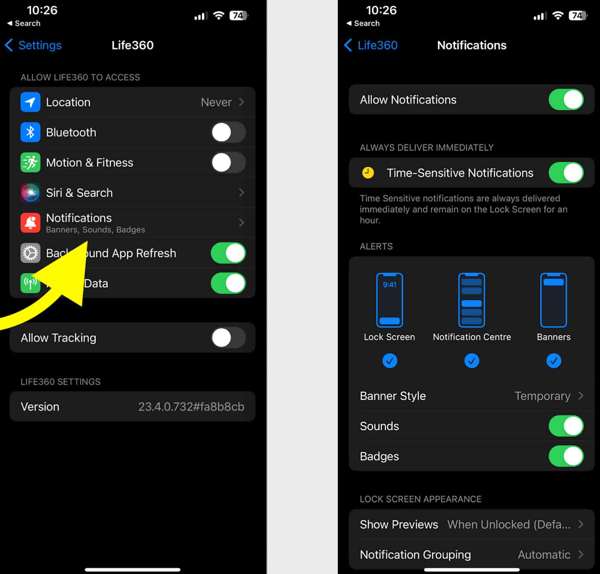
Otevři Nastavení aplikace.
Vybrat Life360 a klepněte na Oznámení.
Zapněte Allow Notifications a Time-Sensitive Notifications.
Na Androidu
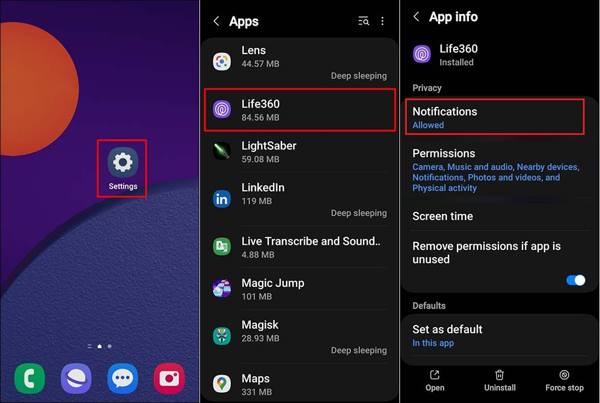
Běh Nastavení.
Jít do Aplikace a vybrat si Life360.
Tap Notifications, and choose Dovolit.
Solution 2: Update Life360
If you could not be located on Life360, you'd better update your app. The outdated app may lead to a variety of issues. In fact, the developer fixes bugs and adds new features in each update of the app.
Na iPhone
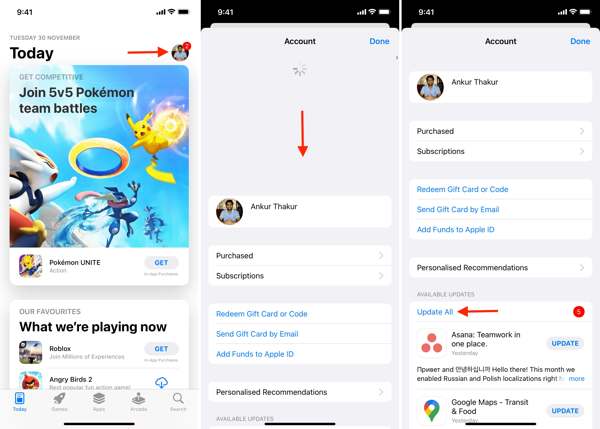
Otevřete svůj Obchod s aplikacemi.
Klepněte na svůj profil.
Přejeďte prstem dolů od horního okraje obrazovky.
Klepněte AKTUALIZACE for Life360.
Na Androidu
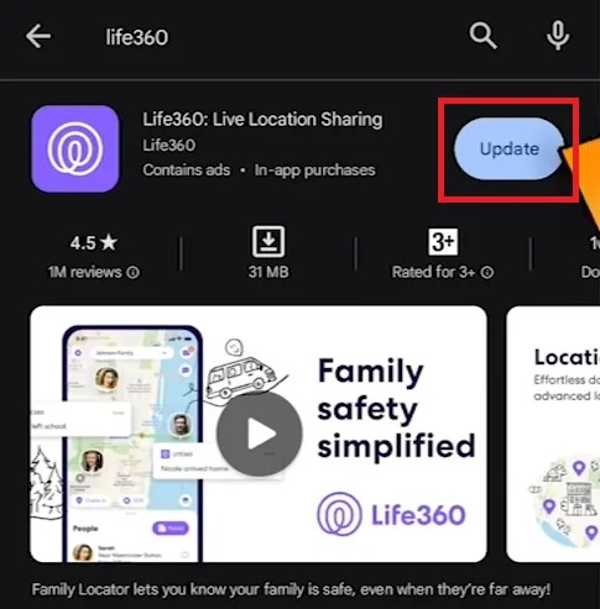
Otevři Play Store and find Life360.
Check if an update is available.
Klepněte na Aktualizace knoflík.
Solution 3: Restart the App
Why does Life360 say I'm driving when I'm not? This problem is partly because your app or device gets stuck. You can force stop the app and restart Life360 to share your location as usual.
Na iPhone
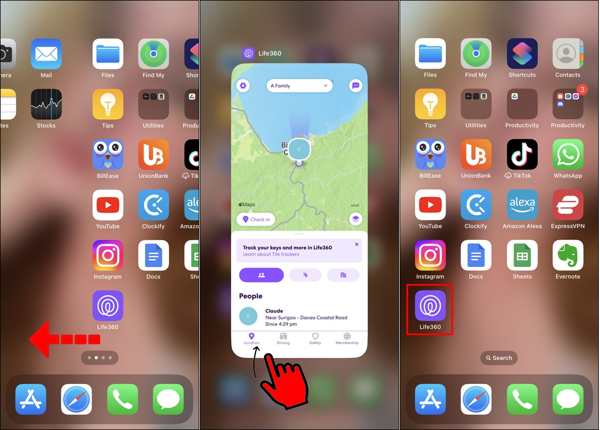
Přístup k Přepínač aplikací na vašem zařízení.
Swipe left and right to find the Life360 app.
Tap the app and swipe upward to close it.
Then, open Life360 again.
Na Androidu
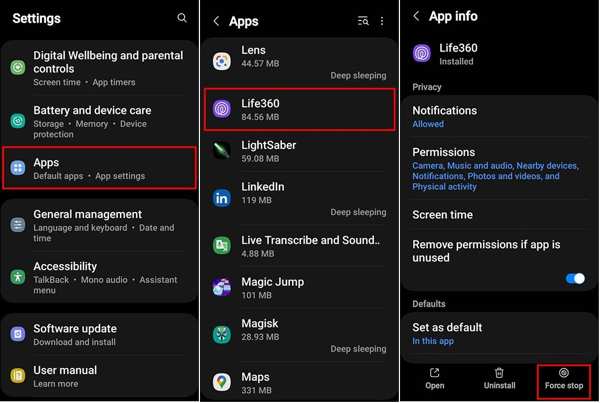
Jít do Aplikace v Nastavení.
Vybrat Life360 a klepněte na Vynucené zastavení.
Then, reopen the app.
Solution 4: Check Your Account
After changing your account credentials for Life360, you must update them on all your devices. Plus, you have to update it if the associated email or phone number stops being used. Otherwise, Life360 won't work today.
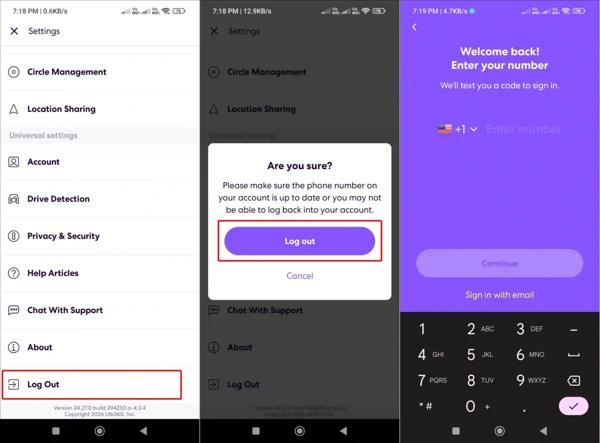
Běh Life360 na vašem telefonu.
Klepněte na Nastavení tlačítko s ikonou ozubeného kola.
Přejděte dolů a klepněte Odhlásit se.
Restart your iPhone or Android phone.
Next, sign in with your account and password.
Solution 5: Enable Location Sharing
Life360 works through the GPS on your mobile phone. If you accidentally disable Location Sharing, the Life360 app won't work. Therefore, you'd better check Location Sharing for Life360 and keep it on.
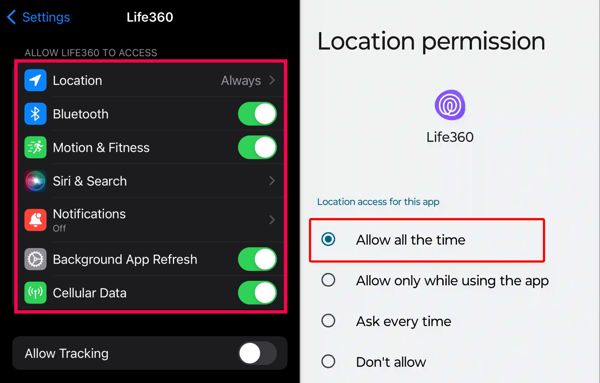
Na iPhone
Vybrat Life360 ve vašem Nastavení aplikace.
Klepněte Umístění a vybrat si Vždy.
Poté zapněte Přesné umístění.
Na Androidu
Spusťte Nastavení aplikace.
Jít do Aplikace a vybrat si Life360.
Klepněte Oprávnění a vyberte Umístění.
Enabling Location Sharing in Always mode ensures Life360 can update your location continuously, even when the app is in the background.
Zapněte Použijte přesnou polohu.
Rozšířené čtení:
Solution 6: Allow Background App Refresh
If your Life360 is not showing speed, you need to allow Background App Refresh. Once you disable this option, Life360 cannot update your location and speed when it is running in the background.
Na iPhone
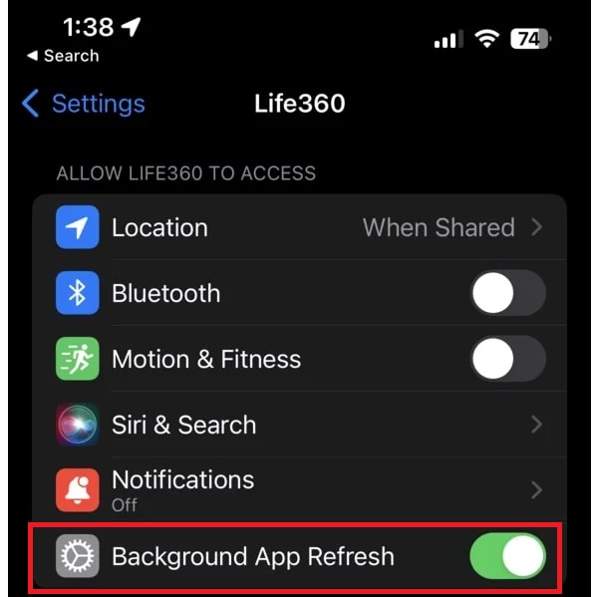
Vybrat Life360 v Nastavení.
Vyhledejte Allow Life360 to Access sekce.
Zapněte Aktualizace aplikace na pozadí.
Na Androidu
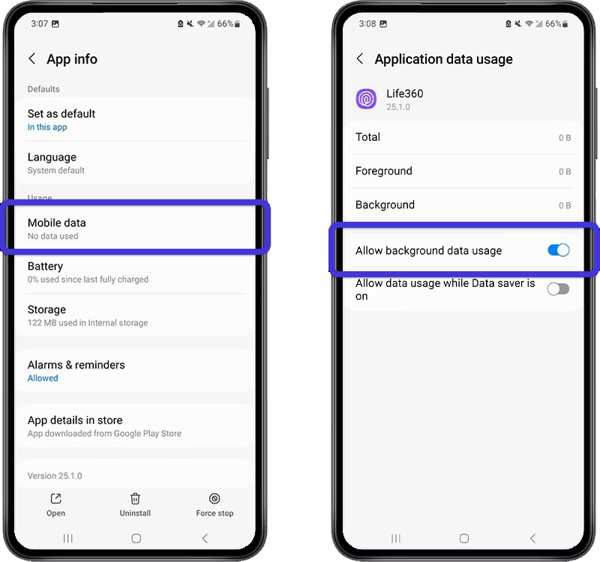
Jít do Aplikace v Nastavení.
Vybrat Life360 a klepněte na Mobile Data & Wi-Fi.
Zapněte Povolit využití dat na pozadí.
Part 3: Bonus Tip: How to Change Life360 Location Without Notifying Others
iLocaGo is an effective method to change your Life360 location to anywhere on your iPhone or Android phone. More importantly, the user-friendly design makes it easy to use, especially for beginners.

Více než 4 000 000 stažení
Change Life360 location with one click.
Use an accurate address or any position.
Nabídka více režimů pro různé účely.
Support a wide range of iPhones and Android devices.
How to Change Life360 Location Without Notifying Others
Install the Life360 location spoofing tool
Launch the Life360 location spoofing tool after installing it on your computer. Connect your iPhone or Android phone to your computer with a compatible USB cable.

Vyberte režim
Vybrat Upravit umístění if you need to change the static location. The other three modes, Režim jednoho zastavení, režim více zastávek, a Režim joysticku, se používají k vytváření virtuálních tras.

Změňte umístění Life360
Input an address into the field or click a position on the map. Finally, click the Upravit button. Now, you can open the Life360 app on your mobile device, and the app should update your location automatically.

Závěr
This article explained what you should do if Life360 nefunguje. Můžete se seznámit s hlavními příčinami tohoto problému. Dále můžete krok za krokem postupovat podle našich řešení, abyste opravili svou aplikaci pro sledování polohy a mohli sdílet svou polohu se svou rodinou a přáteli. Pokud si při používání Life360 přejete skrýt svou skutečnou polohu, iLocaGo je užitečný nástroj. Umožňuje podvrhnout vaši geolokaci jak na iPhonu, tak na telefonu s Androidem.
Penny je vedoucí redaktorkou v imyPass. Zaměřuje se na objevování perfektních řešení pro GPS lokalizaci ve všech scénářích a má také zkušenosti s opravami počítačů.
Horká řešení
-
Poloha GPS
- Nejlepší umístění Pokémon Go se souřadnicemi
- Vypněte svou polohu na Life360
- Jak změnit polohu na iPhone
- Recenze iSpoofer Pokemon Go
- Nastavte virtuální umístění na iPhone a Android
- TikTok Sledujte svou polohu
- Monster Hunter nyní joystick
- Recenze IP Location Finderu
- Změňte umístění mobilních legend
- Změňte polohu na Tiktoku
-
Odemkněte iOS
-
Tipy pro iOS
-
Odemkněte Android


