



 Lösung
 Support-Center
 Über uns
 Kontakt
How Can I Tell If My Phone Is Unlocked Without a SIM Card
 Gideon Byron Veröffentlicht auf 27. Februar 2026Android entsperren3-minütige Lektüre
When you're about to switch phones or consider a new carrier, have you ever wondered if your phone is already unlocked? Maybe you are wondering: How do I know if my phone is unlocked? Don't worry, checking your phone's status is easier than you think. Next, we will teach you step by step to quickly confirm, so that you can easily take the initiative in the free use of your phone.

In diesem Artikel:
Part 1. What Does an Unlocked Phone Mean
Have you ever wanted to change carriers or use an overseas SIM card, but weren't sure if your phone would work? An unlocked phone is the key to this problem. Simply put, what an unlocked phone means is that the phone is free to use any carrier's network, no longer restricted by the original carrier.
So, what does it mean when a phone is unlocked? It means you can change your SIM card at any time, whether changing plans, traveling abroad, or buying and selling used phones, without worrying about network constraints. Once you understand this concept, it's easier to manage your device and make it work for you instead of being tied to it.
Part 2. How to Check If a Phone Is Unlocked
Now that you know what it means to unlock your phone and the flexibility it offers, the next most important step is to verify that your device is actually unlocked. Whether you're using an iPhone or Android, there are a few easy and reliable ways to check if your phone is unlocked quickly.
Für iPhone
Method 1: Apple Support
Open the Apple Support website or use the Apple Support App.
Log in to your Apple ID and select the device you want to query.
Check for device lock status or contact online customer service to confirm.
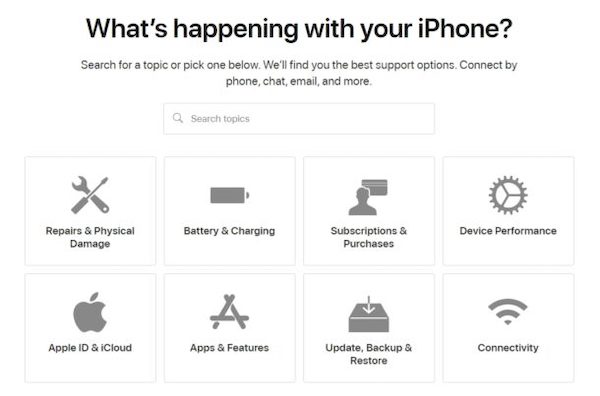
This method is the most reliable, and the information provided by the official channel is accurate and suitable for users who want to confirm the official record.
Method 2: Use SIM cards from different carriers
Power off and remove the current SIM card.
Insert another carrier's SIM card.
Turn it on and try to make a call or send a text message.
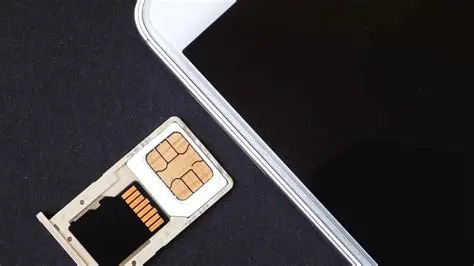
If it works, your phone is unlocked. This method is intuitive and fast, making it ideal for users who want instant verification. If SIM wird auf dem iPhone nicht unterstützt, there may be other factors.
Method 3: Settings
Gehe zu Einstellungen > Allgemein > Um.
Suchen Sie die Trägerschloss Sektion.
Das Keine SIM-Einschränkungen display indicates that the iPhone is unlocked.
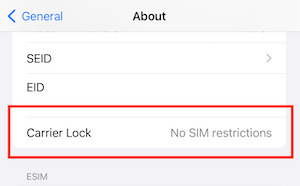
This method is suitable for those who want to know how to check if the phone is unlocked but don't want to change the card, because it can be done directly on the phone, which is very convenient.
For Android
Method 1: Settings
Gehe zu Einstellungen. Klopfen Netzwerk & Internet.
Klicke auf Mobile Network oder SIM cards.
Look for items like Network Unlock/Carrier Lock/SIM Lock.
If "Network unlocked" or "No SIM restrictions" is displayed, you can determine that the phone is unlocked
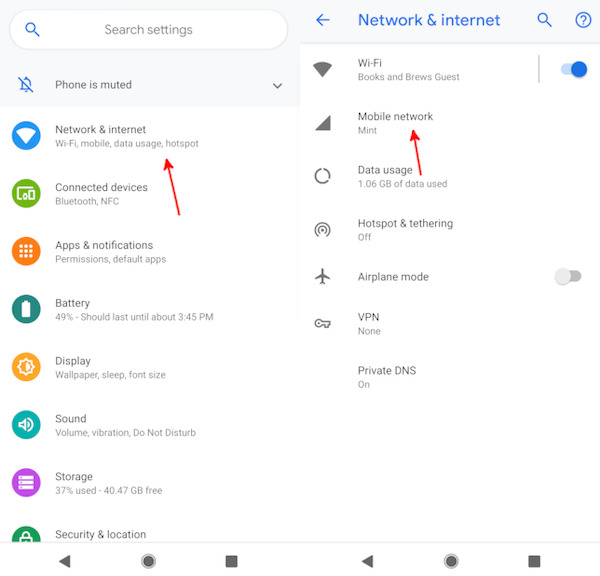
Although different brand names are not exactly the same, they all focus on network Settings. It's also the quickest way to check if an Android phone is unlocked, but sometimes it may occur a miscalculation may occur.
Method 2: IMEI
Wählen *#06# to obtain the IMEI number of the mobile phone.
Open the operator's official website or a trusted third-party website for inquiry.
After entering the IMEI, the system will display whether the device is locked.
This method is suitable for users who want official records or third-party verification, and the code is so powerful that you can even iCloud-Aktivierung mit IMEI umgehen.
Method 3: Developer Mode
Gehe zu Einstellungen > Über das Telefon > Softwareinformationen.
Tippen Sie auf die Build-Nummer seven times in a row to enable Entwicklermodus.
Go to Developer options and look for OEM-Entsperrung or related options.
If OEM Unlocking is enabled, your phone should be unlocked. Not every Android has this entry, but it's an advanced and useful way to check if an Android phone is unlocked.
Part 3. What to Do If Your Phone Is Locked
Even confirming that your phone is locked doesn't mean it's hopeless, and you still have a chance to turn it into a truly unlocked device. But not all devices can go directly into the carrier unlocking process. In particular, the second mobile phone or device of unknown origin sometimes cannot even unlock the screen, which will directly affect the network unlock later.
First. Make the phone accessible
If you're getting a used Android, or if your phone can't get into the system because you forgot your passcode, then you'll need to use imyPass AnyPassGo to unlock the screen limit before you can apply for further unlocking.

Über 4.000.000 Downloads
Support multiple Android brands, Samsung, and Pixel. Xiaomi, etc.
No IMEI, contract information, or additional proof is required.
Suitable for used equipment or machines of unknown origin.
Visual operation with fixed steps ensures stable success rates.
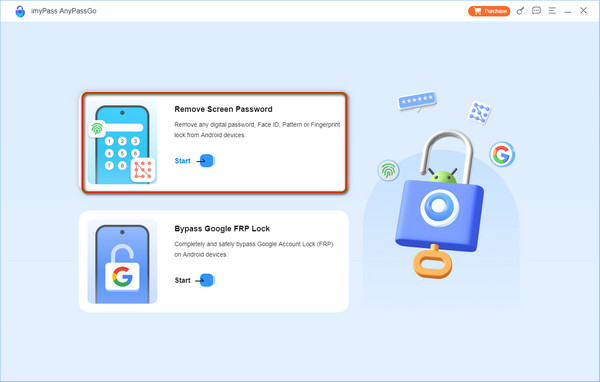
Nachdem Sie die Software geöffnet haben, wählen Sie die Option Bildschirmkennwort entfernen auf der Hauptseite.
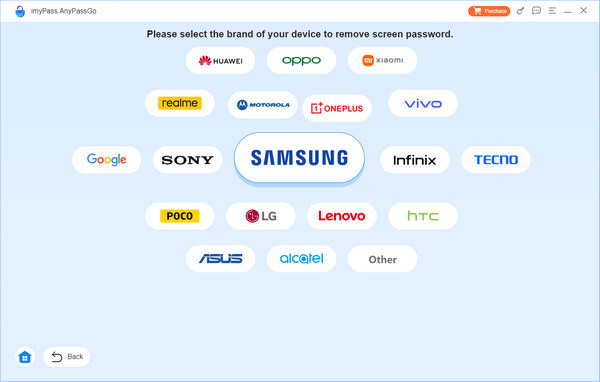
Wählen Sie dann die Marke Ihres Telefons.
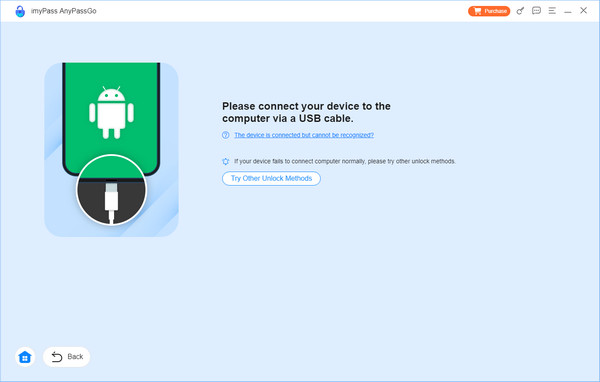
Warten Sie, bis die Software nach dem Verbinden des Telefons das Gerätemodell identifiziert hat. Wenn die Software Ihr Telefon nicht erkennt, klicken Sie auf den blauen Text unten: Das Gerät ist verbunden, wird aber nicht erkannt? Folgen Sie einfach den Anweisungen auf dem nächsten Bildschirm.
Klicken Sie zum Schluss einfach auf die Jetzt entfernen Schaltfläche und warten Sie, bis der Fortschritt abgeschlossen ist, bevor Sie das System betreten
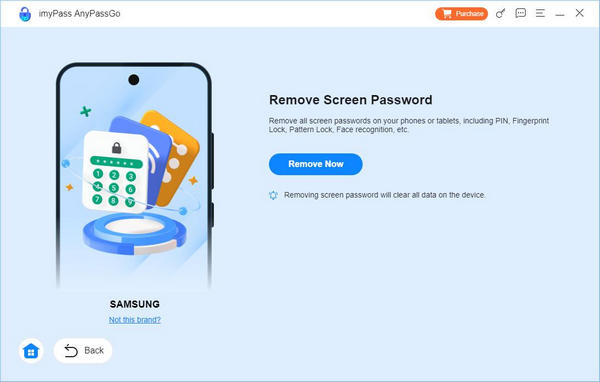
Es ist zu beachten, dass zwar der Zugriff auf das Gerät wiederhergestellt wird, die Daten auf Ihrem Telefon jedoch gelöscht werden. Daher ist es am besten, dies zu tun, wenn Sie das Gerät gerade erst gewechselt haben und noch keine wichtigen Daten darauf sind.
Zweitens: Offizielle Entsperrung durch den Netzbetreiber beantragen
Wenn das Gerät erreichbar ist, können Sie den aktuellen SIM-Lock-Status prüfen und bei dem entsprechenden Netzbetreiber eine Entsperrung beantragen. Je nach Anbieter müssen Sie möglicherweise die IMEI, eine Bestätigung über Gebührenfreiheit, einen Eigentumsnachweis usw. vorlegen.
Übermitteln Sie die IMEI an den Kundenservice oder über die Seite des ursprünglichen Netzbetreibers.
Warten Sie auf die Überprüfung, die von einigen Stunden bis zu mehreren Wochen dauern kann.
Nach der Genehmigung nimmt der Anbieter Ihre IMEI in die Entsperr-Freigabeliste auf.
Setzen Sie eine andere SIM-Karte ein, um die Netzregistrierung zu überprüfen, nachdem der Kundenservice Ihnen eine E‑Mail zur Entsperrbestätigung geschickt hat.
Fazit
Jetzt wissen Sie nicht nur woran erkenne ich, ob mein Handy entsperrt ist, sondern Sie können es auch entsperren, wenn die Antwort Nein lautet. Selbst wenn Sie keinen Zugriff auf das System haben, können Sie imyPass AnyPassGo verwenden, um das Gerät wieder in einen zugänglichen Zustand zu versetzen und die Entsperrung fortzusetzen. Sobald Sie das System wieder aufrufen können, liegt es ganz bei Ihnen, wie Sie es nutzen, mit wessen Netz Sie sich verbinden und welche Karte Sie verwenden!
Gideon schreibt über das Entsperren von iOS-, Android- und Windows-Geräten. Zuvor arbeitete er als Spezialist für Mobilgeräte in einem Reparaturzentrum und unterstützte Kunden bei gesperrten Geräten und der Wiederherstellung von Passwörtern. In seiner Freizeit testet er neue Entsperrtools, passt Smart Devices an und macht komplexe Entsperrprozesse einfach und sicher.
Heiße Lösungen
-
Android entsperren
- AddROM FRP-Bypass-Tool im Test
- So umgehen Sie FRP mit vnROM
- So umgehen Sie FRP auf ZTE-Geräten ganz einfach
- Detaillierte Rezension zu FRP Hijacker
- So umgehen Sie die FRP-Sperre beim Revvl 5G
- So umgehen Sie FRP auf Samsung-Geräten ohne PC
- So umgehen Sie die FRP-Sperre beim Galaxy A7 Lite ohne PC
- Einfache Flashing FRP Bypass 8.0 APK – Rezension
-
iOS entsperren
-
Passwort-Tipps
-
iOS-Tipps

