



 Solução
 Centro de Apoio
 Sobre nós
 Contato
2026 Ways to Bypass iCloud Activation with IMEI Number
 Samuel Spenser publicado em fevereiro 28, 2026Desbloquear iOSLeitura de 3 minutos
Many online sources claim that you can bypass iCloud Activation Lock with IMEI for free. However, it's important to understand that IMEI alone cannot remove or bypass iCloud Activation Lock. In most cases, the only legitimate ways to remove it are by entering the correct Apple ID credentials, asking the previous owner to remove the device from their account, or contacting Apple Support with valid proof of purchase.
In this guide, we will explain what IMEI is actually used for, how to find and verify it, and clarify common misconceptions about IMEI-based unlocking services. We will also introduce an alternative solution that may help in specific situations.
Understanding the facts will help you avoid scams and choose the safest and most reliable path to regain access to your iOS device.

Neste artigo:
Part 1: How to Find and Verify IMEI Number on iPhone/iPad
IMEI number is like an ID card of a device. You can use it to ask Apple to unlock an iCloud-locked iOS device. Let's see how to find the IMEI number on iPhone or iPad.
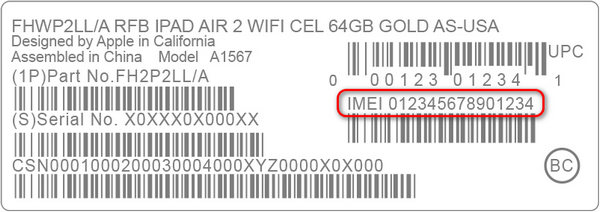
Method 1: Check the Apple Device Box
If you still have the box of your iPhone or iPad, you can find the IMEI number on it.
- 1.Locate the back of the box.
- 2.Find a white barcode sticker.
- 3.Check the IMEI number of your iOS device.
Method 2: iPhone Locked to Owner Screen
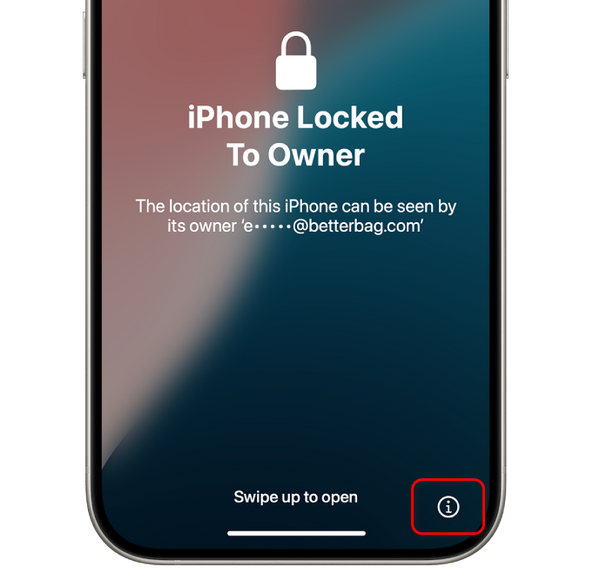
If your iPhone or iPad is iCloud-locked, you can still find the device's IMEI number.
On the iPhone Locked to Owner screen, tap the Informação button at the bottom right. Then, it will show IMEI number, Serial number, and device model.
Method 3: Finder or iTunes
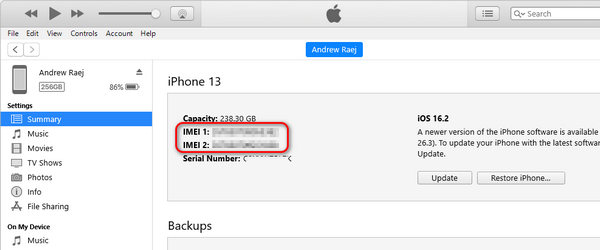
Connect your iPhone or iPad to your computer using a cable.
On macOS 10.15 or later, open Finder. On macOS Mojave or earlier, or on a Windows PC, open iTunes.
Select your device, then go to the Em geral tab in Finder or the Summary tab in iTunes. Click the Número de telefone to display the IMEI. For an iPad, click the Número de série to view the IMEI.
You may note: For iOS devices that support two SIMs, there'll be two IMEI numbers.
Part 2: How to Bypass iCloud Activation with IMEI Number
Official Way to Remove iCloud Activation Lock on iPhone/iPad
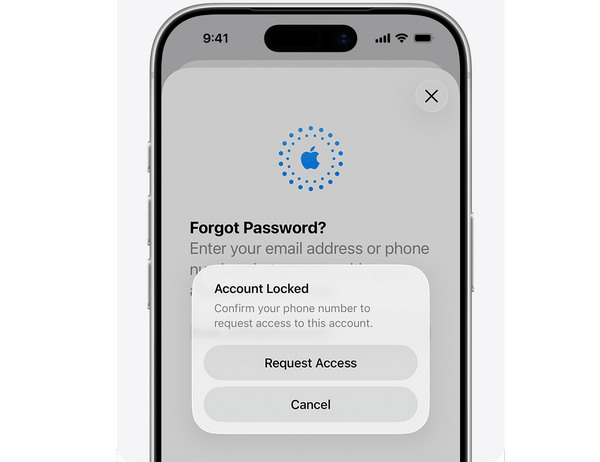
When you've forgotten the Apple ID password and the former owner (if your iOS device is secondhand) cannot help you remove the iCloud lock, the only option is to contact Apple Support, whether by a physical store, webpage, or phone call.
Necessary Preparation
Prepare IMEI number, Serial number, and the proof of purchase of your iCloud-locked device.
You may note: If your iPhone or iPad is second-hand, and you didn't get the proof of purchase, Apple Support won't help you.
Access Apple Support
Offline access: Go to a physical Apple Support near you
Webpage: iforgot.apple.com/unlock
Phone call: 1 (800) 275-2273 (for the US and Canada)
Unlock iCloud Lock with IMEI
Apple Support will verify your info and help you unlock iCloud Activation Lock. You'll need to reset the Apple ID password or switch to another Apple ID. That's the only way to remove iCloud activation lock with IMEI number.
Are IMEI Remote Unlock Websites Reliable?
Maybe you've seen some online services that claim to help you unlock or bypass iCloud Activation Lock with an IMEI number, such as UnlockMaker. However, they are all scams and cannot help you bypass iCloud lock at all. Apple has been increasing security techniques to avoid those unofficial and illegal unlock methods.
Therefore, always follow the official way to unlock iCloud activation with IMEI number for free. However, if you cannot find the proof of purchase of your iPhone or iPad, how can you regain access? You can check the next method to bypass iCloud activation lock.
Leituras relacionadas:
Part 3: How to Bypass iCloud Activation Without Passcode or IMEI
imyPass iPassBye é um aplicativo de desbloqueio fácil de usar, projetado para ajudar indivíduos que enfrentam problemas de bloqueio de ativação do iCloud em seus dispositivos iPhone ou iPad. Se você não conseguir remover o bloqueio do iCloud, que pode restringir severamente a funcionalidade do seu dispositivo iOS, ele oferece uma solução simplificada. Siga as etapas abaixo para desbloquear rapidamente o seu dispositivo e recuperar o acesso a todos os seus recursos.
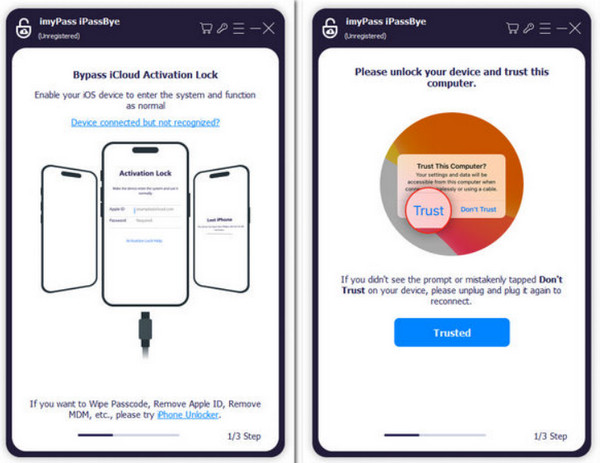
Certifique-se de ter a versão mais recente do imyPass iPassBye instalada em seu computador. Inicie o aplicativo para iniciar o processo de desbloqueio.
Conecte seu iPhone ou iPad a um computador onde você baixou imyPass iPassBye. Se solicitado, clique no Confie neste computador opção no seu dispositivo iOS para definir uma conexão.
Reserve um momento para revisar todos os avisos fornecidos pelo aplicativo, pois eles contêm informações importantes. Quando estiver pronto, marque o Começar botão para iniciar o processo de verificação.
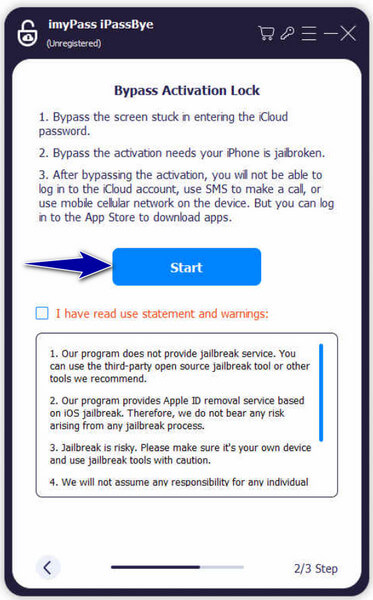
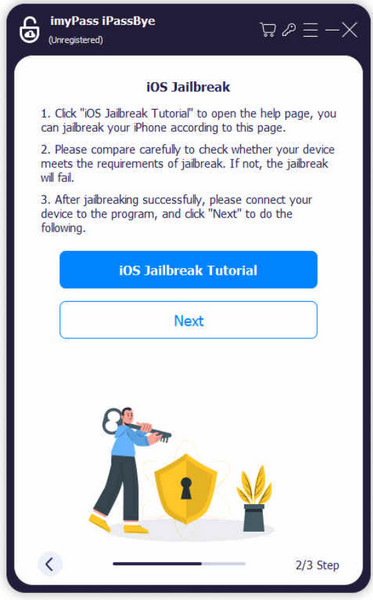
Observação:
É essencial fazer o jailbreak do seu dispositivo iOS antes de usar o iMyPass iPassBye. Este aplicativo não oferece serviço de jailbreak. Consulte o Tutorial de jailbreak do iOS fornecido no aplicativo para saber como fazer o jailbreak do seu dispositivo e clique em Próximo para prosseguir.
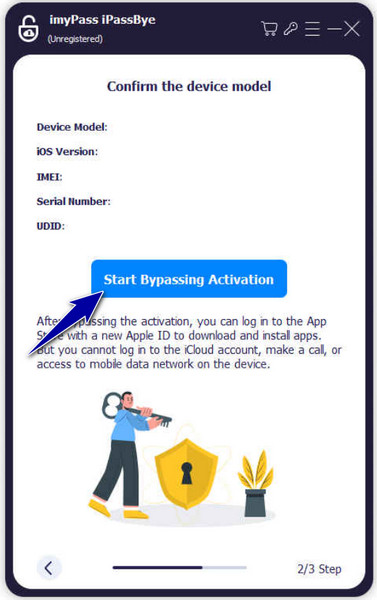
Após confirmar as informações do dispositivo, clique no botão Iniciar a ativação do bypass botão dentro do aplicativo. Você deve esperar pacientemente enquanto o processo de bypass é iniciado e concluído.
Perguntas frequentes.
-
Como encontro meu ID Apple e senha do IMEI?
Você não pode. O número IMEI serve apenas para identificar o seu dispositivo, não para o seu ID Apple ou senha. Se você tem esqueceu a senha do seu ID Apple, use as opções de recuperação de conta no site da Apple ou entre em contato com o Suporte da Apple.
-
Você pode fazer login no iCloud com o número IMEI?
Não, você não pode. O iCloud precisa do seu ID Apple e senha, não do número IMEI. Use seu ID Apple e senha para acessar os serviços iCloud.
-
Posso encontrar meu iPhone com o número IMEI?
Sim, mas poderia ser mais direto. Você precisa da ajuda do seu provedor de serviços móveis ou da polícia. Eles poderão rastrear seu iPhone usando seu número IMEI se ele for perdido ou roubado. Além disso, o recurso Find My iPhone da Apple pode ajudar se estiver ativado no seu dispositivo e conectado à Internet. Mas você deve inserir o número IMEI no iCloud para localizar seu iPhone diretamente.
-
Ignorar a ativação do iCloud com IMEI pode anular a garantia do meu dispositivo?
Quaisquer modificações ou intervenções não autorizadas no seu dispositivo, como ignorar a ativação do iCloud com IMEI, podem anular a garantia do seu dispositivo. Os termos de garantia da Apple normalmente não cobrem danos ou problemas resultantes de modificações não autorizadas ou adulteração do software ou dos recursos de segurança do dispositivo.
-
Existem riscos associados a ignorar a ativação do iCloud usando IMEI?
Sim, existem riscos envolvidos em ignorar a ativação do iCloud usando IMEI. Esses riscos podem incluir perda de dados, instabilidade de dispositivos, vulnerabilidades de segurança e possíveis consequências legais. É crucial proceder com cautela e compreender as implicações potenciais antes de tentar qualquer método de desvio.
Conclusão
Este artigo diz a você how to unlock iCloud-locked iPhone with IMEI via the official method. You also need to prepare proof of purchase, which is the most important factor. Note that those online iCloud lock removal tools are all scams. Don't pay for them to waste your money and time.
If you've lost the proof of purchase of your iPhone or iPad, you cannot remove iCloud lock. However, imyPass iPassBye can help you bypass iCloud activation lock with IMEI. This method will also help you regain access to your device.
Samuel é editor sênior da imyPass. Ele é especialista em desbloqueio de senhas e tem mais de cinco anos de experiência escrevendo tutoriais sobre desbloqueio de celulares.
Soluções quentes
-
Desbloquear iOS
- Revisão dos serviços gratuitos de desbloqueio do iCloud
- Ignore a ativação do iCloud com IMEI
- Remover Mosyle MDM do iPhone e iPad
- Remover support.apple.com/iphone/passcode
- Revisão do Checkra1n iCloud Bypass
- Ignorar a senha da tela de bloqueio do iPhone
- Como fazer o Jailbreak do iPhone
- Desbloquear iPhone sem computador
- Ignorar iPhone bloqueado para proprietário
- Redefinição de fábrica do iPhone sem senha do ID Apple
-
Dicas para iOS
-
Desbloquear Android
- Como saber se o seu telefone está desbloqueado
- Desbloquear tela do telefone Samsung sem senha
- Desbloquear bloqueio de padrão no dispositivo Android
- Revisão de desbloqueios diretos
- Como desbloquear o telefone OnePlus
- Desbloquear OEM e corrigir desbloqueio de OEM esmaecido
- Como desbloquear um telefone Sprint
-
Senha do Windows
