Solução
 Centro de Apoio
 Sobre nós
 Contato
What Is EaseUS MobiSaver: How It Works to Recover Files
 Clara Prescott publicado em julho 07, 2026Recuperar dadosLeitura de 3 minutos
Photos, documents, audio, or other data types are stored on devices digitally, like mobile phones, including an iPhone and an Android phone. Due to this, they are prone to accidental deletion due to human error and system issues.
Luckily, there are third-party tools that can retrieve your Android and iPhone files. EaseUS MobiSaver is one of the most famous. But there are some people who are not familiar with the tool. Do you want to know more about it? Kindly scroll through this post to see the pros, cons, alternatives, and other information about the mentioned tool.

Neste artigo:
Part 1. What Is EaseUS MobiSaver?
There are countless data retrievers online, including the downloadable tools. EaseUS MobiSaver is one of the most famous tools to retrieve accidentally deleted files, system failures, and more. It supports Android and iOS devices. The software is available on Windows and Mac computers. It does not need an internet connection to function.
You only need a USB cable to plug your mobile phone into your computer. However, the tool has advanced features for its pro version, which will be difficult for novices to manage.
Part 2. Key Features
The mentioned tool above is indeed manageable by professionals and novices, depending on the version you will use or purchase. EaseUS MobiSaver has different features that it can offer. Let us guide you about the features it can offer to you as a user in the list below.
- 1.The tool permits you to preview the files on your mobile phone to be certain about the data you can recover.
- 2.The tool supports quick and deep scan modes to see the deleted files on your mobile phones.
- 3.It allows you to recover from different data sources, including cloud backups, local backups, device storage, and more locations.
- 4.It permits you to recover selective data, without affecting the entire backup from the supported devices.
- 5.The software has a user-friendly interface, which will be very convenient for beginners.
- 6.The tool can extract the entire backup from your devices, including your iPhone and Android phone.
Part 3. Free Version vs. Pro Version (Pricing & Plans)
EaseUS MobiSaver has a free version and a pro version. These plans have different supported features and pricing. The table below will help you determine the plan you can purchase or use for better data recovery on your Android phone or iPhone.
| Recurso | Versão gratuita | Versão Pro |
| Preço | No Cost | $79.95 for Mac and $69.95 for Windows |
| Recover Contacts | 5 Contacts Per Recovery | Ilimitado |
| Recover Videos | 1 Video Per Recovery | Ilimitado |
| Recover Photos | 1 Photo Per Recovery | Ilimitado |
| WhatsApp Chat Recovery | Not Included | Incluído |
| Dispositivos iOS compatíveis | Limited Support | 5 iOS Devices |
| Technical Support | Not Supported | Incluído |
Part 4. How It Works & What It Can Recover
EaseUS MobiSaver is the leading and melhor software de recuperação de dados do iPhone program nowadays. It works with a USB connection using your mobile phone, including an iPhone and an Android phone. You can also use the backups from different cloud services. Then, the tool analyzes your storage structure for the deleted data records. It will categorize the found content, so the user can choose the data they can recover. Lastly, the user can finally recover different data types, which are listed below.
- Documentos
- Calendar Information
- Reminder & Notes
- Application files
- Camera images
- Voice recordings
- mensagens
- Address book entries
Part 5. Does EaseUS MobiSaver Actually Work?
Does EaseUS MobiSaver work? Definitely, yes. This tool works for recovering your iPhone and Android data. However, it only works when the data was deleted recently. If they were deleted a long time ago, the recovery process will not give you a 100% success rate.
Part 6. Pros & Cons
Now that you know the full information about EaseUS MobiSaver, it is better to know its pros and cons. In this case, you can determine the advantages and disadvantages of the tool. See them from the list below.
Prós
- It supports Android and iPhone devices.
- Best for beginners.
- You may preview files that can be recovered.
- It allows you to handle multiple categories.
- Allows selective recovery options.
- It offers backup-based methods for recovery.
Contras
- It requires a paid license for advanced features.
- It offers a deep scan feature.
- The results for the recovery depend on the device and scenario.
- Physical storage damage can be a hindrance to the recovery.
- Not all detected files can be recovered.
Part 7. Best Alternatives to EaseUS MobiSaver
However, EaseUS MobiSaver iPhone Data Recovery might still be lacking for some users. There is nothing to worry about! The three best alternatives to the mentioned tool are in this section. Please continue browsing to see their full details.
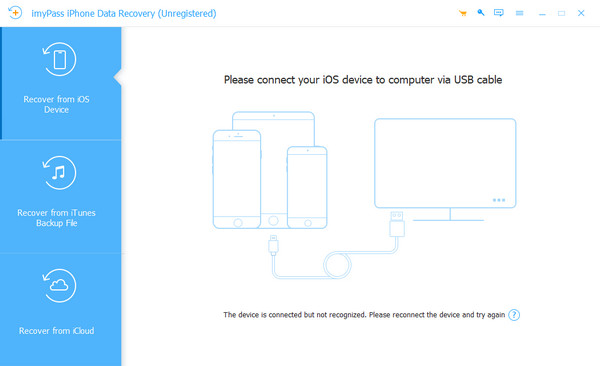
1. Recuperação de dados do iPhone imyPass
Recuperação de dados do iPhone imyPass is the best alternative to EaseUS MobiSaver. This third-party tool has three recovery features that allow you to retrieve your iPhone data. You can use its Recover from iOS Device, Recover from iTunes Backup File, and Recover from iCloud. You can use them to retrieve your data with or without a backup, depending on the situation.
Also, the tool does not use an internet connection. So, the recovery process will not depend on the strength of your network. Lastly, it is best for novices due to the simple interface and features it offers.
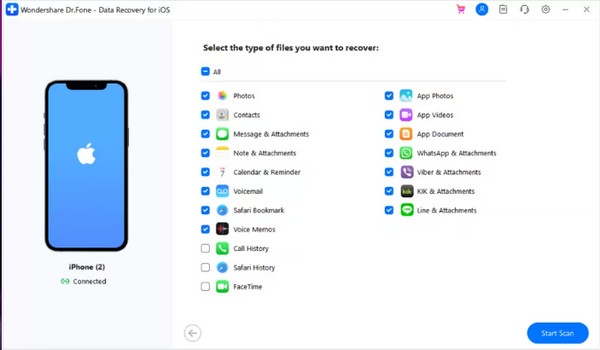
2. Dr.Fone iPhone Data Recovery
Dr.Fone iPhone Data Recovery is a tool that has the same functions as EaseUS MobiSaver. It allows you to check recoverable data before you recover it. In this case, you know the data file size and quantity for the process. Also, the tool can recover your data from iCloud backups. It also allows users to have a selective restore process from them.
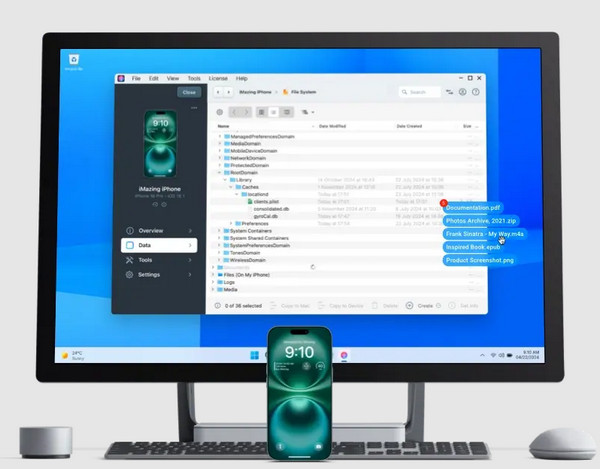
3. iMazing
iMazing is a bit different from the previous tools. This third-party program only allows a backup extraction to recover your data. Though it cannot recover data without a backup, it will be helpful for users who love backing up their data from different cloud storage services. It is available on Mac and Windows computers. Besides that, the tool can be used as a transfer tool for your iPhone data to other devices.
Conclusão
Is EaseUS MobiSaver free? In conclusion, the mentioned tool offers free and paid versions. Also, it is a third-party tool for iPhone and Android phone data recovery. All of this information is included in the article. Recuperação de dados do iPhone imyPass is here as the best alternative. The tool can recover different data types on your iPhone. Downloading the tool will help you explore more of the features it offers!
Clara has over 8 years of experience helping users recover lost files and transfer data. She previously worked as a data recovery technician for a major IT service company. Certified in Data Recovery and Digital Forensics, her articles focus on simple solutions that make complicated recovery tasks easier for everyday users.
Soluções quentes
-
Recuperar dados
- Análise da recuperação de dados do AppGeeker iOS
- Disk Drill iPhone Data Recovery Review
- How to Get iPhone Out of Recovery Mode
- How to Fix support.apple.com/iphone/restore
- How to Recover Data from DFU Mode
- Análise do Gbyte iPhone Data Recovery
- How to Recover iPhone Deleted Photos After 30 Days
- How to Recover Deleted Photos on iPad
-
Desbloquear iOS
-
Transferir dados
-
Dicas para iOS

Recuperação de dados do iPhone
Recuperar dados do iPhone excluídos ou perdidos
Download grátis Download grátis