Solução
 Centro de Apoio
 Sobre nós
 Contato
How to See and Recover Deleted Messages on Discord
 Clara Prescott publicado em julho 22, 2026Recuperar dadosLeitura de 3 minutos
Discord is a unique social media. It is a popular communication app among game players. In fact, it was designed for the gamer community. Players can communicate with each other while playing games as well as join their favorite gaming community. If you have ever been in a situation where you need to ver mensagens apagadas no Discord, you are not alone. This guide shares multiple proven methods.

Neste artigo:
Part 1. Can You See Deleted Messages on Discord
It is significant to understand how Discord handles deleted messages. When you delete a message accidentally or intentionally, it is wiped from Discord’s servers instantly. Unlike other social media platforms that include a Trash folder or similar features, Discord is designed to make the deleted data disappear permanently for privacy reasons.
In other words, Discord doesn’t have a native feature to undo a deletion or view the history of deleted conversations. If you need to view deleted messages on Discord, you will need the help of third-party tools.
Part 2. How to Check Deleted Discord Messages from Notifications
One easy way to check deleted messages on Discord is through notifications. However, this way is only available for the messages received within 24 hours. Moreover, you can only see the preview text but not the full messages. The media files won’t appear. More importantly, the precondition is that you have enabled the notification for Discord on your phone.
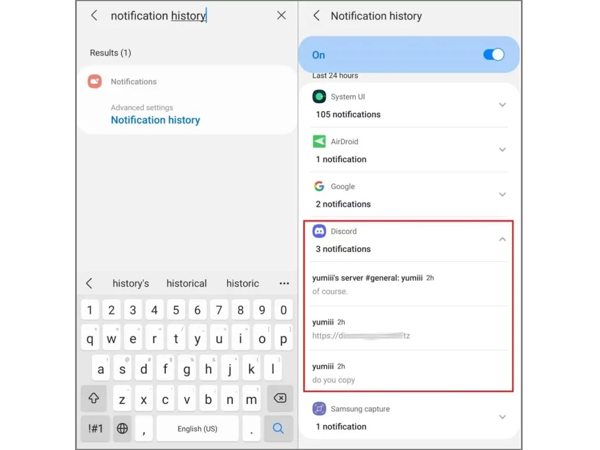
Abra o Definições aplicativo no seu celular.
Vou ao Notificações aba e escolha Notification history.
Achar Discórdia na lista.
View notifications from the past 24 hours.
Observação:
The iPhone doesn’t include a dedicated notification history feature.
Part 3. How to See Deleted Messages on Discord with Dyno Bot
As mentioned previously, Discord doesn’t keep deleted messages on its servers. Fortunately, Dyno Bot enables you to see deleted messages on Discord. It is a versatile Discord bot that helps manage, moderate, and automate tasks on your server. Of course, the precondition is that you have added Dyno Bot to your Discord.
Add Dyno Bot to Your Discord

Head to the Dyno Bot website and click Entrar com Discord.
Clique no Authorize button to grant the desired permissions.
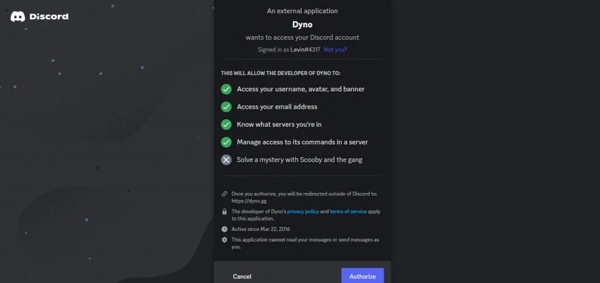
Select the server you need to view deleted messages on.
Next, grant the required permissions to Dyno.
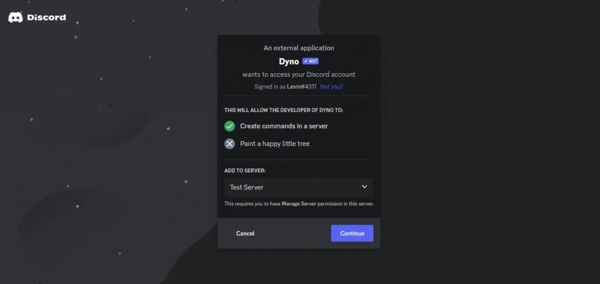
That only works if you possess Manage Server permissions yourself. So, make sure you select the right server.
After that, complete the setup following the onscreen instructions.
Create a Text Channel on the Discord Server
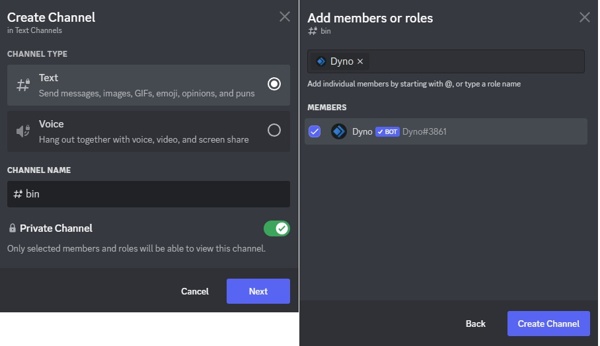
Head to Discord and click Adicionar beside the Text Channels tab on your server.
Enter a name for the channel and turn on Canal Privado.
Add Dyno to this channel.
Check Deleted Messages on Discord
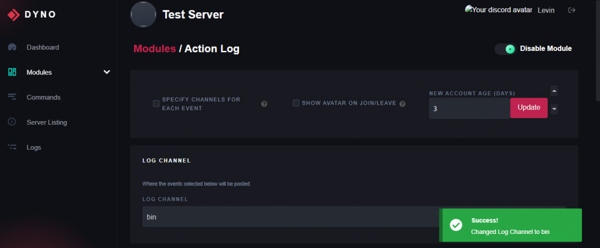
Head back to the Dyno dashboard.
Vou ao Módulos aba.
Abra o Registro de Ações module and select the channel you created as the Canal de Log.
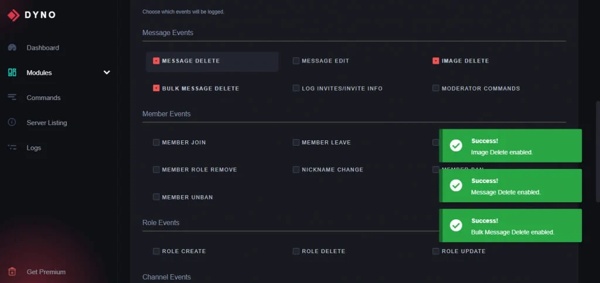
Localize o Eventos de mensagem section to check deleted messages on Discord.
You May Also Like:
Part 4. How to Find Deleted Messages on Discord via BetterDiscord
Another option is Discord deleted message viewer plugins, such as BetterDiscord and MessageLoggerV2. In fact, you need both add-ons to keep your deleted messages. Here is how to get started:
Install BetterDiscord
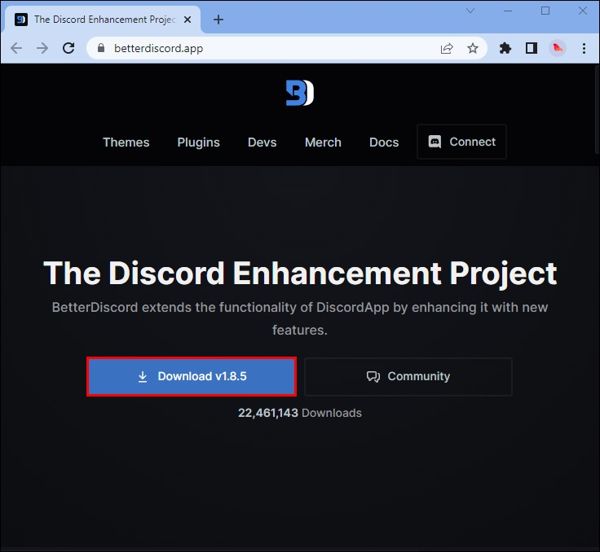
Download the latest version from the official website.
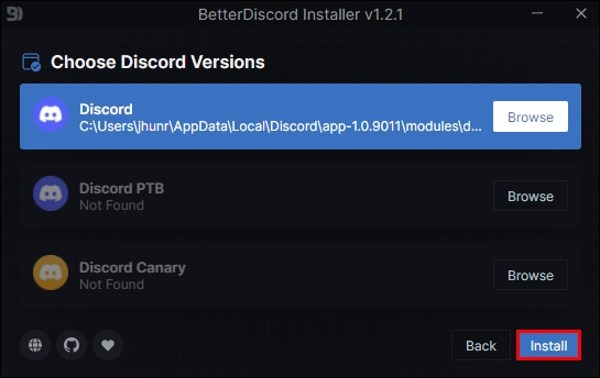
Open the EXE file and follow the prompts to install BetterDiscord.
Click the Discord version you are using and click Instalar.
Download MessageLoggerV2
Go to https://1lighty.github.io/BetterDiscordStuff/?plugin=MessageLoggerV2 and download the plugin to read deleted messages on Discord.
Após o download, clique em Keep.
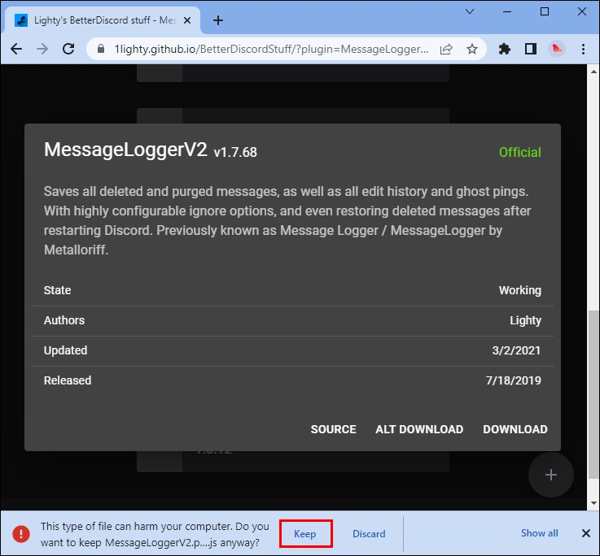
Add MessageLoggerV2 to Discord
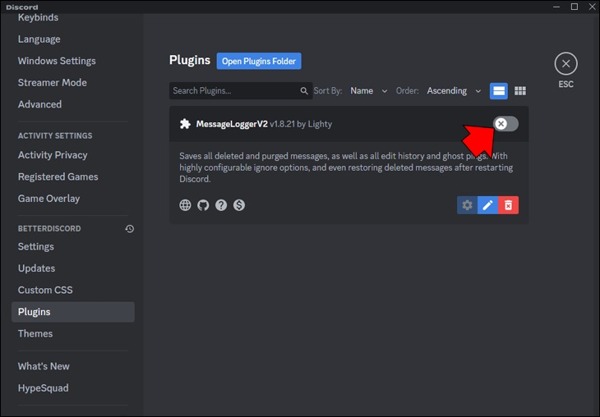
Run Discord and click Definições.
Role para baixo e escolha Plugins.
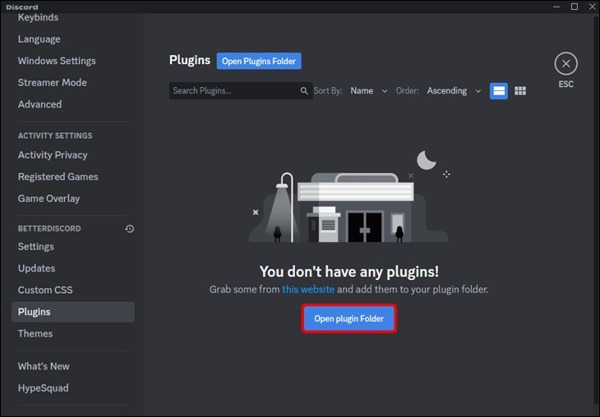
Clique Open Plugin Folder and add the plugin.
Then, turn on the plugin.
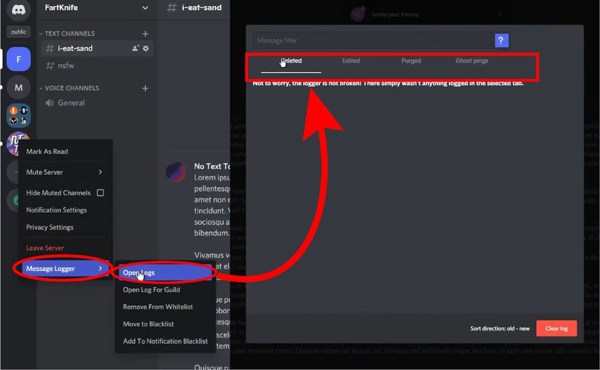
Right-click on your server, choose Message Loggere clique em Add to Whitelist.
Find Deleted Messages on Discord
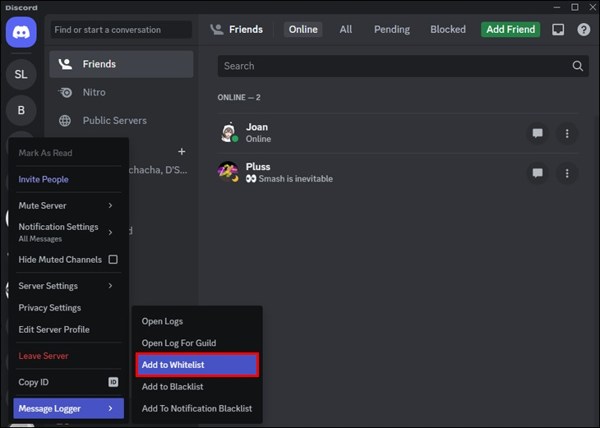
Vou ao Message Logs from the home page.
Escolher Open Logs and find deleted Discord messages under the Deleted aba.
Part 5. How to Recover Deleted Discord Messages on iPhone
Obviously, both the Discord bot and plugins are complicated to set up. If you are using Discord on an iPhone, try Recuperação de dados do iPhone imyPass. It can recover deleted messages on Discord on your iPhone or iPad without a backup.
Mais de 4.000.000 de downloads
Recover deleted messages on Discord quickly.
Extract messages from iCloud/iTunes backup.
Preview deleted messages for selective recovery.
Retrieve multimedia attachments, like images and videos.
Suporte a uma ampla variedade de modelos de iPhone e iPad.
How to Recover Deleted Messages on Discord on Your iPhone
Digitalize seu iPhone
Launch the message recovery software for iPhone on your PC. There is another version for Mac. Choose the Recuperar do dispositivo iOS tab. If you have a backup, choose Recuperar do arquivo de backup do iTunes ou Recuperar do arquivo de backup do iCloud. Connect your iPhone to your PC with a Lightning cable. Click the Iniciar digitalização botão para seguir em frente.
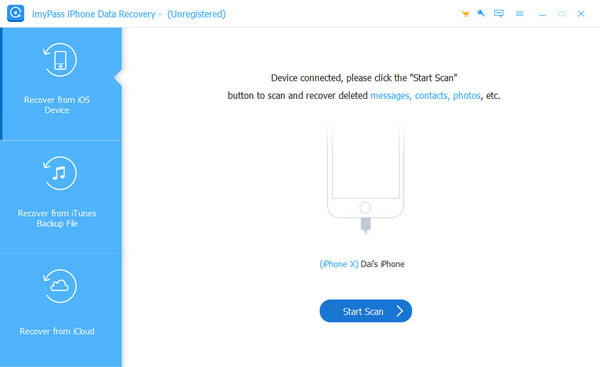
Visualizar mensagens excluídas
After scanning, you can view lost data by type. If there are too many files, choose Mostrar apenas os excluídos na opção suspensa superior.
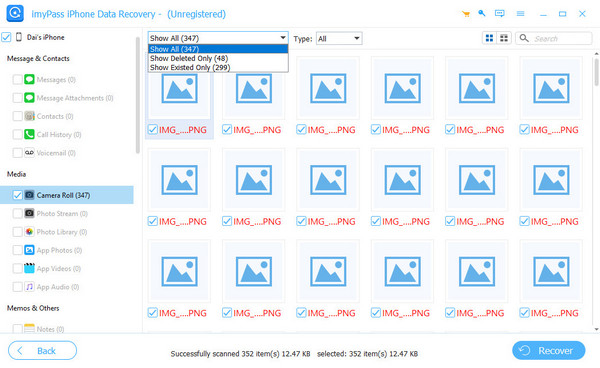
Recuperar mensagens apagadas do Discord
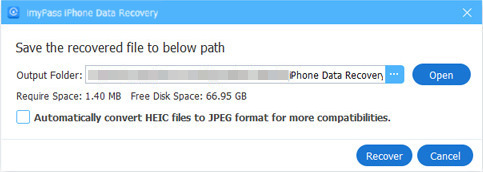
Finally, select the messages you want to get back and click the Recuperar button. Set an output folder and click the Recuperar button again. When it is done, you can find the lost messages on your hard drive.
Conclusão
Este guia compartilhou várias maneiras de check deleted messages on Discord. The Dyno Bot is a Discord bot for performing various tasks, including keeping your deleted messages and chats. Moreover, you can use a plugin to manage your Discord messages even if they are deleted. Recuperação de dados do iPhone imyPass is an easy way to get back lost Discord conversations on your iPhone without a backup.
Clara has over 8 years of experience helping users recover lost files and transfer data. She previously worked as a data recovery technician for a major IT service company. Certified in Data Recovery and Digital Forensics, her articles focus on simple solutions that make complicated recovery tasks easier for everyday users.
Soluções quentes
-
Recuperar dados
- Análise da recuperação de dados do AppGeeker iOS
- Disk Drill iPhone Data Recovery Review
- How to Get iPhone Out of Recovery Mode
- How to Fix support.apple.com/iphone/restore
- How to Recover Data from DFU Mode
- Análise do Gbyte iPhone Data Recovery
- How to Recover iPhone Deleted Photos After 30 Days
- How to Recover Deleted Photos on iPad
-
Desbloquear iOS
-
Transferir dados
-
Dicas para iOS

Recuperação de dados do iPhone
Recuperar dados do iPhone excluídos ou perdidos
Download grátis Download grátis