



 Solução
 Centro de Apoio
 Sobre nós
 Contato
How to Unlock a T-Mobile Mobile Device with or Without an Account
 Samuel Spenser publicado em setembro 02, 2026Desbloquear AndroidLeitura de 3 minutos
A carrier-locked phone can be frustrating when you want to switch networks or use a local SIM while traveling. Fortunately, T-Mobile has a defined eligibility policy, and its current unlocking process is more automated than it used to be. In this post, we will explain T-Mobile requirements and show you how to check your device's eligibility. You'll also learn how to unlock T-Mobile devices and what to do when the standard process doesn't work.

Neste artigo:
- Part 1. Understanding T-Mobile's Unlock Policy
- Part 2. How to Check If Your T-Mobile Phone Is Eligible
- Part 3. How to Unlock Your T-Mobile Phone
- Part 4. Temporary Unlock vs Permanent Unlock
- Part 5. Can You Unlock a T-Mobile Phone Without an Account?
- Part 6. Troubleshooting – Why Won't My T-Mobile Phone Unlock
Part 1. Understanding T-Mobile's Unlock Policy
Before we get into the main topic, let's first understand how T-Mobile's unlock policy works.
What Does Locked Mean?
A locked phone means you cannot use the device with another carrier. If your phone is restricted to T-Mobile's network, inserting another SIM/eSIM won't work.
General Eligibility Requirements
Para desbloquear o telefone from T-Mobile, you must meet the following eligibility criteria:
- T-Mobile originally sold the device.
- The device must not be marked as lost, stolen, or blocked.
- The account linked to the device must be in good standing with zero balance.
Postpaid vs. Prepaid Requirements
| Requirement(s) | Postpaid Accounts | Prepaid Accounts |
| Network Time | Active for at least 40 days on the requesting line. | Active for at least 365 days on the network. |
| Refill History | The account is paid in full monthly. | More than $100 in refills since activation. |
| Contract Status | All device payment plans completed. | Device purchased at full retail price. |
2026 Update: Automatic Unlocking
Under T-Mobile's request-unlock policy today, eligible devices are automatically unlocked remotely within 2 business days. If the device didn't unlock remotely, you'll receive a notice to complete manual setup. You can use your T-Mobile Account to track the status.
Part 2. How to Check If Your T-Mobile Phone Is Eligible
Before trying to desbloqueie seu telefone da operadora, check first whether your T-Mobile phone is eligible. You can check the status in the official app, in the Android phone's built-in unlocking settings, or in the iPhone's settings.
Method 1: Check via the T-Mobile App
In the T-Mobile app, you can check your device's unlock status and eligibility directly. See the quick guide below on how to unlock a phone from T-Mobile:
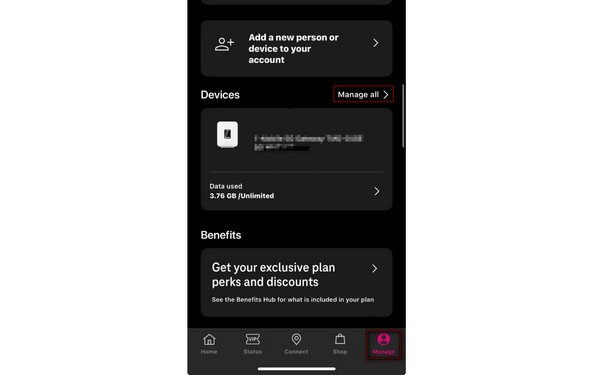
Open the T-Life or T-Mobile app and go to the Gerenciar aba.
Toque Manage All and select the phone or line you want to check.
Selecione os Device lock status to see whether your phone is eligible for unlocking.
Method 2: Check via Android Settings (Device Unlock App)
Some Android phones have a built-in Device Unlock app that can check eligibility for unlocking T-Mobile phones.
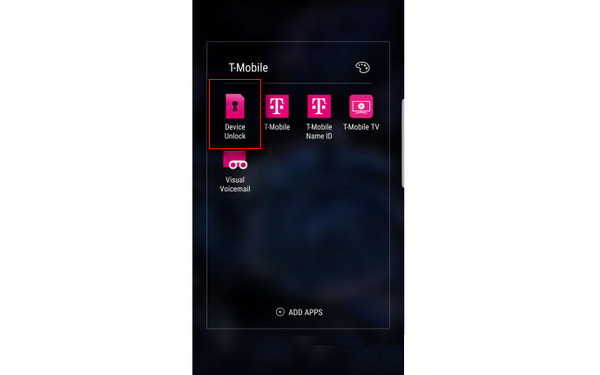
Open the app list and select Desbloqueio do dispositivo. Tocar Desbloqueio do dispositivoe selecione Continuar.
Toque Check eligibility, then wait while the Device Unlock App connects to T-Mobile's server to check eligibility.
Method 3: Check via iPhone Settings
On an iPhone, you don't need an additional app to check if your device is carrier-locked.
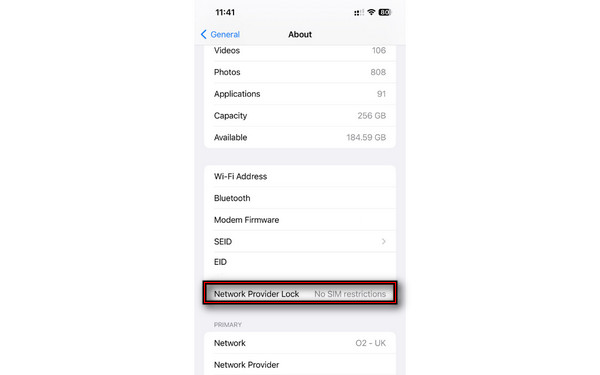
Vamos para Definições, tocar Em geral, e selecione Sobre.
Role para baixo até Operadora. If it says Sem restrições de SIM, your iPhone is unlocked.
Part 3. How to Unlock Your T-Mobile Phone
For iPhone Users: Remote Unlock (No App Required)
Eligible iPhones can be unlocked remotely without an extra app because T-Mobile unlocks carriers electronically.
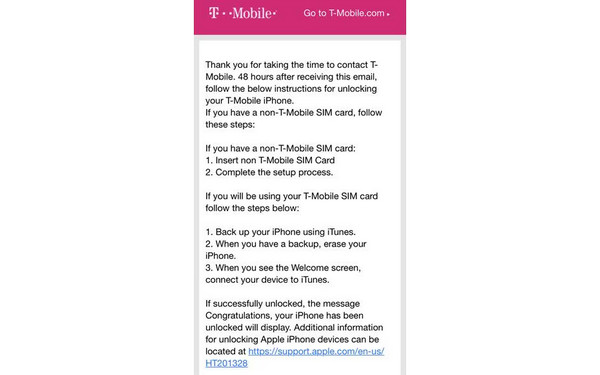
Reach the customer care using online chat through T-Mobile Support.
Provide your account information, including the iPhone's IMEI number.
Wait for 2 business days for processing and confirmation of the unlock approval.
For Android Users: T-Mobile Unlock App
Android users, particularly those on Google-branded devices, can unlock their devices in the T-Mobile Unlock application. Just be sure you have a T-Mobile SIM inserted, or a T-Mobile eSIM set up on the device.
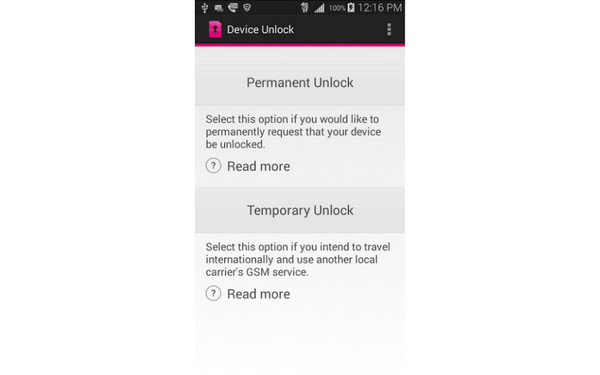
Baixe o T-Mobile Device Unlock (Pixel) app, open it, and select Check eligibility.
Toque Desbloqueio Permanente to remove the lock permanently, then restart your device.
Request Unlock Through T-Mobile Customer Support
The best official solution is to contact the carrier and request unlocking. This is your last option if your device is eligible but does not unlock automatically.
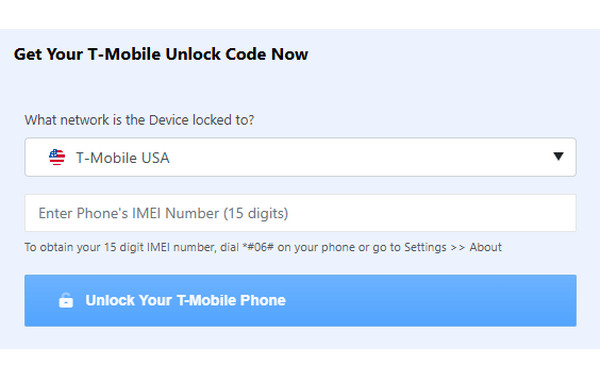
Go to the customer care page and file an unlock code request.
Enter the free T-Mobile unlock code sent to your email to free your phone from being locked.
Part 4. Temporary Unlock vs Permanent Unlock
When unlocking a T-Mobile phone, you'll see two unlock options: Temporary and Permanent. Temporary Unlock lifts the carrier restriction for 30 days. It allows you to use a foreign carrier's SIM card while traveling abroad. Meanwhile, Permanent Unlock removes the carrier restriction from an eligible device. It lets you use a compatible service from another carrier on an ongoing basis.
Observação:
Select Permanent Unlock if you want to use another carrier's SIM or eSIM permanently. On the other hand, T-Mobile Temporary Unlock is intended for short-term situations only.
Part 5. Can You Unlock a T-Mobile Phone Without an Account?
The short answer is: it depends. If you cannot access the original T-Mobile account, your official options are mostly limited to contacting T-Mobile support and requesting a temporary unlock. If T-Mobile refuses your request to unlock the devices due to account access issues or the phone does not qualify under its policy, use imyPass iPassGo.
It is an all-around iOS unlocker and password management tool. It can unlock any SIM card from various carriers, including T-Mobile, AT&T Mobility, and Verizon. It lets you remove network restrictions so you can use different SIM cards/eSIM worldwide. It is compatible with all iPhone models and versions, including the latest iPhone 18 Pro Max with iOS 27.. Below are the quick steps on how to unlock a T-Mobile phone:
Download iPassGo, install it on your computer, then open it.
Connect the locked T-Mobile iPhone to the PC with a USB cable, then click Unlock SIM Card.
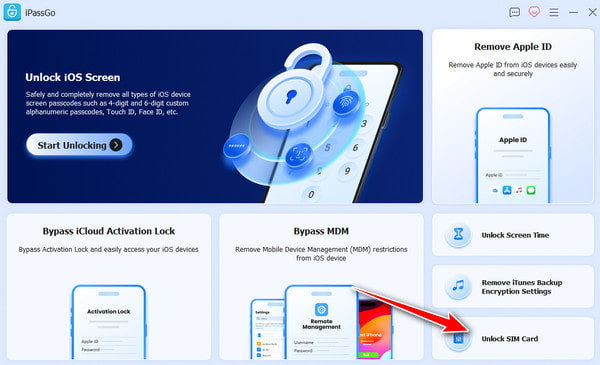
Carefully review all the statements and warnings, then click Comece agora para iniciar o processo de desbloqueio.
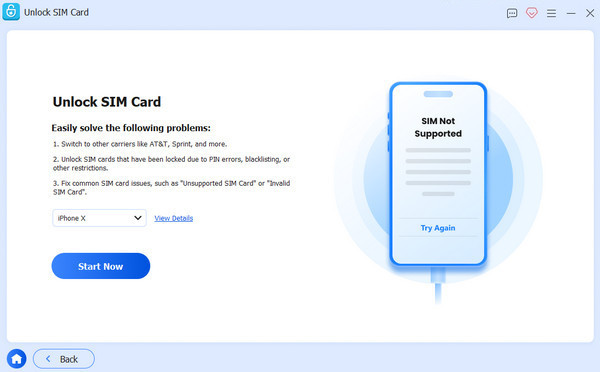
Verify your device information on the following page. If it's correct, click Comece a ignorar.
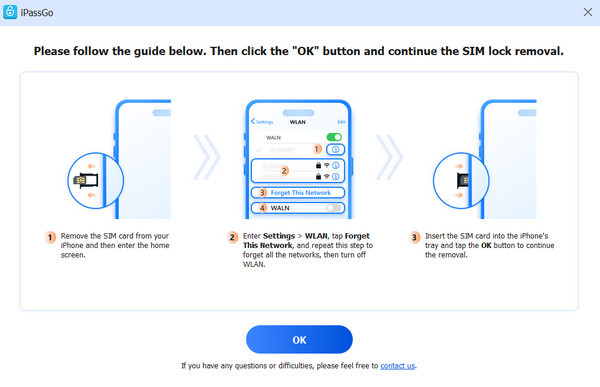
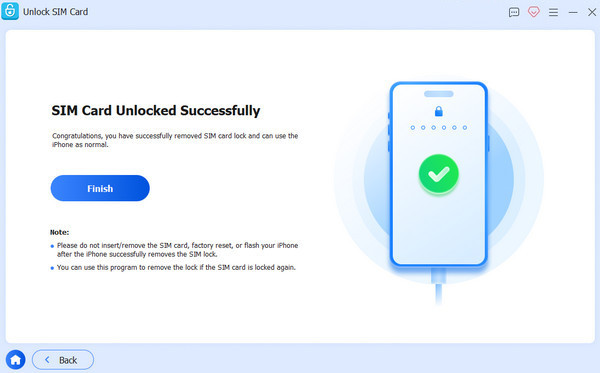
Follow the instructional guide for setting up the device. Right after that, your T-Mobile phone will be unlocked.
Part 6. Troubleshooting – Why Won't My T-Mobile Phone Unlock
1. Device Not Eligible in the Device Unlock App
When the app shows your device is not eligible for unlock, it means you do not currently meet T-Mobile's unlocking requirements. Make sure:
- Your T-Mobile account is in good standing.
- The device was sold by T-Mobile.
- Any applicable device payment obligations have been satisfied.
2. iPhone Taking Too Long
The new unlock status will not immediately show on a qualifying iPhone. If, after the applicable automatic-unlock period, the result is still No SIM restrictions, contact T-Mobile customer care.
3. Unlock App Missing on Android
Some newer devices have a specific setting, while older devices have a preinstalled Device Unlock app. If you do not have an unlock app on your Android device, search for your exact model on T-Mobile's device support page.
4. Device Blocked or Reported Lost/Stolen
A device must not have been reported lost, stolen, or blocked to be eligible for unlocking by T-Mobile. If you get a message that the device is blocked, contact T-Mobile to verify why the IMEI is blocked.
5. Already Unlocked More Than 2 Devices Per Line (Prepaid)
Under T-Mobile's existing prepaid unlocking policy, customers can unlock up to two mobile devices per line of service within any 12-month period. So even if your current phone otherwise appears eligible, the unlock could be denied if the line has already reached this limit.
Conclusão
By learning how to unlock a T-Mobile phone, you can switch between carriers or use a different SIM. If you meet all the eligibility requirements, you can easily unlock your phone. For those situations where official unlocking isn't an option, due to account access or device-specific issues, go with imyPass iPassGo. Always check compatibility and remember that third-party software is not an official unlocking process of T-Mobile.
Samuel specializes in password security and digital privacy. He used to work as a cybersecurity consultant for small businesses to protect digital assets. With certifications in Cybersecurity and Ethical Hacking, he turns complex security topics into easy-to-follow advice. He also enjoys sharing password tips to help users protect their accounts more confidently.
Soluções quentes
-
Desbloquear Android
-
Desbloquear iOS
-
dicas de senha
-
Dicas para iOS


