Solução
 Centro de Apoio
 Sobre nós
 Contato
How to Reset a Toshiba Laptop to Fix Software Issues
 Penny Warren publicado em março 20, 2026Dicas do WindowsLeitura de 3 minutos
Toshiba laptops are indeed great for offering a smooth performance in different operations. It could be for browsing, programs, etc. Regardless of this convenience, there are times when the Toshiba laptop can experience software issues. Due to this, other users need to factory reset the Toshiba laptop to improve its performance.
On the other hand, other Toshiba laptop users factory reset it to prepare it for selling or giving it away. How to master reset a Toshiba laptop? In this article, you will know how to do that, regardless of whether you can or cannot sign in with the laptop. Please continue browsing to know the complete information about the topic.

Neste artigo:
Part 1. Before You Begin - ESSENTIAL Preparation
Before you factory reset your Toshiba laptop, there are things you need to consider before performing it. In this section, we will help you prepare for a factory reset that will be performed.
1. Faça backup dos seus dados
The process of a factory reset will delete everything on your Toshiba laptop. It only means that your data will be permanently deleted. Besides the data, the settings of your Toshiba laptop will also be deleted. It is suggested to back up your data before you factory reset the Toshiba laptop. You may use the built-in backup tool or third-party software for the device.
2. Charge Your Laptop
The factory reset of a Toshiba laptop can last for multiple minutes. It is suggested to charge it before the process. This way, you will prevent an interruption for the procedure, and you do not need to perform the factory reset again in case of.
3. Find Your Product Key (For Windows 7/8)
A product key on a Toshiba laptop serves as proof that your copy is genuine. It is a 25-character code. It helps Microsoft to verify that Windows is legally licensed. This way, you can reinstall Windows 8 or 7 during the factory reset.
Part 2. How to Factory Reset (When You Can Sign into Windows)
A factory reset is easy. It happens when you know the password. This way, you do not need to criar um disco de redefinição de senha do Windows. Toshiba laptops contain different Windows versions. Their different procedures are available below.
For Windows 10 & 11
Windows 10 & 11 are the updated Windows versions of Toshiba. The steps to factory reset them are available below.
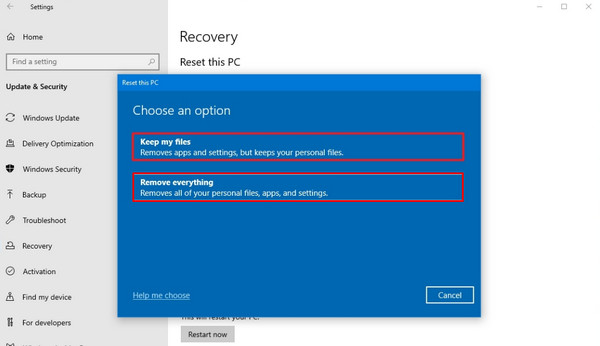
Vou ao Menu Iniciar e clique no Definições button. Then, select the Sistema button from the screen.
Clique no Recuperação botão e escolha o Remover tudo button. Follow the on-screen instructions to complete it.
For Windows 8.1
The Windows 8.1 version is one of the most used versions before. So, there are still people who use it nowadays. Factory reset the Toshiba laptop that contains it with the steps below.
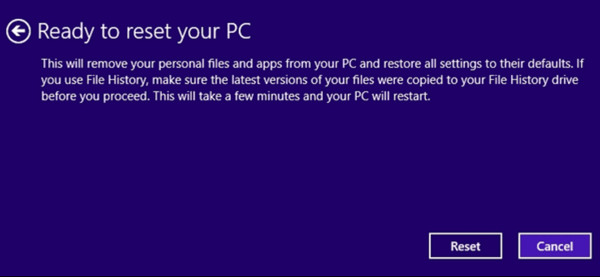
Restart the Toshiba laptop. Then, press the F8 ou Shift + F8 repeatedly. After that, click the Troubleshoot button.
Clique no Reinicialize seu PC button. Perform the on-screen instructions and click the Redefinir botão para iniciar a restauração de fábrica.
For Windows 7
Windows 7 is one of the earliest versions that the Toshiba laptop can have. You can factory reset it with the steps below.
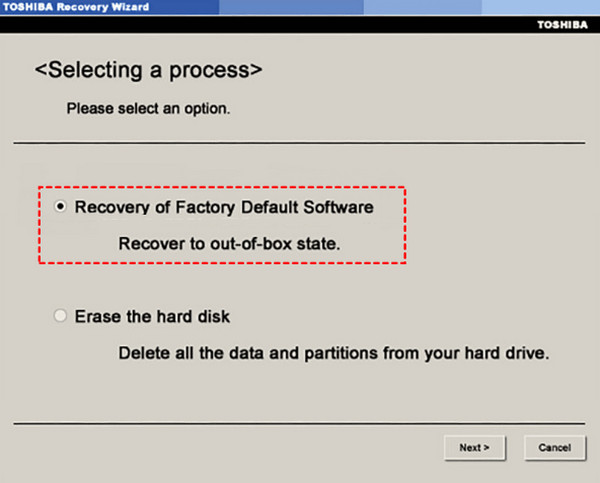
Turn off the device. Press and hold the 0 key. Then, press the Poder button. Release the 0 key when the Recovery screen is shown. Then, select the Assistente de recuperação da Toshiba botão.
Clique Restaurar para Factory Default Software. Later, click Next and click it again to confirm. The factory reset will start afterward.
Part 3. How to Factory Reset (When You Cannot Sign into Windows)
Redefinição de senha do Windows imyPass is the most suggested tool to factory reset your Toshiba laptop when you do not know the password. It allows you to do that by creating a CD/DVD and USB boot drives that can be made in a few minutes. You can choose your plan between the Standard, Platinum, and Ultimate versions. There are multiple scenarios it supports. It includes the forgotten password, a second-hand computer, a forgotten admin password, and creating a new account without administrator access.
The tool supports different Windows versions. For some versions, resetting the password from Windows computers can be done without losing their data. It includes Windows 11/10/8.1/8 and more. The steps below will be your guide on how to use the tool.
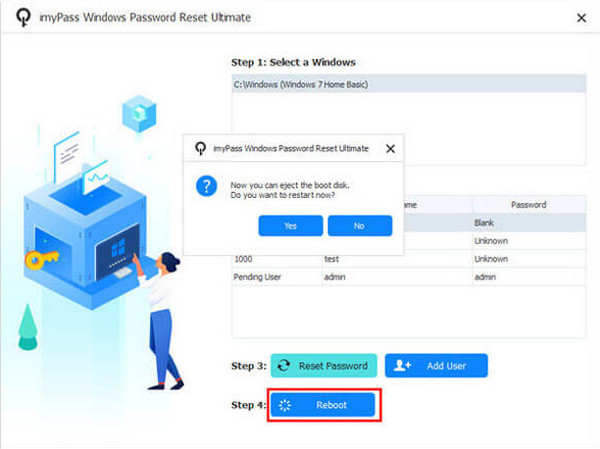
Acesse o site principal de Redefinição de senha do Windows imyPass. After that, set up, install, and open the tool to start the process. Later, the tool will ask if you want to create a password with a CD/DVD or a USB. Click the Gravar CD/DVD ou Gravar USB botão em seguida.
Reinicie o computador e pressione F12. The tool will enter the Bota menu. Please press the Enter key to save and exit it. After that, please choose the Windows you prefer to reset. Then, new options will be prompted on the screen.
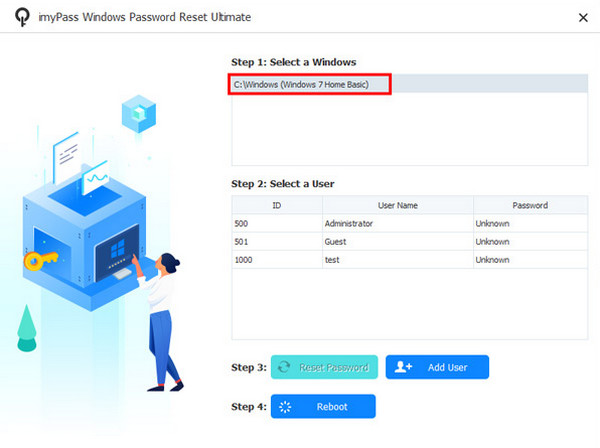
Please select the user at the bottom of the screen. After that, please click the Redefinir senha button at the bottom. Please click the Sim button on the small window. Finally, tap the Reinício button at the bottom to restart your Toshiba laptop.
Part 4. Troubleshooting Common Reset Problems
Before, during, and after the factory reset of your Toshiba laptop, there are problems that you might encounter. In this section, we will show you some of them, including the procedures on how to fix them. Scroll below to know the full details.
1. Factory Reset Freezes
The factory reset can get stuck or frozen during the process. If that happens, you can wait at least 30 minutes to 1 hour.
2. Toshiba Laptop Will Not Reboot
There are instances wherein the Toshiba laptop will not reboot. It might appear black screen, a blue screen, or more. If that happens, you need to turn off your laptop and wait for it to be turned on.
3. Reset Failed Error Message
You might also see the There was a Problem Resetting Your PC error message on your screen. Fixing it will require the laptop to be restarted.
Part 5. After the Reset - What to Do Next
When you factory reset or reset the password of a Toshiba laptop, it is like a new computer again. After the process, you need to complete the setup process of the Toshiba laptop. Also, you are required to install the updates for its Windows version. Besides the Windows version, you also need to install the drives, which are also important.
Conclusão
All in all, the Toshiba laptop reset factory default is the focused of this article. It does not matter if you can or cannot sign in with the laptop. Redefinição de senha do Windows imyPass is here to factory reset your Toshiba laptop if you do not know the password. You may download the tool if you want to explore it.
Penny focuses on GPS troubleshooting and Windows optimization. She formerly worked as a technical support engineer, helping clients solve location-based and system issues efficiently. Backed by IT support experience, she provides practical solutions that really work. In her free time, she likes hiking and geocaching, testing GPS tech in the real world.
Soluções quentes
-
Dicas do Windows
-
Senha do Windows
-
Corrigir janelas
-
dicas de senha

Redefinição de senha do Windows
Redefinir conta de administrador/usuário do Windows
Download grátis Download grátis