



 Řešení
 Centrum podpory
 O nás
O nás Kontakt
What Location Expired Mean on iPhone and How to Fix It
 Penny Warren Zveřejněno dne 23. června 2026Poloha GPS4minutové čtení
"When my friends and I are trying to share our location, my iPhone says Expired Location before the location can even load in. Why does it say Location Expired?" According to our research, this common error occurs when your iPhone cannot update or share its current location information. Some iPhone users face this frustrating issue. This article shares the effective solutions to fix this error without losing data.

V tomto článku:
Part 1. What Does Location Expired Mean and Why Does It Occur
What does Location Expired mean? The error message is alarming on iOS devices. It interrupts the ability to track or share your whereabouts. Typically, this error occurs when sharing location on the Messages or other apps. It means that the location information is no longer available or up-to-date. When the error appears, you cannot see the shared location or share your location on your iPhone.
Before walking through the solutions, let’s explore the underlying causes why it keeps saying Location Expired on your iPhone.
- 1.Location Services is disabled accidentally.
- 2.Find My is restricted or stuck.
- 3.There is a problem with your iPhone’s network connection.
- 4.The location was shared a long time ago and has naturally expired.
- 5.Outdated iOS.
- 6.Softwarové chyby.
Part 2. How to Fix Location Expired on iPhone
While seeing an iPhone error message saying Location Expired can be frustrating, you can try the solutions below one by one to fix this error on your iPhone. Then, you can share your location normally.
Solution 1: Double Check Location Services
Otevři Nastavení na vašem iPhone.
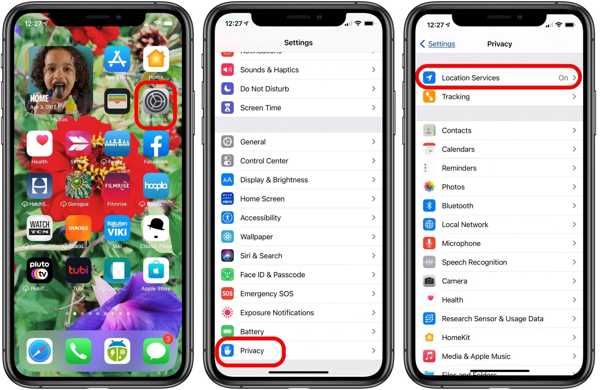
Přejít na Soukromí tab.
Klepněte na Poziční služby knoflík.
Zapněte Poziční služby volba.
Poté klepněte na Sdílet moji polohu knoflík.
Zapněte Sdílet moji polohu volba.
Make sure to allow the desired contact to fix the Location Expired on iPhone.
Řešení 2: Restartujte svůj iPhone
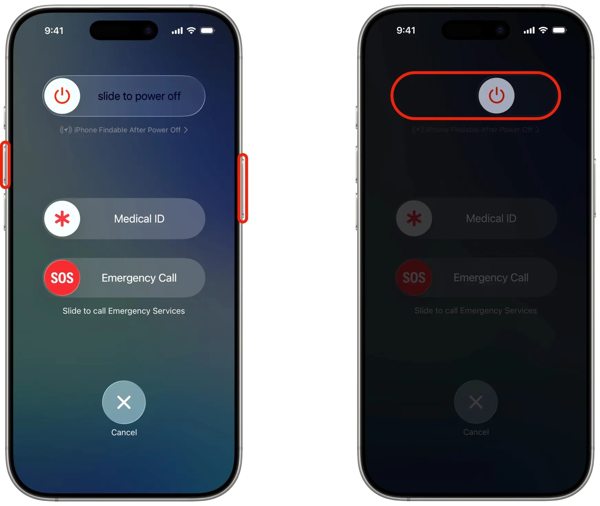
U iPhonu s Face ID podržte některé Hlasitost tlačítko + Boční button together. For an iPhone without Face ID, press and hold the Boční nebo Napájení knoflík.
When the power-off screen pops up, release the buttons or button.
Posunutím posuvníku doprava zařízení vypnete.
After your touchscreen turns black, wait for a few minutes.
Then, hold down the Side nebo Napájení dokud neuvidíte logo Apple.
Now, try to share your location again to check if Location Expired is fixed.
Řešení 3: Opravte datum a čas
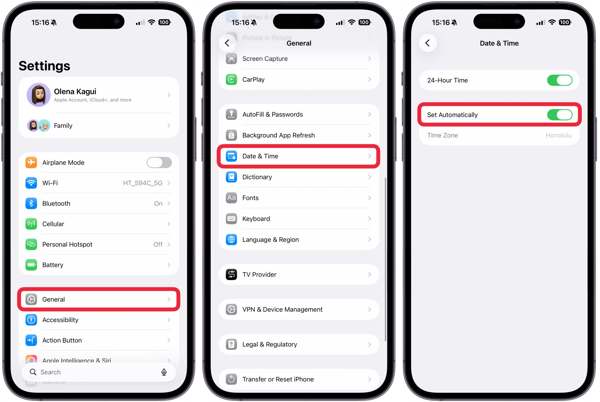
Jděte do svého Nastavení aplikace z domovské obrazovky.
Navigovat do Všeobecné a Čas schůzky.
Zapněte Nastavit automaticky.
Connect to a stable network and fix Location Expired on iPhone.
Solution 4: Check Your Network
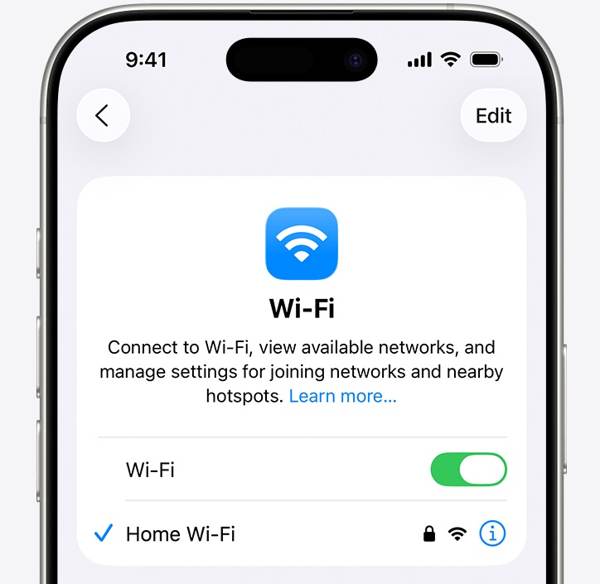
Sharing location on iPhone works through an internet connection. If you are using Wi-Fi and Location Expired occurs on your iPhone, connect to a cellular data network or vice versa. Then, share your location again.
Solution 5: Re-enable Find My
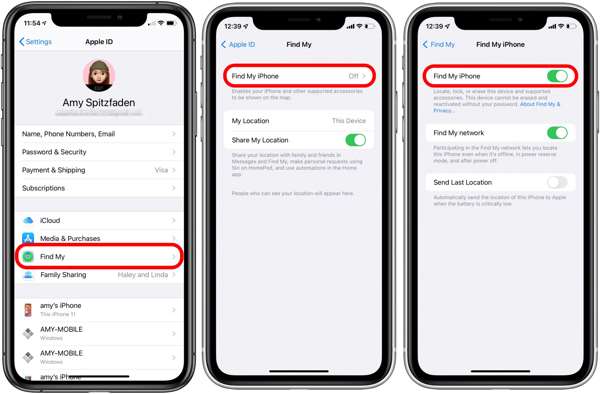
Spusťte Nastavení aplikace z domovské obrazovky.
Klepněte na svůj profil.
Vyber Najít moje možnost a klepněte na Najdi můj iPhone.
Zapněte Najdi můj iPhone a Find My network to fix Location Expired on iPhone.
If Find My iPhone is enabled, toggle it off and turn it back on.
Řešení 6: Aktualizace iOS
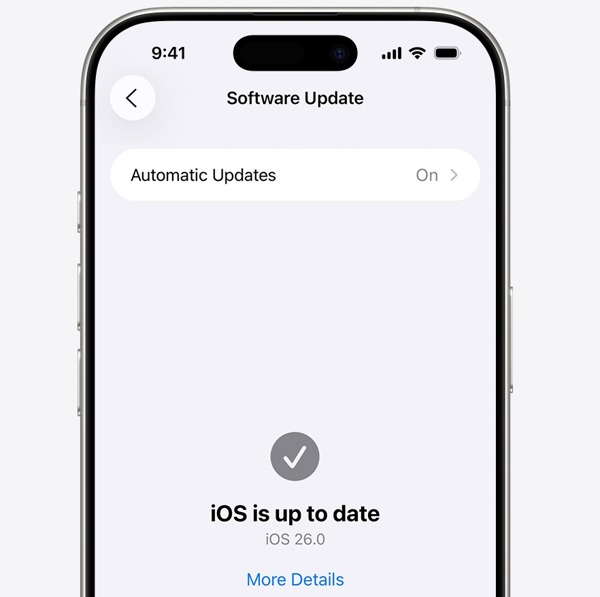
Spusťte svůj Nastavení aplikace.
Navigovat do Všeobecné a Aktualizace softwaru.
Pokud je k dispozici aktualizace, klepněte na Stáhnout a nainstalovat knoflík.
Follow the onscreen instructions to update the iOS.
Po dokončení se váš iPhone restartuje.
Try to share your location to see if the Location Expired error disappears.
Řešení 7: Resetujte polohu a soukromí
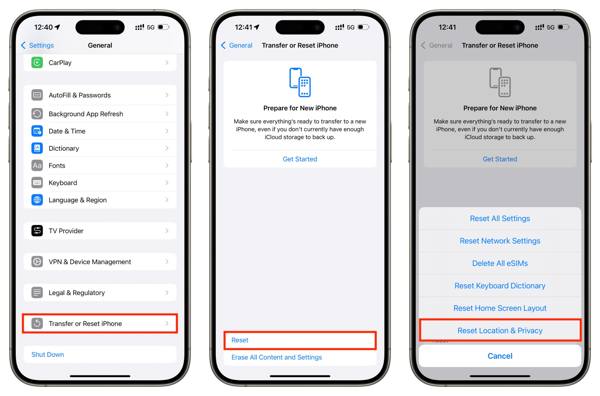
Otevři Nastavení aplikace na vašem zařízení.
Jít do Všeobecné a Přeneste nebo resetujte iPhone.
Klepněte na Resetovat knoflík.
Vyber Resetovat polohu a soukromí volba.
Next, turn on Location Services and Find My iPhone to fix Platnost umístění vypršela.
Související četby:
Part 3. One-stop Solution to Fix iPhone Location Expired
If you have performed the common solutions but the iPhone Location Expired error persists, you can try imyPass iLocaGo. It allows you to share any location without turning off Location Services on iOS devices. Plus, the user-friendly design makes it easy to use.

Více než 4 000 000 stažení
Falešná poloha iPhonu jedním kliknutím.
Simulujte pohyb pomocí více režimů.
Work with accurate addresses and any locations.
Nabídněte vlastní možnosti, jako je rychlost.
Support a wide range of iPhones and Android devices.
How to Fix Location Expired on Your iPhone
Zjistěte svůj iPhone
Launch the iPhone location spoofing software once you install it on your PC. There is another version for Mac. Next, connect your iPhone to your PC with a Lightning cable. Then, the software will detect your device immediately.

Vyberte režim
Vyber Upravit umístění mode if you want to change the static location. The other three modes, Režim jedné zastávky, Režim vícenásobného zastavení, a Režim joysticku, se používají k vytváření virtuálních tras.

Zfalšujte svou polohu
Next, type in an accurate address into the field. If you don’t have an address, click the right position on the interactive map. Finally, click on the Upravit button to confirm it. Now, turn on your iPhone and check if the Location Expired error is resolved.y.

Závěr
This article explained why it says Location Expired on your iPhone. More importantly, we shared the effective solutions to help you fix this error and enable you to share your location as usual. The good news is that software glitches or conflict settings cause this error. If the common solutions are unavailable, try imyPass iLocaGo. It allows you to share any address around the world on your iPhone without disabling Location Services.
Penny se zaměřuje na odstraňování problémů s GPS a optimalizaci Windows. Dříve pracovala jako technická podpůrná inženýrka a pomáhala klientům efektivně řešit problémy související s lokalizací a se systémem. Díky zkušenostem z IT podpory nabízí praktická řešení, která skutečně fungují. Ve volném čase ráda chodí na pěší túry a věnuje se geocachingu, při kterém v reálném prostředí testuje technologie GPS.
Horká řešení
-
Poloha GPS
- Jak zjistit, zda někdo pozastavil svou polohu na Life360
- Jak zdarma uskutečnit falešné (spoof) hovory
- Nejlepší lokality pro Pokémon GO s souřadnicemi
- 10 nejlepších triků a cheatů pro Pokémon GO
- 9 nástrojů pro spoofing v Pokémon GO
- Jak sledovat polohu iPhonu
- Co je to mock umístění
- 5 nejlepších GPS joysticků pro Pokémon GO
-
Odemkněte iOS
-
Tipy pro iOS
-
Odemkněte Android


