



 Oplossing
 Ondersteuning's centrum
 Over ons
 Contact
Fly GPS: Locatie wijzigen op Android-telefoon en iPhone is eenvoudig
 Penny Warren gepubliceerd op 26 december 2025GPS-locatie3 minuten lezen
De locatiebepaling van Android-telefoons en iPhones is een van de belangrijkste functies. Sommige mensen moeten deze locatie echter om verschillende redenen wijzigen. Bijvoorbeeld wanneer ze Pokémon GO spelen. Sommigen hebben geen tijd om naar buiten te gaan om Pokémon te vangen. Daarom veranderen ze vaak hun locatie op hun iPhone of Android-telefoon.
Vlieg GPS is een van de apps waarmee je je locatie op je mobiele telefoon kunt wijzigen. Dit artikel helpt je vertrouwd te raken met de app door een volledige review te geven. Lees verder voor alle details.

In dit artikel:
Deel 1. Wat is Fly GPS?
In verschillende reviews van de beste locatie-apps ben je misschien Fly GPS tegengekomen. Het is een van de bekendste apps waarmee je je locatie kunt wijzigen op een Android-telefoon en een iPhone. Deze applicatie staat bekend om zijn eenvoudige interface en functies. Werkt Fly GPS ook voor Pokémon GO? Absoluut! Dit mobiele spel is de bekendste app die door de locatie-app wordt ondersteund.
Deze app bevat echter advertenties in de interface, wat voor sommigen wellicht storend is. Je kunt de betaalde versie aanschaffen om de advertenties te verwijderen en alle functies te kunnen gebruiken.
Het voordeel van deze app is dat je de locatiegeschiedenis kunt bekijken die je hebt ingesteld op je Android-telefoon of iPhone. Je kunt er ook verschillende instellingen mee aanpassen om de locatie op je iPhone te wijzigen. Denk hierbij aan instellingen voor de snelheid van Google Maps, de bijgewerkte snelheid via GPS, instellingen voor de afstand en meer.
Deel 2. Hoe je Fly GPS gebruikt in Pokémon GO op Android en iPhone.
De Fly GPS-app voor Pokémon GO voor iPhone en Android is eenvoudig te gebruiken. Deze app vereist echter wel meerdere machtigingen op je iPhone of Android-telefoon. Je moet de ontwikkelaarsopties inschakelen voor geavanceerde aanpassingen via de instellingen van je telefoon. Beginners zullen hier wellicht moeite mee hebben, ondanks de eenvoudige functies.
De genoemde procedure is enigszins riskant als je een beginner bent. Je kunt mogelijk verkeerde instellingen maken die je iPhone en Android-telefoon negatief kunnen beïnvloeden. De onderstaande stappen helpen je bij het gebruik van Fly GPS op je Pokémon-account in de app.
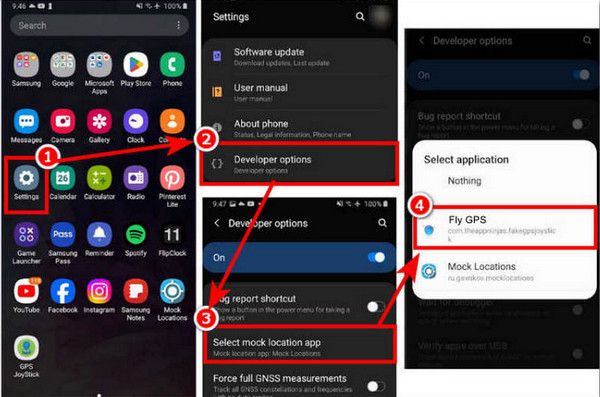
Downloaden Vlieg GPS op je Android-telefoon of iPhone. Tik daarna op de Instellingen app vanaf het scherm en tik op de Ontwikkelaarsopties knop van het scherm. Tik op de Selecteer een neppe locatie Selecteer de app-knop in de lijst. Tik op de Vlieg GPS knop vanuit het kleine venster.
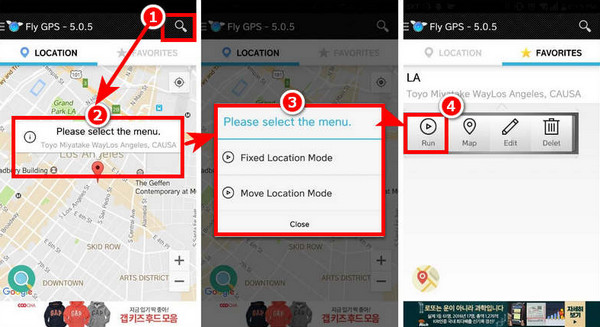
Open de Vlieg GPS app op je mobiele telefoon. Selecteer vervolgens de Zoekopdracht knop rechtsboven. Kies de Vaste locatiemodus of Locatie verplaatsen modus knop op je mobiele telefoon.
Je kunt de functies die je wilt gebruiken instellen via de Favoriet sectie rechtsboven. Tik daarna op de Rennen knop in de werkbalk. Op deze manier kunt u de openen Pokémon GO app op een iPhone of Android-telefoon om Pokémon over de hele wereld te vangen.
Deel 3. Werkt Fly GPS echt en is het veilig?
Fly GPS zal je iPhone en Android-telefoon inderdaad veranderen, waardoor je het kunt gebruiken als een GPS-joystickEr zijn echter diverse risico's verbonden aan het gebruik van de applicatie op je Android-telefoon en iPhone.
1. Schending van de gebruiksvoorwaarden voor meerdere applicaties
Fly GPS is niet veilig te gebruiken in verschillende apps op je iPhone en Android-telefoon. Pokémon GO, Facebook en Instagram zijn daar voorbeelden van. Deze apps verbieden het wijzigen van je locatie op je iPhone of Android-telefoon. Dit kan ernstige gevolgen hebben voor je account op deze platforms of in mobiele games. Je account kan zelfs geblokkeerd worden.
2. Verstoort de daadwerkelijke navigatie
De valse GPS-signalen van de app kunnen je werkelijke locatie verstoren of overschrijven. Dit kan aanzienlijke gevolgen hebben voor Google Maps, Waze en andere apps die afhankelijk zijn van de locatiegegevens van je iPhone en Android-telefoon.
3. Instabiliteit van het Android- of iPhone-systeem
De app wijzigt het GPS-gedrag en simuleert de locatiefunctionaliteit van je mobiele telefoon. Hierdoor loopt de batterij van je iPhone en Android-telefoon snel leeg. Dit kan leiden tot vastlopen en vertragingen op je telefoon.
4. Problemen met tracking en advertentie-injectie
Fly GPS heeft gekraakte en APK-versies die op je mobiele telefoon geïnstalleerd kunnen worden. Sommige versies van deze applicatie kunnen spyware of adware bevatten. In dat geval lopen je gegevens of informatie op je iPhone of Android-telefoon gevaar. GPS-wisselaars Informatie afkomstig van derden kan potentiële risico's met zich meebrengen.
5. Juridische kwesties
Het vervalsen van je locatie vanuit sommige landen of regio's is beperkt of illegaal. Je kunt juridische stappen verwachten als je Fly GPS gebruikt. Het hangt er ook vanaf hoe je de app op je iPhone of Android-telefoon gebruikt.
Deel 4. Alternatief voor vliegen met GPS
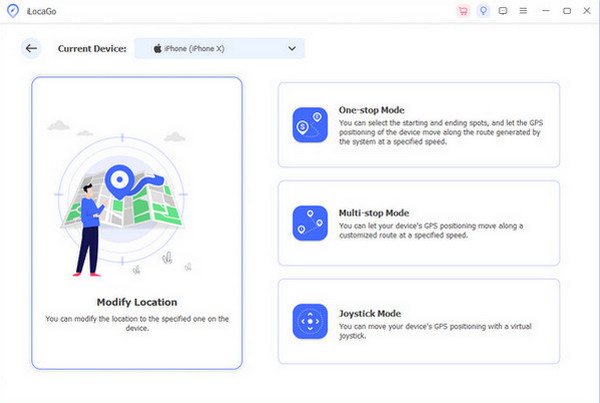
Er zijn talloze nep-Fly GPS-apps te vinden in digitale winkels en online. Dat is de belangrijkste reden waarom mensen een alternatief voor de app zoeken. imyPass iLocaGo Deze tool kan gebruikt worden. Met deze tool kunt u de locatie van uw iPhone en Android-telefoon in vier modi wijzigen: Eén-stopmodus, Meerdere-stopmodus, Joystickmodus en Aangepaste snelheid. Deze tool ondersteunt de nieuwste softwareversies van mobiele telefoons, waaronder Android 16 en iOS 26.
Daarnaast kan deze software je locatie wijzigen vanuit verschillende populaire apps op je mobiele telefoon. Denk hierbij aan Facebook, Pokémon GO, Hinge, WhatsApp, Snapchat en meer. De app biedt ook een geschiedenis- en favorietenfunctie voor extra gebruiksgemak. De onderstaande stappen laten zien hoe je de tool gebruikt.
Open de meest betrouwbare webbrowser op uw computer. Ga naar imyPass iLocaGo Download het bestand via het eerste scherm. Stel het bestand in en installeer het vervolgens. De software wordt daarna automatisch geïnstalleerd.
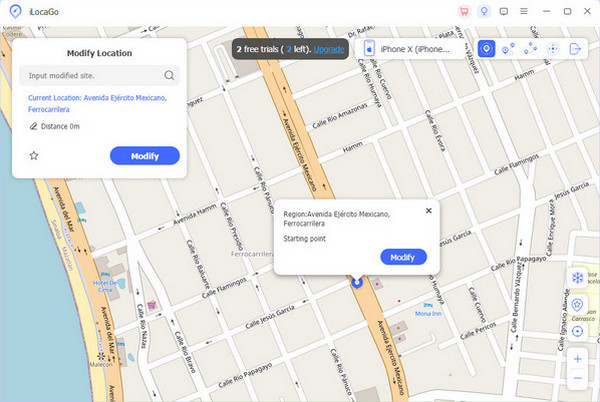
De belangrijkste functies van de tool worden op het scherm weergegeven. Selecteer de gewenste optie. Locatie wijzigen Klik op de knop aan de linkerkant. Vervolgens verschijnt de volgende interface.
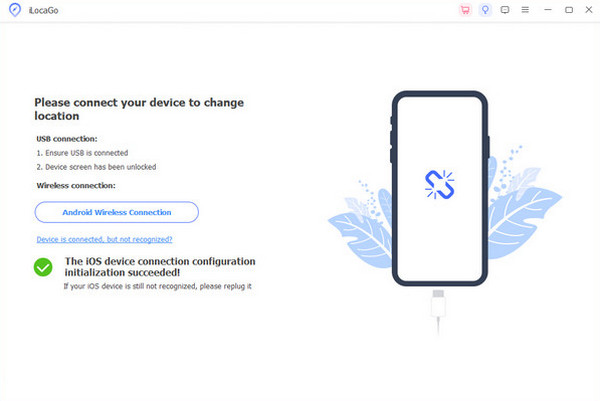
Voor deze tool moet u uw Android-telefoon of iPhone op de computer aansluiten. USB Sluit de kabel aan en volg de instructies op het apparaat. Vervolgens zou de naam van de iPhone in de hoofdinterface moeten verschijnen.
Je ziet een klein venster linksboven in het scherm. Typ daar de gewenste locatie voor je iPhone en Android-telefoon. Klik vervolgens op de Bewerken Druk op de knop om deze binnen enkele seconden te wijzigen. De pincode wordt daarna vervangen, wat aangeeft dat het proces succesvol is verlopen.
Conclusie
Concluderend kan gesteld worden dat de APK Fly GPS 100% is niet veilig voor je iPhone en Android-telefoon, inclusief hun functies en apps. Dit artikel laat ook zien hoe je de app correct gebruikt. Het biedt je een alternatief voor de app, namelijk imyPass iLocaGoDeze tool geeft een nauwkeurige locatieverandering op uw mobiele telefoon weer.
Penny is senior redacteur bij imyPass. Ze heeft zich toegelegd op het vinden van perfecte GPS-locatieoplossingen in alle scenario's en heeft ook ervaring met het repareren van computers.
Hete oplossingen
-
GPS-locatie
- Beste Pokemon Go-locaties met coördinaten
- Schakel uw locatie uit op Life360
- Hoe u de locatie op de iPhone kunt wijzigen
- Recensie van iSpoofer Pokemon Go
- Stel virtuele locaties in op iPhone en Android
- TikTok Volg uw locatie
- Monster Hunter Nu Joystick
- Herziening van IP-locatiezoeker
- Wijzig de locatie van Mobile Legends
- Wijzig locatie op Tiktok
-
Ontgrendel iOS
-
iOS-tips
-
Ontgrendel Android


