



 Solução
 Centro de Apoio
 Sobre nós
 Contato
How to Unlock an LG Mobile Phone: Bypass Screen & Carrier Lock
 Gideon Byron publicado em fevereiro 27, 2026Desbloquear AndroidLeitura de 5 minutos
LG phones contain different security features that secure your data, privacy, information, etc. Some of them are screen lock and carrier lock. Screen lock features is used to prevent unauthorized access to your LG phone. You can use PIN, pattern, password, and more types. On the other hand, carrier lock is a restriction to a particular mobile network provider.
The said security features are helpful, but not all the times. There are circumstances when users prefer to remove them. Worst, they do not know the credentials for the security features. How to unlock an LG mobile phone? Five of the easiest methods can be discovered as you scroll below.

Neste artigo:
Part 1. Best Method to Unlock LG Phone Easily
Bypassing the screen lock on an LG phone is a bit demanding, especially for methods that require professional skills. Try imyPass AnyPassGo! It can unlock your LG phone from a forgotten lock screen password in one click. You can remove its pattern, PIN, password, Face ID or face recognition, or fingerprint. Besides that, a damaged or broken screen, a second-hand LG phone, and too many wrong password attempts are also supported.Furthermore, the tool can also bypass the Google FRP lock from your LG phone and other famous brands. It includes Xiaomi, Huawei, Samsung, etc. Learn how to use this tool with the steps below.
Open your trusted web browser and search for the official website of imyPass AnyPassGo. After that, locate the downloaded file and set it up based on the requirements. Later, install and open the tool as the primary step.
Selecione os Remover senha da tela button. It is located in the top left section of the tool. You can also click the Começar button under its description. Please select the LG button at the bottom of the list of supported Android phone brands.
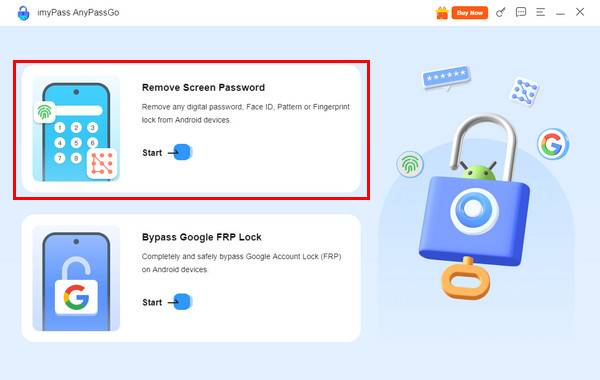
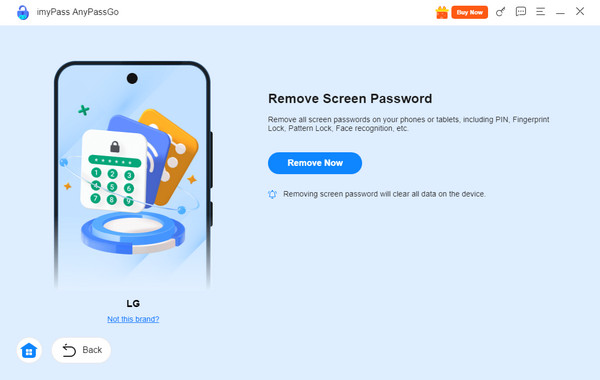
Get a compatible USB cable. Then, use it to plug your LG phone into the computer. Allow the permissions needed to recognize the mentioned device. Finally, click the Remover agora button to start unlocking your LG phone.
Part 2. Use Google's Find My Device to Unlock LG Phone
Google Encontre Meu Dispositivo, also known as Find Hub, is a helpful service that offers different wireless operations on your LG phone and other Android phone brands. It can track, locate, play a sound, and erase your LG phone. This service requires the associated Google account from the locked LG phone. Without it, the erasing process is impossible.
The process will factory reset your LG phone, which means that all of its content and settings will be deleted permanently. Otherwise, you have a backup for your LG phone data using Google and other backup services. Unlock your LG phone with Google Find Hub using the steps below.
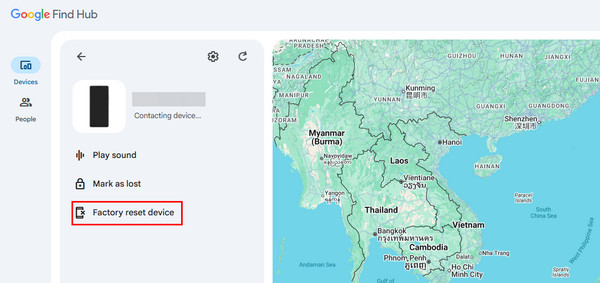
Grab the device that will be used for the process. Then, search for the website of Encontre o Hub. Sign in to the associated Google account from the locked LG phone. Later, choose the Dispositivos botão na interface principal.
The list of LG or other devices associated with your Google account will appear. Please select the name of your LG phone and choose the Dispositivo de redefinição de fábrica button. Confirm the process by selecting the Apagar botão na janela pequena.
Part 3. Use Factory Data Reset to Unlock LG Phone
The Factory Data Reset command is included in the recovery mode of your LG phone. This procedure is a bit demanding due to the combination of physical buttons. If you are a novice, it is recommended to ask for intermediate to professional help. If not, you can follow the steps carefully below.
Turn off your LG phone. Press the Volume baixo e Poder ou Trancar keys on the back of your phone. Release the Poder ou Trancar key when the LG screen is displayed. Later, press and hold the Poder oTrancar botão novamente.
Please release all the pressed keys from the LG phone when the Factory Hard Reset screen is shown. Press the Poder ou Trancar button to proceed. Then, press the mentioned button again to cancel.
Part 4. Use Smart Lock or Backup PIN to Unlock LG Phone
Google offers a backup PIN for your LG phone. You can use this PIN to unlock your LG phone when the passcode is accidentally forgotten. Alternatively, you can use Bloqueio inteligente. It allows you to unlock the LG phone that has a forgotten password with a trusted device. This service is only available to the latest versions of Android OS. There are four features that can unlock your LG phone. You can use the On-body Detection, Trusted Places, Trusted Face/Voice, and Trusted Devices features. The well-explained descriptions with these features can be seen below.
1. On-body Detection
The LG phone can be unlocked while you carry it using your hands. However, it will be locked after you put it down.
2. Trusted Places
The LG phone will be unlocked from the trusted places where you bring it. It includes your workplace and home. It will be locked when you leave the mentioned places.
3. Trusted Devices
You can unlock your LG phone from a device that has been associated with it. It can be a smartwatch or a car.
4. Trusted Face/Voice
A Familiar voice or face can unlock the LG phone when the lock screen password is forgotten. However, it is the least effective among all of them.
Part 5. How to Carrier Unlock an LG Phone
LG phones can be bought from different carriers. Some prefer to buy from carriers for purchasing it on an installment plan. However, the LG phone will be carrier-locked. It means that you cannot use another SIM card, except for the one they offer. Travelling with a carrier-locked LG phone is inconvenient. The reason is that some SIM cards are not available in different places or countries. You cannot use your SIM from the carrier if it is not supported in the area. The good thing is that you can bypass your carrier-locked LG phone. The steps are available below.
Open your LG phone and ensure that it is locked. Then, use the dial-up screen to dial the master code to bypass the carrier-locked LG phone.
Você pode usar o 2945#*#. Alternatively, you can consider the 2945#*71001# e *#865625# codes. Then, tap the Chamar button to dial them. Follow the on-screen instructions afterward.
Conclusão
All in all, this post is all about how to unlock an LG phone quickly. Five easy methods are included to help you experience a smooth unlocking process. imyPass AnyPassGo can unlock your LG phone in one click! The tool can also bypass the Google FRP lock feature on your LG phone. Download it if you want to experience more of the tool!
Gideon é editor sênior do imyPass. Ele é especialista em desbloqueio de celulares e computadores e escreve tutoriais de senhas no imyPass há 3 anos.
Soluções quentes
-
Desbloquear Android
- Como saber se o seu telefone está desbloqueado
- Desbloquear tela do telefone Samsung sem senha
- Desbloquear bloqueio de padrão no dispositivo Android
- Revisão de desbloqueios diretos
- Como desbloquear o telefone OnePlus
- Desbloquear OEM e corrigir desbloqueio de OEM esmaecido
- Como desbloquear um telefone Sprint
-
Desbloquear iOS
-
dicas de senha
-
Dicas para iOS

