



 Solução
 Centro de Apoio
 Sobre nós
 Contato
Por que meu iPhone vibra aleatoriamente? Resolva facilmente
 Samuel Spenser publicado em setembro 06, 2024Dicas para iOSLeitura de 3 minutos
Você já notou seu iPhone vibra aleatoriamente sem notificação? Você pode se sentir perdido ao verificar seu iPhone, mas apenas para descobrir que nenhuma mensagem aparece. Por que um iPhone vibra anormalmente? Este artigo explicará por que isso acontece para enganar você. Você também pode aprender 5 maneiras de consertar seu iPhone vibrando aleatoriamente e ficar tranquilo.

Neste artigo:
Parte 1: Possíveis razões pelas quais o iPhone vibra aleatoriamente
Existem dois motivos principais que fazem seu iPhone vibrar aleatoriamente, além do que você calcula: erros de sistema e configurações inadequadas.
Erros do sistema
Se você costuma descarregar seu iPhone ou instalar aplicativos de fontes desconhecidas, seu iPhone acumulará bugs de sistema e acabará causando problemas inesperados, como vibrar aleatoriamente sem notificações.
Configurações impróprias
Se você não definiu bem as configurações de notificação no seu iPhone, você também pode encontrar o iPhone vibrando aleatoriamente sem um prompt de mensagem instantânea. Esse fenômeno geralmente acontece quando há várias notificações chegando ao mesmo tempo.
Parte 2: A maneira mais fácil de consertar o iPhone vibrando aleatoriamente
Quando você perceber que seu iPhone tem grandes problemas de sistema, e eles fazem seu iPhone vibrar anormalmente, então a ação imediata que você deve tomar é recorrer ao Apeaksoft iOS System Recovery. Este programa pode limpar facilmente todos os erros e bugs do sistema para que você possa resolver os problemas de vibração do iPhone com facilidade. O que vai impressionar você é que ele requer apenas um cabo USB e alguns cliques para apagar todos os problemas de sistema e problemas relacionados à tela ou dispositivo.
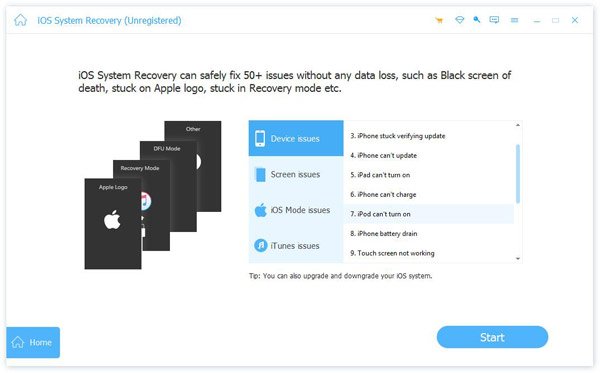
Lançar Recuperação do sistema iOS da Apeaksoft e conecte seu iPhone ao seu computador. Você pode clicar no Começar botão para começar a consertar a vibração aleatória do seu iPhone.
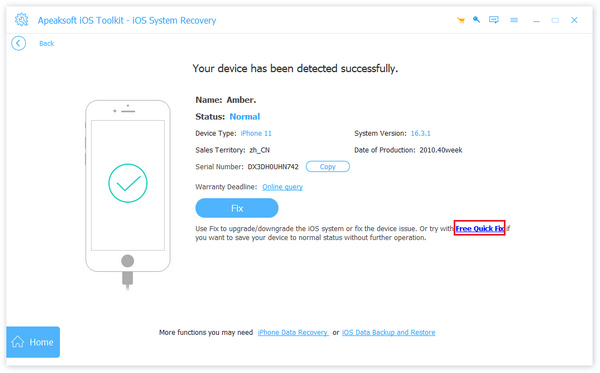
Você pode clicar no Solução rápida gratuita botão para consertar rapidamente seu iPhone, e então o problema de vibração aleatória do iPhone pode ser corrigido. Se não, você pode clicar no Consertar botão para continuar.
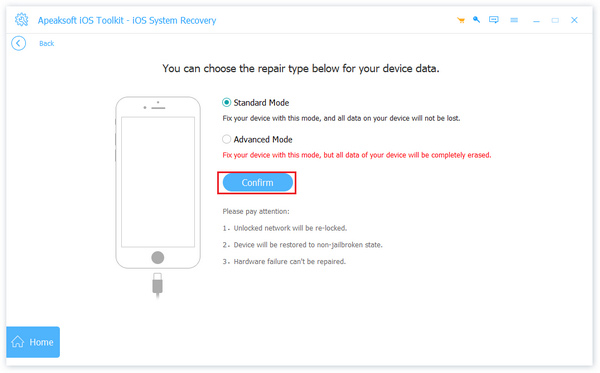
Nesta nova janela, se você escolher o Modo padrão botão para consertar a vibração aleatória do seu iPhone. Se você considera que seu iPhone tem muitos erros de sistema, escolha Modo avançado e clique no Consertar botão.
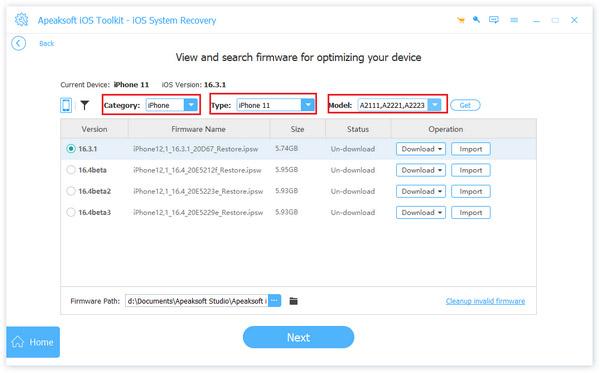
Você deve baixar o pacote de firmware de um sistema iOS. Depois disso, o programa apagará os problemas do sistema. Você pode consertar seu iPhone vibrando aleatoriamente.
Parte 3: Como resolver o problema de vibração aleatória do iPhone no dispositivo
Se não houver nenhum problema no sistema, mas seu iPhone vibra aleatoriamente, então as causas podem ser configurações impróprias ou bugs atuais. Você pode aprender as 4 maneiras abaixo para consertar seu iPhone vibrando aleatoriamente.
1. Reinicie o seu iPhone
Quando você perceber que seu iPhone vibra aleatoriamente sem nenhuma notificação, você pode reiniciá-lo para tentar consertar esse problema. Quando você encontrar problemas desconhecidos em um dispositivo digital, reiniciá-lo é um método rápido e seguro. Basta tentar desta forma para testar se você consegue consertar seu iPhone vibrando sem mensagens.
2. Habilitar notificação visual
Às vezes, seu iPhone vibra sem motivo, e isso ocorre porque o dispositivo está travado e não mostra conteúdo visual quando vibra. Você pode ativar o recurso de prompt visual para forçar seu iPhone a mostrar notificações necessárias.
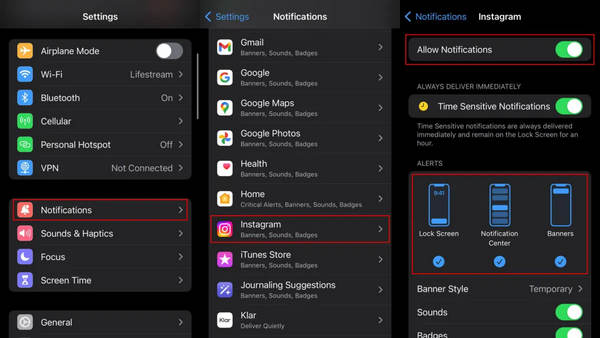
Abrir Definições e toque no Notificações botão. Escolha o aplicativo que normalmente faz seu iPhone vibrar e ative Permitir notificação para o aplicativo.
Em seguida, ligue o Tela de bloqueio, Centro de Notificação, e Bandeiras para o aplicativo. Este método pode consertar o iPhone vibrando aleatoriamente sem notificações. Você também pode proibir um aplicativo de mostrar notificações. Por exemplo, você também pode desligue a localização no seu iPhone para evitar que aplicativos acessem sua localização.
3. Atualize a versão e os aplicativos do iOS
Você também pode atualizar a versão do iOS ou os aplicativos que você suspeita que geralmente emitem vibrações, o que pode consertar o iPhone vibrando aleatoriamente enquanto não há nenhuma mensagem. As atualizações do iOS podem corrigir erros do sistema ou bugs deixados pelo desenvolvedor. Além disso, atualizações frequentes de aplicativos também podem remover bugs ocultos ou explícitos no seu iPhone, o que pode consertar os problemas de vibração do iPhone. Se você não tiver um ID Apple conectado, você pode redefinir o iPhone de fábrica sem um ID Apple.
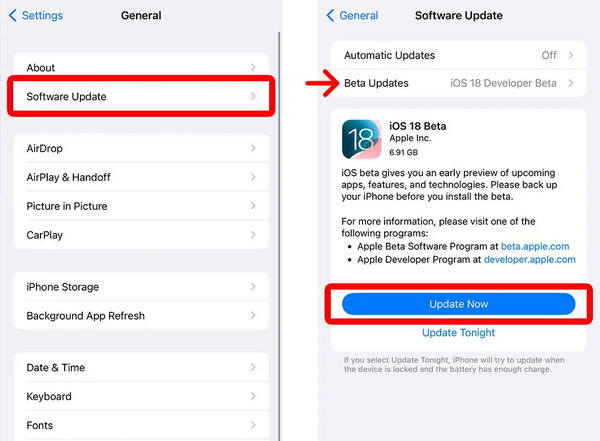
Vamos para Definições e toque no Em geral botão. Toque Atualização de software. Você verá a versão mais recente do iOS nas novas janelas. Toque em Atualizar agora botão para baixar e instalar o novo sistema iOS no seu iPhone.
Perguntas frequentes.
-
Por que meu iPhone vibra aleatoriamente em vez de tocar?
Isso ocorre porque você desativou o toque para mensagens enquanto a vibração ainda estava ativada. Portanto, quando uma mensagem ou notificação chega, seu iPhone não emite um toque, mas vibra para notificá-lo.
-
Por que meu iPhone vibra aleatoriamente sem notificação no iPhone?
Você pode verificar se há um recurso de notificação ativado em um aplicativo, como o Pokemon Go. Se sim, você pode desativá-lo para ver se o problema pode ser resolvido.
-
Por que meu iPhone vibra quando recebo uma chamada?
Isso se deve a um recurso integrado - System Haptics. Você também pode vê-lo como interação homem-máquina. Ele pode reproduzir haptics para acompanhar o ritmo do seu toque. Esse recurso também é comumente usado em consoles de jogos.
-
O que faz o iPhone vibrar quando há uma notificação?
Existe um recurso chamado Sistema Haptics dentro Definições. Ele pode ser ligado e desligado manualmente. Se você considerar isso incômodo, pode cancelá-lo. Então, você só ouvirá o toque quando uma notificação chegar.
-
Por que meu iPhone vibra quando eu digito?
Você deve ir para Som e Tátil para desligar Háptica no feedback do teclado. A háptica no teclado não funciona bem no iPhone. Geralmente, ele não consegue sincronizar os toques dos seus dedos.
Conclusão
Por que meu iPhone vibra aleatoriamente? Este artigo mostra 4 maneiras de corrigir esse problema. Você pode ajustar as configurações em Notificação ou Som e Tátil. Você também pode reiniciar seu dispositivo ou atualizar para o iOS mais recente para resolvê-lo. No entanto, a maneira mais conveniente deve ser o Apeaksoft iOS System Recovery. Ele pode corrigir com um clique todos os tipos de erros de sistema no seu iPhone, incluindo configurações inadequadas. Você consertará o iPhone vibrando aleatoriamente para deixar o dispositivo em boas condições.
Samuel é editor sênior da imyPass. Ele é especialista em desbloqueio de senhas e tem mais de cinco anos de experiência escrevendo tutoriais sobre desbloqueio de celulares.
Soluções quentes
-
Dicas para iOS
-
Desbloquear iOS
-
Localização GPS
-
Dicas do Windows


