



 Solução
 Centro de Apoio
 Sobre nós
 Contato
How to Quickly Bypass SOTI MobiControl on iOS and Android
 Samuel Spenser publicado em março 27, 2026Desbloquear iOSLeitura de 3 minutos
SOTI MobiControl is a comprehensive MDM solution. It consists of four components: Management Service, Deployment Server, SQL database, and Soti agent. Many small and large organizations deploy SOTI MobiControl and monitor enrolled mobile devices. At the same time, users will lose full control of their iPhones and Android phones. Without an admin password, you cannot easily remove the MDM. However, this tutorial shares how to bypass SOTI MobiControl on your device quickly.

Neste artigo:
Part 1: What Is SOTI MobiControl
As mentioned previously, SOTI MobiControl is a mobile device management solution. With an SOTI MobiControl login, IT administrators can simplify the security and management of multi-vendor, multi-form-factor, and multi-operating-system devices.
Main Features of SOTI MobiControl
1. Manage apps on enrolled devices.
2. Manage content.
3. Share devices.
4. Remote support.
5. Single Sign-On for shared devices.
6. Integrate the SOTI One platform.
7. Compatible with SOTI XSight.
Part 2: How to Bypass SOTI MobiControl on Android
Way 1: How to Bypass SOTI MobiControl on Android by Factory Reset
A standard factory reset cannot bypass SOTI MobiControl on Android or any other MDM solutions. If you don't have an admin password, you have to perform a factory reset in Recovery Mode to get freedom.
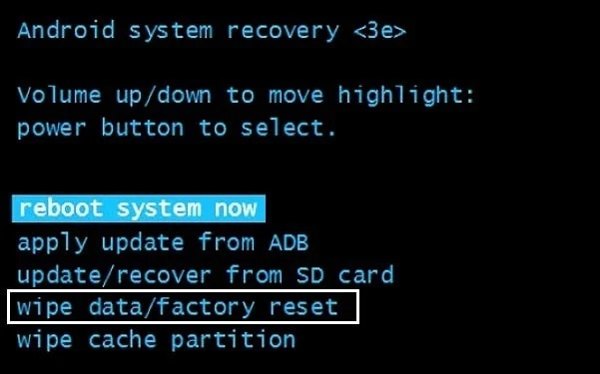
Pressione e segure o Power + Volume Down buttons together until the boot-loader menu appears.
The button combination may be different on your phone.
Realçar Modo de recuperação com o Volume buttons, and select it with the Poder botão.
A seguir, selecione Limpar dados / reinício fábrica com o Volume buttons, and press the Poder button to perform the option.
If prompted, select Sim e confirme.
When it is complete, select reboot system now and perform it.
Wait for your phone to restart and set it up as a new device.
Don't restore a backup that contains SOTI MobiControl when setting up your phone. Otherwise, the MDM solution will be added on your phone again.
Way 2: How to Delete SOTI MobiControl on Android via ADB
ADB is a command-line tool for Android devices. It can access the basic system and personalize your device. It is possible to delete SOTI MobiControl from an Android device without a password.
Turn on your phone.
Abra o Definições aplicativo e vá para Opções de desenvolvedor.
Se você não conseguir encontrar Opções de desenvolvedor, Vá para Sobre telefone dentro Definições and tap on the Número da versão sete vezes.
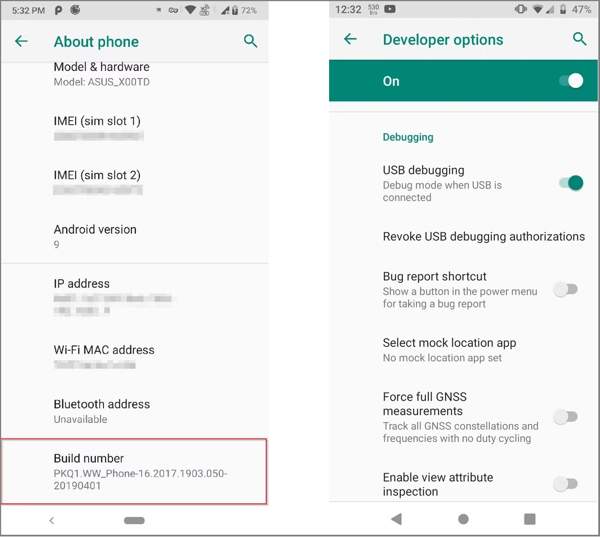
Ligue o Depuração USB modo.
Download and install ADB on your PC.
Conecte seu telefone ao PC com um cabo USB.
Go to the directory where ADB is installed.
Clique com o botão direito do mouse em Começar cardápio e escolha Command Prompt(admin) ou Windows PowerShell(admin).
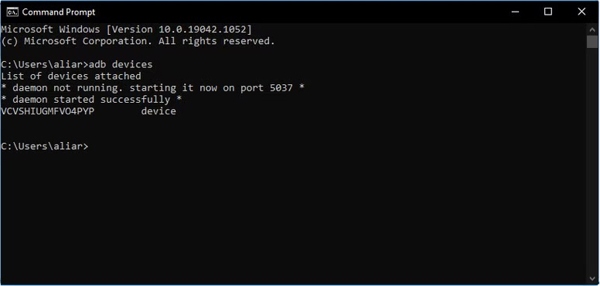
Digitar dispositivos adb e pressione o Digitar tecla do seu teclado.
Next, input shell adb e pressione Digitar.
Digitar seu e pressione Digitar.
Perform the command: cd /system/priv-app to access the system apps folder.
Entrada ls, e pressione Digitar.
Then, input rm -rf e pressione Digitar to delete SOTI MobiControl on Android.
Disconnect your device and go to the Definições aplicativo.
Escolher Aplicativos and uninstall the SOTI MobiControl device agent.
Part 3: How to Bypass SOTI MobiControl on iPhone
Way 1: How to Remove SOTI MobiControl on iPhone with 3uTools
3uTools is a free toolkit for iOS devices. While it doesn't support all iPhones, you can try it to remove SOTI MobiControl on iOS 17.1 to 18.2. Bear in mind that the success rate is different, depending on your situation.
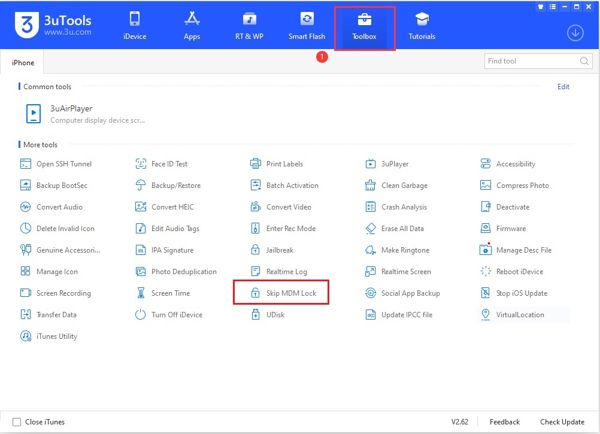
Install the freeware on your computer.
Next, plug your iPhone into your computer with a USB cable.
Open 3uTool, go to the Caixa de ferramentas guia e escolha Pular bloqueio MDM.
Clique no Pular agora botão na caixa de diálogo pop-up.
Então clique Desativar and wait for the process to finish.
Tap and hold the MDM app until it shakes, and tap the X to remove SOTI MobiControl.
The freeware cannot get rid of the SOTI MobiControl profile permanently. Your device will be locked again if you reset it.
Way 2: How to Uninstall SOTI MobiControl on iPhone Using iPassGo
Another way to uninstall SOTI MobiControl on your iPhone is iPassGo. It is able to get rid of any MDM profiles from your iOS device with a single tap. More importantly, the user-friendly design makes it easy to use.

Mais de 4.000.000 de downloads
Uninstall SOTI MobiControl and other MDM profiles.
Don't require admin passwords or your Apple ID password.
Proteja seus dados durante o processo.
Ofereça recursos de bônus, como Desativar o Tempo de Tela.
Support the latest editions of iOS and iPadOS.
How to Uninstall SOTI MobiControl from Your iPhone
Conecte-se ao seu dispositivo
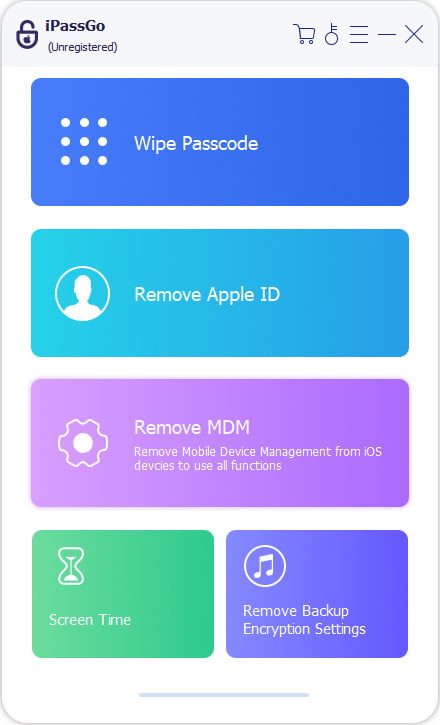
Download and install the MDM removal software on your PC. It is compatible with Windows 11 to XP. There is another version for Mac users. Connect your iPhone to your PC with a Lightning cable, and the software will detect your device immediately. Choose the Remover MDM modo para prosseguir.
Uninstall SOTI MobiControl
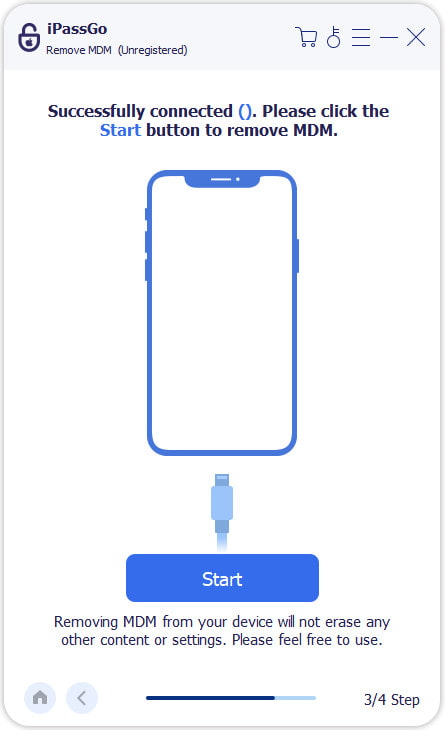
Se estiver pronto, clique em Começar button to begin bypassing SOTI MobiControl on your iPhone. Once the process is successful, your device will restart. Disconnect it, and you will find the MDM profile is deleted. If you can see the SOTI MobiControl app on your home screen, manually uninstall it directly.
Leitura Estendida:
Conclusão
This guide discussed what SOTI MobiControl is and how to bypass the MDM solution from Android and iOS devices. A factory reset in Recovery Mode can remove all data from a phone, including MDM. The ADB commands enable users to get rid of MDM without rooting their devices. For iPhone users, 3uTools is a good starting point. iPassGo is an ultimate solution to remove any MDM solution from an iOS device with a single click.
Samuel é editor sênior da imyPass. Ele é especialista em desbloqueio de senhas e tem mais de cinco anos de experiência escrevendo tutoriais sobre desbloqueio de celulares.
Soluções quentes
-
Desbloquear iOS
- Revisão dos serviços gratuitos de desbloqueio do iCloud
- Ignore a ativação do iCloud com IMEI
- Remover Mosyle MDM do iPhone e iPad
- Remover support.apple.com/iphone/passcode
- Revisão do Checkra1n iCloud Bypass
- Ignorar a senha da tela de bloqueio do iPhone
- Como fazer o Jailbreak do iPhone
- Desbloquear iPhone sem computador
- Ignorar iPhone bloqueado para proprietário
- Redefinição de fábrica do iPhone sem senha do ID Apple
-
Dicas para iOS
-
Desbloquear Android
- Como saber se o seu telefone está desbloqueado
- Desbloquear tela do telefone Samsung sem senha
- Desbloquear bloqueio de padrão no dispositivo Android
- Revisão de desbloqueios diretos
- Como desbloquear o telefone OnePlus
- Desbloquear OEM e corrigir desbloqueio de OEM esmaecido
- Como desbloquear um telefone Sprint
-
Senha do Windows


