



 Solução
 Centro de Apoio
 Sobre nós
 Contato
MDM vs. MAM: How to Choose the Right Mobile Management Solution
 Samuel Spenser publicado em abril 22, 2026Desbloquear iOSLeitura de 3 minutos
Nowadays, employees use personal phones for email, tablets for meetings, and laptops for projects. These mobile devices are great for productivity, but they also create challenges for IT teams trying to keep corporate data secure.
Two common solutions are Mobile Device Management (MDM) and Mobile Application Management (MAM). They might sound similar, but there is a key difference between them: MDM manages the whole device, while MAM only manages the enterprise apps and data.
Which one is right for your organization? This guide covers everything you need to know about MDM x MAM.

Neste artigo:
What is MDM vs MAM
Before deciding whether MDM or MAM is the best fit for your organization, it's important to understand how each solution works and their key features.
O que é MDM
MDM, or Mobile Device Management, is a technology used by IT administrators to remotely manage and secure mobile devices used in a corporation. It includes phones, tablets, laptops and even desktop computers that employees use. MDM allows administrators to protect business data and fully control the entire mobile devices.
How MDM Works:
- Centralized Enrollment: Administrators can remotely configure settings, deploy security policies, and manage OS update requirements across devices.
- Remote Management: Administrators can lock or wipe lost or stolen devices and enforce security controls to protect business data.
- App Management: Administrators can distribute enterprise apps, restrict unauthorized installations and removals, or configure app permissions.
- Monitoring: Administrators can generate reports, track inventory, and ensure devices remain aligned with organizational policies.
What is MAM?
MAM, or Mobile Application Management, only focuses on monitoring and managing work applications related to business rather than whole devices. IT administrators can deploy enterprise apps, manage business data, and remove corporate information while keeping employees' personal data private. MAM is suitable for BYOD (Bring Your Own Device) environments.
How MAM Works:
- App-level Security: MAM enables administrators to enforce security controls within enterprise apps and prevents unauthorized transfer between personal and enterprise apps.
- Remote Application Management: IT teams can remotely distribute, configure, update, and remove corporate apps without enrolling the entire device.
- Data Management: Administrators can remove business data from managed apps without affecting personal content.
- Monitoring: MAM can monitor application usage and access activity to ensure corporate data is used only through approved apps and follows company policies.
MDM vs MAM: What are the Key Differences
Although both MDM and MAM help organizations secure corporate data on mobile devices, they differ mainly in many aspects, such as management scope, control level, user privacy, and common use cases.
| Aspecto | MDM | MAM |
| Management Scope | Manages the entire device | Manages only enterprise apps |
| Control Level | Device-level control | App-level control |
| Security Approach | Whole device security | Corporate data within managed apps security |
| Flexibility | Less flexible for personal devices | Higher flexibility |
| User Privacy | May affect user privacy on personal devices | Better preserves personal privacy |
| App Deployment | Users can only install IT-approved apps | Users can install personal apps freely |
| Common Use Case | Corporate or personal device | Personal devices or BYOD scenarios |
MDM vs MAM: Which is Right for You?
Now, we've learned the definition, key features, and differences between MDM and MAM, the next question is: how do you choose the right MDM and MAM solutions for your organization? When should you use MDM, MAM, or both of them?
When to Choose MDM
If your organization primarily issues company-owned devices and requires full control over device settings, security policies, and encryption enforcement, MDM is your ideal choice. It is suited for highly regulated organizations where compliance and data security are critical. Common use cases include large enterprises, hospitals, banks, and government agencies.
When to Choose MAM
If your organization allows personal devices, MAM is recommended. It enables the IT team to protect corporate apps and data without interfering with employees' personal apps and data. MAM is perfect for BYOD, remote work, and flexible workplace environments.
Use Both MDM and MAM
For organizations with mixed employees, such as on-site, remote, hybrid, full-time, part-time, or consultants, using both MAM and MDM is the best solution. Company-owned devices can be fully managed via MDM, while personal devices are protected through MAM. This hybrid approach ensures comprehensive security, compliance, and flexibility across all devices and users.
Bonus: How to Remove MDM Without Data Loss
We've talked a lot about MDM and MAM, but what if you ever run into a device that's restricted by MDM? Maybe you want to reuse an old company-managed phone, or you bought a second-hand iPhone that's locked by MDM. In such cases, how can you remove MDM without losing your data?
A professional bypass tool may save you from the dilemma. imyPass iPassGo helps remove MDM restrictions from all iOS devices and versions without data loss so that you can regain full access to your iPhone.

Mais de 4.000.000 de downloads
Remove MDM restrictions and restore full device functionality.
Bypass common enterprise MDM systems like Jamf, Microsoft Intune, and IBM.
Unlock 4-dgit/6-dgit screen passcodes, Face ID, or Touch ID in simple steps.
Wipe Screen Time, iTunes encryption, or Apple ID password easily.
Steps to remove MDM with iPassGo:
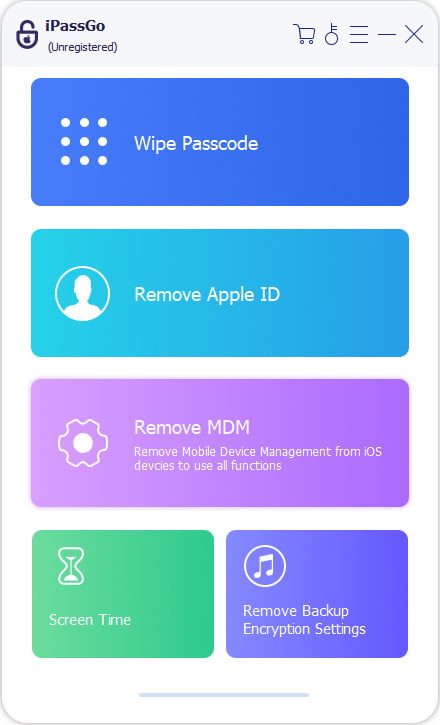
Launch the software on your computer, then select the Remover MDM modo da interface principal.
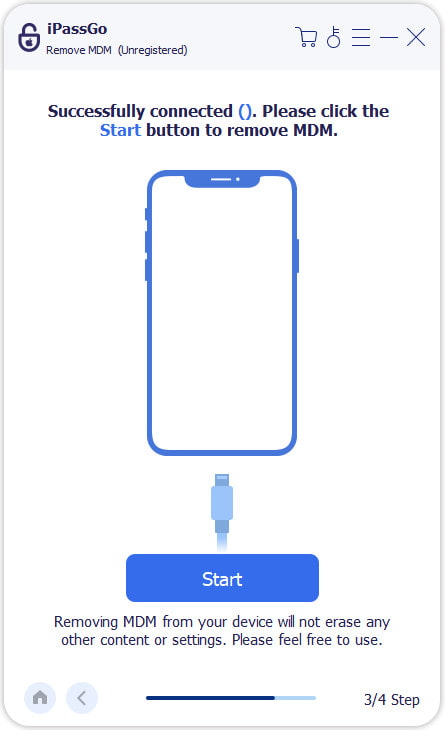
Connect your device to the computer with a USB cable, then click the Começar botão para prosseguir.
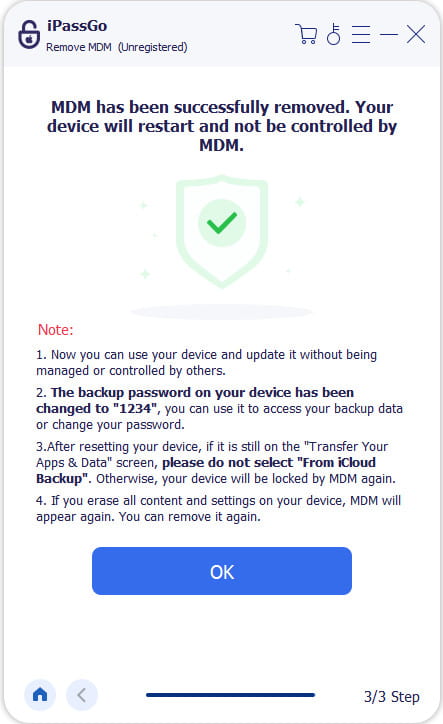
The program will automatically begin removing the MDM profile from your device. Just wait a moment until the process finishes.
Perguntas frequentes.
-
Can Intune MDM and MAM be used together?
Yes, you can use MDM do Intune and MAM together! Many organizations use a hybrid approach - use MDM to fully manage company-owned devices and MAM to protect corporate apps on personal devices.
-
What is the difference between MDM and MAM?
In short, MDM manages the entire device, and MAM only manages corporate apps and data, leaving personal apps and information untouched.
-
Does MAM remove MDM restrictions on my iPhone?
No. MAM only manages enterprise apps and corporate data, not the device itself. To remove MDM restrictions on iPhone, you can use a professional tool like imyPass iPassGo, which can safely remove MDM without data loss.
Conclusão
Choosing between MDM and MAM solutions depends on your devices and workforce. MDM is best for company-owned devices, while MAM protects enterprise apps on personal devices, such as BYOD scenarios. For mixed environments, using both ensures full coverage and security. If you ever need to remove MDM safely without losing data, imyPass iPassGo can help you solve this problem quickly.
Samuel specializes in password security and digital privacy. He used to work as a cybersecurity consultant for small businesses to protect digital assets. With certifications in Cybersecurity and Ethical Hacking, he turns complex security topics into easy-to-follow advice. He also enjoys sharing password tips to help users protect their accounts more confidently.
Soluções quentes
-
Desbloquear iOS
-
Dicas para iOS
-
Desbloquear Android
-
dicas de senha


