



 Soluţie
 Centru de asistență
 Despre noi
 a lua legatura
How to Stop TikTok from Tracking Your Location on Mobile
 Penny Warren publicat pe 06 martie 2026Localizare GPSLectură de 3 minute
Does TikTok track your location? Yes, it does. TikTok uses a multi-layered approach to determine where you are. Even if you try to hide your location, the app uses environmental signals to find you. TikTok’s business model relies on hyper-local relevance. For example, it allows local businesses to show you ads based on your real-time movements.
You can check how TikTok tracks your location. And although it's not easy to 100% prevent TikTok tracking, there are some methods to limit it. If you want to try to protect your privacy, you can try the methods in this post right away.

În acest articol:
Part 1. How TikTok Tracks Your Location
TikTok can know your location in different ways, even if you turn off the location service on your phone. Please check how it works:
Precise GPS Location (New for 2026)
- Before 2026: TikTok explicitly stated it did not collect precise GPS data.
- In and after 2026: If you grant permission in your device settings, TikTok can track your precise GPS location (accurate within a few meters). This allows them to know exactly which building you are in.
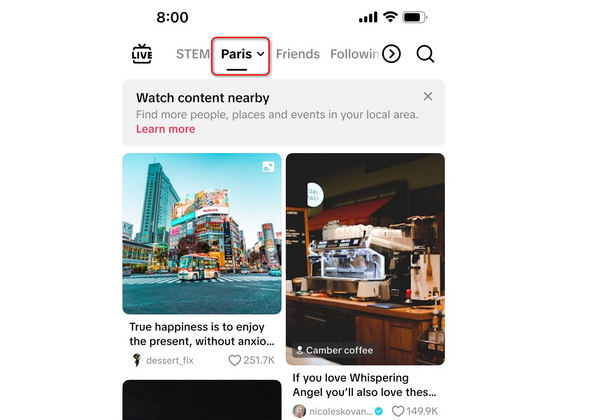
The Nearby Feed: This precise data is used to power the new Nearby content feed, showing you local events, restaurant reviews, and other types of ads.
Approximate Location (Automatic)
Even if you've turned off location service for TikTok, it still can estimate your location using:
- Adresa IP: Your internet connection reveals your city and region.
- SIM Card/Mobile Network: The app identifies your country and carrier region.
- System Settings: Your phone's language and region settings provide additional clues.
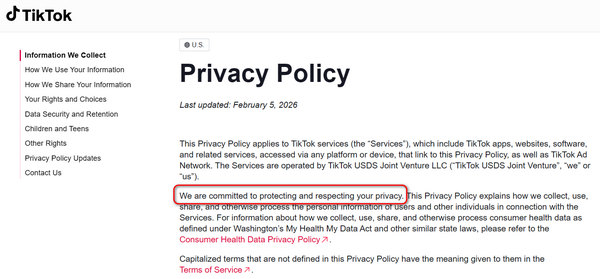
Poate fi util să știi: TikTok is committed to protecting and respecting your privacy. You can go to www.tiktok.com/legal/page/us/privacy-policy/en to see how TikTok uses your privacy.
Why Does TikTok Want Your Location?
- Algorithm Customization: To show you trending sounds and challenges popular in your specific city.
- Hyper-Local Advertising: To send ads from businesses nearby, which is a key business model of TikTok.
- Off-Platform Targeting: The 2026 policy explicitly states TikTok may use your location data to show you ads on third-party websites outside the TikTok app.
Part 2. Why You Want to Protect Your Location on TikTok
The January 2026 policy update caused a massive backlash (and a surge in app deletions) because it explicitly states the collection of sensitive personal information that can be inferred from your location and behavior, including:
- Citizenship or immigration status
- Racial or ethnic origin
- Sexual orientation
Many users want to prevent TikTok from tracking them for a clear browsing experience or to protect their privacy in case hackers steal their information. Although you cannot 100% stop TikTok from tracking your location, there are some methods to limit it.
S-ar putea să îți placă și:
Part 3. 2 Ways to Limit TikTok's Location Tracking
1. Folosind imyPass iLocaGo
imyPass iLocaGo can change the GPS location on your iPhone or Android phone. TikTok will replace the modified location to your real location, With location service turned off, you can easily limit TikTok's location tracking. This program is also very easy to use and work stable. You can change your phone's location to anywhere you want on the earth. If you want to protect your location info right away, you can try it.
Get imyPass iLocaGo
Apasă pe Descarca button below to download, install, and launch this program.
Connect your phone
Connect your iPhone or Android phone to your computer with a USB cable. imyPass iLocaGo will recognize your phone when connected. Then, select Modificați locația.

Change your location on phone
Locate the Search box on the top left side. Input keywords of a location and then select your desired accurate location from the prompts. Finally, click the Modifica button to change GPS location for TikTok.

2. Turn Off Location Service
You just need to turn off the location service only for TikTok. Check the steps on iOS and Android.
On iOS:
- 1.Mergi la Setări > Confidențialitate și securitate > Servicii de localizare.
- 2.Find TikTok and set it to Nu.
- 3.Asigura Locație precisă este oprit.
Pe Android:
- 1.Mergi la Setări > Aplicații > TIC-tac > Permisiuni.
- 2.Atingeți Locație și selectați Nu permiteți.
- 3.Opriți Folosiți o locație precisă.
Poate fi util să știi:
From our test, using a VPN/proxy or changing a SIM card cannot help you stop location tracking from TikTok, we can still browse some business short videos nearby. However, spoofing location on a mobile phone can work. So, you can try a GPS spoofer like imyPass iLocaGo pentru a împiedica TikTok să îți cunoască locația reală.
Întrebări frecvente.
-
TikTok te urmărește și în afara aplicației?
Da, TikTok îți urmărește pe larg activitatea în afara aplicației, chiar dacă nu te conectezi și chiar dacă nu ai un cont TikTok. Începând cu 2026, investigațiile arată că TikTok a construit un imperiu de urmărire care rivalizează cu Google și Meta, folosind instrumente invizibile integrate în milioane de site-uri web terțe.
-
Poate TikTok să îți urmărească adresa IP?
Da, TikTok îți poate cunoaște adresa IP. TikTok are nevoie de adresa ta IP pentru a-ți determina locația reală.
-
TikTok se uită la mine prin cameră?
TikTok poate folosi camera doar atât timp cât îi acorzi permisiunea. Însă nu există dovezi că TikTok folosește în mod constant camerele pentru a‑și urmări utilizatorii.
Concluzie
Mulți utilizatori vor să știe cum să oprească TikTok din a‑ți urmări locația. Din păcate, pentru majoritatea utilizatorilor este aproape imposibil să prevină complet urmărirea locației. Însă TikTok declară că va proteja confidențialitatea tuturor utilizatorilor. Ceea ce poți face este să limitezi urmărirea locației de către TikTok. imyPass iLocaGo te poate ajuta să faci asta cu ușurință. Va falsifica locația GPS de pe telefonul tău, astfel încât TikTok să folosească locația modificată în locul celei reale. Acest lucru îți va proteja într-o anumită măsură informațiile despre locație.
Penny este redactor senior la imyPass. S-a concentrat pe descoperirea soluțiilor perfecte de localizare GPS în toate scenariile și are, de asemenea, experiență în repararea computerelor.
Soluții fierbinți
-
Localizare GPS
- Cele mai bune locații Pokemon Go cu coordonate
- Dezactivați locația dvs. pe Life360
- Cum să schimbi locația pe iPhone
- Recenzie despre iSpoofer Pokemon Go
- Setați locații virtuale pe iPhone și Android
- TikTok Urmăriți-vă locația
- Joystick-ul Monster Hunter Now
- Revizuire a IP Location Finder
- Schimbați locația Mobile Legends
- Schimbați locația pe Tiktok
-
Deblocați iOS
-
Sfaturi iOS
-
Deblocați Android


