



 Solução
 Centro de Apoio
 Sobre nós
 Contato
Unlock Boost Mobile Cell Phone Carrier Restriction for Free
 Gideon Byron publicado em fevereiro 06, 2026Desbloquear AndroidLeitura de 3 minutos
It is cost-effective to purchase a carrier-locked phone, such as a Boost Mobile contract phone. However, the downside to the low price is a SIM lock, which means that your phone cannot work with other carriers like T-Mobile, AT&T, etc. So, when you want to switch to a cheaper and nicer data plan from another carrier, you'll need to unlock Boost Mobile phone first. Here comes the detailed guide, which will show you the prerequisites and how to unlock a Boost Mobile phone yourself for free.

Neste artigo:
Part 1: When Can You Unlock Boost Mobile Cell Phone
To unlock a Boost Mobile iPhone or Android phone, you must meet specific requirements established by their policy. Generally, the most important factor is the length of time the device has been active on their network.
Here are the specific criteria you must fulfill:
12-Month Active Service: The device must have been active on a Boost Mobile account for at least 12 months.
Account Standing: Your account must be in good standing, meaning all bills are paid and the account is currently active.
Payment Completion: If the phone was purchased through a financing plan, it must be fully paid off.
Not Flagged for Fraud: The device cannot be reported as lost, stolen, or otherwise flagged as involved in fraudulent activity.
Military Personnel: If you are a member of the U.S. military and have received deployment papers, Boost Mobile will typically unlock your device even if you haven't met the 12-month requirement. You will need to provide proof of deployment to their customer service team.
Part 2: How to Unlock a Boost Mobile Phone
Now, let's see how to unlock a Boost Mobile phone yourself for free. Whether you use a Boost Mobile iPhone or Android model, you can find specific guides here.
Certifique-se de que seu telefone Boost Mobile seja elegível para ser desbloqueado. Basicamente, você pode desbloquear seu telefone na marca de um ano com boa reputação.
Discar #06# to see the IMEI number of your Boost Mobile phone or go to the Settings app to find it.
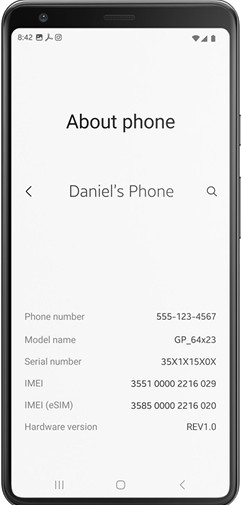
Prepare all the relevant credentials:
Your phone's IMEI number
Phone number or email account linked to the phone
Your account PIN
Then, contact the Boost Mobile customer support line: 1-888-266-7848. Request a Boost Mobile phone unlock.
You may get a response from Boost Mobile within 2 business days.
Para iPhone: If you unlock a Boost Mobile iPhone, Boost will contact Apple, and your iPhone gets unlocked remotely.
Para Android: If you unlock a Boost Mobile Android phone, Boost may give you an unlock code and instructions to manually unlock your phone.
Power off your phone and replace the Boost Mobile SIM card with a new one. Then, power it on. If you use an Android phone, you may need to enter the Boost Mobile unlock code to unlock your device.
Aprenda também:
Part 3: How to Check Whether You Boost Mobile Phone Is Unlocked
Os telefones Boost Mobile são desbloqueados ou não? Esta questão é importante antes de você realizar um desbloqueio de telefone Boost Mobile. Você pode praticar os seguintes passos para verificar o status do bloqueio do seu telefone Boost Mobile.
Desligue seu telefone Boost Mobile e ejete o cartão SIM Boost Mobile do seu telefone. Use uma ferramenta de remoção de cartão SIM para removê-lo com segurança.
Em seguida, insira um cartão SIM funcional de uma operadora diferente no seu telefone Boost Mobile.
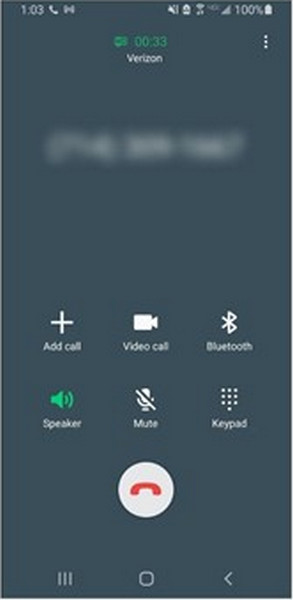
Ligue seu telefone e aguarde alguns segundos. Se você puder ver o nome da nova operadora e tiver barras de sinal claras na parte superior da tela do seu telefone, tente ligar para alguém.
Se essa chamada for completada, seu telefone Boost Mobile estará com o SIM desbloqueado. Se a chamada não for conectada e mensagens de erro como 'Somente chamadas de emergência' ou 'SIM inválido' aparecerem, seu telefone ainda estará bloqueado para o Boost Mobile.
Tips: Why You Fail to Unlock a Boost Mobile Device
Situação 1: You want to switch to a different carrier, but your phone shows SIM inválido ou SIM não suportado when you insert a new card.
Solução: Verify you have met the 12-month active service requirement and that your account is in good standing. If eligible, contact Boost Mobile Customer Care to request a manual unlock.
Situação 2: Boost Mobile has rejected your request to unlock the phone.
Solução: Ask for the specific reason for the denial. Usually, it is because the device hasn't been active for 365 days or there is an unpaid balance on the device. Resolve the payment or wait until the 12-month threshold is met.
Situação 3: The second-hand phone won't unlock
Solução: Because Boost Mobile unlock requires the account to be in good standing, you may need to contact the original owner to settle any unpaid balances or fulfill the service time requirements.
Part 4: Bonus: How to Unlock Boost Mobile Phone Screen
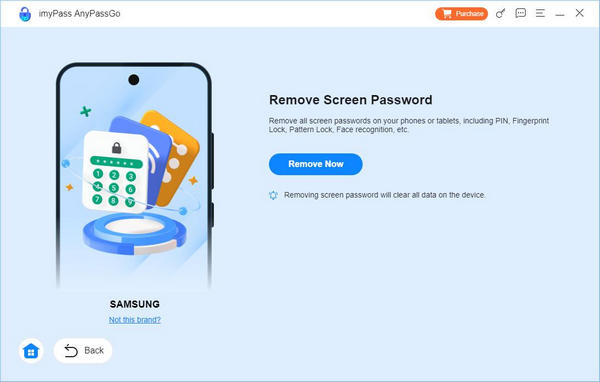
Suponha que você esteja bloqueado do seu celular Boost Mobile devido a uma senha esquecida ou não consiga encontrar seu número IMEI devido a uma tela bloqueada. Nesse caso, você pode usar imyPass AnyPassGo para ignorar o celular Boost Mobile sem um padrão, PIN, impressões digitais ou reconhecimento facial.
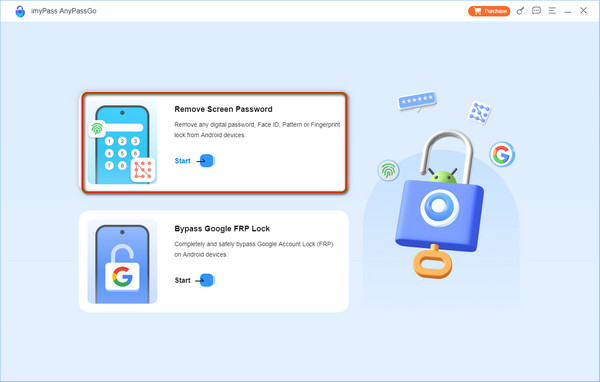
Acesse o site do imyPass para baixar o imyPass AnyPassGo. Abra-o e clique Remover senha da tela na interface home. Então, conecte seu telefone Boost Mobile ao computador.
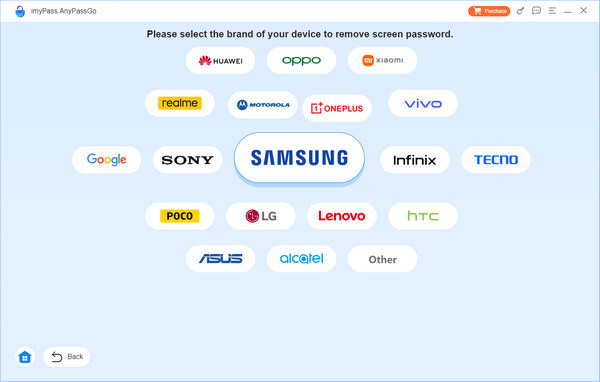
Após uma conexão bem-sucedida, selecione a marca do seu telefone e prossiga.
Depois que tudo estiver pronto, clique em Remover agora e o programa limpará a senha da tela para você.
Perguntas frequentes.
-
Posso baixar o software de desbloqueio Boost Mobile para desbloquear o bloqueio do SIM?
Sim, você pode baixar o AnyUnlock para desbloquear o bloqueio do SIM para qualquer operadora no seu iPhone. Ou você pode baixar alguns aplicativos de desbloqueio Boost Mobile para Android no Google Play.
-
Posso desbloquear um telefone Boost Mobile online?
Sim, você pode explorar alguns serviços seguros de desbloqueio de IMEI online para pedir um código de desbloqueio Boost Mobile. Por exemplo, você pode ir para DirectUnlocks para inserir seu número IMEI e desbloquear seu telefone Boost Mobile online.
-
Os telefones desbloqueados são compatíveis com o Boost Mobile?
Sim, seu telefone desbloqueado é compatível com todas as operadoras sem restrições. Então, se você desbloquear seu telefone do Boost Mobile lock, você ainda pode usar um cartão SIM do Boost Mobile.
Conclusão
Se você quiser unlock Boost Mobile cell phone yourself for free, follow the guide in this post to unlock your iPhone or Android and switch to another carrier easily. You should check whether your phone meets the unlock policy first. If you've forgotten the screen passcode of your Android phone, imyPass AnyPassGo can help you easily remove any screen lock on Android phones easily, including the latest Android 16 and many brands like Samsung, LG, OnePlus, Sony, and more.
Gideon é editor sênior do imyPass. Ele é especialista em desbloqueio de celulares e computadores e escreve tutoriais de senhas no imyPass há 3 anos.
Soluções quentes
-
Desbloquear Android
- Como saber se o seu telefone está desbloqueado
- Desbloquear tela do telefone Samsung sem senha
- Desbloquear bloqueio de padrão no dispositivo Android
- Revisão de desbloqueios diretos
- Como desbloquear o telefone OnePlus
- Desbloquear OEM e corrigir desbloqueio de OEM esmaecido
- Como desbloquear um telefone Sprint
-
Desbloquear iOS
-
dicas de senha
-
Dicas para iOS

