



 Solução
 Centro de Apoio
 Sobre nós
 Contato
Factory Unlocked: Meaning, Drawbacks, and Advantages
 Gideon Byron publicado em fevereiro 27, 2026Desbloquear AndroidLeitura de 3 minutos
Different physical and digital stores sell mobile phones, like the iPhone and Android phones. You can buy them at full price or on an installment plan. However, there are things you need to consider before buying. It includes its RAM, version, especially the unlock state of the mentioned device.
What factory-unlocked mobile mean? In this article, we will help you know the pros and cons of a factory-unlocked iPhone and Android phone. Additionally, you will encounter a third-party tool that can help you unlock your Android phone by yourself. Kindly scroll below to discover all the details about these topics.

Neste artigo:
- Part 1. What Does "Factory Unlocked" Actually Mean?
- Part 2. Factory Unlocked vs. Network Unlocked
- Part 3. Pros and Cons of Factory Unlocked Phones
- Part 4. Are Factory Unlocked iPhones and Samsungs "Original"?
- Part 5. Who Should Buy a Factory Unlocked Phone?
- Part 6. How to Buy a Factory Unlocked Phone Safely
- Bonus: Need to Unlock the Phone by Yourself?
Part 1. What Does "Factory Unlocked" Actually Mean?
Factory unlocked is different from the iPhone factory reset. It is one of the misconceptions that needs to be clear. A factory-unlocked Android phone or iPhone means that it is not locked by any specific carrier. To make it clearer, a carrier does not previously lock the iPhone or Android phone. It is unlocked directly from the manufacturer. These factory-unlocked iPhone and Android phones do not have limitations. You can use the entire content, settings, and features of the mobile phone. However, they must be bought directly from the manufacturer, or they must be bought in installments.
Part 2. Factory Unlocked vs. Network Unlocked
As mentioned, a factory-unlocked smartphone means that it is brought from its manufacturer. On the other hand, there are mobile phones that are network locked or carrier locked. It means that your Android phone or iPhone is locked to the carrier where you bought it. Fully paid mobile phones will not be locked by the carrier. Only the device purchased on an installment plan.
Your device will have limitations if it is carrier-locked. You cannot use any SIM card, except the one offered by your carrier. It is due to business and security reasons. If you want to remove these restrictions, you need to ask for the assistance of your carrier. Factory unlocked vs network unlocked? Factory unlocked is the most convenient.
Part 3. Pros and Cons of Factory Unlocked Phones
The factory unlocked definition is way broader. In this section, we will help you determine the pros and cons of the topic. This way, you will know what its advantages and drawbacks are. Please see the table below.
Prós
- The mobile phone can work with different compatible carriers.
- You can switch plans anytime.
- It does not have bloatware from the carrier.
- There are no restrictions on any features and apps.
- They are convenient if you try to resell them in the future due to multiple networks.
Contras
- There will be no subsidy or discount when purchased, so that you will need a higher upfront.
- Most of the manufacturers do not offer massive freebies when buying directly from their stores, unlike from carriers.
Part 4. Are Factory Unlocked iPhones and Samsungs "Original"?
Are factory-unlocked iPhones and Samsung originals? Well, these factory-unlocked devices are not counterfeit, clones, or refurbished. In short, iPhones and Samsungs are original when factory unlocked, especially if they are bought from the manufacturer.
Did you know that you can check if the iPhone or Samsung phone is original or not? You only need to get the model number of your iPhone or Samsung phone. Also, you need to check the IMEI verification of the mentioned devices. This way, you can ensure that the phone is not blacklisted under any circumstances.
Part 5. Who Should Buy a Factory Unlocked Phone?
A factory-unlocked Android phone or iPhone is best for users who want maximum flexibility. The reason is that there will be no restrictions on the mobile phone. Frequent international travelers will benefit a lot because they do not need to worry about the SIM that they will use.
Also, they can access all the built-in applications of the mobile phone. Factory-locked devices typically lack pre-installed carrier apps, which might be needed by the user. All in all, your fully paid device is worth it because there will be no restrictions on the features, content, and settings of the iPhone or Android phone.
Part 6. How to Buy a Factory Unlocked Phone Safely
Buying a factory-unlocked iPhone, Android phone, or other devices must be directly from their manufacturers. It is the safest way. Alternatively, you can also buy from authorized retailers, including Amazon, Walmart, and Best Buy. You can visit their official websites for a safe purchase.
However, these websites will ask for sensitive information about you, unlike buying from a physical store. Also, some scammers offer second-hand or clone phones. That is why you need to be careful about the reviews of the digital store that posted the item. Please note that you need to avoid shady sellers, including untrusted online shops or websites. This way, you can avoid scammers.
Bonus: Need to Unlock the Phone by Yourself?
Besides a factory-locked, carrier-locked, or SIM-locked Android phone, it can also be locked due to a forgotten lock screen password. imyPass AnyPassGo can help you unlock your Android phone by yourself. No professional skills required! It has a simple interface and features that are best for novices. This tool can remove different screen lock types, including fingerprint, face recognition, pattern, PIN, and more.
You do not need to worry about the Google FRP lock feature after a factory reset. The mentioned security feature can also be removed using the tool. The steps to unlock your Android phone using the tool are posted below.
Download imyPass AnyPassGo on your computer from its website. Then, set it up and install it based on the requirements. Finally, the computer will automatically launch the unlocking tool.
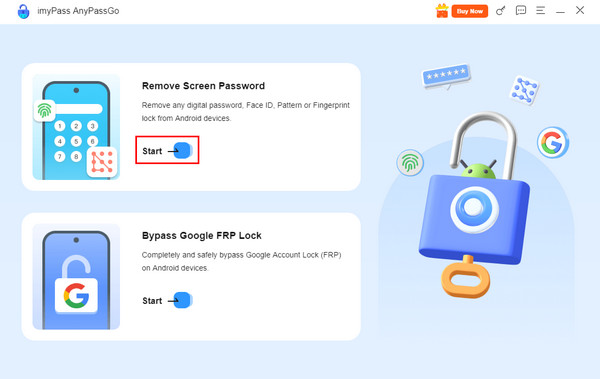
The first screen will prompt you to the primary features of the tool. Please go to the Remover senha da tela section. Then, select the Começar button that is included in the small box.
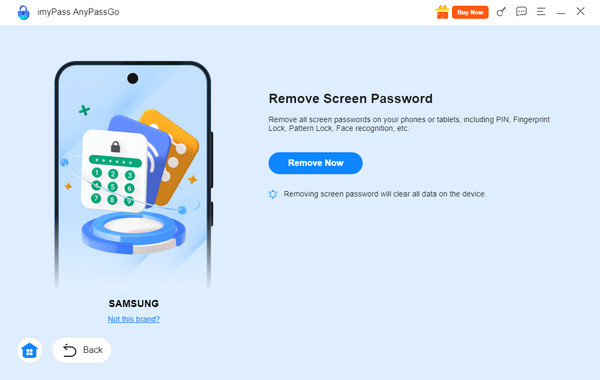
Please select the Android phone brand that you have. Later, please click the Remover agora button under the description.
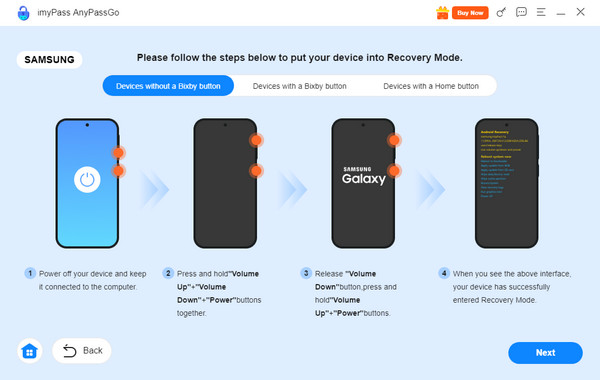
A new window will appear. Please plug your Android phone into the computer. Use a USB cable for the plugging process. Later, follow the on-screen instructions on how you enter the Android phone into recovery mode. Finally, click the Próximo botão para iniciar o processo.
Conclusão
What is factory unlocked? In conclusion, the device is not locked to a specific carrier. It means that it is directly bought from the carrier. This article lets you know more about the topic. Also, imyPass AnyPassGo is also here, which can help you unlock your Android phone by yourself. Learn more about its features by downloading the tool on your computer now!
Gideon é editor sênior do imyPass. Ele é especialista em desbloqueio de celulares e computadores e escreve tutoriais de senhas no imyPass há 3 anos.
Soluções quentes
-
Desbloquear Android
- Como saber se o seu telefone está desbloqueado
- Desbloquear tela do telefone Samsung sem senha
- Desbloquear bloqueio de padrão no dispositivo Android
- Revisão de desbloqueios diretos
- Como desbloquear o telefone OnePlus
- Desbloquear OEM e corrigir desbloqueio de OEM esmaecido
- Como desbloquear um telefone Sprint
-
Desbloquear iOS
-
dicas de senha
-
Dicas para iOS

