Solução
 Centro de Apoio
 Sobre nós
 Contato
UltFone iOS Data Recovery Review: Pros, Cons, Success Rate & More
 Penny Warren publicado em março 06, 2026Recuperar dadosLeitura de 3 minutos
The data loss on different devices, such as an iPhone, is inevitable. Software issues, malicious attacks, hardware failure, natural disasters, power outages, and human error are some of the most common causes. You can recover the data using the methods offers by Apple. However, some methods are not beginner-friendly.
The reason above is one of the reasons why there are various iPhone data recovery tools. Recuperação de dados UltFone iOS is one of the most known. In this article, you will know enough information about the said software. Its pros, cons, key features, hands-on testing, and pricing are included. To see the full details, continue browsing this post.
Neste artigo:

Part 1. What is UltFone iOS Data Recovery
UltFone iOS Data Recovery is a desktop tool that can help users retrieve data on an iPhone, iPad, or iPod Touch. You can perform the UltFone iOS Data Recovery free download on your Mac and Windows. The tool can also extract backup or data from iTunes and iCloud. A direct recovery from your iPhone is the primary feature of the process.
Características principais:
- It can recover data from your iPhone even though it does not have a backup.
- The tool can extract data from unencrypted or encrypted backups stored on your computer using iTunes backup.
- You can use it to download and extract your data stored from an iCloud backup.
- It supports multiple data types, including photos, text messages, iMessages, notes, reminders, and more.
- Previewing the deleted data you want to restore is allowed.
- It supports the latest or earlier versions of iOS.
Part 2. Hands-On Testing
We have undergone hands-on testing of UltFone iOS Data Recovery. Here are the detailed experiences and default information about the performance of the software.
1. iPhone Detection from a Computer
UltFone iOS Data Recovery requires a USB connection for the recovery process. The plugging procedure of the tool for your iPhone is quick. It immediately detects the iPhone as long as you plug it correctly.
2. Recovery Success Rate
The success rate of the software depends on the experience of the users. Currently, it has 4.1 to 4.2 stars out of 5 stars on its website.
3. Speed of Data Recovery
UltFone iOS Data Recovery does not publish official specific timing statistics for recovering your iPhone data. They focus on telling their users what it can recover. In our experience, the fastest recovery time of the tool is 30 minutes to one hour for large files.
4. Facilidade de uso
The tool has an intuitive interface for recovering the data from your iPhone. However, beginners will still have a slow experience if they use it for the first time.
5. Customer Support
UltFone iOS Data Recovery has an official website for FAQs, guides, and other topics about its procedure. It also allows you to create a support ticket. You can also contact the email support they offer.
Part 3. Pricing of UltFone iOS Data Recovery
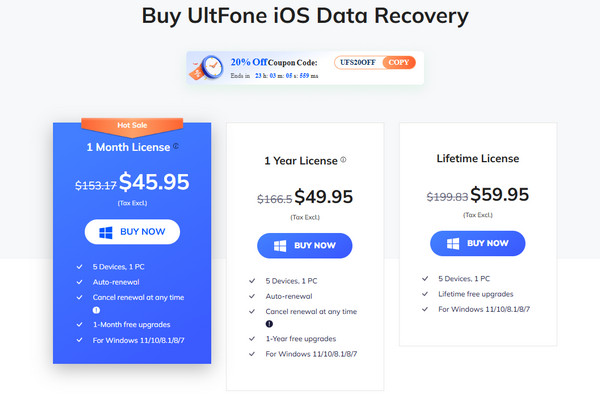
UltFone iOS Data Recovery offers a free version for a few days or months. However, you can only use some of the basic features. If you want advanced features from the software, you need to purchase its 1 Month License, 1 Year License, or Lifetime License.
1-Month License is $45.95, which is available for five devices, including one PC. It offers a 1-month free upgrade. Next, a 1 Year License. The plan costs $49.95, which is almost the same as the previous plan. Its difference is that you have one year for free upgrades. Finally, Lifetime License. It costs 59.95, which includes lifetime free upgrades.
Each time, the manufacturer of this software offers a limited-time discount. You can get a coupon code from their main website to get a discount. The full details of the current pricing of UltFone iOS Data Recovery can be seen in the picture below. Alternatively, you may also pay a visit to the official website.
Part 4. What Are People Saying & Our Verdict
Are you curious about what people say about their experience with UltFone iOS Data Recovery? Well, there are different opinions about this tool. The UltFone iOS Data Recovery Reddit reviews are almost the same. Some users say that you need to avoid the software due to refund issues. On the other hand, other users prefer using the tool due to the smooth and high success rate of recovery.
All in all, in our opinion, UltFone iOS Data Recovery is indeed a great tool for recovering lost data. However, it is not ideal for users who will only use it for a single time. It is due to its price. Also, it does not offer a deeper scanning process for the deleted files. The recently deleted files can be easily recovered, but the old ones are not.
Part 5. Top Alternatives to Consider
The UltFone iOS Data Recovery app is great, but there might be particular features you are looking for in an iPhone data recovery tool. This section contains the three leading alternatives of the software. See their list below.
1. Recuperação de dados do iPhone imyPass
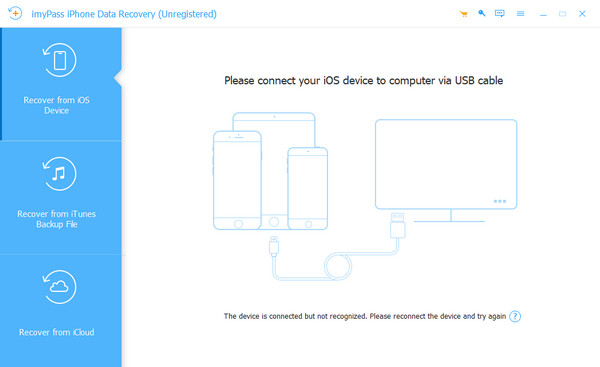
Recuperação de dados do iPhone imyPass is the leading alternative to UltFone iOS Data Recovery. This tool can directly recover from your iOS devices. Besides that, it allows you to recover your data from iCloud and iTunes backup. It supports multiple recoverable data types. WhatsApp data, call history, videos, photos, app data, and more are included.
Moreover, different recoverable scenarios are supported. It includes no backup data, forgotten password, broken screen, water damage, system problem, factory reset, jailbreak failure, and accidental deletion. The tool can recover from iOS 5 to 8, including iOS 26. It uses advanced algorithms that cater to iOS systems, which have a high success rate.
2. AppGeeker iOS Data Recovery
Recuperação de dados iOS do AppGeeker is another great tool for recovering loss data from iOS devices. This third-party tool can recover different data types from your iPhone. It includes videos, contacts, photos, messages, notes, call logs, and more. It has an intuitive interface that can be convenient for beginners. Experienced users will have a smooth recovery process with this tool. You can download it on your Mac and Windows computers. However, the success rate of the tool is 70% only. Some of its features do not work as expected.
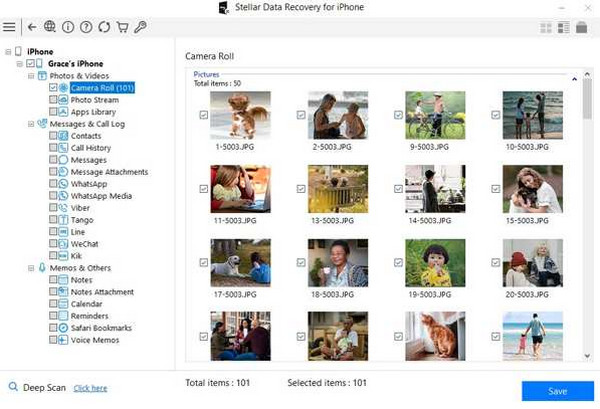
3. Stellar iPhone Data Recovery
Recuperação de dados do iPhone Stellar has a simple interface for recovering your iPhone data. The scanning procedure of this tool is quick because it does not rely on an internet connection. This tool supports different data types, including messages, chats, notes, reminders, voice memos, and more. However, this tool lacks a lifetime plan, and it is expensive. Also, it can only recover data that has been recently deleted. Old ones will not be scanned using the tool.
Conclusão
Contudo, Recuperação de dados UltFone iOS is a great tool for recovering deleted iPhone data. Its pros, pricing, cons, key features, and more details are posted for your reference. Its alternatives also including, which where Recuperação de dados do iPhone imyPass. It is a third-party tool that can recover multiple data types, such as WhatsApp data, photos, videos, call logs, and more. Download it and explore more of its excellent features.
Penny é editora sênior da imyPass. Ela se dedica a descobrir soluções de localização GPS perfeitas para todos os cenários e também tem experiência em consertar computadores.
Soluções quentes
-
Recuperar dados
- Recuperar fotos do WhatsApp View Once
- Recuperar vídeos excluídos do TikTok no celular
- Recuperar foto excluída do Facebook
- Recupere mensagens, fotos, etc. do Viber.
- Recuperar fotos excluídas do Snapchat
- 5 melhores aplicativos de recuperação de contatos
- Recuperar mensagens apagadas do Discord
- Análise da recuperação de dados do AppGeeker iOS
- Recuperar dados do modo DFU
- Não é possível restaurar o backup do iPhone
-
Desbloquear iOS
-
Dicas para iOS
-
dicas de senha

Recuperação de dados do iPhone
Recuperar dados do iPhone excluídos ou perdidos
Download grátis Download grátis