



 Solução
 Centro de Apoio
 Sobre nós
 Contato
Experimente 4 métodos para encontrar o dono de um iPhone encontrado
 Penny Warren publicado em 06 de agosto de 2024Desbloquear iOSLeitura de 3 minutos
O que fazer se você ocasionalmente encontrar um iPhone perdido ou roubado? Como encontrar o dono de um iPhone encontrado? E se você encontrar seu iPhone perdido, mas esquecer a senha da tela? Não se preocupe! Você pode aprender 4 métodos para encontrar o dono de um iPhone perdido/encontrado e desbloqueá-lo se o iPhone encontrado for seu.

Neste artigo:
Parte 1. Como encontrar o dono de um iPhone encontrado/perdido [3 métodos]
Quando você pega um iPhone de um canto, há uma grande probabilidade de que ele não possa ser desbloqueado. Se o iPhone encontrado estiver desbloqueado, você pode verificar diretamente seu aplicativo Contatos e encontrar seu dono no Meu Cartão. Então, você pode contatar o dono do iPhone encontrado com seu próprio telefone. Se o iPhone encontrado estiver bloqueado, você pode usar os três métodos a seguir para encontrar seu dono. Além disso, você pode verificar a próxima parte para acessar uma ferramenta de desbloqueio única chamada imyPass iPassGo quando você descobre que seu iPhone perdido está bloqueado.
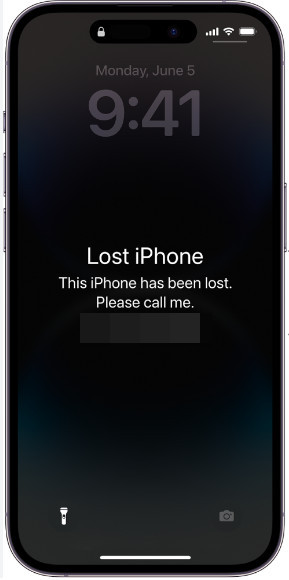
1. Faça uma chamada se o iPhone encontrado estiver no modo perdido
Se o iPhone encontrado estiver no Modo Perdido, você pode ligar o iPhone e verificar a mensagem do Modo Perdido na tela de bloqueio. Você pode entrar em contato com o proprietário com o número de telefone na tela.
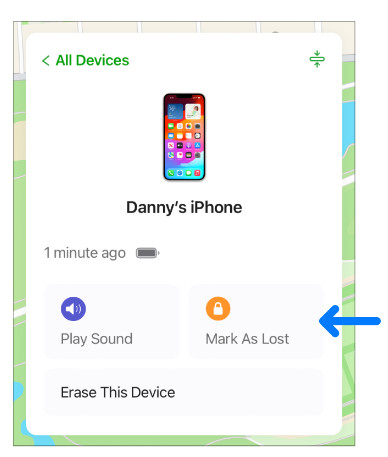
Caso você não saiba como ativar Modo Perdido no iPhone Caso você perca seu iPhone acidentalmente, você pode verificar os passos abaixo e registrar o iPhone como perdido.
Acesse iCloud.com em seu navegador confiável e faça login com o ID Apple e a senha que você usa no seu iPhone perdido.
No Encontre dispositivos seção, selecione seu iPhone na Todos os dispositivos lista e clique Marcar como perdido para ativar o Modo Perdido. Então, você deve seguir as instruções na tela para definir as informações de contato.
2. Use a identificação médica para encontrar o proprietário
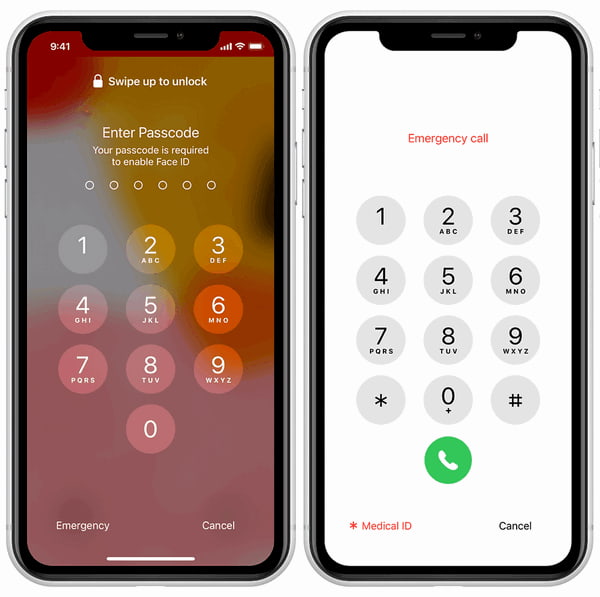
Se o proprietário tiver configurado um Medical ID no aplicativo Health, você pode tocar nele na tela de bloqueio do iPhone e acessar os contatos de emergência. Veja como encontrar o proprietário de um iPhone perdido usando o Medical ID.
Ative o iPhone encontrado, deslize para cima na tela de bloqueio e aguarde a tela de senha.
Toque em Emergência no canto inferior esquerdo da tela Senha. Em seguida, toque em Identificação médica no mesmo local. Então, você pode ver o proprietário Contatos de emergência. Agora, você pode entrar em contato com eles e entregar o iPhone encontrado ao seu dono.
3. Peça à Siri para encontrar o proprietário
Se você não puder usar o Modo Perdido e a ID Médica no iPhone encontrado, você pode usar o Siri para encontrar algumas informações importantes sobre o proprietário do iPhone encontrado. Para um iPhone encontrado com um botão Home, você pode pressionar longamente o Lar botão para ativar o Siri. Para um iPhone encontrado sem um botão Home, você pode pressionar e segurar o Poder botão na lateral para ativar a Siri. Ou você pode dizer "Hey, Siri." Você pode usar a frase abaixo para perguntar à Siri.
Quem é o dono do iPhone?
Ligue para a mamãe/papai.
Parte 2. Encontrei meu iPhone perdido, como faço para desbloqueá-lo
Se você encontrar seu iPhone perdido, mas não consegue lembrar sua senha, você pode usar imyPass iPassGo para desbloquear sua tela de bloqueio sem problemas. Esta ferramenta de desbloqueio iOS tudo-em-um pode ajudar você a remover todos os tipos de bloqueios de tela do iPhone e IDs Apple esquecidos, e ignorar Screen Time/MDM/iTunes Encryption.

Mais de 4.000.000 de downloads
Acesse seu iPhone perdido sem uma senha de tela.
Facilmente excluir um ID Apple sem nenhuma senha.
Você pode remover a senha do Screen Time, o MDM e a senha de backup do iTunes.
Ele suporta as últimas séries de iPhone e versões do iOS.
Baixe esta ferramenta multifuncional de desbloqueio de iPhone no Windows/Mac. Conecte seu iPhone encontrado ao seu computador usando um cabo lightning ou USB. Selecione Limpar senha na parte superior da interface inicial. Clique em Começar para prosseguir com o processo de desbloqueio.
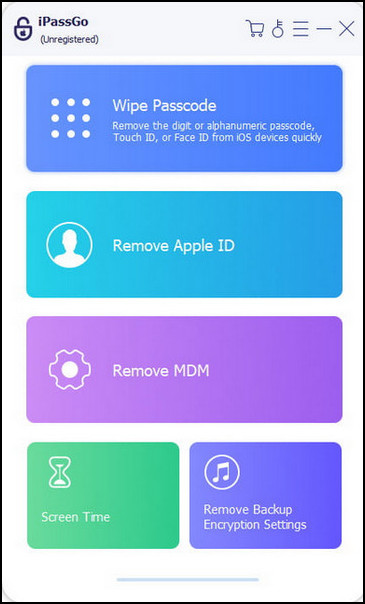
Verifique e confirme as informações do seu iPhone encontrado. Clique Começar novamente para baixar o pacote de firmware.
Clique Desbloquear após o pacote de firmware ser baixado. Digite 0000 para confirmar o desbloqueio do iPhone encontrado.
Perguntas frequentes.
-
Como configurar sua Ficha Médica em um iPhone?
Abra o aplicativo Saúde > toque no seu perfil no canto superior direito > Identificação médica > Toque Iniciar ou Editar > Toque Adicionar contato de emergência debaixo Contatos de emergência. Em seguida, você pode tocar em Concluído para salvar sua Ficha Médica.
-
O que acontece depois que você ativa o Modo Perdido?
Seu endereço de e-mail do Apple ID receberá um e-mail de confirmação e você poderá criar uma mensagem com as informações necessárias. Você não pode usar cartões de pagamento em outros dispositivos aplicáveis.
-
Posso encontrar o dono de um iPhone encontrado pelo IMEI?
Não, você não pode usar o IMEI para encontrar o proprietário porque o número IMEI só pode identificar o dispositivo em vez do usuário. No entanto, você pode desbloquear um iPhone com número IMEI quando você fica preso com um bloqueio de ativação do iCloud.
Conclusão
Neste post você pode aprender como encontrar o dono de um iPhone encontrado. Se você é o dono de um iPhone encontrado, mas esqueceu sua senha, você pode aprender como desbloqueá-lo com imyPass iPassGo.
Penny é editora sênior da imyPass. Ela se dedica a descobrir soluções de localização GPS perfeitas para todos os cenários e também tem experiência em consertar computadores.
Soluções quentes
-
Desbloquear iOS
- Revisão dos serviços gratuitos de desbloqueio do iCloud
- Ignore a ativação do iCloud com IMEI
- Remover Mosyle MDM do iPhone e iPad
- Remover support.apple.com/iphone/passcode
- Revisão do Checkra1n iCloud Bypass
- Ignorar a senha da tela de bloqueio do iPhone
- Como fazer o Jailbreak do iPhone
- Desbloquear iPhone sem computador
- Ignorar iPhone bloqueado para proprietário
- Redefinição de fábrica do iPhone sem senha do ID Apple
-
Dicas para iOS
-
Desbloquear Android
- Como saber se o seu telefone está desbloqueado
- Desbloquear tela do telefone Samsung sem senha
- Desbloquear bloqueio de padrão no dispositivo Android
- Revisão de desbloqueios diretos
- Como desbloquear o telefone OnePlus
- Desbloquear OEM e corrigir desbloqueio de OEM esmaecido
- Como desbloquear um telefone Sprint
-
Senha do Windows


