Navigation
Samsung Google Xiaomi Huawei OPPO Motorola vivo OnePlus realme Sony LG Lenovo Samsung Google Xiaomi Huawei OPPO Motorola vivo OnePlus realme Sony LG Lenovo Samsung Google Xiaomi Huawei OPPO Motorola vivo OnePlus realme Sony LG Lenovo

Powerful Android Unlock Tool for All Common Scenarios

Whatever the situation, imyPass AnyPassGo makes Android unlocking simple and hassle-free. This best Android unlock software helps you quickly remove screen locks and bypass Google FRP.

Remove Any Type of Screen Lock on Android

Forgot your Android password? imyPass AnyPassGo is a simple Android unlocker that removes PINs, patterns, passwords, and other screen locks. For older Samsung models, it can remove the lock without erasing your data.

Bypass Google FRP Lock on Samsung & More

Factory Reset Protection (FRP) helps protect Android devices from unauthorized access after a factory reset. If you can't remember the Google account credentials linked to your device, you may get stuck on the Google account verification screen.

Don't panic! imyPass AnyPassGo is also a powerful Android FRP bypass tool. It supports Samsung FRP bypass, as well as FRP removal on Xiaomi, Huawei, and other supported Android devices. With this tool, you can remove the FRP lock on Android in just a few steps.

Bypass Google FRP
Support Popular Android Brands

Work on Almost All Android Phones & Tablets

Support All Popular Android Brands

Samsung, Google Pixel, Xiaomi, Huawei, OPPO, Motorola, Vivo, OnePlus, Realme, Sony, Infinix, TECNO, POCO, LG, Lenovo, Nokia, HTC, ASUS, Alcatel, and more.

Wide Android Version Support

Supports both screen lock removal and FRP bypass on Android 5.0 to the latest Android 17, including newer Samsung Galaxy models.

Unlock Your Android Phone in Easy 3 Steps

Simple, guided process – no technical expertise required.

STEP 01

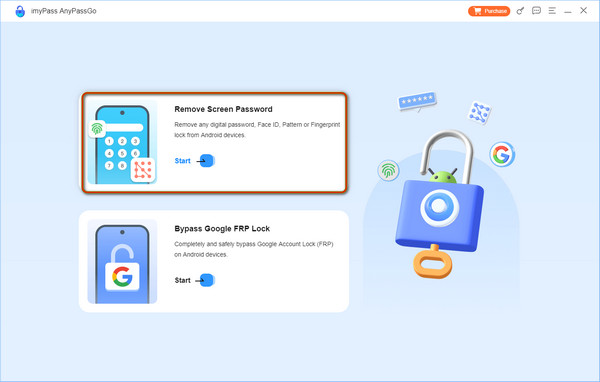
Select Remove Screen Password feature

Launch imyPass AnyPassGo on your computer and select the Remove Screen Password feature.

STEP 02

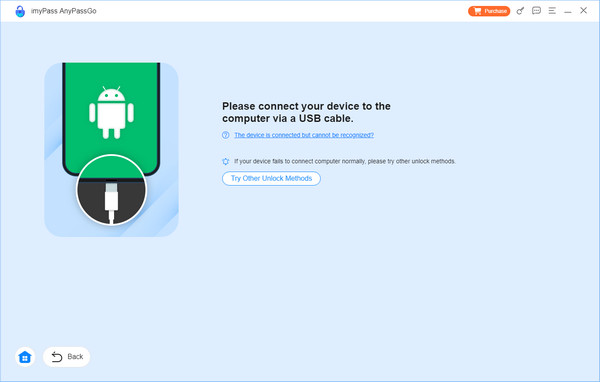
Connect Android Phone to Computer

Select the brand of your device, and connect your phone to your computer using a USB cable.

STEP 03

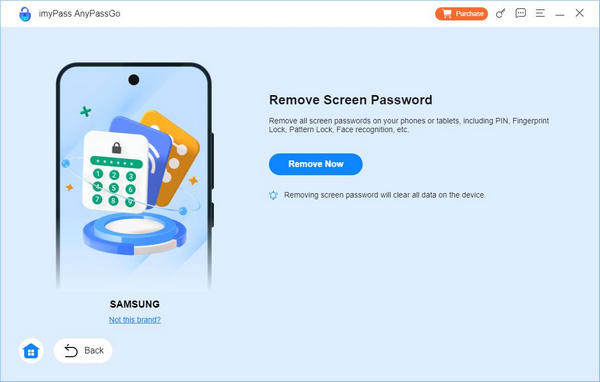
Start Removing Android Screen Lock

Click the Remove Now button to start removing all kinds of Android screen locks.

Select Remove Screen Password
Connect Android Device
Click Remove Now

Trusted by Over
1 Million Users

4.9

1000+

Verified Reviews

It must be the best software to unlock Android without a hard reset. I've just used this Android unlocker to unlock my Samsung screen without a password in a few minutes.

I got a second-hand Android phone, but I don't know the password. When I factory reset it, there was a Google FRP lock. I couldn't get in touch with the previous owner either. Many thanks to this FRP bypass tool that saves me money!

Thank God! I forgot my Google account password and accidentally factory reset my phone. This Google FRP bypass tool saved me! I bypassed Samsung FRP with it!

Frequently Asked Questions

Q

Is imyPass AnyPassGo safe to use?

A

Yes. AnyPassGo is 100% secure and does not contain viruses or hidden risks. Your privacy and data security are always our priority.

Q

Will unlocking my screen password erase my data?

A

Removing a forgotten screen passcode will erase all data on your phone. If possible, back up your device before starting the process.

Q

Can AnyPassGo remove the Google account?

A

Yes. AnyPassGo can help remove the Google account without credentials on Android 5-17, allowing you to regain access to your phone.

Q

Does AnyPassGo work on my phone?

A

AnyPassGo supports a wide range of Android brands and versions. Check the technical specifications for details.

Hot Solutions You May Need

imyPass AnyPassGo

No complicated steps · No technical skills needed · Easy guidance included

AnyPassGo

Unlock your Android phone & bypass FRP!