



 Solution
 Support Center
 About Us
 Contact
How to Remove Activation Lock on iPhone: 4 Unlock Ways
 Samuel Spenser Published on July 14, 2026Unlock iOS3-min reading
If you're locked out by iPhone Activation Lock and don't know how to proceed, keep reading. This article sorts out every solution for different scenarios. Whether you've forgotten your Apple ID credentials or bought a second-hand iPhone stuck on the activation screen, you'll find easy fixes and a reliable unlocking tool for iPhone Activation Lock removal.

In this article:
Part 1. What is Activation Lock on iPhone
Activation Lock is Apple's built-in security feature tied to the Find My function on your iPhone. Its core job is to protect your device and personal data if your phone gets lost, stolen, or resold. Once you turn on Find My on your iPhone, the Activation Lock is automatically turned on. Even if someone factory resets the phone, the Activation Lock stays active. Anyone trying to set up the phone again will need to enter the original Apple ID and password to activate it.
You'll see the lock screen in following three scenarios:
- 1.You reset your iPhone to factory settings but forgot your Apple ID password.
- 2.You bought a second-hand iPhone that is linked to the previous owner's Apple account.
- 3.Your device is restored or updated, and the system requires re-verification of the original account.
Part 2. How to Remove iPhone Activation Lock - 3 Official Ways
If you remember the original Apple ID, or can complete official verification with a phone number or email, use Apple's official methods first. These solutions are safe, permanent, and won't cause any risks to your iPhone. Below are the three most reliable official ways you can try right now.
Disable Activation Lock via Settings (Apple ID Required)
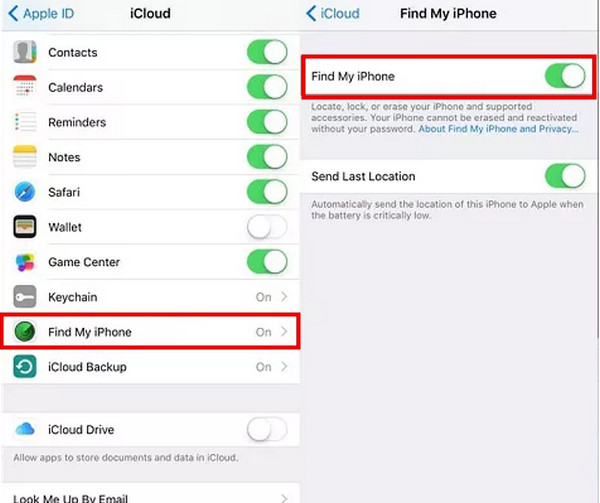
For users who still remember their Apple ID password, the easiest and fastest method is to disable Activation Lock directly via settings on their device. The process only takes one minute to complete.
Open your iPhone's Settings and tap your profile at the top.
Scroll down and select iCloud.
Tap Find My iPhone and toggle it off.
Enter your Apple ID password to confirm the change.
Remove Activation Lock Via iCloud.com (Remote Erase)
What if you bought a second-hand iPhone that is locked by the previous owner? If you can contact the owner, you can ask him/her remotely remove Activation Lock through the iCloud website.
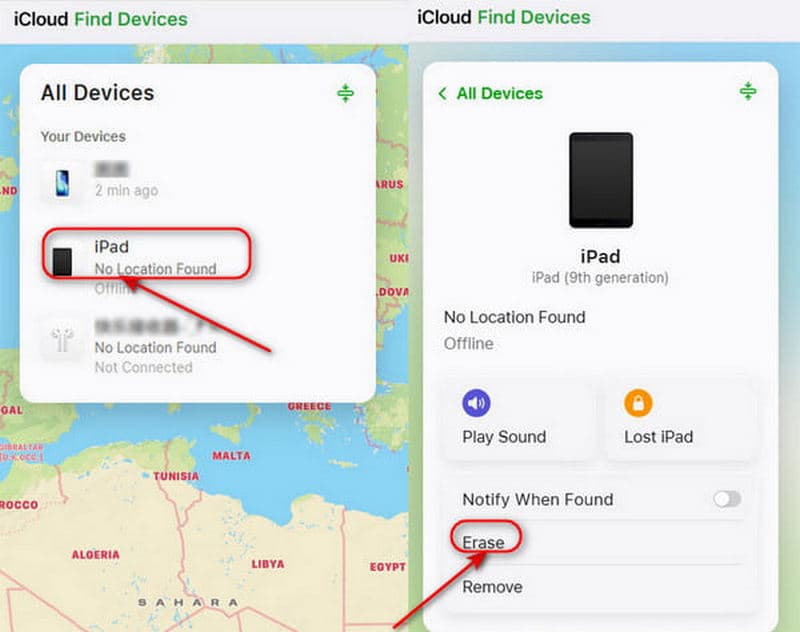
Go to iCloud.com and log in to their Apple Account.
Click on Find Device. In the list of All Devices, select the target iPhone.
Tap Erase to start removing the previous Apple ID. After erasing, click Remove from Account to completely disable Activation Lock.
Contacting Apple Support (Verification Required)
Don't remember the Apple ID, and can't reach the previous owner? Apple will remove Activation Lock for you, but only if you can prove legal ownership of the device.
Gather all proof documents: original purchase receipt, official invoice, device serial number or IMEI code.
Visit the Apple Support official page, go to an offline Apple store, or call Apple support directly.
Submit your ownership documents and request for Activation Lock removal.
Wait for Apple's official verification. It usually takes 3-7 business days. Once approved, Apple's team will remove the Activation Lock permanently.
Part 3. How to Bypass iPhone Activation Lock Without Apple ID
If all official methods don't work for you, that's where a professional bypass tool comes in handy. With high success rate and simple operation, imyPass iPassGo becomes a popular solution for Apple lockout issues. Work on windows and Mac, this tool can help you remove the Activation Lock without a password in all lockout scenarios.

4,000,000+ Downloads
Remove iCloud Activation Lock from iPhone without passcode.
Get into a locked, disabled, second-hand, frozen iPhone easily.
Bypass MDM and Screen Time restrictions safely.
Support all iOS versions, including the latest iOS 27.
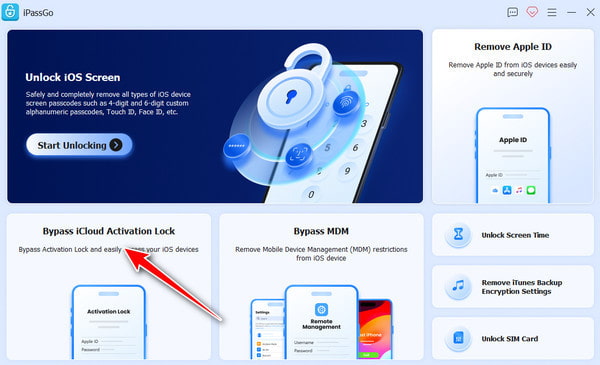
Launch the software and choose Bypass iCloud Activation Lock.
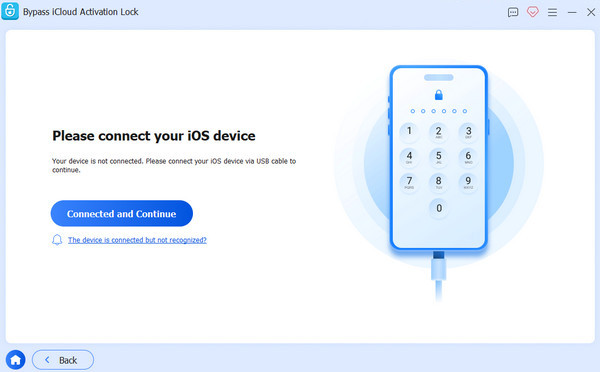
Connect your iOS device to your computer with a USB cable. Tap Trust on your device to trust this computer.
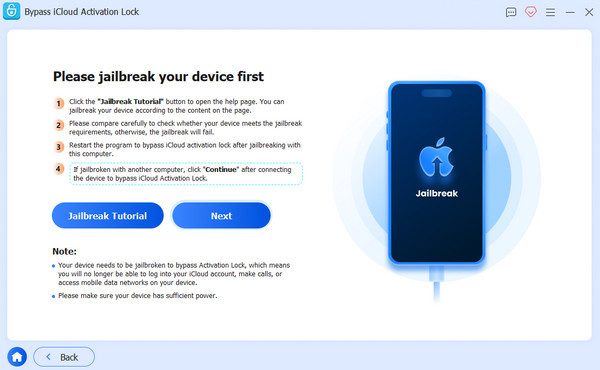
Read the warnings before you decide to bypass the iCloud Activation Lock. Click the jailbreak iPhone tutorial and follow the instructions to proceed.
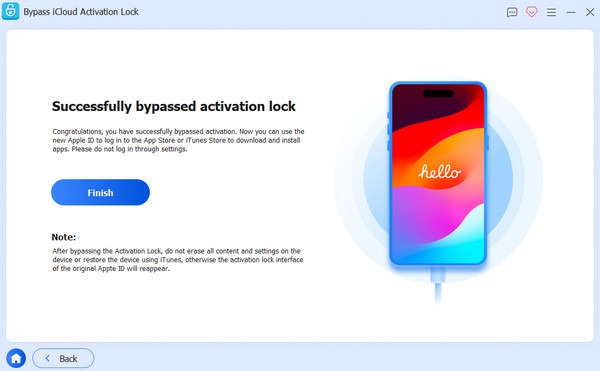
Check your device information and click the Start Bypassing Activation button. Then, the iCloud Activation Lock will be removed from your device soon.
Disclaimer: Never use this method on stolen, lost, or illegally obtained iPhones, which violates relevant laws and regulations.
FAQs.
-
Can I bypass Activation Lock without the previous owner's Apple ID?
Yes, you can contact Apple Support for a removal request with the ownership receipt. If you can't contact the last owner and have no proof of purchase, a trusted third-party tool like imyPass iPassGo can help you bypass the lock without any Apple ID or password.
-
Is bypassing iPhone Activation Lock legal and safe?
Apple doesn't approve Activation Lock bypass, as it will reduce system security, disable Find My, block official iOS updates, and void your device's warranty. Generally speaking, using bypass tools is legal and safe on your owned device for personal purposes, like unlocking a forgotten password.
-
Will bypassing Activation Lock delete all my iPhone data?
Yes, almost all Activation Lock bypass methods will erase your device data. So it's essential to keep an iPhone backup regularly to avoid accidental data loss. Then you can restore from an iCloud backup later.
Conclusion
One last reminder: Before paying for a used iPhone in the future, confirm the seller has removed Activation Lock on iPhone completely! If you've unfortunately already locked out, try official methods first then use a professional unlocking tool like imyPass iPssGo. Avoid unproven online unlocking services that claim to bypass locks remotely!
Samuel specializes in password security and digital privacy. He used to work as a cybersecurity consultant for small businesses to protect digital assets. With certifications in Cybersecurity and Ethical Hacking, he turns complex security topics into easy-to-follow advice. He also enjoys sharing password tips to help users protect their accounts more confidently.
Hot Solutions
-
Unlock iOS
-
iOS Tips
-
Unlock Android
-
Password Tips


