



 Solution
 Support Center
 About Us
 Contact
How to Download Apps on Your iPhone Without Apple ID
 Clara Prescott Published on August 06, 2026iOS Tips3-min reading
Currently, Apple has increased the security of iPhones and iPad devices. Users have to authenticate with their Face ID, Touch ID, or passcode when downloading apps from the App Store, including the free apps. The downside is that you have to enter your passcode repeatedly if you need to download multiple apps. This guide shares multiple ways to download apps without an Apple ID on your iPhone or iPad.

In this article:
- Part 1: How to Download Apps Without an Apple ID Using Settings
- Part 2: How to Download Apps Without an Apple ID with Face ID
- Part 3: How to Download Apps Without an Apple ID via Family Sharing
- Part 4: How to Download Apps Without an Apple ID for Pre-installed Apps
- Part 5: Bonus Tip: How to Reset Apple ID Password and Download Apps
Part 1: How to Download Apps Without an Apple ID Using Settings
Through the right settings, you can download apps on iPhone without an Apple ID for free apps or within 15 minutes. Of course, you still need to enter your password if you download a paid app from the App Store.
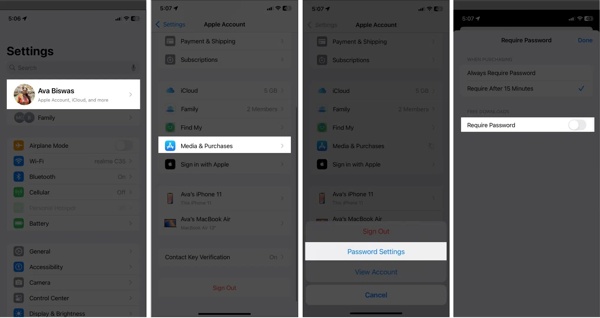
Open your Settings app.
Tap on your profile.
Choose the Media & Purchases option.
Tap Password Settings on the dialog.
Toggle off Require Password.
Make sure to select Require After 15 Minutes.
Tap the Done button to save your settings.
Part 2: How to Download Apps Without an Apple ID with Face ID
For new iPhone and iPad models, you can authenticate with Face ID or Touch ID when downloading apps. It means that you can download apps without an Apple ID by scanning your face or fingerprint.
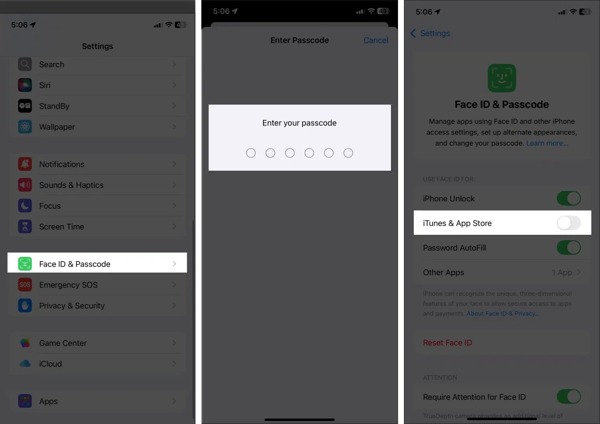
Run the Settings app on your iPhone.
Choose the Face ID & Passcode or Touch ID & Passcode option.
Enter your passcode to authenticate.
Toggle on iTunes & App Store under the USE FACE ID FOR section.
Now, you can download apps from the App Store with your Face ID or Touch ID.
Part 3: How to Download Apps Without an Apple ID via Family Sharing
Apple Family Sharing makes it easy for up to six family members to share purchases, subscriptions, storage, and more. If you have joined Family Sharing, you can download apps on your iPhone without an Apple ID.
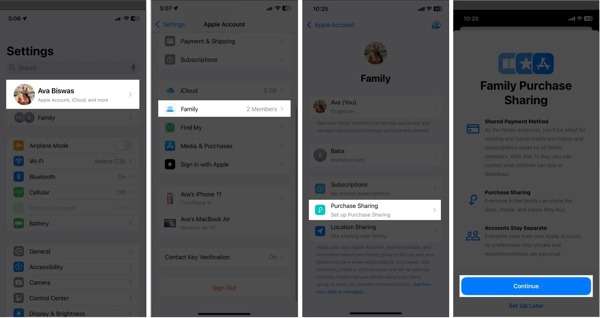
Start your Settings app.
Tap on your profile and choose the Family option.
Tap the Purchase Sharing option.
Read the message and tap Continue.
Add a payment method if you don’t have one.
Now, a family member can download the apps that others have purchased without authentication.
You May Also Like:
Part 4: How to Download Apps Without an Apple ID for Pre-installed Apps
Another way to download apps without an Apple ID is to use the apps previously installed. If you have installed an app and deleted it, for example, you can download it from the App Store directly without authentication.
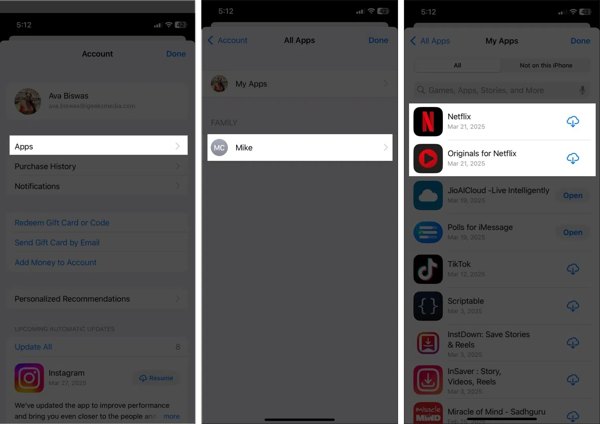
Run the App Store app.
Tap on your profile at the top right corner.
Tap Apps to display all apps previously installed.
Find the desired app, and tap the Download button to install it directly.
Part 5: Bonus Tip: How to Reset Apple ID Password and Download Apps
Can you download apps without an Apple ID if you forgot your Apple ID password? No. However, imyPass iPassGo can help you reset your Apple ID password and then download apps on your iOS device easily.

4,000,000+ Downloads
Remove the old Apple ID credentials easily.
Don’t require your iPhone passcode or Apple ID password.
Offer bonus features, like bypassing Screen Time.
Support the latest models of iPhone and iPad.
How to Download Apps After Resetting Apple ID Password
Connect to your iPhone
Launch the Apple ID removal tool after installing it on your computer. It is available on Windows 11 or earlier and Mac OS X 10.12 or above. Plug your iPhone into your computer with a Lightning cable. Choose the Remove Apple ID mode to continue.
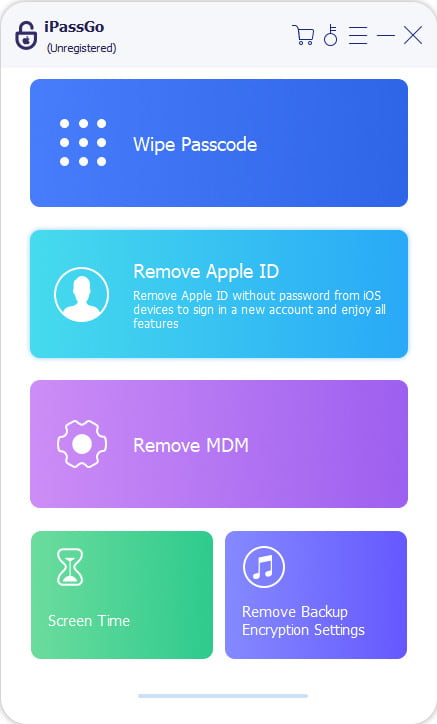
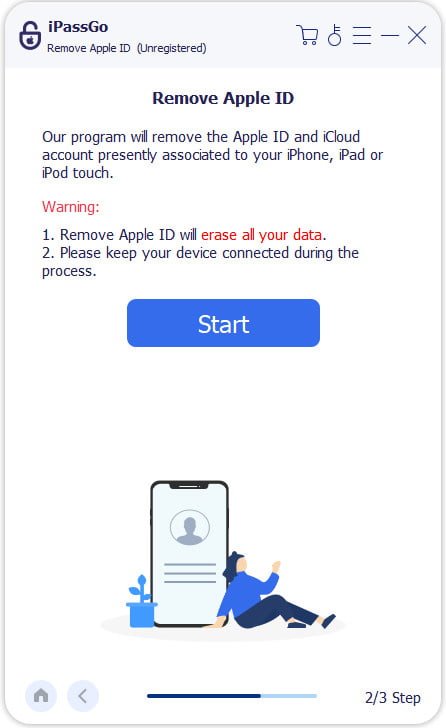
Remove old Apple Account
Once your device is detected, click the Start Now button. If Find My is enabled, reset all settings on your device. Then, click Confirm Again to initiate the process. If Find My is disabled, the software will begin removing your account immediately.
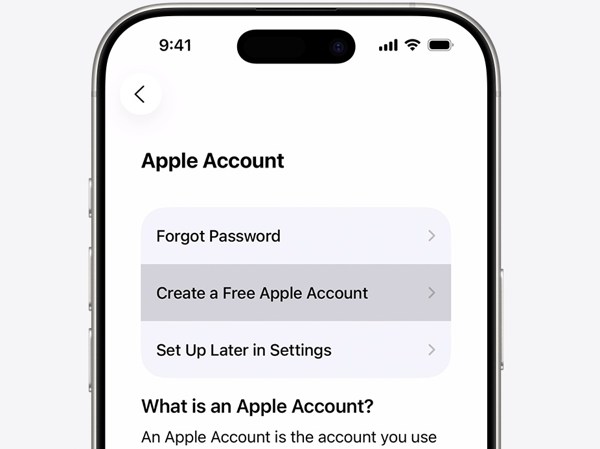
Create a new account
When it is done, set up your iPhone as a new device. Choose Create a Free Apple Account if you are asked to sign in to an account. Complete setup and download apps from the App Store with the new account password.
Conclusion
This guide shared five methods to download apps on Apple without an Apple ID. You can adjust settings to download free apps without authenticating. If you are using new models of iPhone or iPad, set up Face ID or Touch ID for downloading apps. Family Sharing is another way to share purchased apps across family members. imyPass iPassGo enables you to reset the forgotten Apple ID password on your iPhone or iPad, so you can download apps quickly.
Clara has over 8 years of experience helping users recover lost files and transfer data. She previously worked as a data recovery technician for a major IT service company. Certified in Data Recovery and Digital Forensics, her articles focus on simple solutions that make complicated recovery tasks easier for everyday users.
Hot Solutions
-
iOS Tips
-
Unlock iOS
-
GPS Location
-
Windows Tips


