Remove and Reset Widnows Password in Seconds
Wipe iOS Screen Passcode, Remove Apple ID, etc.
One-click to Bypass the iCloud Activation Lock
View, Export, and Restore iPhone Passwords
Bypass Android Screen Lock and FRP
Change or Hide Location on iOS/Android Devices
Recover iOS data from devices, iCloud, iTunes backup
Transfer Data Between iPhones, Laptops, and iTunes
With imyPass iLocaGo, you can simply click a location and spoof GPS location without jailbreak or root.
For those who want to preset and simulate movements on Android and iPhone, imyPass iLocaGo provides various modes to meet their needs. You can not only spoof GPS on iPhone and Android, but also set the speed, select spots, and utilize different modes.
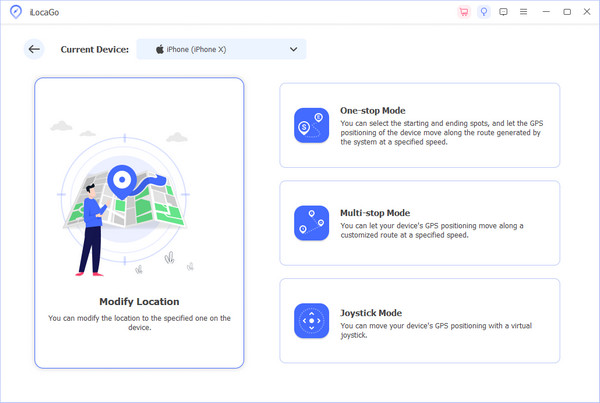
One-stop Mode
You can decide the start and the end of the route, then the software will generate the best route for you to change your Android and iPhone location movement.
Multi-stop Mode
If you have more than one spot to visit, then this mode can help you set several locations as approaches while faking the movement.
Joystick Mode
Even if you don’t have a specific destination, you can also use the joystick mode to control the movement all by yourself easily.
Custom Speed
While moving, the speed is also changeable. You can set from 1m/s to 50m/s as you like, basically from walking to driving.
This program is highly compatible with AR games like Pokémon Go, Zombies, Run!, Jurassic World Alive, Harry Potter: Wizards Unite, and more. You can control in-game movement with a joystick and spoof iPhone location without physically moving. This location spoofer is especially useful for GPS-based games, and you don't need to worry about your game account being banned.
100% Safe
We protect phone privacy and game/ social media account safety while changing phone location.
Support Many Devices
We support a lot of iOS and Android devices and systems, including the latest iOS 26/27 Beta and Android 16.
History and Favorite
You can check and use previous location easily and save common-used spots.
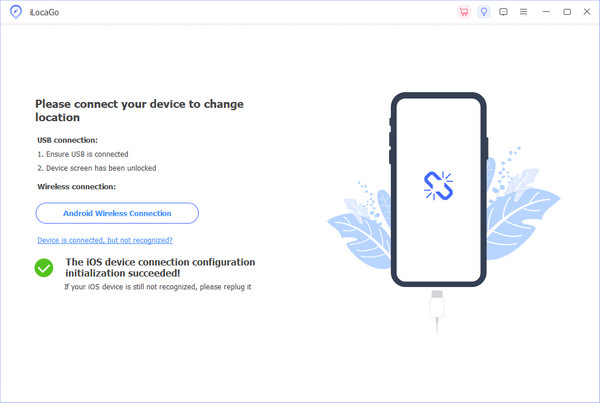
Open imyPass iLocaGo, and connect your iPhone or Android phone to your computer via a lightning cable.
In the main interface, please select Modify Location on the left.
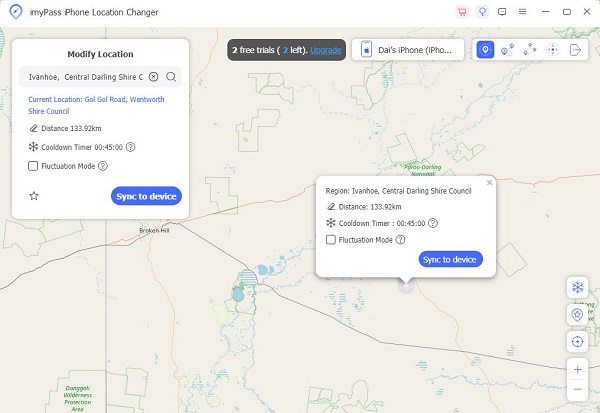
You can select any spot on the map or directly input the address as you like. Then click on Start Move to change your location to the destination right away.

It's really easy to spoof iPhone location, just pick a spot on the map and you're done. I used it to change my location online in AR games.
Used it a couple times when browsing different region-based content. Very easy to use, nothing complicated.
I don't like apps tracking my exact location all the time. So this just helps me change it when I need.
It doesn't slow down my phone or internet. Compared to other GPS spoofers I've tried, this one feels much more stable.
Change Location for Pokémon Go & Life360 on Any Phone!
Sorry, this product (or service) is currently unavailable to users in this region due to local regulations. We appreciate your understanding in this matter.