Solution
 Support Center
 About Us
 Contact
Can iFreeiCloud Remove iCloud Activation Lock? Full Review
 Samuel Spenser Published on August 19, 2026Unlock iOS3-min reading
If you bought a used iPhone or iPad which is still linked to the previous owner's iCloud account, you might get stuck on the iCloud Activation Lock screen and be unable to use your device. When looking for a solution, many users turn to tools like iFreeiCloud. The question is, can iFreeiCloud really remove iCloud locks?
In this iFreeiCloud review, we will take a closer look at what iFreeiCloud offers, including its features, pricing, legitimacy, and alternative. Let's find out whether iFreeiCloud is the right solution or if you should consider another option.

In this article:
- Part 1: What is iFreeiCloud?
- Part 2: iFreeiCloud Features: What Can You Check?
- Part 3: Pricing & Payment Options
- Part 4: Can iFreeiCloud Remove iCloud Activation Lock?
- Part 5: Is iFreeiCloud Legit?
- Part 6: Best iFreeiCloud Alternative for Removing Activation Lock
- Part 7: FAQs About ifreeiCloud Review
Part 1: What is iFreeiCloud?
iFreeiCloud is an online service that helps users check Apple device information through IMEI numbers. You can check if a phone or tablet is locked or clean when buying a second-hand iPhone or iPad. It provides details about device status, lock status, and other related information. The service does not unlock devices, but it keeps users safe from fraudulent purchases.
Part 2: iFreeiCloud Features: What Can You Check?
iFreeiCloud mainly works as an Apple device checking service. It helps users learn more about a device by checking its IMEI number. Here are the main features iFreeiCloud provides:
1. Free IMEI Check
The free IMEI check is one of the basic services offered by iFreeiCloud. By entering a device's IMEI number, users can get basic information about their Apple device for free.

2. Detailed IMEI Reports
Besides the free check, iFreeiCloud also provides paid IMEI reports with more detailed information, such as warranty details and lock status. This helps users make a more informed decision when evaluating a second-hand Apple device.
3. Device Status Check
Another important feature of iFreeiCloud is checking the overall status of an Apple device. Users can use the service to find out whether a device is lost, stolen, or iCloud-locked.
4. iCloud Lock Status Check
Many users discover iFreeiCloud when they are looking for ways to deal with iCloud Activation Lock. However, its role is mainly to check the device's lock-related information rather than remove the lock.
Part 3: Pricing & Payment Options
iFreeiCloud offers some free checks and paid, detailed reports. The prices depend on the level of information users want. Payment methods are simple and common. Here is a clear table:
| Service | Price Range | Description | Payment Options |
| Free IMEI Check | $0 | Basic device status check | No payment needed |
| Paid IMEI Check | $0.01 – $2.75 | Detailed reports (warranty, lock status) | Credit card, PayPal, others |
iFreeiCloud keeps its pricing simple and easy to understand. You can obtain basic device information for free, and detailed reports are available at a small cost. Payments are secure and accepted through common methods like credit cards and PayPal. The service focuses solely on device checks, with no hidden fees or unlocking charges. This clear pricing helps users trust and use the service safely.
Part 4: Can iFreeiCloud Remove iCloud Activation Lock?
No, iFreeiCloud cannot remove iCloud Activation Lock. iFreeiCloud is not an iCloud unlock tool. Instead, iFreeiCloud focuses on checking Apple device information through IMEI numbers. It can help users learn more about a device's status before purchase, but it cannot remove the Apple ID linked to the device or unlock the Activation Lock screen. Users will need to contact the original owner or consider other solutions for activation lock removal.
Part 5: Is iFreeiCloud Legit?
iFreeiCloud is a real and trustworthy service that focuses on device checks. It began in 2016 and operates primarily in London. Users rely on it to get clear and accurate information about their Apple devices. The company does not break Apple's rules because it does not unlock iCloud locks. It makes it safer than many other services claiming to do so.
However, users should remember that unlocking iCloud locks is hard and mostly unsupported. iFreeiCloud's primary function is to provide users with accurate device information, not to bypass locks. It makes it a good choice for checking phones before making a purchase. Always be cautious when using any service that promises iCloud unlocking, as many are scams or unsafe.
Part 6: Best iFreeiCloud Alternative for Removing Activation Lock
iFreeiCloud helps check Apple devices, but it cannot remove iCloud lock. It can be frustrating if you really need a dedicated Activation Lock remover to use a locked iPhone or iPad. That is where imyPass iPassBye comes in as a better alternative.
imyPass iPassBye help users bypass iCloud Activation Lock on iOS 17 and lower. If you see the Lost Mode screen, Locked to Owner screen, or experience activation troubles, imyPass iPassBye can quickly remove the Activation Lock. The tool is safe and easy to use. It supports various iOS models and provides customer support and a 30-day money-back guarantee.
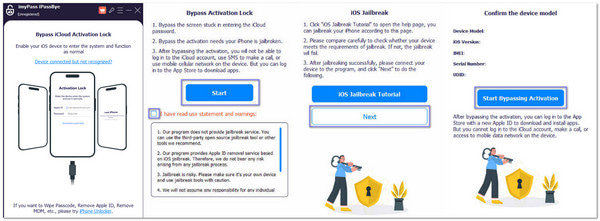
Install imyPass iPassBye on your computer. Once complete, launch the program and connect your iPhone or iPad to the computer using a USB cable.
On your device, tap the Trust button when it asks you to trust the computer, then click Done.
The program will check your device's settings. When the information appears, read the terms and warnings carefully. Then, check the boxes to agree and click Start to begin.
Next, imyPass iPassBye will confirm your device model. After that, click Start Bypassing Activation to move on.
Now, the program will work on removing the iCloud Activation Lock. This part takes some time, so please wait patiently until it finishes.
FAQs.
-
Does iFreeiCloud offer any phone locking service?
No. iFreeiCloud is a check expert that offers services to check the IMEI number. To unlock an iPhone that is under iCloud activation lock, use its alternative like imyPass iPassBye.
-
Is iFreeiCloud free to check the IMEI number?
Yes. Individual users can use it for free. And the processing duration is quick: there is no refreshing or page redirecting. You can get the result just on the page. For batch processing, the price is $0.02-0.04.
-
Do I need to log in iFreeiCloud before using it?
Yes. All of its service needs to sign and log in. For iFreeiCloud alternatives that don't need a login, see IMEI Check and IMEI Info.
Conclusion
iFreeiCloud checks your device for basic information, such as IMEI, warranty, and lock status. It cannot remove iCloud Activation Lock or bypass the "Locked to Owner" screen. If you need a solution for Activation Lock removal, imyPass iPassBye is a user-friendly alternative worth considering. It provides a simple way to remove iCloud Activation Lock, then you can sign in with a new Apple ID and enjoy your iPhone or iPad again.
Samuel specializes in password security and digital privacy. He used to work as a cybersecurity consultant for small businesses to protect digital assets. With certifications in Cybersecurity and Ethical Hacking, he turns complex security topics into easy-to-follow advice. He also enjoys sharing password tips to help users protect their accounts more confidently.
Hot Solutions
-
Unlock iOS
-
iOS Tips
-
Unlock Android
-
Password Tips