Solution
 Support Center
 About Us
 Contact
iHello HFZ Complete Review: Free Download and Usage Tutorial
 Samuel Spenser Published on April 24, 2026Unlock iOS3-min reading
If you purchased a used iPhone but found it stuck on the iCloud Activation Lock screen, tools like iHello HFZ may help bypass the lock on certain supported devices. Designed for users dealing with locked Apple devices, it has become a popular option for both technicians and beginners.
Before trying it, however, it's important to understand what iHello HFZ is, how it works, and whether it's the right solution for your situation. This guide will introduce its main features, supported devices, pricing, strengths and setbacks to help you make an informed decision.

In this article:
Part 1: Basic Introduction and Review of iHello HFZ
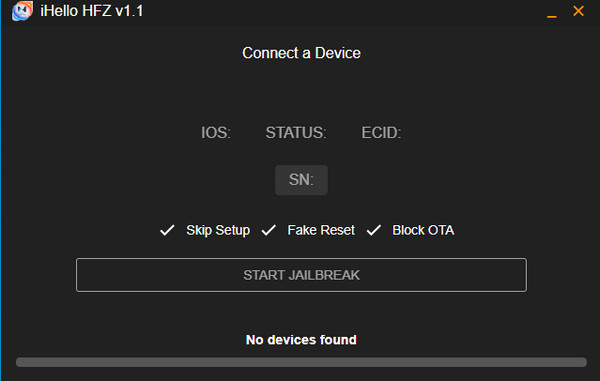
iHello HFZ is a professional iCloud bypassing software designed by users of locked iPhones and iPads. It is focused on those devices with the use of A8 to A11 chips, and it skips the iCloud screen effectively through the use of the checkm8 exploit. The tool has progressed with time, adding enhanced speed, stability and support with a wider range of iOS versions, a series running between version 1.0 and 2.5.
Supported Device
iPhone: iPhone 5s, 6, 6s, 7, 8, X
iPad:
iPad Air 2, Mini 4, Pro (various models)
iPad 2017, 2018, 2019 Models
iPad Pro 10.5 and 12.9 (2018, 2019)
iOS Versions: iOS 15 - iOS 17
iHello HFZ: Standard vs. Premium Explained
iHello HFZ comes in two versions: the Standard version, for basic unlocking tasks, and the Premium version, which offers enhanced features like signal restoration and broader device support. The premium upgrade is able to cover iPhone SE, 6S/6S Plus, 7/7 Plus, 8/8 Plus, as well as iPhone X, and it supports iOS 14, 15, and 16. After the process of iHello HFZ registration is over, the user will receive instructions on how to perform the iHello app to unlock their phone and restore the use of the SIM card, allowing them to use cellular data and make phone calls.
Pricing
The tool is not flawless either. It does work on a variety of devices, but compatibility might not be very successful, depending on which model and iOS version one uses. Not all iPhones will unlock fast, and the advanced features are costly. If you want to get the latest pricing on each available version of the iHello, then read the chart that we have below to know it better.
| Service/Device | Pricing | Platform | Other Details |
| iHello HFZ Activation RepairV1 (iPhone 5s / 6 / 6+) | $5 | Windows and macOS | / |
| iHello HFZ Bypass 6/6+ (iOS 12, SIM Working) | $5 | Windows and macOS | Supports iOS 12, includes SIM functionality |
| iHello HFZ Bypass 6S / 6S Plus / SE (iOS 15, SIM Working) | $10 | Windows and macOS | Supports iOS 15, includes SIM functionality |
| iHello HFZ Bypass 7 / 7 Plus (iOS 15, SIM Working) | $20 | Windows and macOS | Signal supported, stable bypass |
| iHello HFZ Bypass 8 / 8 Plus (iOS 15/16, SIM Working) | $25 | Windows and macOS | Compatible with iOS 15 & 16, SIM works |
| iHello HFZ Bypass iPhone X (iOS 15/16, SIM Working, SN Change) | $35 | Windows and macOS | Compatible with iOS 15 & 16, SIM works, change SN |
| iHello HFZ Bypass iPads 2017 (Mini 4/Air 2/Pro) | $11 | Windows and macOS | / |
| iHello HFZ Bypass iPads 2018 (5th/6th/7th/Pro 10.5) | $19.5 | Windows and macOS | / |
Is iHello HFZ really effective? Test Result
We tested iHello HFZ on several supported devices to evaluate its real-world performance.
| Device Model | iOS Version | Chip | Result | Time |
| iPhone 7 | iOS 15 | A10 | Success | ~4-6 min |
| iPhone 8 | iOS 16 | A11 | Success | ~3-5 min |
| iPad Air 2 | iOS 15 | A8X | Success | ~5-8 min |
In our testing, iHello HFZ achieved an estimated high success rate on iPhone 7 and iPhone 8 models. Performance was more stable when the jailbreak and DFU process were completed correctly.
Limitations & Risks
iHello HFZ requires entering DFU mode and performing a jailbreak process before using. In our testing, no malware behavior or abnormal system damage was observed during installation or execution.
However, users should still be aware of the following potential risks:
- Temporary system instability after jailbreak.
- Potential data loss if restore is required during the process.
- The Activation Lock may return after a reset or update.
- Some features may not work after the bypass.
What are Users Saying?
User feedback collected from forums and community discussions is mixed.
- 1."Worked on my iPhone 7 on iOS 15. Took a few minutes after DFU mode, pretty straightforward overall."
- 2."iHello HFZ premium I tried it with two devices very recently. Surprisingly, it worked and bypassed, but after bypass one iPad proxy fails and no iCloud sign in worked."
- 3."Not beginner-friendly. The DFU and jailbreak steps were confusing at first."
- 4."Success depends heavily on the device. My iPhone 8 worked, but my friend's didn't."
Our Unbiased Review of iHello HFZ
iHello HFZ bypass has been a popular choice of some individuals, yet before plunging into it, it is important to know what you are dealing with and its limitations.
Pros
- Supports multiple older iOS versions (A8-A11 chips).
- Successfully bypass Activation Lock on compatible devices.
- Regular updates to improve performance and success rates.
Cons
- Limited support for newer iOS versions; performance varies by device.
- Certain operations, like jailbreak, can be time-consuming and difficult.
- Premium features are quite expensive for some users.
Part 2: How to Free Download and Use iHello HFZ [Step-by-Step]
Bypassing iCloud activation on iHello HFZ is very easy after the configuration is complete. This is the simplified step-by-step guide that will help you go through it:
How to Free Download iHello HFZ
Go to the official website of this program - https://hfzactivator.com/ and follow the on-screen instructions to download and install it.
Extract the zip files.
Run ihello_HFZ.exe as administrator.
How to Use iHello HFZ
When you are done downloading the tool and making the iHello HFZ registration, open iHello HFZ and press Activate in order to start the bypass process.
Most keenly take a closer look at following the instructions as seen on the screen, to set your device into DFU mode or Device Firmware Update mode. The step is critical to prepare for jailbreak.
To execute the exploit, press Start Jailbreak. Your device will start a jailbreak process and will be able to ignore the iCloud lock, as iHello HFZ will perform this process.
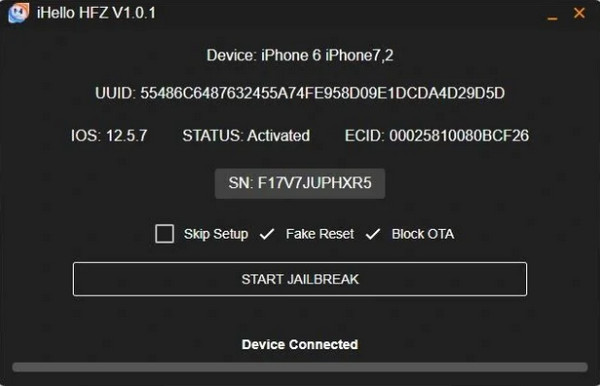
The process of jailbreaking will restart your phone once you establish that process. Now you may install it with a clean slate and complete access, besides carrying a functional SIM signal, in case it is covered.
Part 3: Best Alternative to iHello HFZ [Safe & Guaranteed]
While iHello HFZ offers advanced features such as signal support only in its premium version, some users still look for free options to bypass iCloud Activation Lock. In this case, imyPass iPassBye is a better choice. It is more beginner-friendly, supports more devices, and offers a higher success rate compared to iHello HFZ.
4,000,000+ Downloads
Remove iCloud Activation Lock from iPhone, iPad, or iPod Touch.
Bypass iOS devices with iOS 17 locked to the owner.
Offer intuitive interface that easy to navigate.
Professional technical support team at your assistance.
| Features | iHello HFZ | imyPass iPassBye |
| Ease of Use | Moderate – DFU and jailbreak required | Beginner-friendly with minimal steps |
| Supported Device | A8-A11 chips only | A5-A12 and more |
| Platform Supported | Windows and Mac | Windows and Mac |
| Pricing Structure | Per Model | 1-Month Plan and One-time Purchase |
| Bypass Success Rate | Varies since it can be slow due to other models | Higher and more stable |
| Customer Support | Community-based support | It offers a professional team dedicated to fixing issues immediately |
FAQs.
-
Does iHello HFZ bypass iCloud lock for iOS 17?
No. Even the latest iHello HFZ 8 only supports at most iOS 16. Actually, only a few tools in the market support bypassing iOS 17 iCloud activation. You can try imyPass iPassBye. It supports iOS 17.7.0 and lower iOS versions.
-
Does iHello HFZ have an in-built jailbreak feature?
Yes. iHello HFZ offers the easy-to-follow jailbreak tutorials, helping users prepare their iPhone before iCloud lock removal.
-
Does iHello HFZ remove data when bypassing iCloud lock?
Yes. Not only iHello HFZ, almost all iCloud lock removers will erase the iPhone data and jailbreak the iPhone when removing iCloud lock. This is because of Apple's system security.
Conclusion
iHello HFZ bypass tool is a solid tool for unlocking iCloud-locked devices powered by A8 to A11 processors. It offers features such as SIM signal support and regular updates, but the overall success rate may vary depending on the device with a learning curve. However, if you're a beginner or looking for a simpler solution, imyPass iPassBye might be a better option for you.
Samuel specializes in password security and digital privacy. He used to work as a cybersecurity consultant for small businesses to protect digital assets. With certifications in Cybersecurity and Ethical Hacking, he turns complex security topics into easy-to-follow advice. He also enjoys sharing password tips to help users protect their accounts more confidently.
Hot Solutions
-
Unlock iOS
-
iOS Tips
-
Unlock Android
-
Password Tips