Solution
 Support Center
 About Us
 Contact
DarkRa1n iCloud Bypass Review: Does It Still Work in 2026
 Samuel Spenser Published on April 24, 2026Unlock iOS3-min reading
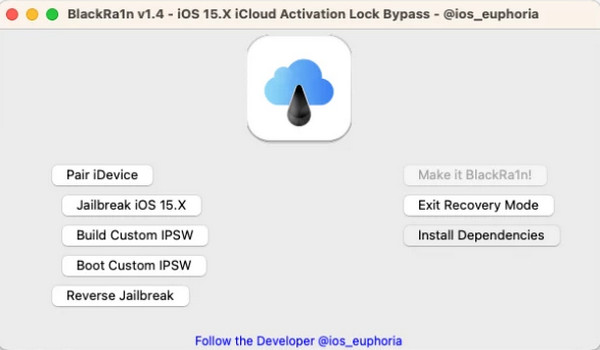
Searching for a way to remove the iCloud Activation Lock without the previous owner? DarkRa1n is one of the tools often mentioned for this purpose. It is a free iCloud bypass tool inspired by earlier jailbreak-based solutions like BlackRa1n. In this article, we will introduce its features, advantages, limitations, and how to download and use it. However, since DarkRa1n comes with several restrictions, we'll also present a reliable alternative later in this review.

In this article:
Part 1: What is DarkRa1n
DarkRa1n is a tethered iCloud bypass tool designed to help users unlock iPhone or iPad. It leverages the checkm8 exploit to bypass the iCloud Activation Lock and gain access to the device. Because it uses a tethered bypass method, the device must reconnect to a computer after every restart to maintain the bypass status.
This tool works more commonly on older devices and uses known system vulnerabilities to turn off the iCloud activation lock so that users can use their devices without Apple ID credentials.
Supported Devices:
It works on devices with A9 to A11 chip running iOS 15 and 16, typically from iPhone 6s to iPhone X. It does not support newer devices with A12 chips or later.
Part 2: Limitations & Risks of DarkRa1n
1. Limited device support
DarkRa1n only works on A9 to A11 devices with mainly iOS 15 - 16, which means newer iPhone and iPad models are not supported.
2. Tethered bypass requirement
The tool uses a tethered jailbreak method, meaning the bypass is not permanent and the device need to reconnect to a computer after each reboot.
3. Technical difficulty
Users need to use Terminal commands and follow code-based steps, which can be challenging for beginners.
4. Limited Apple services after bypass
After bypassing the Activation Lock, some features like iCloud sign-in, iMessage, and FaceTime may not work properly.
5. SIM card issues and security risks
Jailbreaking weakens your device's security, making it more vulnerable to malware, and you won't get official Apple updates or support anymore. What's more, the SIM card will stop working as well.
Part 3: Pros & Cons of DarkRa1n
DarkRa1n is compatible with Windows and Mac computers. However, the supported iOS versions and iPhone and iPad models are quite limited. Besides, utilizing this program requires code skills. See detailed Pros and Cons here:
Pros
- Can bypass iCloud Activation Lock on supported devices.
- May disable Find My on supported firmware versions.
- Completely free to use (donations are optional to support the developers).
Cons
- The official download link hardly works; you need to download Darkra1n via GitHub.
- Only supports A9 to A11 devices running iOS 15 and 16.
- Requires Terminal commands and basic scripting knowledge.
- Uses a tethered jailbreak to bypass the Activation Lock.
Part 4: How to Use DarkRa1n Step by Step
Open your web browser and download DarkRa1n from its GitHub repository or trusted community forks. Since multiple versions are available online, make sure to verify the download link before installing the tool.
Open the file and follow the installation process. Be careful of possible security alerts, and make sure you provide all necessary permissions during installation.
Make use of USB-C to Lightning cable. Launch the Darkra1n application on your computer.
After that, install these dependencies by typing bash ./install_deps.sh into the terminal.
Next, in the terminal, type python3 darkra1n.py.
Connect your iPhone or iPad again and select STORM iCloud. Jailbreak your device following the on-screen instructions.
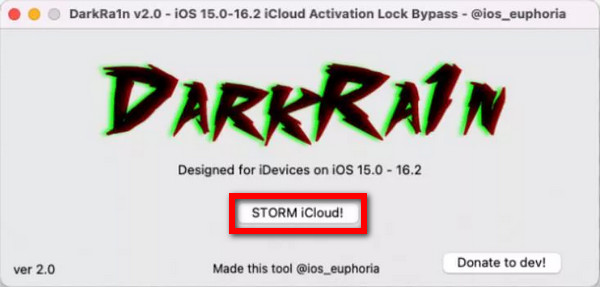
Finally, your device must bypass this iCloud activation lock after jailbreaking it.
Note:
After bypassing the Activation Lock with DarkRa1n, some services like iCloud sign-in, iMessage, or cellular features may be unavailable. In addition, because DarkRa1n uses a tethered bypass method, the device may need to reconnect to a computer after rebooting to maintain the bypass status.
Part 5. Best Alternative to DarkRa1n
Because DarkRa1n only supports limited devices and uses a tethered bypass method, some users may look for easier alternatives with broader compatibility. imyPass iPassBye provides a more beginner-friendly solution for users who cannot use DarkRa1n successfully. It supports all iOS models and versions running iOS 5 and later.
4,000,000+ Downloads
Bypass iCloud Activation Lock without the previous owner's Apple ID or password.
Supports all models of iPhone, iPad, and iPod running iOS 5 and later.
Beginner-friendly interface without requiring Terminal or coding skills.
Provides a relatively stable bypass performance with free online support.
How to Use:
Download imyPass iPassBye from its official site and install it on your PC.
Next, link your iOS device to the PC via USB.
Subsequently, check if your device has been jailbroken. Otherwise, refer to the guide provided.
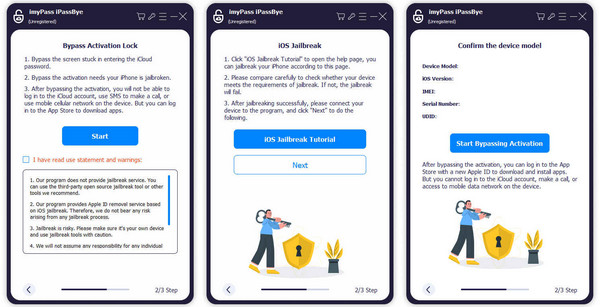
Lastly, click the Start Bypass Activation button to bypass the iCloud Activation Lock from your phone or tablet.
FAQs.
-
How do I recover my device if it becomes damaged due to using DarkRa1n?
If your iPhone becomes broken, you may need to restore it through iTunes or Finder to its restored condition. However, this will undo the bypass and any jailbreak status.
-
Does DarkRa1n support iOS 17 when bypassing iCloud lock?
No. Actually, only a few tools in the market support bypassing iOS 17 iCloud activation. You can try imyPass iPassBye. It supports iOS 17.7.0 and lower iOS versions.
-
What is tethered jailbreak of DarkRa1n?
Tethered jailbreak is not a complete jailbreak. When you shut down your iPhone, it will enter Recovery Mode, and you need to exit this mode with iTunes.
Conclusion
When dealing with iCloud activation locks, choosing the right tool is essential based on your needs and device compatibility. While DarkRa1n offers a free solution for certain iOS versions, alternatives like imyPass iPassBye provide additional iOS versions and ease of use, making them viable options for bypassing iCloud locks on a variety of iOS devices.
Samuel specializes in password security and digital privacy. He used to work as a cybersecurity consultant for small businesses to protect digital assets. With certifications in Cybersecurity and Ethical Hacking, he turns complex security topics into easy-to-follow advice. He also enjoys sharing password tips to help users protect their accounts more confidently.
Hot Solutions
-
Unlock iOS
-
iOS Tips
-
Unlock Android
-
Password Tips