Solution
 Support Center
 About Us
 Contact
Tenorshare 4uKey for Android: Is It Worth Using or Too Expensive
 Gideon Byron Published on October 10, 2026Unlock Android3-min reading
There are many Android unlocking tools on the market today, and Tenorshare 4uKey is one of the options you may come across when searching online. But what can it actually do, and is it worth the price? In this Tenorshare 4uKey review, we'll look at its main features, supported Android versions, pricing, and potential risks. We'll also cover its pros and cons and compare it with an alternative to help you figure out whether 4uKey is the right choice for you.

In this article:
- Part 1: What is Tenorshare 4uKey for Android
- Part 2: Tenorshare 4uKey Review: Main Features & Compatibility
- Part 3: Our Test of Tenorshare 4uKey: Does It Really Work
- Part 4: How to Download and Use Tenorshare 4uKey
- Part 5: Tenorshare 4uKey Price, Pros and Cons
- Part 6: More Affordable Alternative to 4uKey Screen Lock Removal
Part 1: What is Tenorshare 4uKey for Android
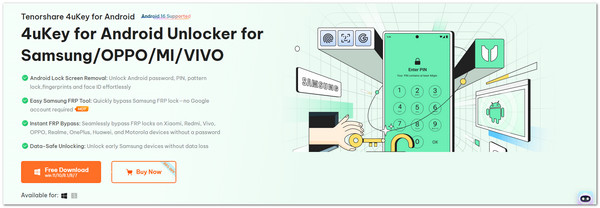
Tenorshare 4uKey for Android is a desktop tool designed to help users regain access to their Android phones. It supports various Android brands, including Samsung, Xiaomi, OPPO, Realme, Huawei, Google, Sony, and others. It offers features for removing Android screen locks and bypassing Google Factory Reset Protection (FRP).
No matter why you are locked out, Tenorshare 4uKey gives you a way back in. It can handle cases such as:
- Forgot your Android screen lock PIN, password, or pattern.
- Bought a second-hand phone that is still locked.
- Can't access your device because it is disabled, damaged or locked.
- Need to troubleshoot an Android device that is stuck during account verification.
- Can't complete Google account verification after a factory reset.
Part 2: Tenorshare 4uKey Review: Main Features & Compatibility
Tenorshare 4uKey is not only about unlocking phones. It offers more tools that make using an Android device easier when you are locked out. Below, we will go through its main features and explain how each one works in detail.
1. Android Lock Screen Removal
Tenorshare 4uKey can remove screen locks on supported Android devices running Android 4–16. No matter you're locked out by a PIN, password, pattern, fingerprint, or facial recognition, it can help you remove face locks, PIN, and all these locks in just a few minutes.
2. Easy Samsung FRP Tool
One of the hardest problems for Samsung users is FRP lock (Factory Reset Protection). After a reset, the phone asks for the Google account that was last used. If you forgot the passcode or bought a second-hand phone, you get stuck. Tenorshare 4uKey supports FRP removal on Samsung devices running Android 6–16. You do not need the old account, and you can set up the phone as new right away.
3. Instant FRP Bypass for Other Brands
FRP lock is not just on Samsung. Phones from Xiaomi, Redmi, Vivo, Oppo, Realme, OnePlus, Huawei, and Motorola also have it. Tenorshare 4uKey makes this problem easier by offering instant FRP bypass for these brands. Check the official Tenorshare 4uKey specifications before using it to bypass FRP.
4. Data-Safe Unlocking for Samsung
Tenorshare 4uKey has a solution for certain early Samsung models. It can remove the screen lock without deleting anything stored on the device. That means your photos, videos, and contacts stay safe while you unlock your phone. Not every brand supports this, but for Samsung users, it is a huge advantage.
| Android Brand | Supported Versions |
| Samsung | Android 6-16 |
| Xiaomi and Redmi | MIUI 10–14 |
| Vivo | Android 10–12 |
| Huawei | Android 10 |
| OnePlus | Android 6-16 |
Part 3: Our Test of Tenorshare 4uKey: Does It Really Work
To evaluate Tenorshare 4uKey for Android, we focused on two main features: screen lock removal and Google FRP bypass. We would connect each phone to a Windows 11 computer with Tenorshare 4uKey installed.
| Test Device | Android Version | Screen Lock Removal | FRP Bypass |
| Samsung Galaxy S25 | Android 16 | Successful | Successful |
| Samsung Galaxy A52 | Android 13 | Successful | Successful |
| Xiaomi Redmi Note 12 | MIUI 14 | Successful | Successful |
| OnePlus 11 | Android 13 | Successful | Failed |
| Vivo V27 | Android 13 | Successful | Failed |
| Huawei P30 | Android 10 | Successful | Failed |
Test Result: Tenorshare 4uKey performed more consistently for Android screen lock removal than for FRP bypass. The screen lock tests were successful on all tested devices, while FRP results varied between brands and models. Samsung, Xiaomi, and Redmi showed better results, while some Vivo and Huawei devices could not complete the FRP process.
Note:
The results should be limited to the tested devices. Compatibility and performance may differ across Android models, system versions, and security configurations.
Part 4: How to Download and Use Tenorshare 4uKey
Before using Tenorshare Android Screen Unlocker, you need to prepare a computer and a USB cable. The program must be downloaded and installed on Windows or Mac, since it does not run on phones directly.
Some supported Samsung models offer a screen lock removal option that may preserve data. However, other methods may require a factory reset and erase your data. Follow the on-screen instructions carefully and back up your data before use.
Let us start the process now!
Go to the official Tenorshare 4uKey for Android website and download it on your computer. Once it finishes downloading, install and launch the program to get started.
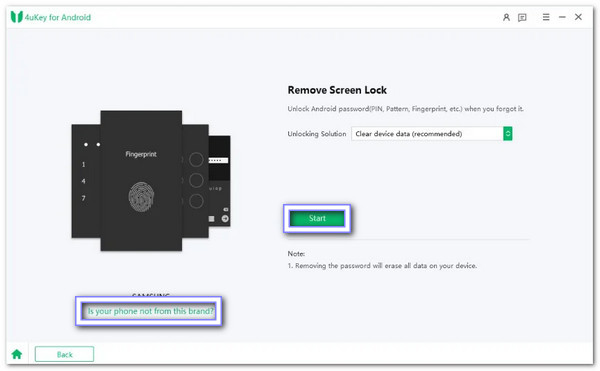
On the home screen of the program, click on Remove Screen Lock. For Samsung users, you can choose Remove Screen Lock without Data Loss. For other Samsung devices, select Clear device data. Non-Samsung users should pick their phone brand and press Start. If the program shows the wrong brand, click Is your phone not from this brand button and then choose the right one.
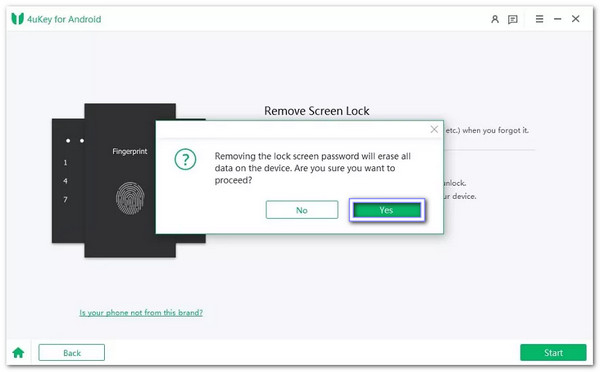
The program will warn you that unlocking the phone will erase all data. If you agree, click Yes to continue. After this, Tenorshare 4uKey Android Screen Unlocker will begin removing the lock screen automatically. Samsung users may finish here if the process completes.
For non-Samsung devices, after the unlock process begins, you may need to enter recovery mode. Follow the on-screen guide and perform a factory reset on your phone so the screen lock can be removed fully.
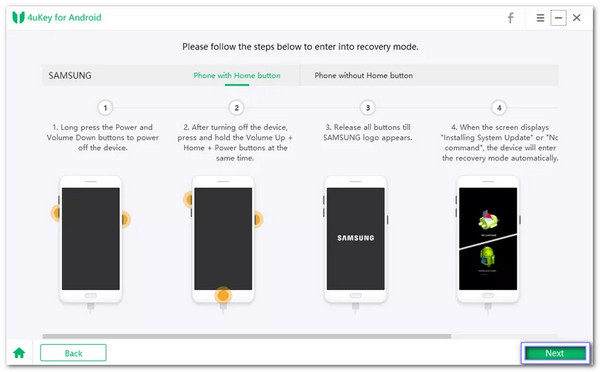
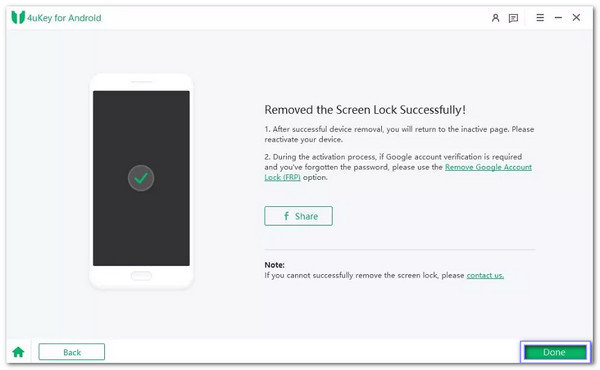
Once recovery mode and reset are done, 4uKey will complete the unlocking. After a few minutes, your screen lock will be gone, and you will see a confirmation. Now, you can access your Android device without a passcode.
Part 5: Tenorshare 4uKey Price, Pros and Cons
Let us start with the 4uKey pricing:
- 1-Month License - $24.95 (covers one computer, five devices)
- 1-Year License - $39.95 (covers one computer, five devices)
- Lifetime License - $49.95 (covers one computer, five devices)
- Business Plans - Start at $52.95 and go up depending on the number of devices
- 0000000000
- 0000000000
All plans include:
- Free upgrades
- Freetechnical support
- Unlock Android without a password
- Bypass Google FRP lock
- Safe factory reset
Let us move to the advantages and disadvantages you will encounter:
Pros
- It is easy to use, even for beginners.
- It works with many Android versions and brands.
- It removes all lock types.
- It supports some Samsung unlocks without data loss.
Cons
- It is a free download, but no free unlocking.
- Limited FRP bypass support: Xiaomi/Redmi (MIUI 10–14), Vivo (Android 10–12), and Huawei (Android 10 only).
- Some brands like Sony, Oppo, and OnePlus are limited.
- The fingerprint and face unlock removal will erase data.
- It works on Windows only for early Samsung unlocks.
- The subscription is fair, but there are cheaper tools out there.
So, if you want a reliable unlock tool, Tenorshare 4uKey is a strong and dependable choice. However, if you need the newest Android support or cheaper options, you may need to compare first.
Part 6: More Affordable Alternative to 4uKey Screen Lock Removal
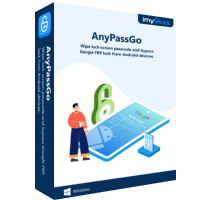
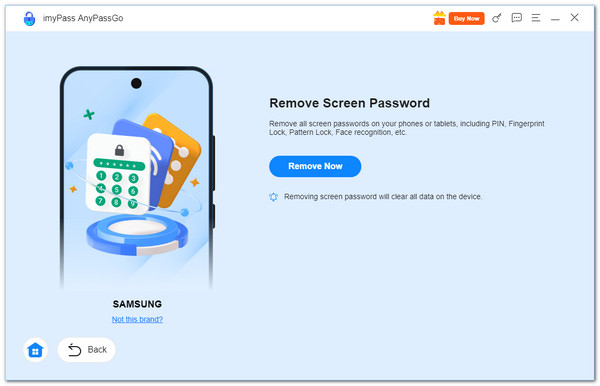
If Tenorshare 4uKey is outside your budget, imyPass AnyPassGo is another Android unlocking tool to consider. It offers screen lock removal and FRP bypass features for Android 4–17. The tool can remove different types of screen locks, including PINs, patterns, and passwords. It can also bypass fingerprint and facial recognition lock easily.
4,000,000+ Downloads
Remove Android screen locks in just a few clicks.
Bypass FRP without a Google account or password.
Easy to use and budget-friendly.
Support most popular Android brands and Android 4-17.
Conclusion
After reviewing its features, pricing, and compatibility, you may still wonder: Is Tenorshare 4uKey safe to use? Yes, Tenorshare 4uKey is generally safe to download from its official website. Some unlocking methods can erase your data, so check the risks before proceeding. If you're looking for another option, imyPass AnyPassGo also offers Android screen lock removal and FRP bypass features.
Gideon writes about unlocking iOS, Android, and Windows devices. He previously worked as a mobile device specialist in a repair center, assisting customers with locked devices and password recovery. In his spare time, he tests new unlock tools, customizes smart devices and makes complex unlock processes simple and safe.
Hot Solutions
-
Unlock Android
-
Unlock iOS
-
Password Tips
-
iOS Tips