



 Solution
 Support Center
 About Us
 Contact
FRP Unlock Samsung: Reaccess Phone After Factory Reset
 Gideon Byron Published on June 09, 2026Unlock Android3-min reading
When a Samsung phone is facing a serious system issue, a factory reset is one of the most recommended techniques to fix it. Also, a factory reset is usually used when you are preparing the Samsung phone or other devices for their new owner.
However, Google Factory Reset Protection, or FRP, will be accessed. It is the security lock that secures the Samsung phone from unauthorized access after the factory reset. However, some users forgot the Google account associated with it. So, you need to perform a Samsung FRP bypass. The information you need to know can be found as you scroll below, including the five methods that can help you.

In this article:
- Understanding FRP on Samsung Devices
- Part 1. The Official Way (How to Avoid Bypassing)
- Part 2. Using Samsung's Voice Assistant (TalkBack)
- Part 3. Using imyPass AnyPassGo
- Part 4. Using SamFW FRP Tool (For Recent Models)
- Part 5. Using Google Account Recovery via IMEI
- Troubleshooting: Why FRP Bypass Might Not Work
Understanding FRP on Samsung Devices
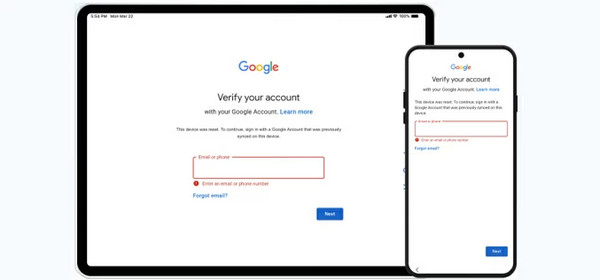
Google FRP Lock is a security feature that allows you to secure your Samsung phone or tablet after a factory reset. This way, no one can add a passcode or other critical modifications or setups from the mentioned devices. If you forgot the Google account associated with the device, you might need an FRP hijacker to bypass it.
Sometimes, you just change your Google account password and factory reset your Samsung device. In this case, Google will make a temporary Google FRP lock within 72 hours. It is based on their security policies, which users find very convenient and secure.
Part 1. The Official Way (How to Avoid Bypassing)
If you do not want to bypass your Samsung Google FRP lock, you only need to enter the correct Google account associated with the Samsung phone after the factory reset. Usually, the process will only last for a few seconds or minutes. It depends on the strength of the internet connection.
But if you want to prevent Google FRP lock from being accessed after a factory reset, you need to remove the Google account from Samsung. However, it might be risky to the security of your Samsung phone because after the process, someone can set up or modify it.
Part 2. Using Samsung's Voice Assistant (TalkBack)
Samsung's TalBack or Voice Assistant is made for a vision-impaired user or customer. It provides feedback from the device to navigate their Samsung phones or tablets. They do not need to look at the screen to achieve it. Some say that you can use this feature as a Samsung FRP bypass voice assistant.
However, it has a low success rate because the bug has been fixed. Anyway, you can refer to the steps below to give it a try.
Press and hold the Volume Up and Volume Down keys. Release them after a few seconds.
Say Bypass Google FRP Lock or Remove Google FRP Lock. Then, the voice assistant will talk back and offer a detailed procedure. You only need to follow it accordingly.
Part 3. Using imyPass AnyPassGo
Due to the low success rate of the previous method, you might need an alternative way. You can use imyPass AnyPassGo. It is a Samsung FRP bypass tool that can bypass the feature lock without an internet connection. Besides Samsung, it can also bypass the feature from different Android phone brands. It includes Motorola, Oppo, Huawei, OnePlus, and more.
Additionally, the duration of the bypass process only lasts for a few seconds or minutes. Professionals and beginners can use this tool due to the simple interface and procedure it supports. Please use the steps below to know how to use the tool.
Download imyPass AnyPassGo. Then, set up the downloaded file. Install and open it on your computer afterward to start the process.
Plug your Samsung phone into a USB port using a USB cable. Click the Bypass Google FRP Lock feature on the first screen. Then, choose the Samsung button at the center, which is the list of supported devices. Follow the additional on-screen procedures to proceed with the process.
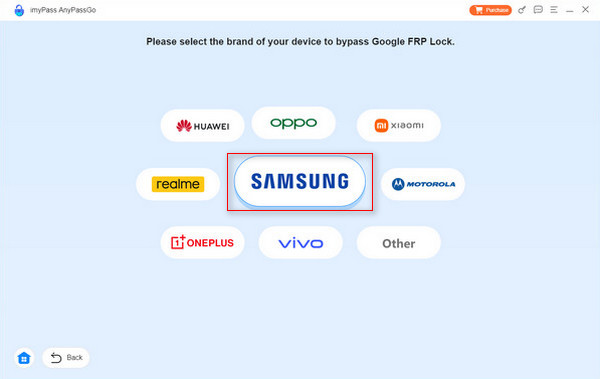
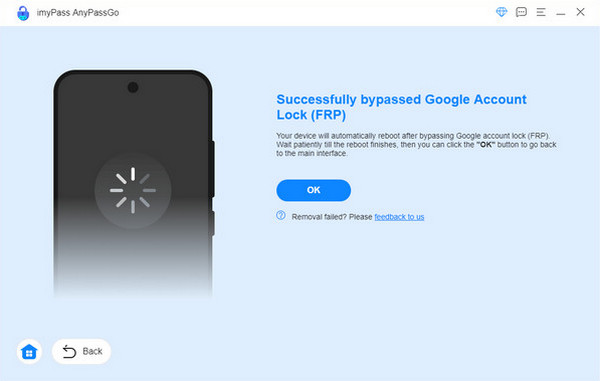
Click the Bypass Now button at the bottom. The bypass process will start afterward. Later, wait for the process to be completed. Finally, please click the OK button at the bottom when the process is successful.
Part 4. Using SamFW FRP Tool (For Recent Models)
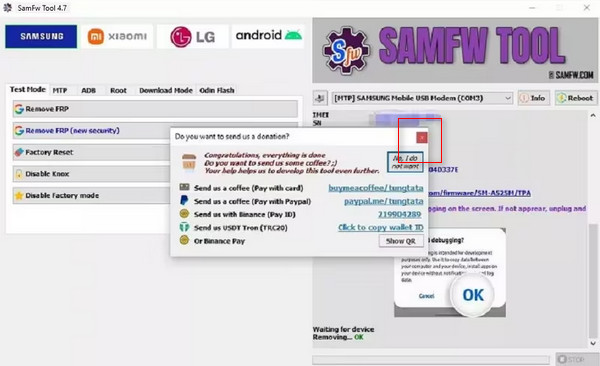
SamFW FRP Tool is another third-party tool that can remove the FRP lock on Samsung. It supports different Android phone brands, including LG, Xiaomi, Samsung, etc. However, the tool has a complex interface that might be confusing for novices.
On the other hand, professionals will love using it because SamFW FRP Tool offer more advanced functionality and higher success rates on newer devices compared with free methods like TalkBack and AddROM bypass. The tool explains the procedures in code, so beginners will also have a hard time understanding it. Please use the steps below if you want to use this tool to bypass your FRP lock.
Download, set up, install, and open the tool on your computer. Then, plug your Samsung phone into the computer with a USB cable. Then, click the Remove FRP button at the top left of the screen.
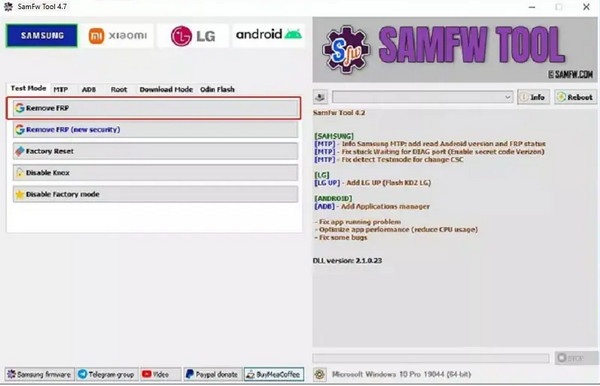
Tap the OK button on your Samsung phone. Then, follow the on-screen instructions. Click the X button to close the small window that will pop up. Please wait for the bypass procedure to be completed on your Samsung phone.
Part 5. Using Google Account Recovery via IMEI
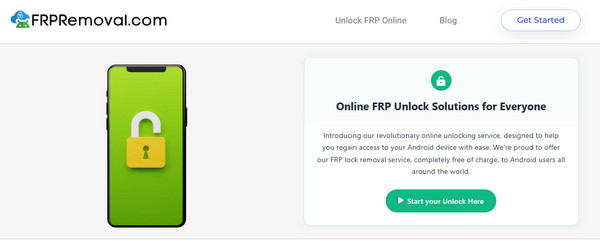
FRPRemoval is an online FRP bypass free tool that can also remove the FRP lock of Samsung without a computer. The reason is that this tool can be accessed on smartphones. However, the success rate of this online tool is low. The IMEI information might not be enough to bypass the Google FRP lock on your Samsung phone. Please refer to the steps below to know how to use the online tool.
Visit the official website of FRPRemoval. Then, click the Start Your Unlock Here button.
Choose Samsung from the brand of your device. Then, enter the IMEI number in the next box. Click the Next button at the bottom to start the bypassing process.
Troubleshooting: Why FRP Bypass Might Not Work
The FRP bypass might not work due to the security patches that block it. Also, the Google account used for the unlocking process might be incorrect. Lastly, there might be a recent change to your Google password. The best way to fix it is to recover your Google account. See how below.
Visit the Account Recovery website of Google. Then, enter your email or phone number. Click the Next button at the bottom right.
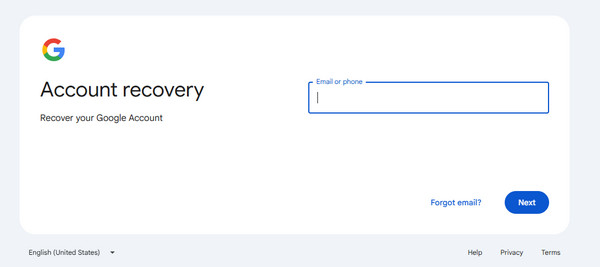
An authentication will appear. Please enter the needed information and click the Continue button. Finally, create your new password for your Google account to use it for removing the Google FRP lock.
Conclusion
All in all, you can remove FRP on a Samsung tablet and phone with the correct Google account associated with them. Alternatively, you can bypass the Google FRP lock when the account is forgotten. imyPass AnyPassGo is one of the easiest methods that can help you. You may download the tool if you want to know more about it!
Gideon writes about unlocking iOS, Android, and Windows devices. He previously worked as a mobile device specialist in a repair center, assisting customers with locked devices and password recovery. In his spare time, he tests new unlock tools, customizes smart devices and makes complex unlock processes simple and safe.
Hot Solutions
-
Unlock Android
-
Unlock iOS
-
Password Tips
-
iOS Tips

