Solution
 Support Center
 About Us
 Contact
How to Retrieve Deleted Calls on iPhone Using Backups and Tools
 Clara Prescott Published on January 23, 2026Recover Data3-min reading
Accidentally deleted a call, but have lost the call on your iPhone? You are not the only one. iOS does not treat call logs in the same manner that you treat messages or photos. This may create an impression of the call being lost permanently. This guide shows how to see deleted calls on iPhone, why some calls do not appear in the deleted folder, and simple steps to get your call history back safely.

In this article:
Part 1. How to See Deleted Calls on iPhone
Accidentally deleted a call on your iPhone? You are not alone. iOS does not maintain a visible folder for deleted calls, so once a call is removed from the Phone app, it is no longer visible. This makes it tricky to open your phone and check simply. If you want to recover lost call history, this guide will show you how to view deleted calls on iPhone and what options are available when dealing with deleted calls on iphone. Here are the main ways to recover deleted calls:
1. Restore from Backup
If you regularly back up your iPhone data with iCloud or iTunes/Finder, restoring from a backup created before you accidentally deleted calls can recover them. Be aware that restoring a backup will replace all current data with the backup version.
2. Use Third-Party Recovery Tools
Several reliable tools can scan your iPhone or backup files for deleted calls. These apps help you access call logs that were accidentally removed. This method works best if the space has not been overwritten after you delete calls on your iPhone.
3. Check Your Carrier Records
Some mobile carriers store call history on their servers. Contacting your carrier or logging into your account may let you access deleted calls on your iPhone that no longer appear in your device's Phone app.
4. Use a Third-party Software to Retrieve Deleted Calls
How to recover deleted call history on iPhone without backup? This question has already been quite a hot topic to discuss, because retrieving deleted files on iOS without a backup might seem impossible. But right now, you can use third-party tools to retrieve deleted files like messages, photos, videos, and even your call logs.
Even though iOS does not keep a folder for deleted calls, you can still recover them. Backups, third-party tools, and carrier records are the main ways to get lost call history back. Next, we will explain why some deleted calls do not appear in the deleted folder.
Part 2. Why Can't I find Deleted Calls in the Deleted Folder
Many iPhone users expect deleted calls to appear in a Recently Deleted folder, like photos or messages. The truth is that iOS does not have a folder for deleted calls. Once a call is removed from the Phone app, it disappears from view.
To understand how to retrieve deleted phone calls on an iPhone, you need to know that iOS does not keep deleted calls in any visible folder. The Phone app cannot show them after deletion. Recovering these calls requires methods outside the default call log system. Knowing this limitation helps you understand why deleted calls are not easy to access.
Part 3. How to Retrieve Deleted Calls on iPhone
Losing call history on your iPhone can be stressful. Luckily, there are proven ways how to retrieve deleted phone calls on iPhone safely. You can restore call logs using specialized recovery software, iCloud or iTunes backups, or your carrier's records. Each method is explained with step-by-step instructions so you can recover your calls confidently.
Method 1: imyPass iPhone Data Recovery
imyPass iPhone Data Recovery is one of the most reliable tools to retrieve deleted phone calls on iPhone. It scans your device directly and allows you to recover deleted call history without overwriting existing data, making it the safest option for restoring lost calls.
Download imyPass iPhone Data Recovery on your Windows or Mac computer. Follow the installation prompts and open the program. Use a USB cable to attach your device to the computer. Wait for the program to detect your iPhone.
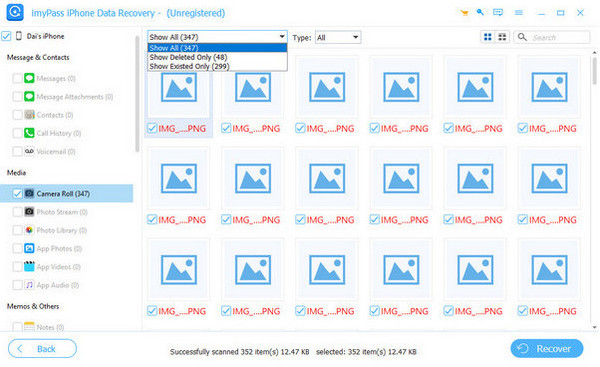
Select Recover from iOS Device and allow the software to scan your call history. You can use filters or search options to locate specific entries.
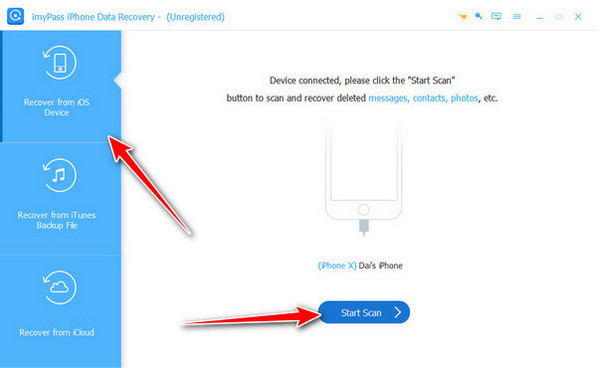
Choose the call logs that you wish to restore, save them to a folder on your computer, and recover them safely.
Method 2: Restore from iCloud Backup
If you have an iCloud backup that contains the missing call log, you can recover the deleted call log iPhone using iCloud. This method restores your call history from a previous backup but will replace your current data.
Open the Settings > General > Reset > Erase All Content and Settings.
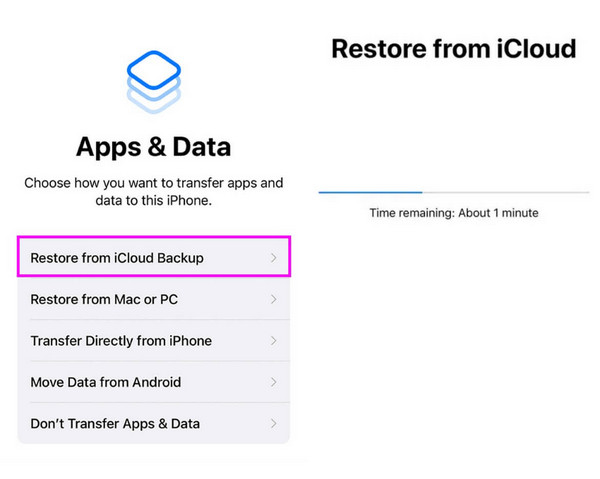
Set up your iPhone as new until the Apps & Data screen appears.
Tap Restore from iCloud Backup, sign in, and select a backup created before the calls were deleted. Wait for the restore process to finish. Your call history will now be restored.
Method 3: Restore from iTunes/Finder Backup
Restoring from iTunes or Finder backup is another method to retrieve deleted phone calls on an iPhone. This is useful if you regularly back up your iPhone to a computer, although it will overwrite current data.
Use a USB cable to link up your device. Open iTunes or Finder.
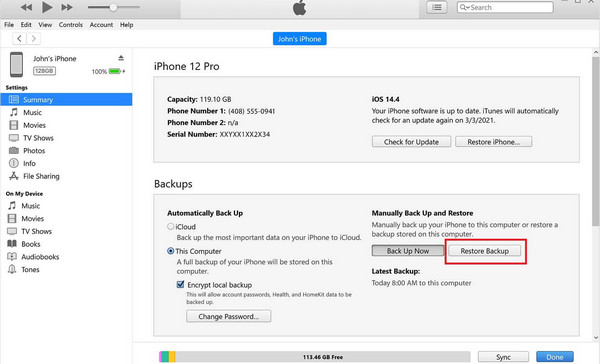
In iTunes, click the device icon. In Finder, select your iPhone from the sidebar.
Click Restore Backup and select the backup containing your deleted call history. Allow the restore to finish. Your deleted calls will now appear on your iPhone.
Method 4: Check Carrier Records or Contact Support
Some mobile carriers store call history for several months. You can recover deleted call logs on iPhone by checking your carrier's website or app, or contacting support to request older call records. To do it, you need to find the carrier's website and log in to your device. Find the Usage or Call History section to see if it is still accessible here. If you can not find it, then try to ask for the customer support team and request access to it.
Conclusion
Losing call history can feel like losing important pieces of your day, but it does not have to be permanent. By using tools like imyPass iPhone Data Recovery, restoring backups, or checking with your carrier, you can quickly reclaim your call logs. With these methods, you now know exactly how to retrieve deleted calls on iPhone and take control of your iPhone's call history without stress.
Clara has over 8 years of experience helping users recover lost files and transfer data. She previously worked as a data recovery technician for a major IT service company. Certified in Data Recovery and Digital Forensics, her articles focus on simple solutions that make complicated recovery tasks easier for everyday users.
Hot Solutions
-
Recover Data
- AppGeeker iOS Data Recovery Review
- Disk Drill iPhone Data Recovery Review
- How to Get iPhone Out of Recovery Mode
- How to Fix support.apple.com/iphone/restore
- How to Recover Data from DFU Mode
- Gbyte iPhone Data Recovery Review
- How to Recover iPhone Deleted Photos After 30 Days
- How to Recover Deleted Photos on iPad
-
Unlock iOS
-
Transfer Data
-
iOS Tips