



 Solution
 Support Center
 About Us
 Contact
5 Proven Software to Bypass Google Verification Easily
 Gideon Byron Published on January 30, 2026Unlock Android3-min reading
The Factory Reset Protection, or FRP, is a feature that secures the accessibility of your Android phone. The reason is that after a factory reset, your Android phone is vulnerable due to the security features being removed, like the lock screen password. The associated Google account is the primary requirement to unlock FRP.
In spite of that, the Google account associated with the FRP lock is sometimes forgotten by Android phone owners. They cannot regain access to their data due to this. Recovering the Google account credentials is the top way to unlock the said security feature. If you cannot, you can use the FRP lock Google verification bypass tool or software. Five of the best ones are posted in this article. Continue scrolling to discover them.

In this article:
Top 1. imyPass AnyPassGo
If you look for the best Google FRP bypass tool, imyPass AnyPassGo is the most recommended. Professionals and beginners can use this tool due to the simple interface it supports. The tool supports multiple Android phone brands, including Xiaomi, Huawei, Samsung, and more. The good thing about it is that it can bypass the Google FRP lock on your Android phones in a few clicks and seconds only!
Key Features:
- The tool supports Android phones running 5.1 Lollipop and later versions.
- It prevents unauthorized access to your Android phone when lost, stolen, or reset to factory settings.
- It does not recall the Google account information after unlocking.
Pros
- It only uses a USB connection for bypassing the Google FRP lock.
- It can also bypass the Android phone lock screen PIN, password, pattern, face recognition, and fingerprint.
- The Google FRP lock will not return after restarting the Android phone.
Cons
- It is only available on PCs.
Get the latest version of imyPass AnyPassGo from its website. After that, locate the downloaded file from the web browser of your computer. Then, install it to open the tool on your computer successfully.
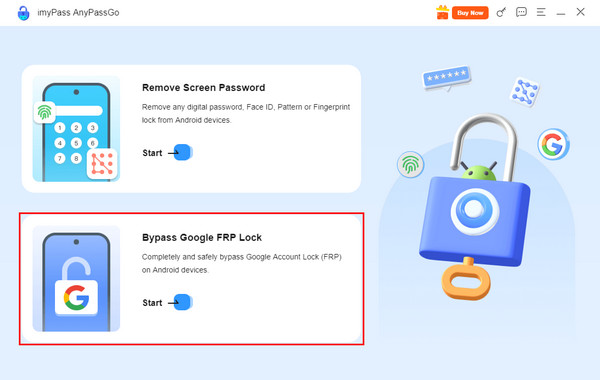
The supported main functions of the tool will be prompted on the first screen. You will also see their main operations. Please click the Start button under the Bypass Google FRP Lock button at the bottom left.
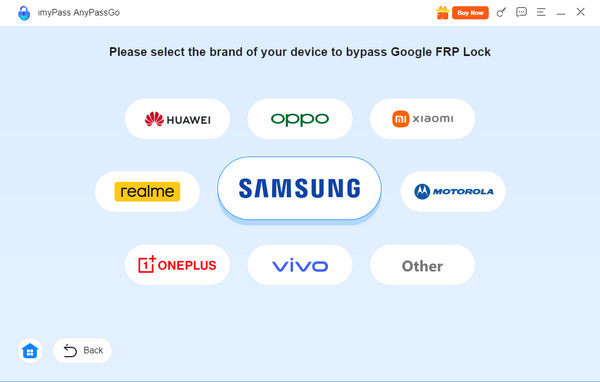
The tool will show you the Android phone brands that are supported. Please select the brand of your Android phone you prefer to bypass the FRP lock.
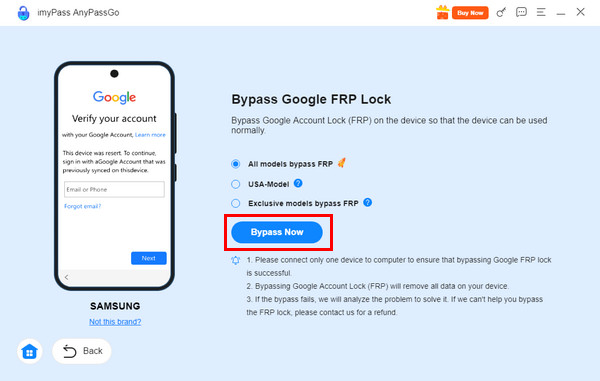
Choose from the listed models on the left side of the Android phone brand. Then, click the Bypass Now button at the bottom. Follow the on-screen instructions for turning on the USB Debugging mode and other operations on your Android phone. The FRP bypass will start afterward.
Top 2. iMobie DroidKit
iMobie DroidKit is famous for its supported scenarios to bypass the Google FRP lock. It includes forgotten Google account credentials, buying the Android phone second-hand, and more. The tool is recommended for beginners.
Key Features:
- It can bypass the Google FRP lock in different Android brands, including Motorola, Redmi, Samsung, and more.
- It allows you to regain full access to your Android phone.
Pros
- It allows you to log in to another Google account after the FRP bypass.
- It unlocks your Android phone and allows you to use it freely.
Cons
- Expensive full version.
- Limited free features.
- Inconsistent success rate.
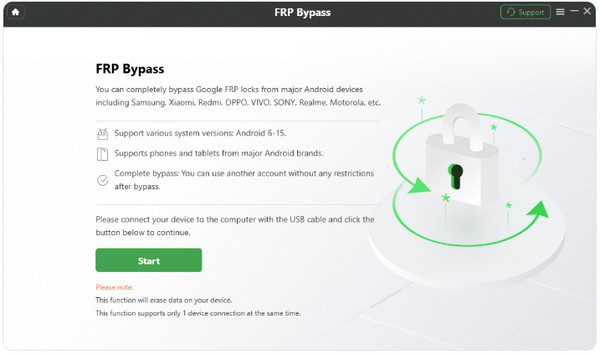
Open the tool and plug your Android phone using a USB cable. Click FRP Bypass afterward.
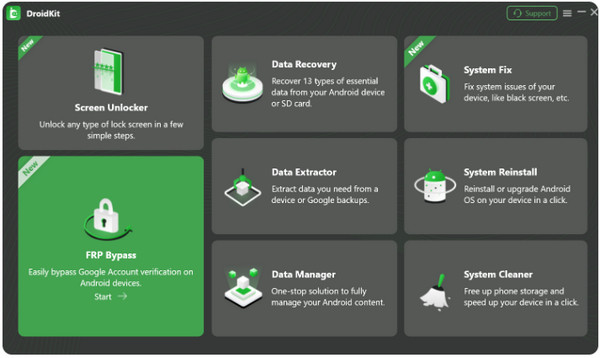
Click Start and follow the on-screen instructions. Choose your Android phone brand and version. Click Next and Start to Bypass. The FRP bypass will start.
Top 3. iToolab UnlockGo
iToolab UnlockGo is famous due to the simple unlocking process it gives for unlocking Google FRP bypass. This tool can also remove lock screen passwords, PINs, patterns, and more. It can also unlock early Samsung devices without losing data.
Key Features:
- This FRP bypass tool can also bypass the Google FRP lock on Android tablets.
- It can remove MDM profiles.
- It is available on Windows and macOS.
Pros
- It has a simple interface.
- It supports a money-back guarantee and support.
Cons
- Some features do not work with some Android phone brands or models.
- Its particular features erase the data from your Android phone.
- Any misuse of the tool can lead to legal and security issues.
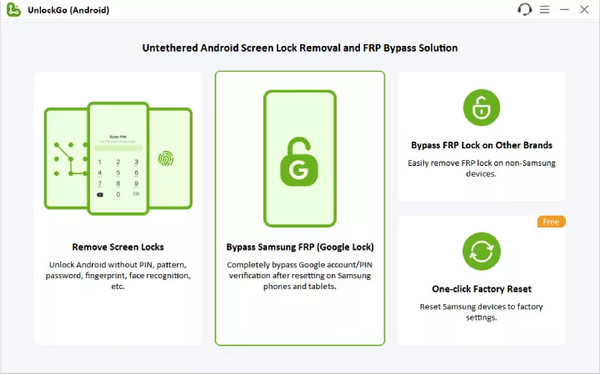
Download, set up, install, and open the tool. After that, click the Bypass Samsung FRP button from the first screen. Plug the Android phone into the computer afterward.
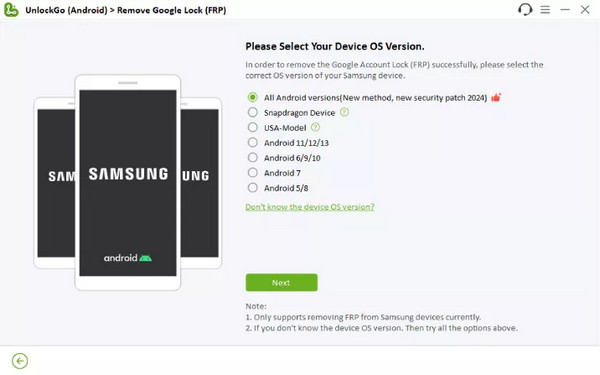
Select the model of your Android phone. Click the Next button at the bottom. Perform the on-screen instructions. Click the Next button, and the bypass process will start.
Top 4. Pangu FRP Bypass
Pangu FRP Bypass is a tool that is designed to bypass the Google FRP lock for professionals. It has a complex procedure to bypass the said Google lock. It can be used as a bypass Samsung Google account verification app APK since it can be downloaded to your Android phone.
Key Features:
- It is compatible with different Android phone brands, including Xiaomi, HTC, Samsung, LG, and more.
- The tool is completely free.
Pros
- It does not ask for additional information from your Google account.
- It can be directly used from the lock devices as an APK.
Cons
- You need a spare Android phone to use the app version of this tool.
- The tool offers a risky download process from different unverified resources.
- It is an unofficial tool because it is not well-documented.
- It does not have updated official support from its manufacturer.
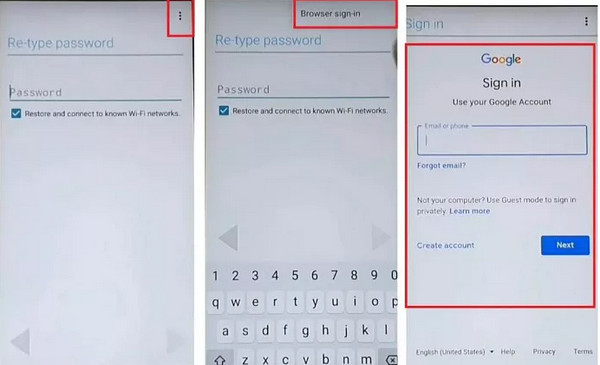
Open the Pangu FRP Bypass tool. Tap the Three Dots button at the top right. Select Browser Sign-in. After that, type a fresh Gmail account. Tap Next to continue. Make a different account password.
The New Account Successfully Included screen will appear. Select the option again and tap the Next button. Finally, the FRP bypass process will be acknowledged and begin.
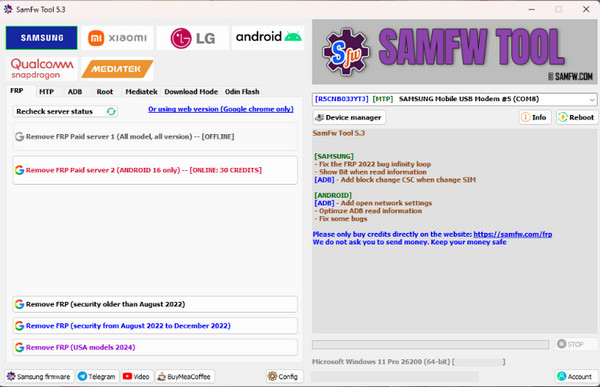
Top 5. SamFw FRP Tool
The FRP lock feature will appear when you cannot remove the Google account from the phone. SamFw FRP Tool can remove the mentioned Google lock in a few clicks. It uses ADB mode features, including disabling the Know from the devices. It can be the FRP lock Google verification bypass tool software for free with frequent updates.
Key Features:
- The Download mode and Odin flash support of the tool can fix certain issues on your Android phone.
- It can read the Android phone information, including the software version and model, automatically.
Pros
- It has an intuitive interface.
- It does not offer extensive features.
Cons
- It is limited to Samsung versions and models.
- You can face warranty risk and errors if used incorrectly.
Open SamFw FRP Tool. Plug your Android phone into the computer. Select your Android phone brand at the top. Select FRP from the drop-down list.
Select a method for the FRP bypass. The procedure will start immediately afterward.
Conclusion
To summarize, this post contains the five FRP lock Google verification bypass software for free or paid. imyPass AnyPassGo is considered one of the best tools. It can bypass your Google FRP lock in a few clicks! Also, it supports different Android phone brands. Downloading the tool will help you know it more.
Gideon is a senior editor from imyPass. He is an expert in unlocking phones and computers, and he has written password tutorials in imyPass for 3 years.
Hot Solutions
-
Unlock Android
-
Unlock iOS
-
Password Tips
-
iOS Tips

