Solution
 Support Center
 About Us
 Contact
How to Recover Old Kik Conversations on iPhone and Android
 Clara Prescott Published on January 13, 2026Recover Data3-min reading
Kik is one of the most well-known messaging applications on iPhone and Android. It is commonly used for anonymous chatting because it does not require a phone number to sign in. It relies on the preferred username of the users. You can send photos, videos, text, and other attachments to your messages. It allows you to explore groups by joining group chats from your account.
Unfortunately, these messages disappear from some of the accounts of Kik users. Loss of important messages from the app is very inconvenient. How to recover Kik messages? This article will show you the easy methods for your Android phone and iPhone. Kindly scroll below to know their full details.

In this article:
Part 1. Does Kik Keep Chat History After Logging Out and Re-logging In?
When we are using a messaging app, such as Kik, we tend to sign out of our accounts. It might be for switching accounts, hiding the messages from someone, and more. However, some Kik users are afraid to log out of their accounts from the app due to possible data loss. Does Kik keep chat history after logging out and re-logging in?
The short answer is, yes. Kik allows you to access your messages from the account if you sign in again to your account. The messages from the app will only be cleared when you sign out, as other messaging apps do.
Part 2. How to Recover Old Kik Messages Without Backup?
Not all Kik messages can back up their messages. They might not be so tech-savvy to do that. imyPass iPhone Data Recovery is here for you! It allows you to retrieve the Kik messages without a backup. Novices can use it because it does not offer a complex set of features for the recovery process. It supports the latest versions of iOS, including the earlier ones. Besides Kik messages, this tool can also retrieve your call logs, other messages, photos, videos, and more data types. Also, you can download it on your Mac or Windows. Learn how to recover Kik conversations with this tool using the steps below.
Go to the web page of the imyPass iPhone Data Recovery. After that, download the tool from the screen. Set up and install the file afterward. Later, launch the software on a computer to start the process.
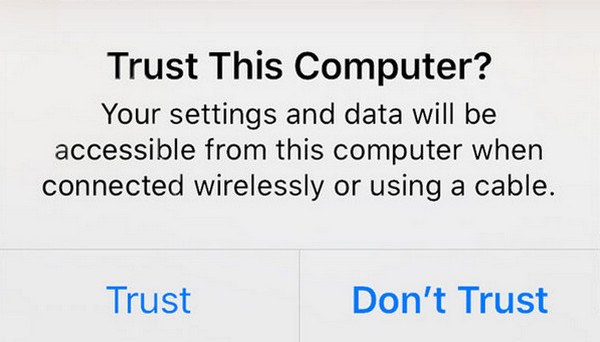
Plug your iPhone into your computer. Then, open your iPhone and tap the Trust button to allow the permission. Then, you will see the iPhone information on the screen.
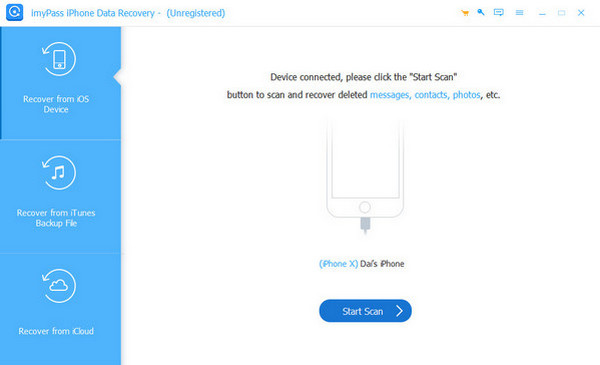
Select the Recover from iOS Device button. Please click the Start Scan button that is placed on the right. Later, the tool will scan your data. It will last for a few seconds or minutes, depending on their size and quantity.
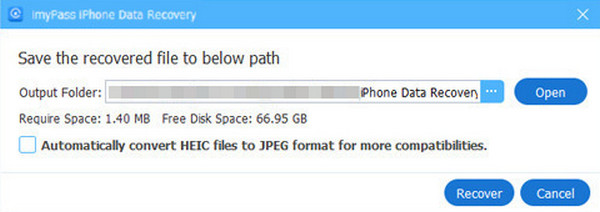
The results will appear afterward. Select the Kik messages you want to retrieve and click the Recover button.
Part 3. How to Recover Old Kik Messages from Backups?
Some people are organized enough to back up their Kik messages on their Android phone and iPhone. They might be afraid to lose their data, including the messages from the mentioned app. Did you have the chance to back them up before you lost them? Restore these backups by exploring the procedures below.
1. Google Backup
Most Android phone brands support Google as their built-in account. This service allows you to back up multiple data types on your Android phone. Kik messages are included for the backup. You can restore these backups if you have the associated Google account. The steps are available below.
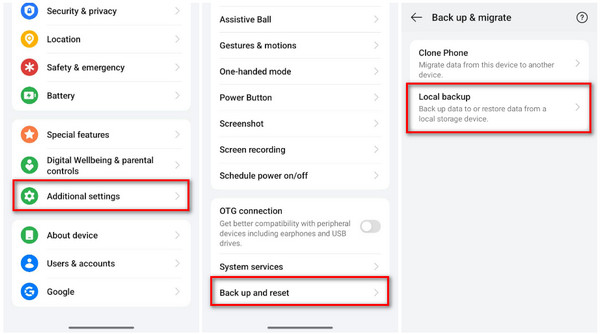
Open the Settings app on your Android phone. After that, tap the Additional Settings button on the first screen. Select the Back Up and Reset button at the bottom of the main interface.
Please tap the Back Up & Migrate button at the top. Select the Local Backup button and choose your local backup where the Kik messages are included. Then, restore them by following the on-screen instructions.
2. iCloud
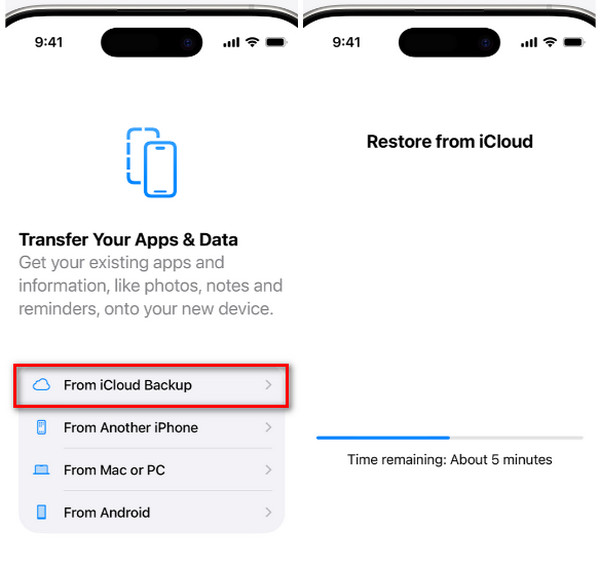
Your iPhone needs iCloud if you want additional features on its system. It offers countless security features to secure your data, including Activation Lock and more. This service allows you to back up your data, such as photos, videos, call logs, and most especially messages from different apps, like Kik. However, your iPhone must be new. If not, you can only recover iPhone data after a factory reset. But there are times when a new iPhone gets stuck on the Restore from iCloud screen. If you have a backup for your Kik messages with iCloud, restore them with the steps below.
Factory reset your iPhone if it is not brand new. After that, start the setup process, like adding the Wi-Fi network, language, and more. Stop when you reach the Transfer Your Apps & Data screen. On this screen, please select the From iCloud Backup button.
Sign in to the associated account from the backup. Then, choose the most recent backup for them. Enter the encryption passcode if needed, and the restore procedure will start immediately.
3. iTunes
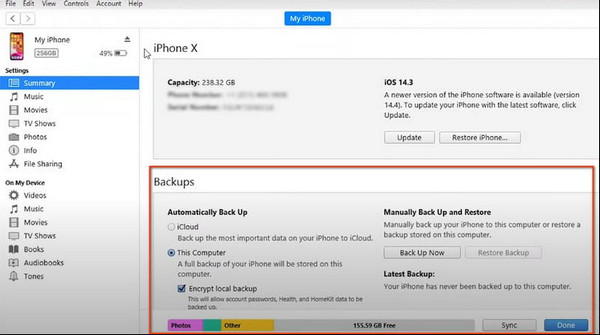
You might have encountered using iTunes on your computer. The reason is that it is a famous tool for playing multiple media files, like videos and audio. Did you know that it can also back up your iPhone data? It can back up most of the supported data on your iPhone, including the Kik messages. You can also use it to recover deleted contacts from the mentioned Apple device. However, there are times iTunes cannot restore an iPhone when its version is outdated. Keep the tool update to prevent this issue. You can follow the instructions below to operate iTunes correctly for restoring your backup.
Grab your USB cable and plug the iPhone into the computer where iTunes is installed. After that, click the iPhone button at the top of the main interface. The iPhone information will appear, and you need to click the Summary button on the left.
The tool will show you information about the backup and restore details. Please click the Restore Backup button at the bottom right. The tool will load to scan the available backups for your iPhone. Please select the most recent one to proceed.
Enter the password of the backup. Later, the restoring procedure will start. You only need to wait for the procedure to be completed before you unplug the iPhone from the computer.
Conclusion
All in all, this post will teach you how to recover deleted Kik messages. It listed the four easy ways to recover the mentioned messages from the app. It could be with or without a backup. imyPass iPhone Data Recovery can do both with your iPhone. We recommend that you download the mentioned third-party tool to know all of its helpful features.
Clara has over 8 years of experience helping users recover lost files and transfer data. She previously worked as a data recovery technician for a major IT service company. Certified in Data Recovery and Digital Forensics, her articles focus on simple solutions that make complicated recovery tasks easier for everyday users.
Hot Solutions
-
Recover Data
- AppGeeker iOS Data Recovery Review
- Disk Drill iPhone Data Recovery Review
- How to Get iPhone Out of Recovery Mode
- How to Fix support.apple.com/iphone/restore
- How to Recover Data from DFU Mode
- Gbyte iPhone Data Recovery Review
- How to Recover iPhone Deleted Photos After 30 Days
- How to Recover Deleted Photos on iPad
-
Unlock iOS
-
Transfer Data
-
iOS Tips