Solution
 Support Center
 About Us
 Contact
How to Find Deleted Twitter Messages on Mobile and Computer
 Clara Prescott Published on July 17, 2026Recover Data3-min reading
Sometimes, you may not think too much when freeing up your Twitter, now X, direct messages. In most cases, it is fine, as you don’t want too many messages in your inbox. Some messages may be significant to you, but this realization only hits you after they are removed. Even though Twitter doesn’t come with a built-in Trash or Delete folder, there are a few ways you might be able to see deleted messages on Twitter.

In this article:
Part 1. How to Check Deleted Messages on Twitter in the Inbox
One simple way to check deleted messages on Twitter is through your email notifications. According to Twitter, it sends an email notification every time someone sends you a direct message. The notification includes the full message. It is worth trying the inbox of your email if you have Twitter email notification enabled.
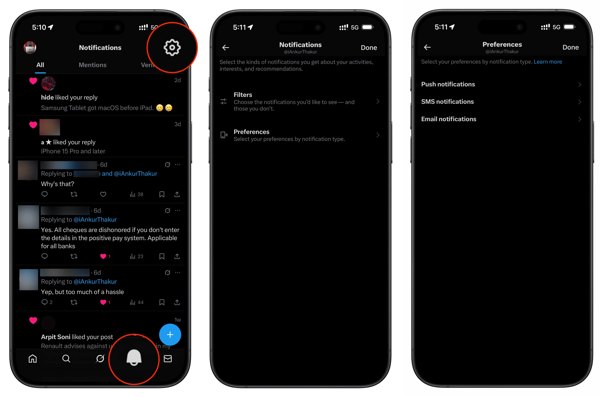
Go to Settings on Twitter.
Navigate Notifications, choose Preferences, and tap Email notifications.
If it is enabled before you delete messages, continue.
Open the inbox of your email connected to your Twitter account.
Type x.com or twitter.com in the search field and press the Enter or Return key on your keyboard.
Narrow results with a date range.
Then, read the email to find the message.
Part 2. How to Get Back Deleted Twitter Messages via Senders
Even if you delete messages on Twitter from your side, the senders can still keep them in their accounts. In other words, Twitter direct messages only delete from either the sender or receiver side, but not both. To get back deleted Twitter messages, ask the other side to send them again if they still have the conversation thread.
Part 3. How to See Deleted Twitter Messages by Archive
Twitter allows users to download a data archive to find deleted Twitter messages. It takes up to 24 hours to get the archive once Twitter receives your request. Plus, you must verify your identity during the process. Bear in mind that the archive includes a wide range of data, and you have to search for the desired messages.
Log in to your account on Twitter.
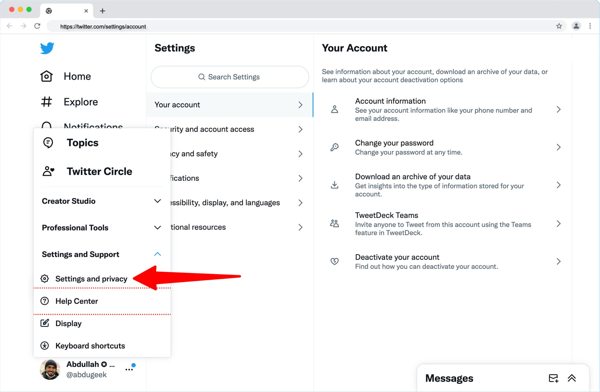
Click More, choose System and Support, and click Settings and privacy.
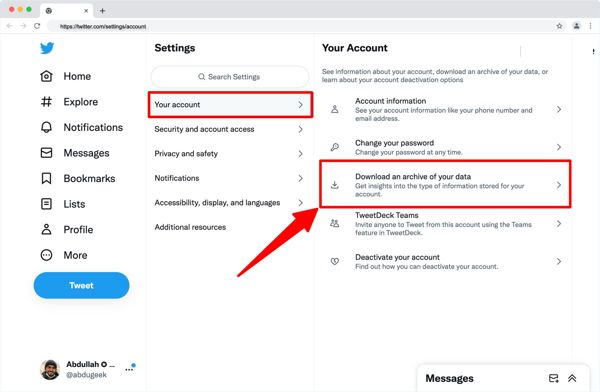
Click Your account and hit Download an archive of your data.
Enter your Twitter password again.
Select the verification channel, and enter the code you receive.
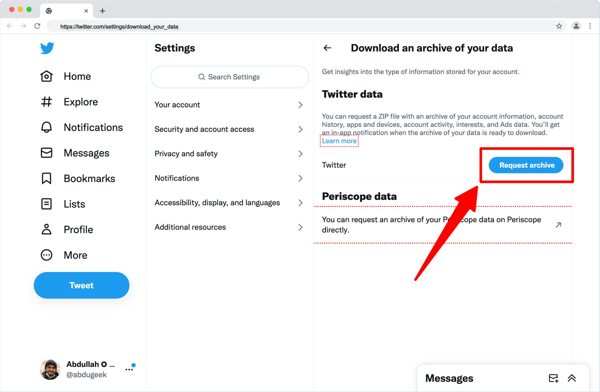
Next, click the Request archive button.
24 hours later, open the email from Twitter.
Open the download Twitter archive page.
Finally, click the Download archive button to get the archive.
Then, open the archive file and find the deleted Twitter messages.
You May Also Like:
Part 4. How to Recover Deleted Messages on Twitter for iOS
If you intend to recover deleted Twitter messages on your iPhone, imyPass iPhone Data Recovery is a good option. It can scan your iPhone memory and look for lost data even if you don’t have a backup. Furthermore, the user-friendly design simplifies the workflow of message recovery.
4,000,000+ Downloads
Recover deleted messages on your iPhone in 3 steps.
Extract data from iPhone memory or backups.
Work for messages and attachments.
Preview lost Twitter messages for selective recovery.
Support a wide range of iPhones and iPad devices.
How to Recover Deleted Twitter Messages on Your iPhone
Scan your iPhone
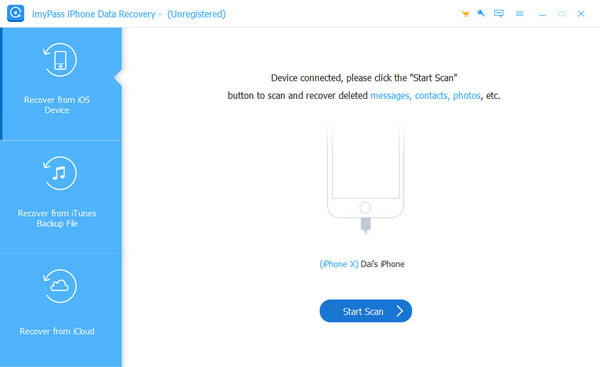
Start the message recovery software for iPhone after installing it on your PC. There is another version for Mac. Go to the Recover from iOS Device tab. Connect your iPhone to your PC with a Lightning cable. Follow the onscreen instructions to trust this computer. Click the Start Scan button to begin scanning your memory.
Preview deleted messages
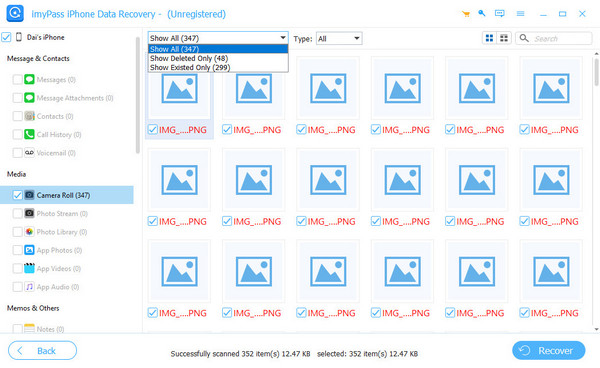
Once data scanning completes, choose the data types you want to recover on the sidebar. To narrow the results, choose Show Deleted Only from the dropdown option. Then, preview the lost messages on your iPhone.
Recover deleted Twitter messages
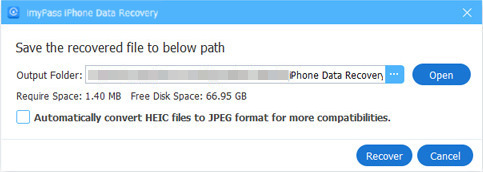
Select all messages you want to get back and click the Recover button at the bottom right corner. Click the Open button on the pop-up dialog to set an output folder and hit Recover. When it is done, check the deleted Twitter messages on your computer.
Conclusion
This article shared multiple ways to check deleted messages on Twitter in various situations. If you have turned on email notification in your account, you can check the lost messages and other information in the linked email address. Moreover, you can submit a request to download all messages. Asking the other side to send the lost messages is another option. imyPass iPhone Data Recovery is the ultimate option to get back lost messages on your iPhone.
Clara has over 8 years of experience helping users recover lost files and transfer data. She previously worked as a data recovery technician for a major IT service company. Certified in Data Recovery and Digital Forensics, her articles focus on simple solutions that make complicated recovery tasks easier for everyday users.
Hot Solutions
-
Recover Data
- AppGeeker iOS Data Recovery Review
- Disk Drill iPhone Data Recovery Review
- How to Get iPhone Out of Recovery Mode
- How to Fix support.apple.com/iphone/restore
- How to Recover Data from DFU Mode
- Gbyte iPhone Data Recovery Review
- How to Recover iPhone Deleted Photos After 30 Days
- How to Recover Deleted Photos on iPad
-
Unlock iOS
-
Transfer Data
-
iOS Tips