Solution
 Support Center
 About Us
 Contact
Best iPhone Data Recovery Solutions for Lost or Deleted Data
 Clara Prescott Published on January 23, 2026Recover Data3-min reading
Losing photos, notes, or work files can feel sudden and stressful. This is why many users turn to iPhone data recovery tools to get their data back fast. In real tests, some tools worked well while others missed key items or slowed down during scans. You need clear facts before you choose one, not broad claims or empty promises. This review gives you simple results from real use so you can see what each tool can and cannot do. Up next, we will look at our test steps, the top tools to try, and key tips that help keep your data safe.

In this article:
Part 1. Our Evaluation Criteria for the Best iPhone Data Recovery
Before we compare tools, it helps to set the right standards. Many users choose a data recovery on the iPhone based on ads or bold claims, but real results depend on a few core factors. These criteria guide our tests and help you judge each option with confidence. They show what matters most when you want safe, fast, and reliable results from any recovery app.
1. Scan Accuracy and Success Rate
We check how well each iPhone data recovery software finds lost files. This includes deep scans, deleted item detection, and the recovery of photos, videos, messages, and app data.
2. Safety and Security Standards
For any third-party data recovery software for iPhone, we test, user safety is a top factor. We look at privacy, encryption, and on-device protection to ensure your data stays secure.
3. Ease of Use and Recovery Speed
A good data recovery software for iPhone should be simple for all users. We check setup steps, layout, scan time, and how fast files return once found.
4. Device and iOS Compatibility
We review how each data recovery software for iPhone performs across iPhone models and iOS versions. This includes support for issues like deletion, system crashes, and update failures.
5. Pricing and Overall Value
A reliable iPhone data recovery tool should offer fair pricing for what it can restore. We compare free features, limits, paid plans, and real-world value based on our tests.
Part 2. Top 5 iPhone Data Recovery Software
1. imyPass iPhone Data Recovery
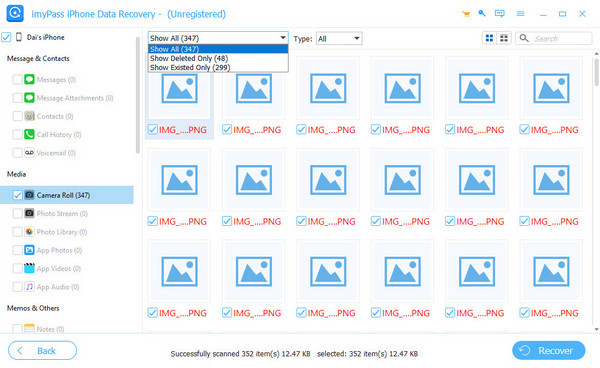
imyPass iPhone Data Recovery is easy to use, reliable, and thus makes it an ideal iPhone data recovery app for beginners and casual users. It divides files that have been recovered into tidy boxes that can be easily chosen. The scanning functionality was also the same with the older and newer devices, and it is a good option in real-world applications.
Pros
- Uncomplicated, user-friendly interface
- Sorting recovered files into a clean category
- Potent photo, message, note, and app recovery
- Supports the older and latest iPhones
Cons
- Free version limits recovery
User Experience:
imyPass has a no-frills workflow. Scans begin immediately, and the results are displayed in distinct sets. The tool was not crashing or slowing down in any of the tests. It is also dependable and simple when it comes to minor and deep recoveries.
Key Features:
- Direct device recovery plus iTunes and iCloud support
- Preview-before-recover workflow
- Recover messages, contacts, app data, notes, call logs, and more
- Suitable for both minor deletions and deep scans
Price: With a 1-month License at $29.96 and a Lifetime License at $59.96, imyPass is one of the most affordable options on this list while still delivering reliable and effective recovery.
2. Disk Drill iPhone Data Recovery
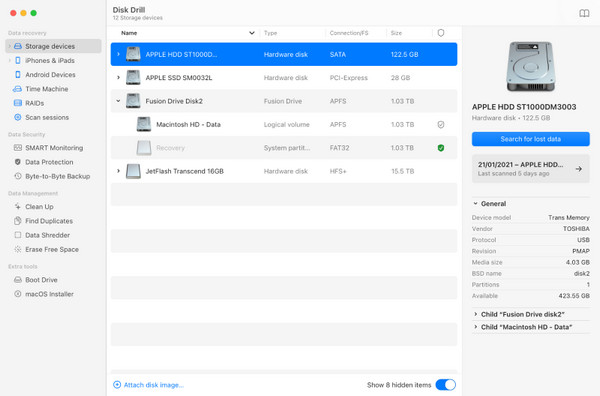
The first in the list of the best iPhone data recovery software is Disk Drill because it is fast, accurate and user-friendly. In the process of testing, it found hard disk images and messages and application information within a large spectrum that had been erased. Its power to produce its own backup functions, circumventing iOS limitations, comes in handy when you have no existing iTunes backup.
Pros
- Modern and intuitive interface
- Fast, accurate scans
- Works on both Mac and Windows
- Strong preview and filtering tools
Cons
- Only previews files within the free version
- iPhone is most effective when used with macOS
User Experience:
Disk Drill delivers a smooth workflow. Big thumbnails ensure that files are easily found, and the speed of scanning is faster than the majority of its competitors. Photo and message recovery was high during the testing.
Key Features:
- Recovers from device, iTunes backups, and soon iCloud
- Broad iOS and device support
- Preview all recoverable items
- Recover app data from WhatsApp, Line, WeChat, and more
Price: Pro version is $89, with lifetime updates is $109
3. iMobie PhoneRescue
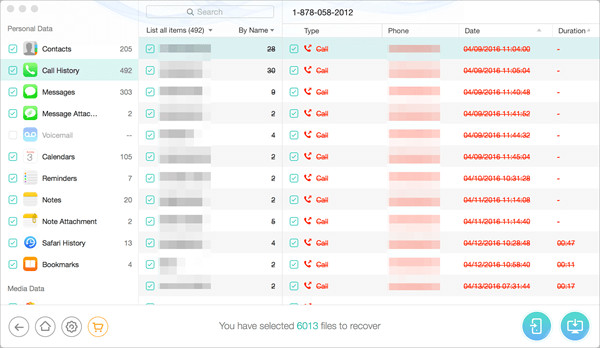
iMobie PhoneRescue combines data recovery on iPhone with device repair tools. It has a well-refined interface and contains various modes of recovery, such as iTunes and iCloud backup. The scan is more time-consuming, but the results are comprehensive.
Pros
- Elegant and contemporary interface
- Added system repair modes
- Powerful message and attachment recovery
- Supports iCloud, iTunes and Device recovery
Cons
- Longer scan times (around 1 hour)
- Full recovery requires a paid license
User Experience:
Although slower to scan, PhoneRescue presents recovered data in clear lists with large icons. It is a good option for users who want recovery and device repair in one tool.
Key Features:
- Recovers data across multiple sources
- Fixes system errors
- Removes Screen Time and lock screen passcodes
- Selective recovery with previews
Price: 3-Month subscription is $65.99, 1-Year plan is $69.99, Lifetime license is $99.99
4. Tenorshare UltData
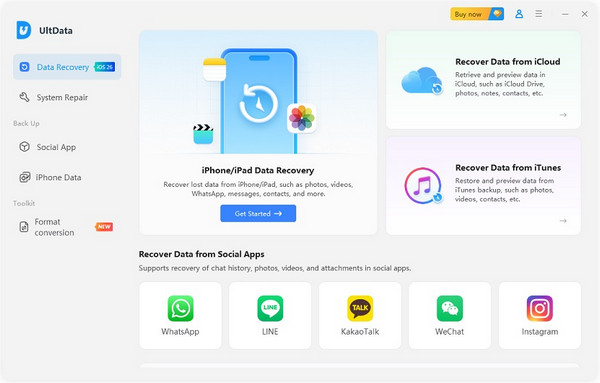
Tenorshare Ultdata is a safe and easy-to-use application, which is regarded as one of the best alternatives to Fonepaw iPhone Data Recovery. It aids in the restoration of iOS devices and iTunes backups, and the management of more than 35 file types. It is easy to identify files because of their preview feature, although some objects may be found with uncertainty.
Pros
- Stable and easy to use
- Fast scanning speed
- Handles a variety of file formats
- Also incorporates other iOS features
Cons
- Higher cost compared to some alternatives
- May not find as many files as other top tools
User Experience:
UltData performed well in tests, scanning devices and allowing selective recovery. Beginners will find the interface intuitive, though you may need to check multiple categories for certain files, like photos or messages. Better to scan the device before purchasing the software.
Key Features:
- Recover deleted or lost data from iPhone and iTunes backups
- Support for more than 35 file types
- Compatible with a wide range of iPhone models
- iOS System Fix and backup/restore features
- Selective recovery to restore only what you need
- Option to restore files directly to the iOS device
Price: 1-Month License is $153.17, 1-Year License is $166.50, Lifetime License is $199.83
5. Dr.Fone - iOS Data Recovery
Dr.Fone - iOS Data Recovery is a reliable free iPhone data recovery software and also has other features, such as the ability to repair your iPhone system, screen unlock, and data transfer. Though it does a good job, it is not as user-friendly as more highly ranked tools, and the cost is a bit more for a similar outcome.
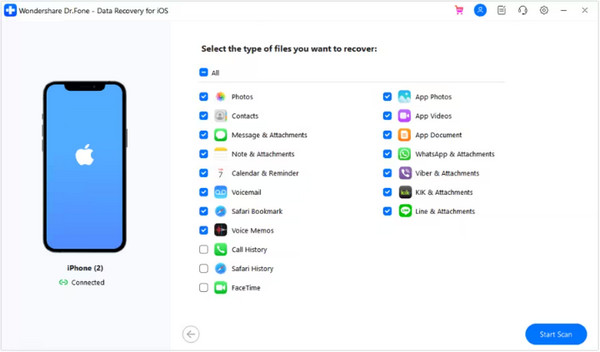
Pros
- Reliable recovery performance
- Includes extra features
- Clean, simple interface
- Large previews of recoverable files
Cons
- Expensive performance of the same kind
- Less user-friendly interface compared to the competition
User Experience:
Dr.Fone was able to restore test files consistently, but the tool is slower and is not as easy to use as Disk Drill or imyPass. It is a good choice and especially when it is bought at a discount.
Key Features:
- Three recovery modes: device, iTunes, iCloud
- Selective recovery
- Wide iOS compatibility
- Export data to PC or back to iPhone
Price: Monthly plan is $26.95, Annual plan is $35.95, Perpetual plan is $41.95
Part 3. Tips You Should Know When Using an iPhone Data Recovery Software
Losing files on your iPhone is stressful, but the right approach makes recovery easier. Whether you use Stellar Data Recovery for iPhone or another tool, start with a free trial to see what files can be recovered. Make sure the software supports your iOS version and device model.
Back up your iPhone first to prevent overwriting data, add encryption when using iTunes backup to PC, and keep the iTunes backup password. Stick to trusted apps and avoid unknown programs or shady links. Focus on recovering the most important files first, and keep your device charged and connected during the process.
Update your software regularly and use one tool at a time. Only follow advice from real users when choosing the best iPhone data recovery method.
Conclusion
Technically, if the files you want to recover are not in your Recently Deleted folder, you will need to use a third-party data recovery software for iPhone. In this guide, we reviewed the top five options to help you recover deleted files efficiently. Consider your needs, device compatibility, and preferred features to choose the best solution. With the right tool, restoring your important data can be quick, safe, and hassle-free.
Clara is an editor from imyPass. She specializes in data recovery. You can find professional tutorials and solutions for recovering lost data from any device. Many users reported that his tutorial is easy and useful.
Hot Solutions
-
Recover Data
- Recover WhatsApp View Once Photo
- Recover Deleted TikTok Videos on Mobile
- Recover Deleted Facebook Photo
- Recover Viber Messages, Photos, etc.
- Recover Deleted Snapchat Photos
- 5 Best Contact Recovery Apps
- Recover Deleted Discord Messages
- AppGeeker iOS Data Recovery Review
- Recover Data from DFU Mode
- Cannot Restore iPhone Backup
-
Unlock iOS
-
iOS Tips
-
Password Tips