Solution
 Support Center
 About Us
 Contact
How to Play WeChat AUD Voice Messages: 2 Easy Methods
 Clara Prescott Published on May 14, 2026iOS Tips3-min reading
Normally, we play WeChat voice messages by simply clicking on the message bar. But what if an important voice message is accidentally deleted or exported? In such cases, the recovered messages are usually saved as .aud files. The problem is, AUD files cannot be played directly with standard media players like Windows Media Player or QuickTime. So, how can you play WeChat AUD voice messages on your computer? Keep reading.

In this article:
Part 1: What is AUD File
AUD is an audio format developed by Tencent, specifically used for voice messages on WeChat. These files are generated whenever users send or receive voice messages, which can be played instantly within the app.
AUD uses the SILK codec for efficient speech compression, keeping the file size small. It often uses a variable bit rate and a unique channel structure tailored for messaging apps. However, it is not a universal audio format, so standard media players like Windows Media Player or QuickTime cannot play it directly. To listen to AUD files on your computer, you need download a compatible player or convert them to other audio formats such as WAV or AMR.
Part 2: How to Play AUD Files on Your Computer via Audacity
To play AUD files on your computer, you need software that can import raw audio data. Audacity, a free and open-source audio editor, supports this feature and works on Windows, Mac, and other platforms.
You can follow the easy steps below to play AUD files on your computer.
Free download Audacity to your computer according to the reference. Run it after installation.
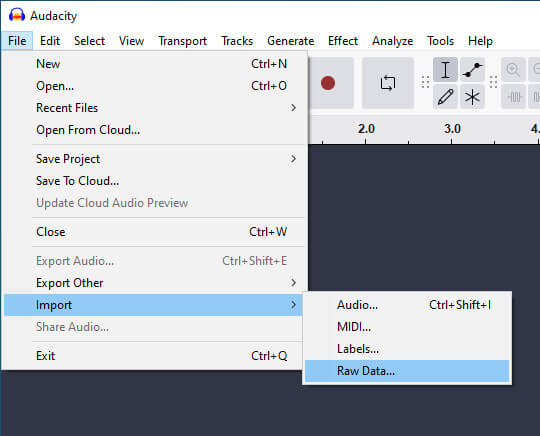
Press the File button in the top left navigation bar. Then, find Import and click it. Next, click Raw Data.
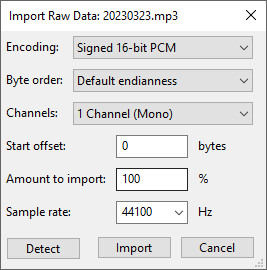
Locate the AUD file you want to play, select it and press Open. Then, a window will pop up. You should set the parameters, like encoding, byte order, channels, start offset, sample rate and more, for your AUD file.
Audacity enables users to import more than one audio clip so that you can import several files at once. Accordingly, you need to set the parameters for each AUD file.
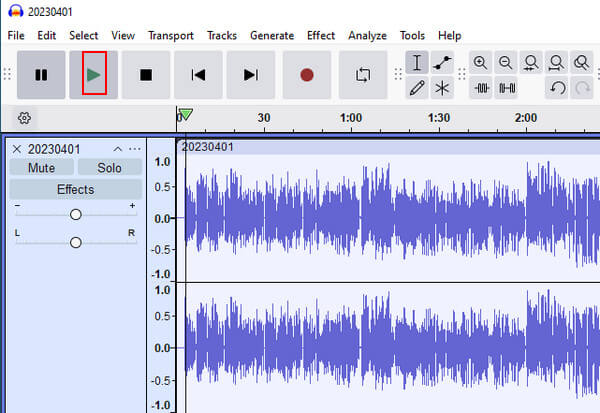
Click the green Play button to play the AUD voice message.
Part 3: Playing AUD Files by Converting Audio Format
You can also play WeChat voice messages in .aud format by converting them. You can use professional audio converters to convert the format from AUD to WAV, MP3, or other formats that can be played on normal media players.
Here we also take Audacity as an example. The steps are quite easy.
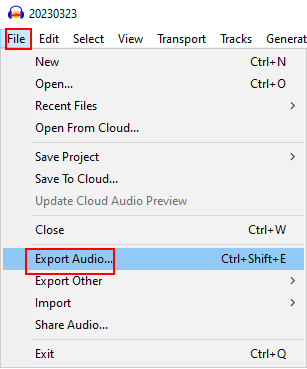
Just when you have finished the steps mentioned in Part 2, go to the top left navigation bar again. Select File and find Export Audio in the following list.
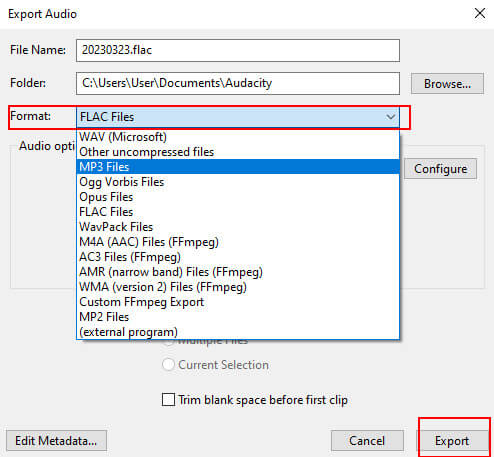
In the pop-up window, go to the third line bar, click the drop-down arrow after Format and choose the exported formats like WAV, MP3, OGG, etc.
Remember to choose the format that is compatible with your built-in media player. Then, you can successfully play WeChat voice messages on your computer without an AUD player.
Part 4: How to Recover Deleted WeChat Voice Messages
Up to now, we've covered how to play or convert AUD files on your computer. But what if the WeChat voice messages you want to listen to have been accidentally deleted? In that case, you first need to recover the deleted messages before you can play them.
imyPass iPhone Data Recovery is a professional tool that allows you to recover deleted or lost data on iOS devices quickly and safely. It can retrieve 20+ types of data in various scenarios, including messages, photos, contacts, and more.
Download and install the software on your computer.
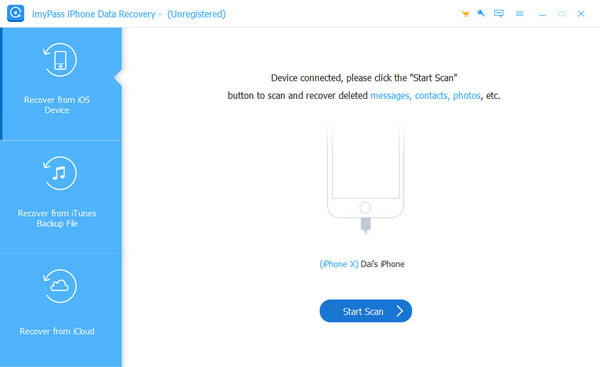
launch it and choose Recover from iOS device from the left sidebar. Connect your iOS device to the computer via a USB cable, then click the Start Scan button.
All the recoverable data on your device will be displayed. You can filter the result by switching between Show All and Show Deleted Only.
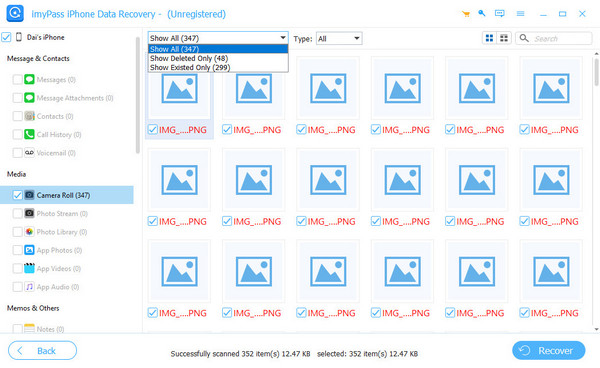
Select the data you want to recover and click the Recover button.
Conclusion
In this article, we have introduced what AUD files are and provided 2 practical and easy ways to play WeChat AUD voice messages on the computer via Audacity. Hope this guide is useful for you. If you have other better solutions or more problems, welcome to put forward them in the comment area below.
Clara has over 8 years of experience helping users recover lost files and transfer data. She previously worked as a data recovery technician for a major IT service company. Certified in Data Recovery and Digital Forensics, her articles focus on simple solutions that make complicated recovery tasks easier for everyday users.
Hot Solutions
-
iOS Tips
-
Unlock iOS
-
GPS Location
-
Windows Tips