



 Solution
 Support Center
 About Us
 Contact
What Is GPS Joystick and How to Use It on Android and iOS
 Penny Warren Published on February 04, 2026GPS Location3-min reading
By default, developers added GPS spoofer apps on mobile devices to test their apps. However, these spoofer apps are able to change the mobile device's geolocation and hide the real location quickly. That provides more fun when playing AR games, sharing photos on social media, or access streaming content. GPS Joystick, for example, is one of the best GPS spoofer apps. This article reviews the app for iOS and Android users.

In this article:
Part 1: GPS Joystick Review
As its name indicates, GPS Joystick can spoof your phone's GPS data, making mocking locations has never been easier. That makes you change your GPS location quickly without a computer or extra hardware.
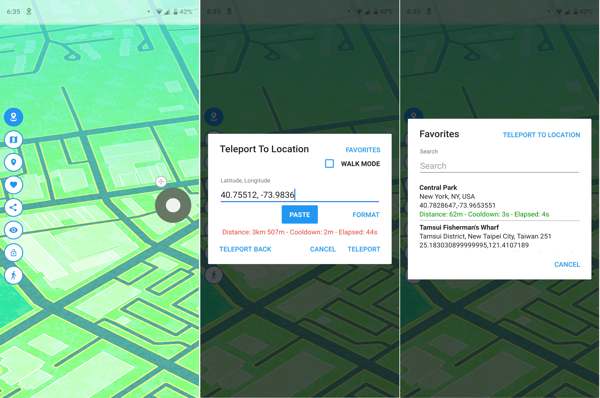
Main Features of the GPS Joystick for iOS and Android
- 1.Modify the GPS metadata of your photos.
- 2.Change the GPS without notifying others.
- 3.Work on both iOS and Android devices.
- 4.Record location history for using later.
- 5.Available to any location globally from a map.
- 6.Instantly change location with specific latitude and longitude.
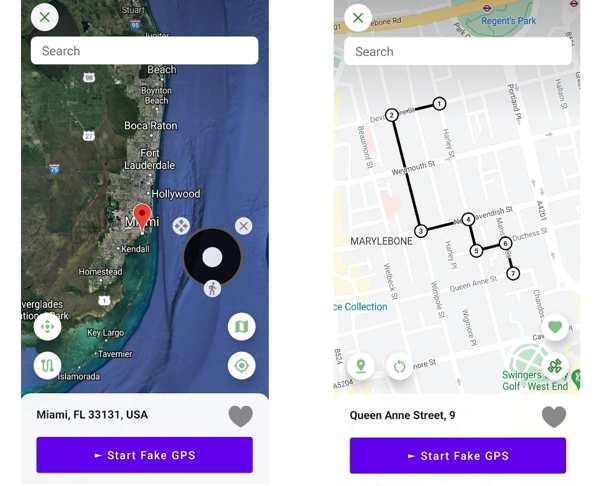
- 7.Make custom routes with your fingers.
- 8.Simulate walking or running with custom options.
- 9.Prevent apps from detecting fake GPS location.
GPS Joystick Review
Pros
- It is free to download from the Google Play Store and Apple App Store.
- It offers multiple modes for changing locations and simulating routes.
- It won't ask you to root Android or jailbreak your iPhone.
- It is available in a wide range of languages.
Cons
- Advanced features are required for in-app purchase.
- There are ads in the free version.
- High risk of being detected by Pokémon Go.
Is the GPS Joystick Safe to Use?
According to our test, GPS Joystick won't install malware or spyware on your mobile device. It is safe even when accessing streaming platforms. However, it may bring other risks. Once your game developer detects the app, for example, your account may be banned.
Part 2: How to Use the GPS Joystick
Install the GPS Joystick from the Play Store or App Store.
If you don't have the Play Store or App Store, install the GPS Joystick APK from the official website.
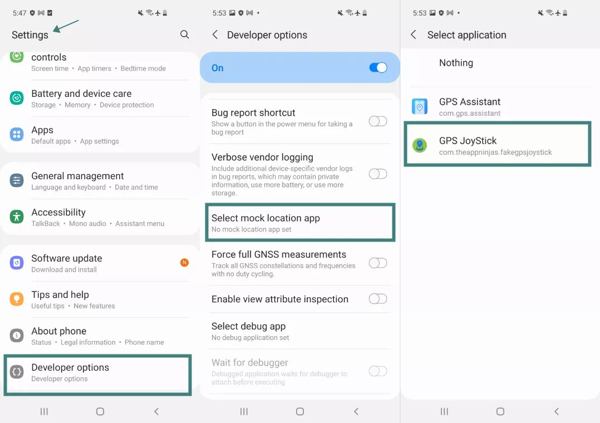
If you are using Android GPS Joystick, go to the Settings app, choose Developer options, tap Select mock location app, and pick GPS Joystick.
If you want to change your GPS location, hit the right position on the map or input the latitude and longitude.
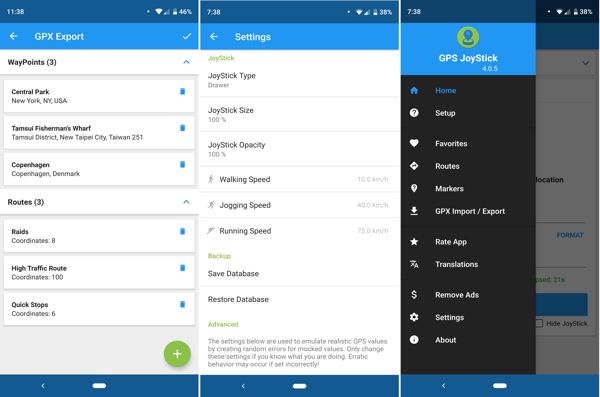
Tap the Start or Teleport button to confirm it.
When you want to stop faking location, tap the Stop button in the app or the GPS Joystick bar on the top notification pane.
Note:
If you wish to make a virtual route, add the starting spot and stops on the map.
Part 3: Best Alternative to GPS Joystick
As mentioned previously, the GPS Joystick may get your account banned. Thankfully, iLocaGo can help you resolve this problem. It fakes your GPS location on your mobile device without installing anything on your iPhone or Android phone. Therefore, apps and services cannot detect your action. Moreover, it provides a variety of custom options to simulate walk, running, and traffic.

4,000,000+ Downloads
Fake your geolocation on your mobile device in one click.
Create and simulate virtual locations and routes quickly.
Offer multiple modes for different purposes.
Available on social media, streaming platforms, AR games, etc.
Support the latest version of iOS and Android.
How to Fake GPS Location on Your Phone
Install the GPS Joystick alternative
Launch the alternative to the GPS Joystick once you install it on your PC. It is compatible with Windows 11/10/8/7. There is another version for Mac. Plug your iPhone or Android phone into your computer with a compatible cable. The software will detect your device automatically.

You can connect your Android phone wirelessly.
Choose Modify Location
Then, you will be presented with a few modes:
Modify Location: change location to a specific address.
One-stop Mode: create a route with the starting and ending spots.
Multi-stop Mode: make a custom route with the starting spot and multiple stops.
Joystick Mode: move your GPS with a virtual joystick.
Here, we choose Modify Location to proceed.

Fake location on your phone
Type in an accurate address into the field. If you don't have an address, click a position on the map. Finally, click on the Modify button to confirm it.

Note:
When you want to stop faking location, disconnect your phone and close the software.
Conclusion
Now, you should understand what the GPS Joystick Pokemon GO is, the advantages and disadvantages, and how to use it to fake your location. If you don't like the spoofer app or it is unavailable on your device, we also recommend an alternative solution, iLocaGo. It is more stable and reliable to use.
Penny is a senior editor from imyPass. She has focused on discovering perfect GPS location solutions in all scenarios, and also has experience in fixing computers.
Hot Solutions
-
GPS Location
- Best Pokemon Go Locations with Coordinates
- Turn Your Location Off on Life360
- How to Change Location on iPhone
- Review of iSpoofer Pokemon Go
- Set Virtual Locations on iPhone and Android
- TikTok Track Your Location
- Monster Hunter Now Joystick
- Review of IP Location Finder
- Change Mobile Legends Location
- Change Location on Tiktok
-
Unlock iOS
-
iOS Tips
-
Unlock Android


