Solution
 Support Center
 About Us
 Contact

Monster Hunter Now Joystick: Top 3 Fake GPS Tools Compared
 Penny Warren Published on November 27, 2026GPS Location3-min reading
Monster Hunter Now uses your real-world location to bring nearby monsters, gathering points, and hunting spots to your game map. This means you usually need to move around to explore different areas. Can you hunt monsters without physical movement? Yes! With the three Monster Hunter Now joystick apps mentioned in this guide, you can hunt rare creatures while staying indoors!

In this article:
How Does a GPS Joystick Work in Monster Hunter Now
Monster Hunter Now is a location-based AR game that brings monster hunting into the real world. Players need to explore their surroundings to find nearby monster, collect resources from gathering points, and join hunts. The game uses your phone's GPS location to update the map and show nearby activities. As you move around in real life, the in-game surroundings change too.
Some players may live in areas with fewer gathering points or monsters. It's inconvenient for them to travel around the game map. That's why some players look for a Monster Hunter Now joystick. A Monster Hunter Now joystick tool can change your GPS location on iPhone or Android phone. You can set a virtual GPS location by selecting coordinates on a map, or move in different directions using a joystick, keyboard, or mouse.
Note:
According to the game's official gameplay fairness policy, GPS spoofing and unauthorized third-party software are prohibited. Using these tools in the game may put your account at risk of warnings or other penalties.
Top 1 Joysticker. imyPass iLocaGo [iOS & Android]
Supported versions: iOS 5–27 and Android 5–17.
imyPass iLocaGo is a GPS location changer for iOS and Android. It lets users change phone location, simulate routes, and control movement using a joystick. It can be useful for exploring location-based games and apps, like Monster Hunter Now, Hinge, and Pokémon Go.
iLocaGo offers several location modes to suit different needs. Modify Location lets you set a specific GPS location, while One-stop and Multi-stop Mode allows you to create routes with one or multiple stops. You can also use Joystick Mode to control virtual movement in real time and adjust the speed.
Go download the iLocaGo app on your Windows or Mac, and make sure to tick the suitable version on your PC. Then, install the package that you have downloaded, follow the setup it requires, and launch it.
After that, connect your phone using the charging cable to the USB port of your computer. Next, click the Joystick Mode on the interface to start moving on Monster Hunter Now.
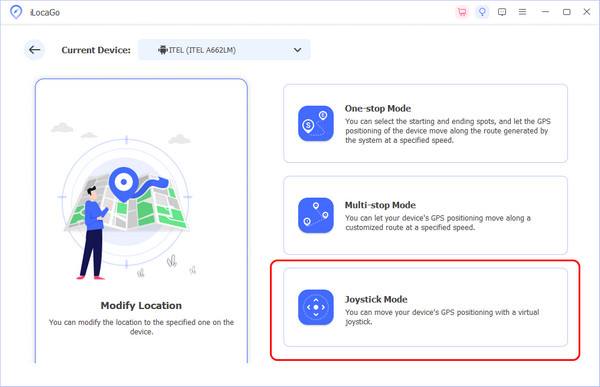
Lastly, to move on to the Free Mode, you can use the arrow cursor on your keyboard or the W, S, D, and A. But if you choose the Mouse Mode, you will use the mouse to move from one place to another. Not only can you use the joystick feature on MHN, but it is also available on the Pokemon Go joystick as well.
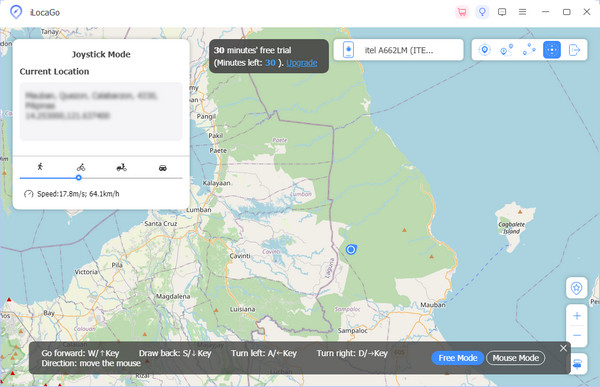
Top 2 Joysticker. PGsharp [Android]
Supported versions: Android 9.0 or above for the current version. Legacy versions are available for Android 8.1 and below.
PGSharp is a well-known GPS spoofing application targeted at Android platform users who desire to experience location-based gameplay from stationary positions. Players can monitor and chase monsters while remaining inside their homes through an easier and more convenient gaming experience using a fake GPS joystick in Monster Hunter Now.
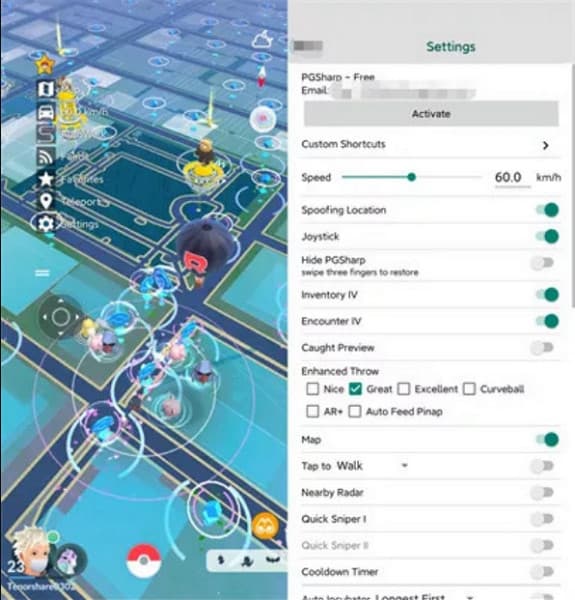
PGSharp offers both free and paid versions. The free version includes basic features such as joystick controls and teleportation. The paid Standard Edition costs $5 per month and unlocks additional options, including Auto Walk, custom GPX routes, Quick Catch, and instant cutscene skipping.
Go to the official PGSharp website, download the version you want to use there, and follow the required installation instructions.
Tap the Open button to launch it on your Android and wait for it to load. To use the Joystick feature, go to Custom Shortcuts.
Inside the Custom Shortcuts, tick the Joystick toggle button to activate it. When its color changes, the feature you turn on is activated.
Top 3 Joysticker. Fake GPS Location - GPS JoyStick [Android]
Supported versions: Android 6.0 or above.
Fake GPS Location – GPS JoyStick by The App Ninjas is an Android app for users who want to change their location without movement. It features an on-screen GPS joystick, teleportation, and route simulation, allowing users explore different areas in the game from home. Users can also adjust movement speed to customize simulated routes. The app doesn't require rooting, but users need to enable Developer Options and configure it as their Mock Location app. This process may take a few extra steps for beginners.
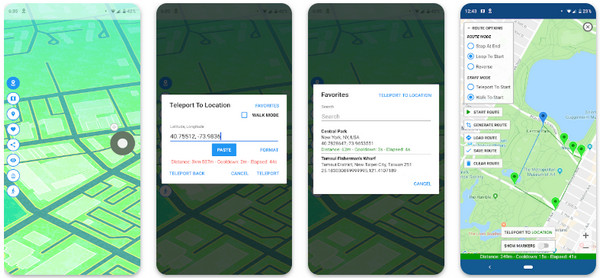
Users can use this application because it operates effectively on devices regardless of root status. Monster Hunter Now and Pokémon implement strong antispoffer security, but GPS joy stick will still be used for these games. Setting GPS JoyStick for the first time could become problematic for users who are new to the process. The application GPS JoyStick provides users with a practical solution to change locations regardless of the system challenges users might encounter.
You can download the app by going to the PlayStore, launch it afterward, and do the required setup to use it properly.
After launching it, choose Get Current Location and set the app to Mock Location.
Lastly, click the Start button, and a joystick will appear on your screen wherein you can move virtually. This is an excellent option if you need a GPS Monster Hunter Now spoofer on your Android.
How to Pick the Best Monster Hunter Now Joystick Tool
Before choosing a Monster Hunter Now joystick, check its device compatibility, main movement features, and requirements. Also compare free and paid plans to see which tool is the most cost-effective. Keep the game's GPS spoofing policy in mind, as using third-party location-changing tools may put your account at risk.
| Tool | Best for | Main advantage | Main limitation |
| imyPass iLocaGo | iOS and Android users | Multiple location modes and joystick control | Requires a computer |
| PGSharp | Android users who play Pokémon GO | Auto Walk, teleportation, and GPX routes | Mainly designed for Pokémon GO |
| Fake GPS Location | Android users who prefer mobile apps | Built-in joystick and route simulation | Requires Mock Location setup |
FAQs.
-
What is the Monster Hunter Now joystick method?
It's usually a GPS-spoofing desktop or mobile program. The program uses a virtual joystick to simulate movement in Monster Hunter Now without walking.
-
What settings make the Monster Hunter Now joystick move naturally?
Adjust joystick speed to normal walking pace (around 5 km/h), enable gradual turns, and avoid instant teleports. Smooth, realistic movement helps reduce detection risk and keeps gameplay safer across different regions or devices.
-
Is using a joystick method safe for Monster Hunter Now gameplay?
Monster Hunter Now has policies against GPS spoofing, so players should use these tools with care. No third-party GPS joystick can guarantee safe use in Monster Hunter Now.
Conclusion
A Monster Hunter Now GPS joystick gives players another way to move from one place to another to get the necessary treasures. You can use the three tools in this guide to visit new locations from the comfort of your home. We hope this guide helps you choose a suitable tool and use it responsibly while keeping the game's rules in mind.
Penny focuses on GPS troubleshooting and Windows optimization. She formerly worked as a technical support engineer, helping clients solve location-based and system issues efficiently. Backed by IT support experience, she provides practical solutions that really work. In her free time, she likes hiking and geocaching, testing GPS tech in the real world.
Hot Solutions
-
GPS Location
-
Unlock iOS
-
iOS Tips
-
Unlock Android