



 Solution
 Support Center
 About Us
 Contact
How to Change Location on Bumble on Mobile and Online
 Penny Warren Published on January 08, 2026GPS Location3-min reading
In today's digital era, dating apps, like Bumble, have changed how people meet, connect, and keep relationships. Unlike social media, dating apps match potential connections based on locations, profiles, and interests. Want to match with people in a new location on Bumble? Our article explains how to change Bumble location on your iPhone or Android phone when you are travelling, on vacation, or curious about nearby dating scenes.

In this article:
Part 1: How to Change Location on Bumble Online
Does Bumble automatically update your location? The answer is simple: no. If you travel to a new city, you can manually change your geolocation on Bumble in a web browser. Here are the steps to complete the job:
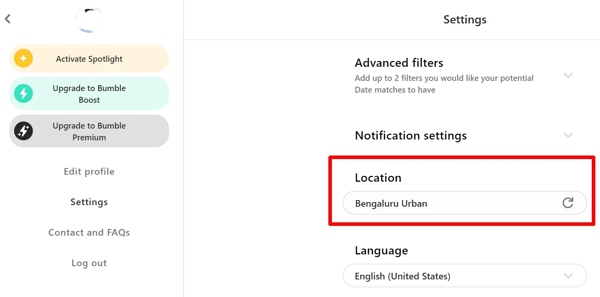
Access https://bumble.com/en-in in a browser, and log in to your account.
Click on your profile picture and choose Settings on the context menu.
Scroll down and find the Location option.
Click the Refresh button manually change the Bumble location.
Part 2: How to Change Bumble Location in the App
Does Bumble location update without opening the app? In fact, you can manually change your current location on Bumble on either an iPhone or an Android device. Here are the step-by-step instructions:
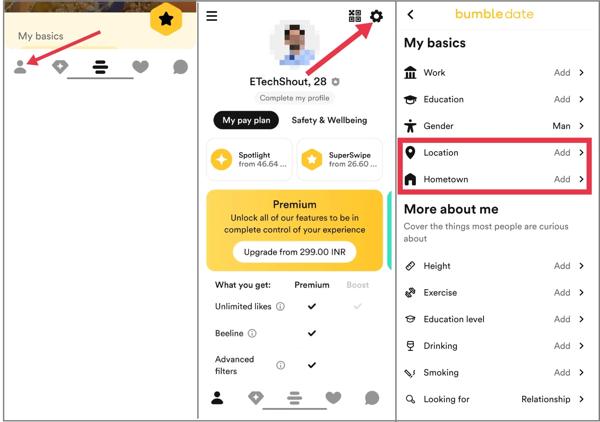
Run the Bumble app on your device and sign in to your account.
Tap on the profile at the top left corner, and choose Settings.
Scroll down and find the Location area:
Bumble my location vs. Lives in
If you want to change your current location, tap Location and search for the desired city. Select it and confirm the change.
If you wish to change where you live, tap Hometown and set it.
Part 3: How to Change Location on Bumble via Travel Mode
How often does Bumble update location? The date app doesn't update its location regularly. Your phone's GPS location determines your location on Bumble. In addition to manually changing where you live and where you are from, you can temporarily change your location for up to 7 days using the Travel Mode.
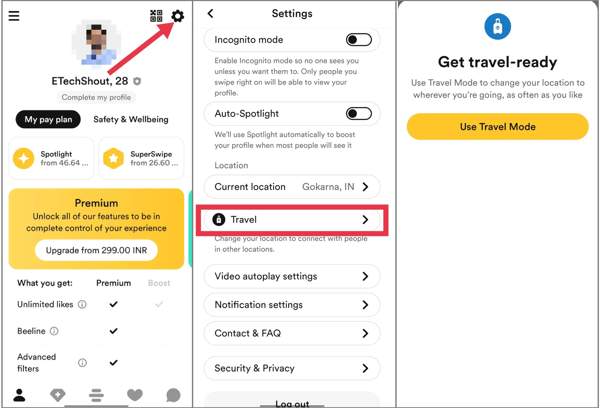
Run the Bumble app, and tap on your profile.
Go to Settings, and move to the Travel section.
Tap Travel, and choose Use Travel Mode when prompted.
Find the location where you intend to travel and set it.
Part 4: How to Change Bumble Location on iPhone and Android
According to Bumble, you can update your profile to show where you live and where you are from, but your general location cannot be customized. Plus, you are not allowed to turn off location on Bumble. In other words, Bumble reads the GPS location of your phone. You can only change the location in your profile. From this point, we recommend iLocaGo. It allows you to change your GPS location to any position around the world when accessing Bumble. Moreover, others won't be notified of your changes. The user-friendly interface makes it easy to navigate.

4,000,000+ Downloads
Hide your location on Bumble on your mobile device.
Change the Bumble location to an accurate address or any region.
Won't be detected when changing Bumble location.
Create virtual locations and fake routes.
Support both iPhone and Android devices.
Install the location changer for Bumble
Start the best location-changing software for Bumble once you install it on your PC. There is another version for Mac. Connect your phone to your computer with a compatible USB cable. If you are using an Android phone, you can also use a wireless connection.

Choose a mode
Once your device is recognized, you will be presented with the mode window. Here you can get four modes:
Modify Location: Change location to a specific address.
One-stop Mode: Set the starting and end spots of a virtual route.
Multi-stop Mode: Set starting and multiple spots to create a route.
Joystick Mode: Create a virtual route with your mouse.
We choose Modify Location and proceed.

Change location on Bumble
Now, input an accurate address in the field on the pop-up dialogue. If you don't have an address, click a position on the map and the software will display the address. Finally, click on the Modify button to change your location. Then, open Bumble on your phone, and you will find that the GPS location has changed. You can also change Life360 location with this program.

Conclusion
This article shares multiple ways to change Bumble locations. The dating service allows you to change where you are living and where you are from in your profile on either a browser or a mobile app. However, it is difficult to customize your GPS location. iLocaGo can meet your needs and modify your geolocation when accessing Bumble and other dating apps. Plus, it is easy to use and a good option for ordinary people.
Penny is a senior editor from imyPass. She has focused on discovering perfect GPS location solutions in all scenarios, and also has experience in fixing computers.
Hot Solutions
-
GPS Location
- Best Pokemon Go Locations with Coordinates
- Turn Your Location Off on Life360
- How to Change Location on iPhone
- Review of iSpoofer Pokemon Go
- Set Virtual Locations on iPhone and Android
- TikTok Track Your Location
- Monster Hunter Now Joystick
- Review of IP Location Finder
- Change Mobile Legends Location
- Change Location on Tiktok
-
Unlock iOS
-
iOS Tips
-
Unlock Android


