Solution
 Support Center
 About Us
 Contact
Recover iPhone Data After Reset [With/Without Packup]
 Clara Prescott Published on November 07, 2025Recover Data3-min reading
As is known to all, a factory reset will wipe out all important data on your iPhone, including your carefully taken photos, dedicatedly written notes, valuable messages, etc.
Want to recover text messages after factory reset iPhone but don't know how?
Don't be frustrated! It is possible to recover iPhone data after a factory reset. Read more to learn!

In this article:
Part 1. Is it Possible to Recover iPhone Data After Factory Reset
Of course. If you have a local or cloud backup, you can just restore it to the device. This article will show the detailed steps to recover iPhone data from backup after a factory reset.
However, if you don't have any backup, it will be super tricky. We tested many popular iPhone data recovery apps, but only a few of them can recover all data from a factory reset. In this article, we will introduce a professional program that recovers iPhone data after a factory reset. And you can use it to preview all data for free.
Part 2. Recover iPhone Data After Factory Reset Without Backup
Actually, it's very hard to recover iPhone data after a factory reset since it wipes all data on your iPhone, making it impossible to retrieve anything on it, even with an iPhone Data Recovery software.
However, imyPass iPhone Data Recovery is worth a try. This is because it claims to recover iPhone data even after a factory reset or from an unresponsive iPhone. Most importantly, you are allowed to preview recovered iPhone data for free. That is to say, you can purchase it after you know for sure that it can get all the erased data back during a factory reset.
4,000,000+ Downloads
Recover iPhone data after a factory reset without backup.
A professional tool especially designed for recovering erased data during a factory reset.
Preview recovered data totally for free.
Support the latest iOS 26/27 Beta and iPhone 17.
Download this dedicated iPhone data recovery tool by clicking the corresponding link above based on your operating system. Launch it after installation.
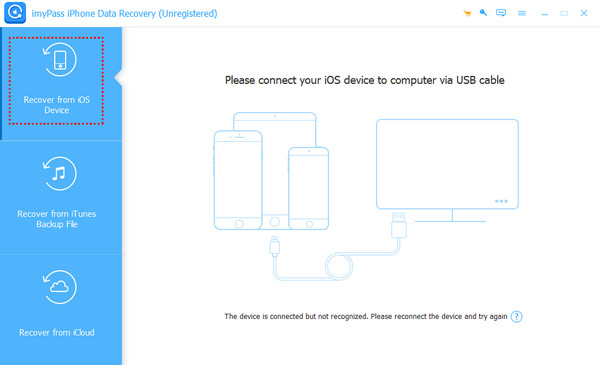
Choose Recover from iOS device on the left panel and connect your device with a USB cable.
Click Restore Backup in the General bar on the right page.
In the pop-up window, select the latest backup and enter your iTunes backup password. Click Restore to move forward.
Check your desired one and press the Recover button in the bottom right.
Part 3. How to Recover Data After Factory Reset on iPhone via iTunes/Finder
If you have backed up your iPhone via iTunes in advance, you are lucky enough to recover data after a factory reset with the iTunes backup quickly. Here are detailed steps with pictures:
iTunes
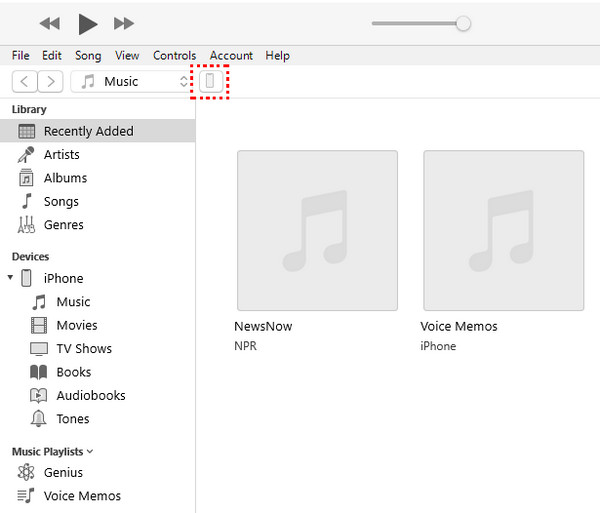
Connect your iPhone to your computer with a USB cable. Launch iTunes on your computer.
Click the phone-like pattern in the top-left corner.
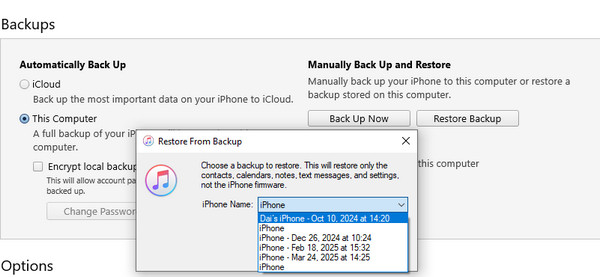
Go to the right page of the screen and locate the Backups section. Choose the Restore Backup option and select the latest iPhone backup. Click Restore to confirm.
Finder
Connect your iPhone to your Mac with a USB cable and open Finder.
Click your iPhone name in the left navigation bar.
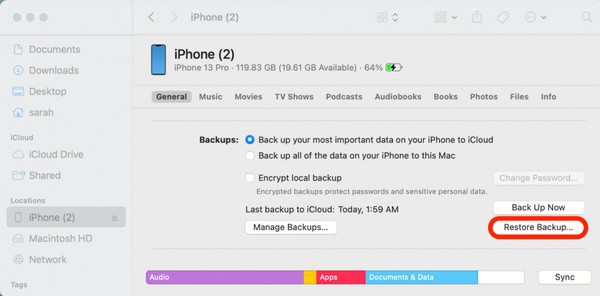
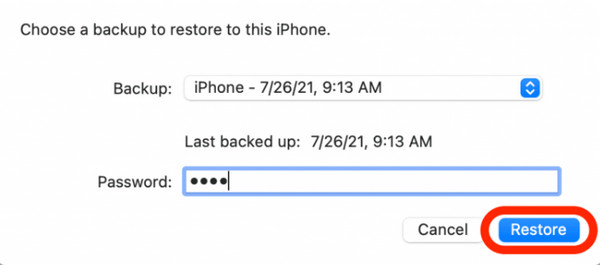
Click Restore Backup in the General bar on the right page.
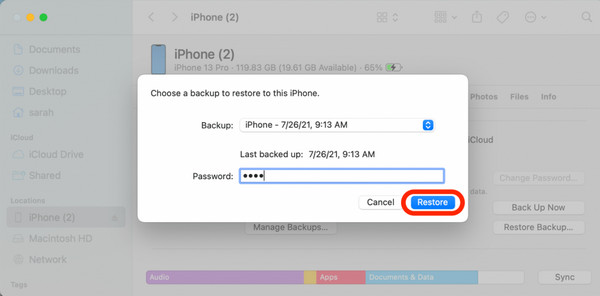
In the pop-up window, select the latest backup and enter your iTunes backup password. Click Restore to move forward.
Part 4. How to Recover iPhone Data After Factory Reset Using iCloud
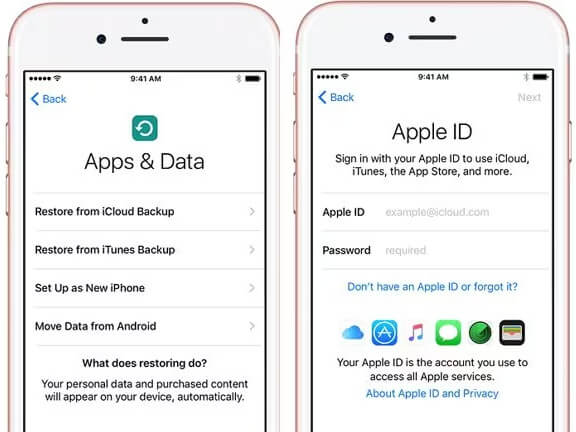
On the Hello screen, follow the on-screen instructions to set up your Phone. Once you reach the Apps & Data page, choose the Restore from iCloud Backup section.
Sign in with your Apple ID and password. You should note that your Apple ID should be the same as the one you create a backup in.
Choose the latest backup to restore. You can also restore other backups if you need to.
Wait in patience for the restoration. Keep in mind that you should always keep your iPhone connected to Wi-Fi and ensure sufficient power.
Note:
If you forget your Apple ID and password, you can try to factory reset iPhone without Apple ID and password.
Conclusion
Now, you have an overall understanding of how to recover iPhone data after factory reset. If you are lucky enough to have just backed up your iPhone before, you can recover iPhone data from iTunes/iCloud backup.
Don't worry if you didn't back up your iPhone. You can try third-party software like imyPass iPhone Data Recovery to recover iPhone data after a factory reset without backup.
Clara has over 8 years of experience helping users recover lost files and transfer data. She previously worked as a data recovery technician for a major IT service company. Certified in Data Recovery and Digital Forensics, her articles focus on simple solutions that make complicated recovery tasks easier for everyday users.
Hot Solutions
-
Recover Data
- AppGeeker iOS Data Recovery Review
- Disk Drill iPhone Data Recovery Review
- How to Get iPhone Out of Recovery Mode
- How to Fix support.apple.com/iphone/restore
- How to Recover Data from DFU Mode
- Gbyte iPhone Data Recovery Review
- How to Recover iPhone Deleted Photos After 30 Days
- How to Recover Deleted Photos on iPad
-
Unlock iOS
-
Transfer Data
-
iOS Tips