Solution
 Support Center
 About Us
 Contact
How to Recover Deleted LINE Chat to Reclaim Important Conversations
 Clara Prescott Published on January 13, 2026Recover Data3-min reading
LINE is a free messaging app that allows you to send instant messages, videos, photos, and voice or video calls. The good thing about it is that you can access it on your PC, mobile phone, and other electronic devices. These messages are commonly stored in your account.
However, there are users who reported that their LINE messages have disappeared out of nowhere. But there are valid reasons why this issue happens. How to recover deleted messages in the LINE app? In this article, we will help you determine the causes that affect your LINE messages, which lead to deletion. Then, let us recover them. Please continue reading to discover all the details.

In this article:
Part 1. When Will the LINE Messages Permanently Disappear?
The LINE messages will be directed to the app. Your chats are safe with the application, but some instances cause them to be deleted. The most common causes for your LINE chats to be deleted are here! If so, you can prevent them from being deleted in the future.
1. The LINE Chats are Deleted by Yourself
The LINE chats can be deleted by yourself. Other users delete some of their conversations purposely. Users want to delete them to free up storage space on the device where the LINE account is signed in. On top of that, users might want to remove clutter from the messages. Finally, they probably want to delete sensitive or unwanted chats from the account permanently. However, some users unintentionally delete some of their LINE chats.
2. The LINE App is Deleted
The LINE app is not built for most devices. Deleting the app is possible, which can lead to the deletion of the conversations from your devices. The good thing about it is that the conversations will not be deleted from the account. Restoring the backups after reinstalling the application will help you get back your messages.
3. The Device is Changed
There are instances wherein the device where the LINE account is signed in experiences issues. They can be repaired or switched to a new one due to replacement. In this case, the messages from your LINE account will be deleted from the device. A local backup will be a big help to restore them afterward.
All in all, there are various reasons to lose your LINE chats. The best way to secure them is by using a regular backup. This way, you will not be afraid of deleting the conversations or replacing the device where you made the chats. These backups are used to recover Viber messages and photos on an iPhone.
Part 2. How to Recover Permanently Disappeared LINE Chat on iPhone?
How to recover deleted LINE chat without backup? imyPass iPhone Data Recovery can help! This tool can recover your permanently deleted or disappeared LINE chats on your iPhone. It can be used for both professionals and novices due to the straightforward interface and features it consists of. WhatsApp, photos, videos, and call history can also be recovered by the tool. It can recover them in different scenarios, like accidental deletion, water damage, broken screen, no backups, and more. Please use the steps below as your guide for this tool.
Go to the main website of this tool and download it. After that, you will see the downloaded file in your web browser. Set it up, and a small window will appear on the screen. Please install the tool, and it will be launched afterward.
Please plug the iPhone into the computer. A USB cable is the proper way to do it. Then, select the Recover from iOS Device button. Then, the tool will scan your iPhone and click the Start Scan button. The tool will scan the files on your iPhone. The results will be prompted on the next screen.
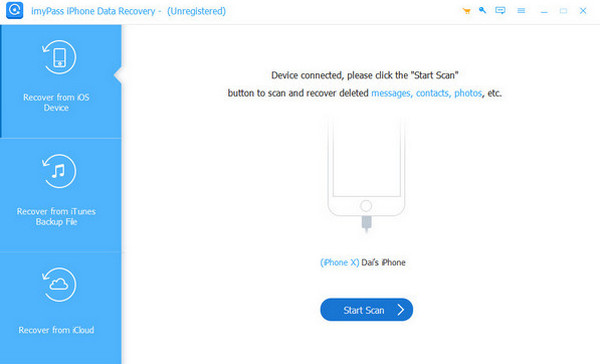
Please locate the LINE chats from the left side of the screen. Then, select the chats you want to recover. Please click the Recover option at the bottom right. Select the path where your LINE chats need to be restored. Later, click the Recover button again to start recovering them.

Part 3. How to Restore LINE Backup?
Can you recover deleted LINE messages? iCloud is the built-in backup feature on your iPhone. This free service allows you to back up your LINE chats or messages. You should consider the prerequisites of the free service to use it quickly. You should have enabled iCloud Drive, and a backup should have been made.
Additionally, there are two types of backup modes for your iCloud LINE backup. These are the Standard Backup and LINE Premium. A Standard Backup will transfer the chats within the last 14 days. However, it still depends on whether you back them up manually. On the other hand, LINE Premium offers a full history restoration across OS types. You do not need your iPhone to be brand new or perform a factory reset. This way, you will prevent an iCloud-locked iPhone. You can restore the iCloud backup to retrieve your LINE chats with the steps below.
Back up your LINE chats. Select the Settings app and select the Chats button. After that, select the Chat History Backup button. Then, tap the Back Up Now button.
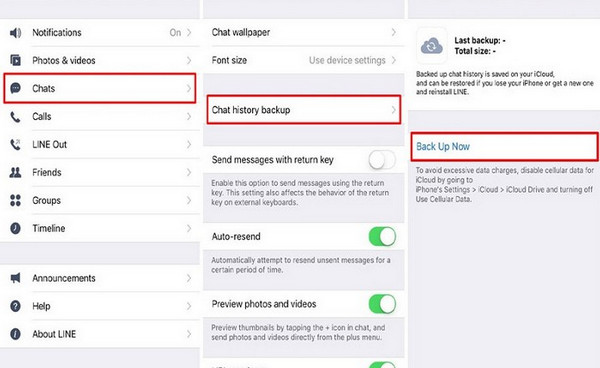
Open the LINE app on your iPhone. After that, tap the Gear button at the top right corner of the screen. Then, choose the Settings button. Later, please select the Chats button from the screen and select the Chat Backup History button. Check the time of the most recent backup for your LINE account.
Press and hold the LINE button from the Home Screen and tap the Remove App button to uninstall it. Go to the App Store afterward to reinstall the application on your iPhone. Open the LINE app and log in to the same phone number or email associated with the backup.
After signing in, the iPhone system will automatically detect the backup from iCloud. It will show you the available backup on the screen. It will also discuss the procedure on the screen. Please tap the Restore Chat History button at the bottom.
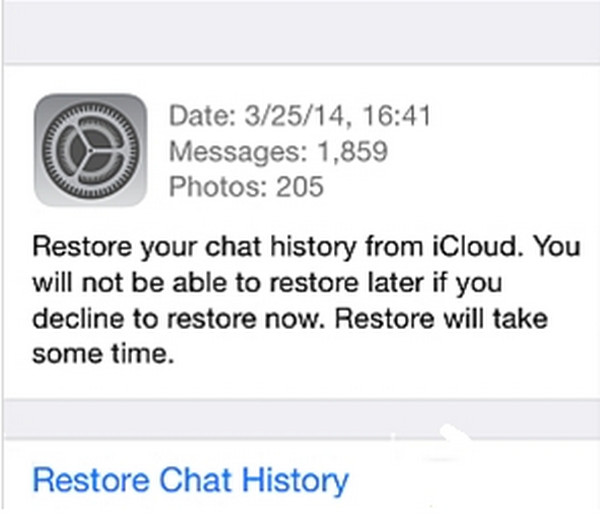
Finally, the chat history will be restored on your iPhone. You can now view the important conversations on your iPhone.
Conclusion
All in all, this article will guide you on how to recover deleted LINE chats. You can retrieve them with or without a local backup. imyPass iPhone Data Recovery is here to help you retrieve deleted LINE chats on your computer. This tool is best for novices due to the simple procedure it offers. Downloading the program is recommended to explore it more.
Clara has over 8 years of experience helping users recover lost files and transfer data. She previously worked as a data recovery technician for a major IT service company. Certified in Data Recovery and Digital Forensics, her articles focus on simple solutions that make complicated recovery tasks easier for everyday users.
Hot Solutions
-
Recover Data
- AppGeeker iOS Data Recovery Review
- Disk Drill iPhone Data Recovery Review
- How to Get iPhone Out of Recovery Mode
- How to Fix support.apple.com/iphone/restore
- How to Recover Data from DFU Mode
- Gbyte iPhone Data Recovery Review
- How to Recover iPhone Deleted Photos After 30 Days
- How to Recover Deleted Photos on iPad
-
Unlock iOS
-
Transfer Data
-
iOS Tips