Solution
 Support Center
 About Us
 Contact
How to Bypass FRP on Honor Phones: Official Methods & Easy Tool
 Gideon Byron Published on November 16, 2026Unlock Android3-min reading
Factory Reset Protection (FRP) is a built-in security feature on Android phones. It keeps your device safe if it gets lost or stolen. But sometimes, you may forget your own Google account or pattern lock and end up locked out. If you are searching for how to bypass Honor FRP, this guide walks you through everything in order. You will learn how work and why they matter. Keep reading if you want a clear way to unlock your phone and get back full access hassle-free.

In this article:
Part 1. What is Honor FRP and Why Does it Appear
FRP (Factory Reset Protection) is a Google security feature built into Android 5.1 and later. On Honor phones, it turns on automatically the moment a Google account is signed in. Its purpose is simple: if someone steals your phone and factory resets it, the device will still demand the Google account and password that were on it before the reset - so a stolen phone becomes useless.
The verification screen appears in these common situations:
- You reset your Honor phone but forgot your Google account and password.
- You bought a second-hand Honor phone and the previous owner did not remove their account.
- You entered the wrong lock screen password too many times and had to reset the device.
- You signed in with multiple Google accounts and the phone now asks for one you rarely use.
Which Method Should You Choose?
- You remember the account but forgot the password. → Use Google Account Recovery
- You bought a second-hand phone still signed in to the seller's account → Ask the previous owner to remove their Google account.
- Cannot Access the Previous Account. → Use an FRP bypass tool.
Part 2: How to Recover Google Account Before Bypassing Honor FRP
If you forgot the Google account password previously synced with your Honor phone, try Google's official account recovery service first.
Method 1. Recover Your Google Account
Open the Google Account Recovery page on another phone or computer.
Enter the Gmail address previously linked to your Honor phone.
Follow the on-screen instructions to verify your identity using your recovery email, phone number, or other verification options.
If Google allows you to reset your password, create a new one and complete the recovery process.
Return to your Honor phone and sign in with the recovered Google account when prompted.
Note:
If you recently changed your Google account password, you may need to wait before using the new password on your Honor device.
Method 2. Ask the Previous Owner to Remove Their Google Account
If you bought a second-hand Honor phone and it is still linked to the previous owner's Google Account, contact the seller for help. Ask them to remove their Google Account from the device before performing a factory reset. It is the cleanest solution because the previous owner can remove the account remotely in minutes.
Contact the previous owner and ask them to open https://www.google.com/android/find on their device and sign in with the account that is on your Honor phone.
Have them select your Honor phone from the device list and choose Erase Device.
After the erase completes, ask them to remove the device from their account, then power your phone off and on again.
Now you can set the phone up as new, and the Google verification screen will no longer appear.
Part 3: Best FRP Bypass Tool to Remove Honor FRP Without Password
If you cannot recover your Google Account or get help from the previous owner, a dedicated FRP bypass tool may be another option. imyPass AnyPassGo is designed to remove Google FRP on various Android devices and brands, including Honor, Samsung, Huawei, or Motorola. It is easy to use and works almost automatically, so you do not have to worry about complicated steps. The bypass does not modify or root your Honor phone. It also removes Android screen locks (PIN, password, pattern, fingerprint, face lock), and can unlock older Samsung models without erasing data.
To fully access imyPass AnyPassGo, you must download and install it from the primary website.
Launch the program and choose the option Bypass Google FRP Lock.
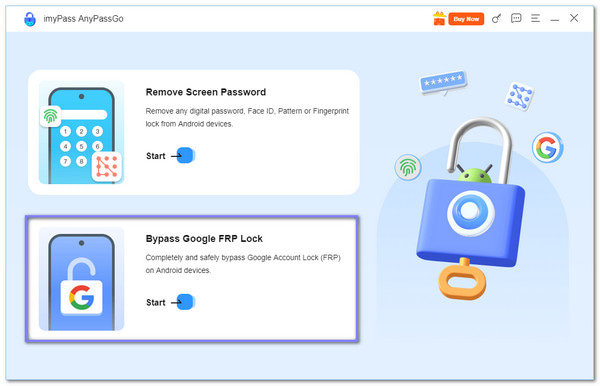
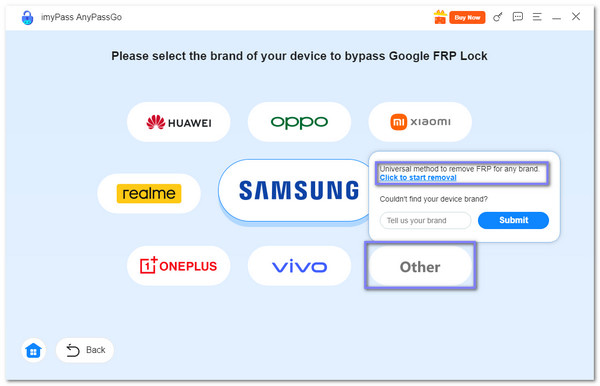
Move your mouse pointer to the Other and press Click to start removal. This option offers a universal method to remove FRP on any brand, like Honor A6a.
Next, connect your Honor A6a device to your computer using a USB cable. Please wait until the program detects your phone. After that, click the Bypass Now button. The on-screen instructions to set up your device will appear on your screen; just follow what is shown.
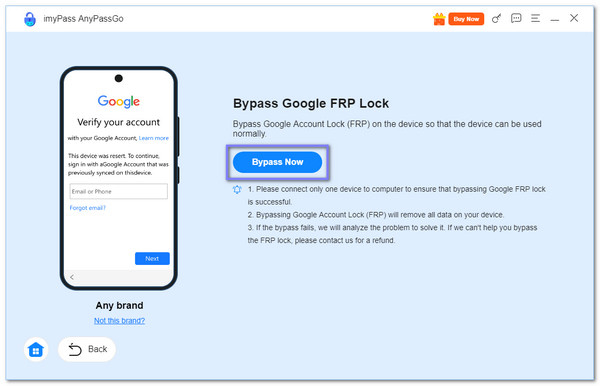
After the setup is done, imyPass AnyPassGo will start the FRP bypass process. Please do not unplug or turn off your Honor A6a while this is happening. Once the bypass is complete, your Honor A6a will restart. You can now set it up from scratch and sign in with a new Google account.
FAQs.
-
Can I bypass FRP on an Honor phone without a computer?
Yes, in some cases. If you can still recover the Google account password, the official Google Account Recovery method needs only another phone with a browser.
-
Is it legal to bypass FRP on my own Honor phone?
Yes. FRP bypass is intended for rightful owners who are locked out of their own devices. Never use these methods on a phone you do not own or lack permission to unlock.
-
Does factory resetting my Honor phone remove FRP?
No. Factory resetting is exactly what triggers FRP. As long as a Google account was signed in before the reset, the phone will ask for that account afterward. To avoid this, remove the Google account before performing the factory reset.
Conclusion
Bypassing FRP on Honor X6A and other Honor models does not need to be hard. Many users get stuck after forgetting their Google login, but the right tool can fix this problem. imyPass AnyPassGo is one of the best choices because it is safe, simple, and works fast. With tools like this, removing the Google FRP on Honor phone becomes less stressful and more secure for anyone.
Gideon writes about unlocking iOS, Android, and Windows devices. He previously worked as a mobile device specialist in a repair center, assisting customers with locked devices and password recovery. In his spare time, he tests new unlock tools, customizes smart devices and makes complex unlock processes simple and safe.
Hot Solutions
-
Unlock Android
-
Unlock iOS
-
Password Tips
-
iOS Tips