



 Solution
 Support Center
 About Us
 Contact
How to Unlock an Android Phone from Metro to Boost Mobile Network
 Gideon Byron Published on June 18, 2026Unlock Android3-min reading
Android phones or iPhones can be bought from their manufacturer around the globe. However, some Android phone or iPhone users prefer to buy from carriers. They do this to have a flexible monthly payment, freebies, and more benefits.
However, there are unexpected circumstances wherein you need to use a different SIM, but your phone is still carrier-locked. In this case, you need to perform a Metro phone unlock. This article will help you learn how to do that. Also, additional methods, like bypassing the screen lock of your Metro phone, are included. Please continue browsing to get the full details about the topic.

In this article:
Part 1. Removing a Carrier Lock on Metro Phones
Are Metro phones unlocked? It depends on how you bought it from their store. If you bought it fully paid or without a balance, the Metro phone will be unlocked. But if you bought it with a monthly installment plan, the network of your phone will be locked. If your phone is locked to the Metro network, you can unlock it. However, there are requirements you need to meet before you can request an unlock.
The phone must be brought from Metro. Also, the phone must be reported stolen, blocked, or lost. Lastly, 365 days must have passed since you activated the phone with Metro. Did you meet these requirements? Unlock your carrier-locked iPhone or Android phone below, as they have the same process.
You cannot unlock the Metro phone by yourself. You need to call the Metro support team. Open your dialer app on your iPhone or Android phone. Then, tap the 611 code using the digital keypad. You may also visit the official website of Metro Device Unlock Support.
The support team or website will ask you about the proof of ownership and other information about you and the phone. Please follow the given instructions to create a ticket unlocking request. You only need to wait for the Metro phone to be unlocked patiently.
Part 2. Bypassing a Forgotten Screen Lock on Metro Phones
There are instances where the Metro phone is locked due to a forgotten passcode. You can unlock a phone with an IMEI number, built-in ways, third-party tools, etc. Please see the methods below.
1. Samsung Devices
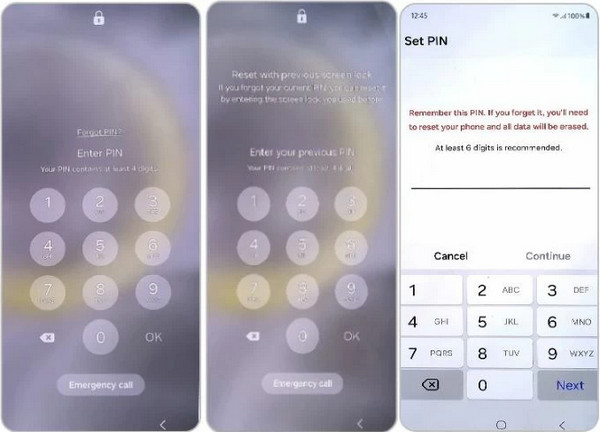
Samsung is one of the most famous brands for Android phones around the globe. So, we will be having a separate guide about it. In addition, it has a distinct difference from other Android phone brands. The good thing about this brand is that it allows you to use the previous passcode when it is changed within 72 hours. This method is the same as the iPhone. It works on One UI 6.1 and later versions. The steps below will guide you through the process.
Please intentionally enter the wrong passcode consecutively. Then, tap the Forgot PIN/Pattern button at the bottom. Later, tap the link prompted on the screen.
Enter your previous passcode afterward. Then, create your new passcode to unlock the Samsung phone.
2. Other Androids
Samsung is not the only Android phone brand available. Oppo, OnePlus, Xiaomi, and more are included. In this case, you can use an online tool as a general method for all Android phone brands for unlocking them. UnlockBase is one of the online tools that can help you.
Search for the website of UnlockBase. Select the Login button at the top right. Then, choose the Register button from the drop-down options.
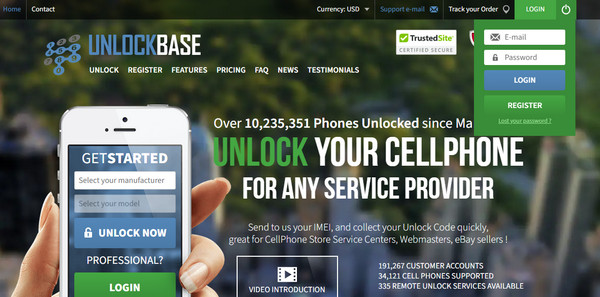
Select the name of your carrier. Input the model of your Android phone. Later, choose the Unlock Now button at the bottom. The tool might need your IMEI number when needed.
3. Ultimate Way: imyPass AnyPassGo
imyPass AnyPassGo is a third-party tool that is designed to help you remove different screen lock types on your Android phones. It includes fingerprint, face recognition, PIN, passcode, password, and pattern. Different Android phone brands can also be unlocked. Xiaomi, Oppo, OnePlus, and more are included.
Besides that, the tool does not need an internet connection because it works offline, unlike the previous method. Professionals and beginners can both use the tool due to the simple interface and advanced features it contains. Please use the steps below to operate the tool correctly.
Download and set up imyPass AnyPassGo. Then, install it from a small window. Later, it will be launched on your computer.
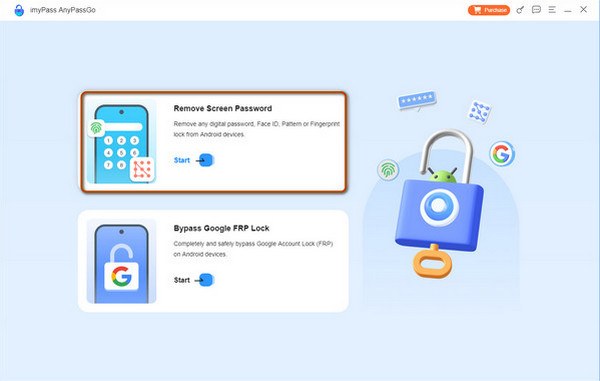
Select the Remove Screen Password button at the top. Then, plug your Android phone into a computer with a compatible USB cable. The supported Android phone brands will appear. Please choose yours from the list.
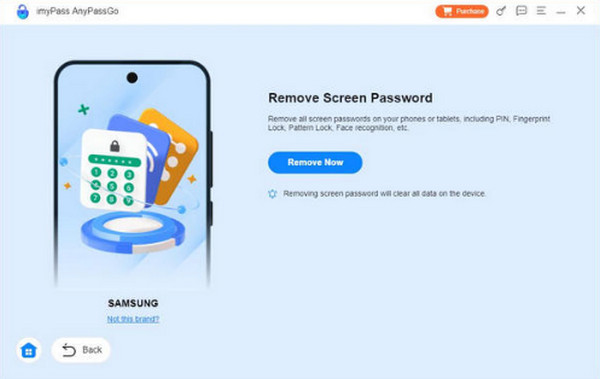
Select the Remove Now button right beside the Android phone model. Then, the bypass procedure will start. You only need to wait for it to be completed. Finally, click the OK button.
Part 3. What Happens After Your Phone Is Unlocked
When you reset an Android phone when locked, you might encounter the Google FRP lock. It is a security feature that permits users to protect their Android phone after a factory reset. The Google account associated with an Android phone is needed. After confirming the account, you will set up your Android phone as new.
On the other hand, if your Android phone is unlocked from the carrier, you will not lose your data. The Android phone will only be able to use different SIMs from its carrier. There will be no limitations on the network of the mentioned device.
Part 4. Can You Unlock a Metro Phone Online?
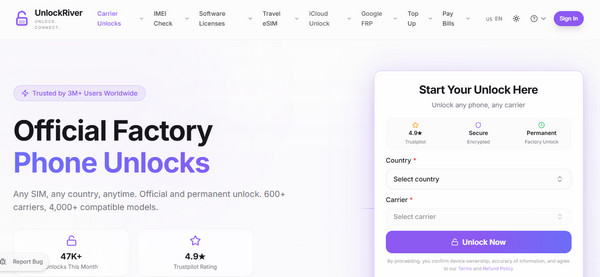
Yes. You can unlock a Metro phone online using different online tools that are intended to unlock a carrier-locked phone. UnlockRiver is one of them. Like the previous online tool, it requires your IMEI number as an identification. It uses an internet connection, so you need to have a strong one. Refer to the steps below to know how to use the tool.
Search for the main website of UnlockRiver. Then, enter the information needed for the process. After that, click the Unlock Now button.
The tool will start to unlock your Metro phone. Please wait for it to be completed.
Conclusion
A Metro phone unlock can be performed in different ways. But you need to ensure that the requirements for the process are present, including the proof of purchase. This article also introduces imyPass AnyPassGo to help you remove the screen lock on your locked Android phone. You may download the tool to know more about it!
Gideon writes about unlocking iOS, Android, and Windows devices. He previously worked as a mobile device specialist in a repair center, assisting customers with locked devices and password recovery. In his spare time, he tests new unlock tools, customizes smart devices and makes complex unlock processes simple and safe.
Hot Solutions
-
Unlock Android
-
Unlock iOS
-
Password Tips
-
iOS Tips

