



 Solution
 Support Center
 About Us
 Contact
Share Live Location on Snapchat to Friends and Family Easily
 Penny Warren Published on December 19, 2025GPS Location3-min reading
Snapchat was launched in 2011 by its developers. It is designed as a multimedia messaging app that can share your messages, videos, and photos. You can send these data types to your friends and family. Data types are not the only thing that can be shared. Your real-time location, too!
What is Live Location on Snapchat? This feature was discovered a long time ago, but some individuals do not know its function yet. If you are interested in knowing how this feature works, we recommend that you read this article until the end.

In this article:
Part 1. What Is Live Location on Snapchat
Snapchat has Live Location, which is a feature that enables you to share your real-time area or location with your friends and family using the app. How does Snapchat Live Location work? This feature is one of the best tracking tools that can locate your friends, share your whereabouts, or meet ups. It uses the GPS and multiple sensors on your mobile phone. It includes GPS satellites, cell towers, motion sensors, and Wi-Fi signals. Your location will be sent to the Snapchat servers.
Your Snapchat location automatically updates as you move. However, it only happens when your mobile phone has GPS accuracy, battery-saving behavior, and an internet connection.
Part 2. How to Share & Turn Off Live Location on Snapchat
The good thing about the Live Location feature on your Snapchat account is that it does not share your location with all your contacts. It will only be shared with your Snapchat friends you have chosen. The location sharing will be stopped when the app permissions are turned off. The Snapchat Live Location last seen is the last updated location of the user from their mobile phone.
Do you want to share your Snapchat Live Location with your friends? Please follow the steps below.
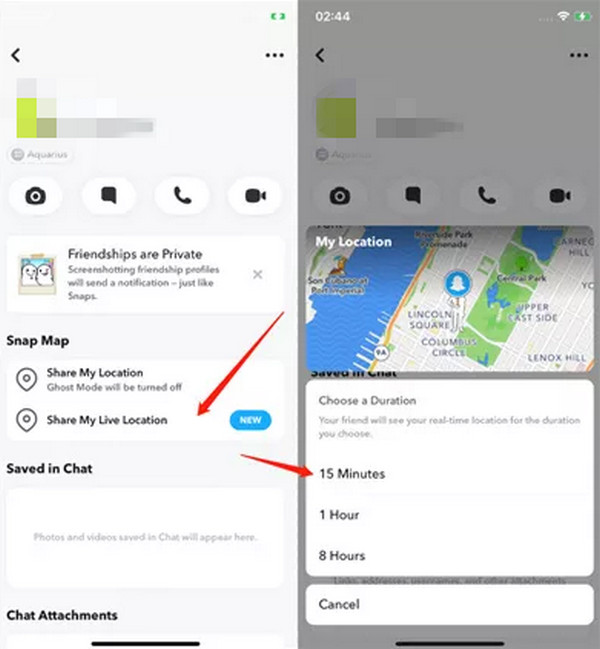
Please open Snapchat and swipe right to go to the Chat screen. After that, select a chat to open, which you want to share the location. Tap the top screen and select the Bitmoji button to open the profile. Go to the Snap Map section and select Share My Live Location.
A pop-up window or screen will prompt you to select how long you prefer to share your location with that friend. Select the duration you prefer from the screen. You can choose from 15 minutes to 8 hours. Follow the on-screen instructions afterward to share your Snapchat Live Location.
On the other hand, how to turn off Live Location on Snapchat? Turning off the Snapchat Live Location feature will turn off the real-time GPS updates to your account. If so, your friend will not see your real-time movement if your location is shared with them. Also, your location will be reverted to normal Snap Map rules. Do you want to proceed with turning off the Live Location feature on your Snapchat account? Please follow the instructions below to know how this procedure works.
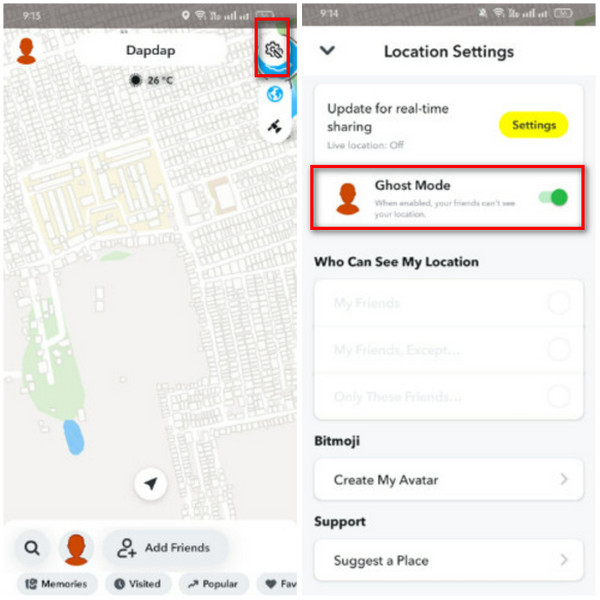
Open the Snapchat app and choose the Location button at the bottom left. The map interface will be prompted on the screen afterward. Then, select the Settings button at the top right.
More options will be prompted on the screen, including the location settings for the Snapchat account. Please toggle on the Ghost Mode slider to hide your location from your friends.
Part 3. How to Simulate Snapchat Live Location
You can simulate the Snapchat location by spoofing it. imyPass iLocaGo is the third-party tool that can help you with that! It can change your Snapchat location from your iPhone or Android phone. It allows you to change the location in one click, simulate routes, and play joystick games. This tool supports the latest version of Android and iOS. Besides Snapchat, it can also change your location on different famous services. It includes Life360, WhatsApp, Hinge, Tinder, and more. Please refer to the steps below to discover how to use this tool.
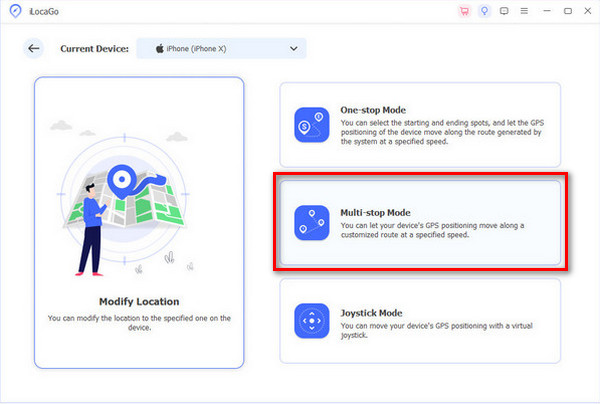
Get the latest version of imyPass iLocaGo. After that, set up and open it on your computer to start changing your Snapchat location. Then, please get a USB cable and plug the Android phone or iPhone into the computer as the start of the process.
The four main methods of the tool will appear on the first screen. You will see their full description, and you only need to click the Multi-stop Mode button on the right. This way, you can change your location at multiple stops.
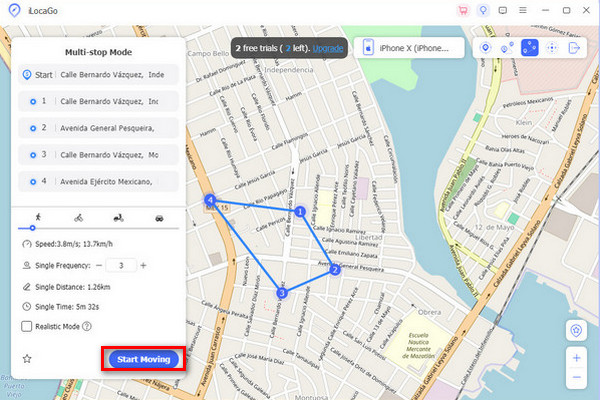
Go to the Multi-stop Mode section at the top left. Then, enter the location where you want to set up the Snapchat app. Please ensure that the location is set up properly to avoid errors during the procedure.
The other information for the locations will appear under the small dialog box. Please click the Start Moving button at the bottom right to start changing the location from your Snapchat app.
Part 4. Does Live Location on Snapchat Mean They Are Active
Does Live Location on Snapchat mean they are active? No. Turning on the Live Location feature on your Snapchat does not mean that the person is active. The Snapchat virtual location can be updated even when their mobile phone screens are turned on or locked. Also, it happens even when the Snapchat app is not opened. Or, they are not using Snapchat at the moment.
Snapchat does not have an Active Now indicator, like other services. It includes Instagram and Messenger. It might be inconvenient for some, but it is one of the privacy features Snapchat offers to its users.
Part 5. Did Snapchat Get Rid of Live Location
Did Snapchat remove Live Location? The good news is that Snapchat did not remove the Live Location feature. However, some users believe it has been removed due to multiple reasons. There are some reports wherein they cannot access the mentioned features. It might be due to a bug or glitch in the app or mobile phone.
Additionally, some users might not have the same version of the location features of Snapchat. This way, they cannot access the Live Location feature. If so, you can simply update the Snapchat app from your mobile phone to get the latest version that supports the Live Location feature. Alternatively, you can change location on Snapchat.
Conclusion
This article tells how Live Location works on Snapchat. The detailed guide on how to share and turn it off is posted. Also, imyPass iLocaGo helps you simulate the Snapchat location by spoofing it. Downloading the tool on your computer is suggested to explore more of its features.
Penny is a senior editor from imyPass. She has focused on discovering perfect GPS location solutions in all scenarios, and also has experience in fixing computers.
Hot Solutions
-
GPS Location
- Best Pokemon Go Locations with Coordinates
- Turn Your Location Off on Life360
- How to Change Location on iPhone
- Review of iSpoofer Pokemon Go
- Set Virtual Locations on iPhone and Android
- TikTok Track Your Location
- Monster Hunter Now Joystick
- Review of IP Location Finder
- Change Mobile Legends Location
- Change Location on Tiktok
-
Unlock iOS
-
iOS Tips
-
Unlock Android


