Solution
 Support Center
 About Us
 Contact
What Is Gihosoft iPhone Data Recovery & Why Consider Using It
 Clara Prescott Published on January 26, 2026Recover Data3-min reading
iPhones can hold valuable pictures, messages, and application data, but they can lose them unpredictably. This paper will examine Gihosoft iPhone Recovery to determine whether it is a reliable solution when iPhone files are lost. Well-known cases such as accidental deletes, system errors and backup problems are discussed in the review. Among the most important aspects, such as safety, success in recovery, and price, are also addressed and proceed to features, advantages, and alternatives.

In this article:
At a Glance: Gihosoft iPhone Data Recovery Verdict
If you want a quick overview of what this article covers, this Gihosoft iPhone Data Recovery review provides a concise summary. It highlights its overall performance, ideal users, limitations, and key takeaways, so you can understand the bottom line at a glance before diving into the full details.
| Features and Aspects | Detailes |
| Overall Rating | 4.5 over 5 |
| Best Used Case Scenario | Users who require a reliable and easy-to-use app to recover photos, videos, messages, and other iOS data from iPhones, iPads, or iPods. |
| Not the Best Choice For | Users are looking for a completely free solution or advanced system repair features. |
| Bottom Line | Gihosoft iPhone Data Recovery is a versatile, beginner-friendly tool that works across most iOS devices and handles a wide range of data loss situations efficiently. |
Core Features & How It Works
Gihosoft iPhone Data Recovery offers two main recovery modes that cover almost all data loss scenarios on iOS devices. These modes make it easy to retrieve lost files from your iPhone, iPad, or iPod, whether you have a backup or not.
1. Recover from iOS Device/iTunes Backup
Through this form, you can restore information from your device or an already existing iTunes backup. It is perfect in case of an accidental deletion, or an error of the system, or when your computer is present, but the information has disappeared. You can use these steps to avoid getting your iPhone stuck in data recovery.
First, install the Gihosoft software and select the type of files that you wish to restore, which may be photos, videos, messages, call logs, contacts, or WhatsApp files. You may have everything, or you may need.
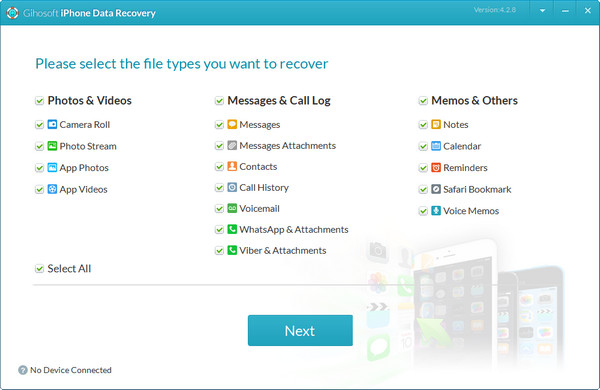
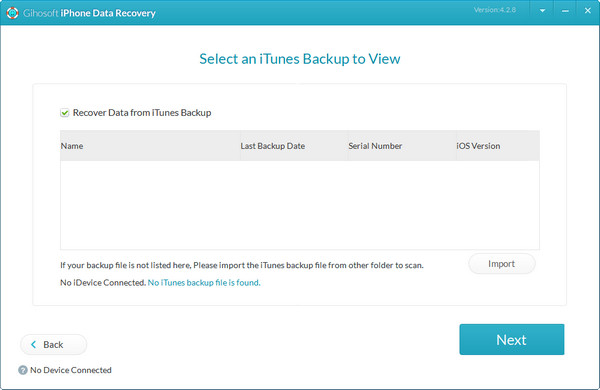
Connect your computer to your iPhone, iPad or iPod. The program will acquire knowledge of your machine and any corresponding iTunes backup. You can even not connect the device and select an iTunes backup.
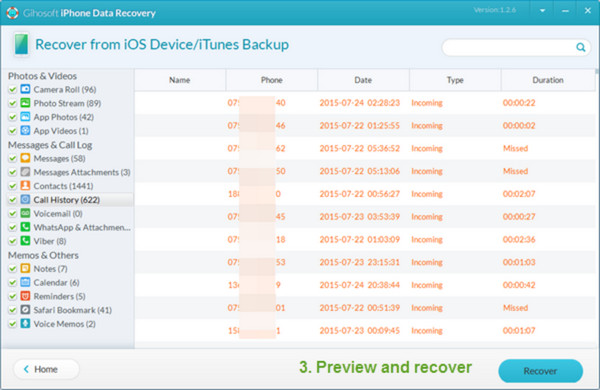
The tool scans your device or backup, organizes all recoverable files in categories, and allows you to preview them. Pick the files you want and tick Recover to export them to your computer safely.
2. Recover from iCloud Backup
This mode is designed to restore lost data from your iCloud backup. It works even if your device is unavailable, lost, or reset.
Launch the software and choose the files you want to recover. Then tick the Recover from iCloud Backup option.
Sign in with your Apple ID to access your iCloud backups. Select the backup you want to scan, and the software will search for recoverable files.
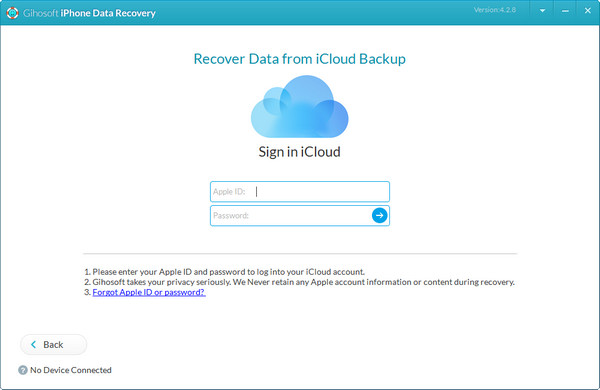
Preview all recoverable data, select what you need, and export it to your computer in readable formats.
You Should Remember: Use Gihosoft iPhone Recovery as soon as possible after data loss, since overwritten files may not be retrievable. All recovered data is organized for easy access, viewing, or printing.
Hands-On Testing & Performance Review
To evaluate Gihosoft iPhone Data Recovery free, we tested installation, user interface, scanning process, recovery performance, and security.
1. Installation & User Interface
Installing Gihosoft Free iPhone Recovery on Windows or Mac is simple. The interface is well organized, user-friendly, and it takes one step by step through the recovery process, thus easy to use even for a beginner.
2. Scanning Process & Speed
The software scans devices and backups, organizing recoverable files into clear categories for easy preview. The scans of average-sized iPhones took just a few minutes in our tests, allowing us to recover files we needed selectively.
3. Recovery Effectiveness (The Most Important Section)
• Recently Deleted Photos/Videos
Photos and videos that were deleted less than 30 days ago were restored effectively.
• Old/Overwritten Data
Files not yet overwritten were restored successfully, while fully overwritten files could not be recovered.
• Messages & Call History
The device and backup both worked well to retrieve text messages, call logs and attachments.
• WhatsApp/App Data
App-specific data, including WhatsApp messages and attachments, was restored accurately.
4. Safety & Security Analysis
Is Gihosoft safe? Yes, it is safe. The software is a secure scan that does not change your device. The files recovered are under the complete authority of the user, and they are exported in readable formats, thus, a trustworthy solution to sensitive data.
Pricing: Free vs. Pro - What Do You Really Get?
| Features | Free Version | Pro Version |
| Core Data Recovery Available | App photos, videos, and attachments only | Full recovery, including contacts, call logs, messages, and app data like WhatsApp and Viber |
| Backup Recovery | iOS device and iTunes/iCloud backups | iOS device and iTunes/iCloud backups with full restoration capability |
| Advanced File Types Supported | Notes, calendars, reminders, Safari bookmarks | Notes, calendars, reminders, Safari bookmarks, voice memos, and voicemail |
| Software Support | Basic functionality, no lifetime updates | Lifetime software updates and technical support included |
| Cost | Free | $59.95 to $79.95, depending on the platform |
Pros and Con
In this Gihosoft iPhone Data Recovery review, we take a closer look at what makes the software effective and where it has limitations. The following is a visible list of the key merits and demerits under the hands-on testing, hence you can easily observe what to anticipate before utilizing it to retrieve old messages on your iPhone.
Pros
- It can recover many types of files, like photos, videos, messages, and app data.
- You can restore data from your iPhone directly, or from iTunes or iCloud backups.
- The interface is simple and easy to use, even for beginners.
- Scanning is fast, and you can preview files, choose only what you want to recover.
- It is safe to use and does not harm your device.
- Works on both Windows and Mac and supports almost all iPhone and iPad.
Cons
- The Free only recovers basic files; messages and app data require the Pro version.
- Old or overwritten files may not be recoverable.
- It cannot fix iOS system problems or crashes.
- Full features, updates, and support require purchasing the Pro version.
Top Alternatives to Consider
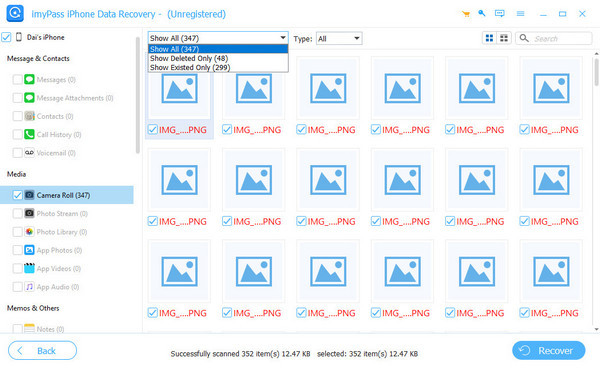
imyPass iPhone Data Recovery is a fast, reliable solution for retrieving lost iPhone data. It supports photos, videos, messages and contacts, WhatsApp files, etc., directly on your phone or backups. The interface is easy, allowing you to preview and choose what to recover, and it works on almost all iPhones, iPads, and iPods. imyPass is a good aid to consider in the event that a person needs to get data quickly and easily.
Conclusion
Gihosoft iPhone Data Recovery Free is a safe and easy-to-use tool for retrieving lost iOS data. It supports a wide range of files and is compatible with the majority of iPhone and iPad editions. Although the Free version is limited, it is ideal for basic recovery, and an upgrade to Pro enables the complete capabilities such as messages, contacts and app data. Gihosoft continues to be a good choice for any person who needs to recover their iPhone data in a hassle-free and reliable manner.
Clara is an editor from imyPass. She specializes in data recovery. You can find professional tutorials and solutions for recovering lost data from any device. Many users reported that his tutorial is easy and useful.
Hot Solutions
-
Recover Data
- Recover WhatsApp View Once Photo
- Recover Deleted TikTok Videos on Mobile
- Recover Deleted Facebook Photo
- Recover Viber Messages, Photos, etc.
- Recover Deleted Snapchat Photos
- 5 Best Contact Recovery Apps
- Recover Deleted Discord Messages
- AppGeeker iOS Data Recovery Review
- Recover Data from DFU Mode
- Cannot Restore iPhone Backup
-
Unlock iOS
-
iOS Tips
-
Password Tips