Solution
 Support Center
 About Us
 Contact
Gbyte Recovery Review - Everything You Need to Know [Full Guide]
 Clara Prescott Published on January 26, 2026Recover Data3-min reading
Losing iPhone files is stressful, and choosing the right recovery tool can save hours of headache. Gbyte Recovery promises to restore deleted data fast, but is it reliable? In this article, we test its real-world performance, features, and ease of use. We also break down pricing and compare top alternatives. By the end, you will know if Gbyte Recovery is the right solution or if a smarter option will keep your data safe without the guesswork.

In this article:
Part 1. What is Gbyte iPhone Data Recovery?
Losing important iPhone data can be stressful, and Gbyte Recovery reviews show that Gbyte iPhone Data Recovery is built to make getting it back simple and secure. The tool can recover photos, videos, messages, files, and chats from apps like WhatsApp, LINE, and Messenger, even from erased, damaged, or locked devices.
You are free to scan your phone and preview what you can recover and what to restore. Every recovery is secure, and it has end-to-end encryption and privacy restrictions. Enterprise users have trusted Gbyte for decades, and now it is time to recover your data with professionalism on personal devices to restore your data in the shortest time and with reliability.
Part 2. Hands-On Testing & Review
Before recommending any data recovery tool, we wanted to see how Gbyte Recovery performs in real-world use. In this section, we take a closer look at installation, core features, performance, and usability.
Our goal is to give you an honest, hands-on perspective so you can understand what works well, what could be improved, and whether the software delivers on its promises.
1. Installation & First Impressions
Getting started with Gbyte Recovery was simple and fast. Both Windows and Mac installations were within a couple of minutes, and they were very easy to follow with no unnecessary procedures. Upon initial release, the interface was fresh and easy to use for any person. The app immediately focused on security and privacy, which instills the feeling that your data is secure.
2. Key Features Tested
We tested its power to recover photos, videos, messages, and files in such apps as WhatsApp, LINE, and Messenger. The free scan and preview option was just as expected, as we could select what we wanted to restore. Deep scanning and general app support, as well as compatibility with various iOS devices, are all reliable, and they demonstrate why Gbyte Recovery reviews are mostly favorable.
3. Performance & Usability
The recovery rate was similar to large scans. The tool was also very responsive, and its step-by-step instructions reduced errors by the user. All in all, it is a good option for all those who encounter data loss as it balances between strong functionality and easy to use design.
4. Pros and Cons Summary
After testing Gbyte Recovery, it is clear that the tool has several strong points, but also a few areas where it could improve. Summarizing these helps you quickly see what works well and what to keep in mind before making a decision.
Pros
- Secure recovery with end-to-end encryption
- Selective data restoration
- Wide app and device support
- Fast and reliable performance
- Intuitive interface
Cons
- Full recovery requires a paid license
- Some advanced features could use clearer explanations.
Part 3. The Verdict: Is Gbyte Recovery Legit?
After hands-on testing, the question is Gbyte Recovery legit? It is straightforward to answer, yes. The software consistently delivered reliable data recovery, whether for photos, messages, files, or chats from popular apps like WhatsApp and LINE.
Its strong security measures, including end-to-end encryption and strict privacy controls, ensure your data remains safe throughout the process. Combined with an intuitive interface and solid performance, Gbyte proves to be a professional, trustworthy solution for both personal and business users facing iPhone data loss.
Part 4. Pricing of Gbyte
Gbyte Recovery offers flexible plans to suit different needs, all designed to deliver full iOS data recovery. Every plan includes recovery for 30+ data types, restoration of chats from over 10 messaging apps, extraction of hidden and latest restored iCloud backups, compatibility with all iOS versions, free 24/7 technical support, and a 30-day money-back guarantee. There are no hidden limits or locked features; everything is included.
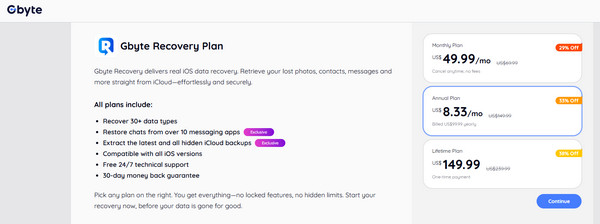
- Monthly Plan: $49.99/month, discounted from $69.99, cancel anytime without fees.
- Annual Plan: $99.99/year or $8.33/month, 33% off $149.99.
- Lifetime Plan: $149.99 one-time payment, which is originally $239.99.
Under these choices, you can tailor the plan to your needs and begin restoring your data before it is lost forever.
Part 5. How to Use Gbyte iPhone Data Recovery [Quick Tutorial]
Now that you have learned all the key information about the app, it is time to show you how to use it to recover your iPhone data after a factory reset. Recovering lost iPhone data with Gbyte Recovery is straightforward and safe. Here is a quick step-by-step guide:
Install and install Gbyte Recovery on your computer or open the web version. Log in safely using your Apple ID. This linking is one-way, and your current iPhones or iCloud data will not be overwritten.
Choose the types of data you want to recover: photos, videos, messages, files, or app chats. Start the scan, and Gbyte will analyze your device or iCloud backups to identify recoverable items.
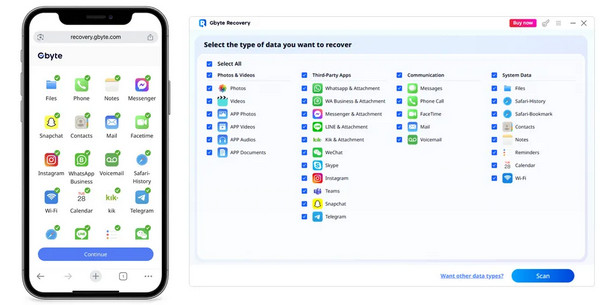
Preview the recoverable data and select only what you need. The selected items are restored safely without affecting your current device data, allowing a precise and controlled recovery process.
Once you confirm the items, start the recovery. The tool will save them to your chosen location, giving you back your lost data quickly and securely.
Part 6. Top Recommended Alternative
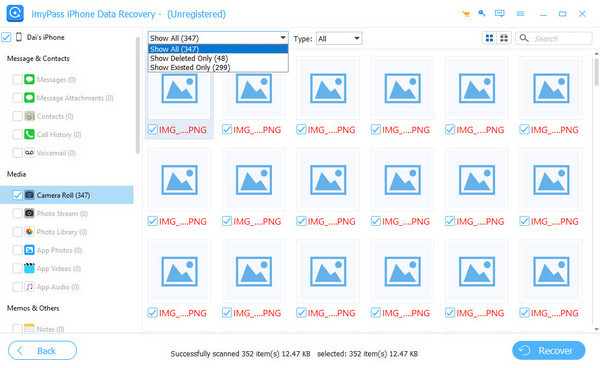
Gbyte Recovery might feel limited for users who want a deeper scan of their iPhone or iPad, which is where imyPass iPhone Data Recovery comes in. Unlike Gbyte, this tool automatically scans all recoverable data on your iOS device, even items lost from the Recently Deleted folder after 30 days. On top of that, it can recover encrypted backups and corrupted files that Gbyte may miss, all while being more budget-friendly, making it a powerful and cost-effective alternative for thorough iPhone data recovery.
Conclusion
Wondering if Gbyte Recovery is legit? The answer is yes. Gbyte iPhone Data Recovery is also very effective and has a high recovery rate of photos, messages, files and app data at a fast and secure rate. Its user-friendly interface, high level of protection and wide range of compatible devices make it a reliable option both among personal users and businesses.
imyPass can be a great alternative to those who require more profound scans, need an encrypted backup recovery, and a cheaper variant. Gbyte or imyPass, they both are easy, safer and faster than ever to restore lost iPhone data.
Clara is an editor from imyPass. She specializes in data recovery. You can find professional tutorials and solutions for recovering lost data from any device. Many users reported that his tutorial is easy and useful.
Hot Solutions
-
Recover Data
- Recover WhatsApp View Once Photo
- Recover Deleted TikTok Videos on Mobile
- Recover Deleted Facebook Photo
- Recover Viber Messages, Photos, etc.
- Recover Deleted Snapchat Photos
- 5 Best Contact Recovery Apps
- Recover Deleted Discord Messages
- AppGeeker iOS Data Recovery Review
- Recover Data from DFU Mode
- Cannot Restore iPhone Backup
-
Unlock iOS
-
iOS Tips
-
Password Tips