



 Solution
 Support Center
 About Us
 Contact
What iTools Virtual Location Is and What It Can Do for You
 Penny Warren Published on December 04, 2025GPS Location3-min reading
If you've ever searched for ways to fake your GPS location on an iPhone, especially for games like Pokémon GO, chances are you've come across iTools and its Virtual Location feature. Over the years, iTools has become known for offering a simple way to simulate GPS movement, change your iPhone's location, and unlock geo‑restricted app functions. But is iTools Virtual Location still reliable today? Is it the right tool for your needs, or should you consider an iTools alternative?
In this in‑depth iTools Virtual Location review, we will break down its key features, advantages, drawbacks, Pokémon GO performance, pricing, device compatibility, and the best alternative. If you're trying to decide whether to download iTools, use it for gaming, or avoid it entirely, this complete guide will help you make the right choice.

In this article:
Part 1: What Is iTools?
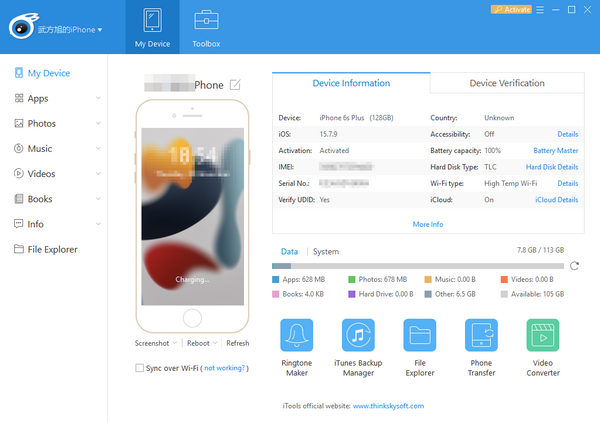
iTools is a device management software developed by ThinkSky. It's often regarded as an iTunes alternative because it allows users to manage files, transfer media, and perform device backups without using Apple's tools. But among all its functions, the most popular one is the iTools Virtual Location feature, which allows iPhone users to:
Change GPS location on iPhone or iPad instantly.
Simulate movement along a route on iPhone or iPad.
Create custom walking/driving paths on your iOS device.
Pause location sharing in Find My or other location-sharing apps.
Trick apps into believing they are somewhere else, which is also called location spoofing.
Many people use iTools iPhone location spoofing for games like Pokémon GO, social apps, location‑based utilities, and privacy protection.
Part 2: iTools Download & Compatibility
iTools is available on Windows and Mac. In some versions of macOS, the Virtual Location feature may be unstable. iTools doesn't have a mobile version. You should use this program on your computer and change location or manage data for your iPhone and iPad.
Note that iTools Android doesn't exist. iTools isn't an Android app, and doesn't support any service for Android devices.
iTools works with most iPhones and iPads, but Virtual Location sometimes struggles on newer iOS updates. From its website, you can see that iTools Virtual Location is only compatible with at most iOS 16.
Part 3: Key Features of iTools Virtual Location
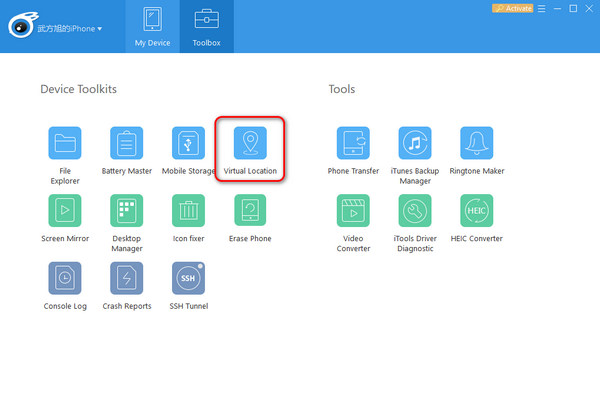
From its name, you can easily know that iTools Virtual Location can make a virtual location for your iPhone or iPad. But there is more detailed information you can explore.
1. One‑Click Location Spoofing
You can type an address or drop a pin to change your iPhone's location instantly.
2. Multi-Spot Route Simulation
Creates a fake walking or driving route. This is one reason iTools Pokémon GO spoofing became popular, for players use it to simulate movement without physically walking.
3. Historical Location Records
iTools remembers previously used locations for quick switching, so you can quickly change your iPhone GPS location to another location.
Part 4: Is iTools Good for Pokémon GO?
Many users want to use iTools Virtual Location to enhance their game experience in Pokémon GO. Is iTools your reliable Pokémon GO assistant? You can check how the tool performs.
Many users in online communities like Reddit and Quora have different types of views on iTools Virtual Location. Many users say that it's easy to simulate walking routes and safer than many other random free spoofers. However, some users report that Niantic frequently detects iTools Virtual Location, and there's high risk if the speed is fast.
Therefore, If you want to use iTools for Pokémon GO today, you may encounter mixed results. It still works, but not as smoothly as before.
Part 5: Detailed Review of iTools Virtual Location
Pros and Cons of iTools Virtual Location
Pros
- Beginner‑friendly interface
- No jailbreak required
- Smooth location simulation
- Multi‑spot movement support
- Works for many apps (dating, AR games, social apps)
- Also includes device management tools
Cons
- No Android version
- Requires PC or Mac connection; no mobile app
- Virtual Location crashes frequently on newer iOS versions
- Updates are slower compared to competitors
- Not ideal for Pokémon GO long‑term spoofing
- Many users report iTools Virtual Location not working after iOS updates
ThinkSky iTools Price & Licensing
iTools offers different prices based on the license versions and supported number of computers.
Premium license for 1 PC or Mac is $30.95. If you want one more supported computer, the price will increase by $1.
Platinum license for 15 PCs or Macs is $69.95, and for 30 PCs or Macs $129.95.
The cost of iTools is mid‑range compared with other GPS spoofers. But due to limited updates, many users feel the price is no longer justified. That's why many users want to find an iTools Virtual Location alternative.
Part 6: The Best iTools Virtual Location Alternative
What is the best iTools Virtual Location alternative? imyPass iLocaGo is your first resort. It's cheaper and offers more stable, precise, and updated features. This alternative to iTools Virtual Location works seamlessly with iOS 18 and 26. You can one-click create virtual location, make a fake route, or use a joystick to freely move your location on iPhone and iPad.

4,000,000+ Downloads
Connect your iPhone to computer to change location or move freely.
Make virtual locations to spoof location services and location-based apps.
Spoof location for Pokémon GO, Tinder, and other social apps.
Work on the latest iPhone 17 and iOS 26 and 18.
Conclusion
iTools Virtual Location is still functional, but it's no longer the strongest GPS spoofing software for iPhone. While it's user‑friendly and works for basic location changes, it struggles with stability, iOS compatibility, and Pokémon GO reliability.
If you want a fast, stable, and long‑term solution, you should look into a modern iTools alternatives with better performance and mobile support, such as imyPass iLocaGo. It can easily create virtual location and route, and let you freely move your iOS devices. Moreover, it's full compatible with the latest iPhone and iOS versions.
Penny is a senior editor from imyPass. She has focused on discovering perfect GPS location solutions in all scenarios, and also has experience in fixing computers.
Hot Solutions
-
GPS Location
- Best Pokemon Go Locations with Coordinates
- Turn Your Location Off on Life360
- How to Change Location on iPhone
- Review of iSpoofer Pokemon Go
- Set Virtual Locations on iPhone and Android
- TikTok Track Your Location
- Monster Hunter Now Joystick
- Review of IP Location Finder
- Change Mobile Legends Location
- Change Location on Tiktok
-
Unlock iOS
-
iOS Tips
-
Unlock Android


