



 Solution
 Support Center
 About Us
 Contact
How to Change TikTok Location to Access Content Wherever You Are
 Penny Warren Published on December 05, 2025GPS Location3-min reading
Countless social media platforms are very famous nowadays. TikTok is one of them, which allows its users to share, create, and watch short videos. These videos usually range from 10 seconds to 10 minutes. People love using this due to the entertainment it offers.
However, TikTok is not available to all countries around the world. It is only accessible to over 150 countries. Changing the TikTok location is one of the solutions to accessing it. How to change your location on TikTok? Four of the best ways to do that are included in this post, which you will discover below.

In this article:
Part 1. Why Change TikTok Location
There are practical reasons why people want to change their TikTok location. The top reason is to see more content from the For You Page. Changing the TikTok location can lead to the discovery of many local trends and popular sounds from another region or country. It also allows you to follow international creators who are popular for making content.
On the other hand, some people change the TikTok location for marketing strategies. Companies can target new audiences, collaborative people, and trends to advertise their products. Finally, changing the location from the mentioned platform is beneficial for people who travel or move out.
Part 2. 4 Ways to Change TikTok Location
It is time to learn how to change location on TikTok on an iPhone and Android phone. These methods are the most practical ways for changing the location of the mentioned program. Please scroll below for their full description and process.
1. Switch the SIM Card and Create a New Account
TikTok does not function with one feature only. It needs multiple features, especially signals, to make it function as expected. Inserting a new SIM into your iPhone or Android phone. This way, TikTok tracks your location quickly. After inserting a SIM, you can now create a new account.
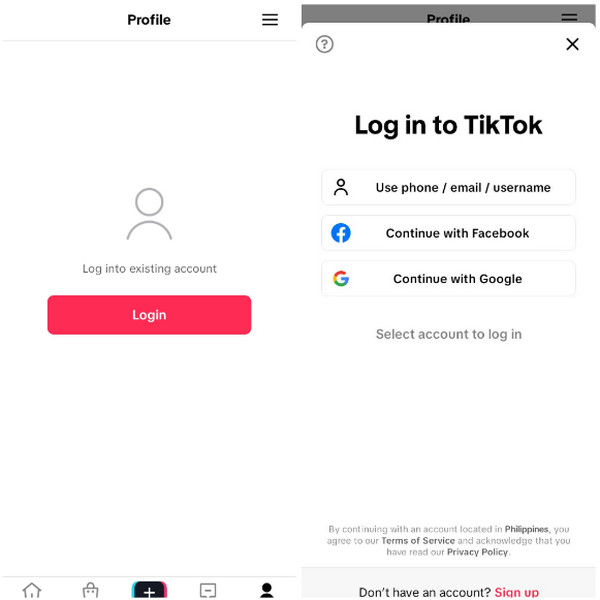
Open the TikTok app on an Android phone and an iPhone. After that, select the Login button at the center of the screen.
he options for making the account will appear. You can link the account from another platform or service. Please choose your preferred one and follow the on-screen instructions to complete creating the account.
2. Spoof Phone GPS Location
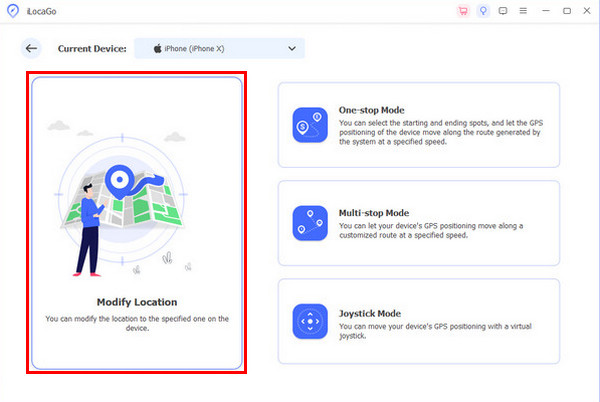
Spoofing your location can also help you change your location on your TikTok account. imyPass iLocaGo is the best third-party tool that can do that. This tool supports your Android phone and iPhone, including their different models and OS versions. It allows you to modify your location, which you can set to different places around the globe. This software has four modes that can change your location. It includes Modify Location, One-stop Mode, Multi-stop Mode, and Joystick Mode. The procedure of the tool will be explained with the steps below.
Download and install imyPass iLocaGo on your computer. Then, open it to start the process. After that, plug the iPhone or Android phone into the computer. Follow the on-screen instructions on how you successfully connect the mobile phones.
The tool will show you the four modes that can change your TikTok location. Please select the Modify Location button on the left side of the screen. Then, the tool will show you its map interface, where you will see your current location.
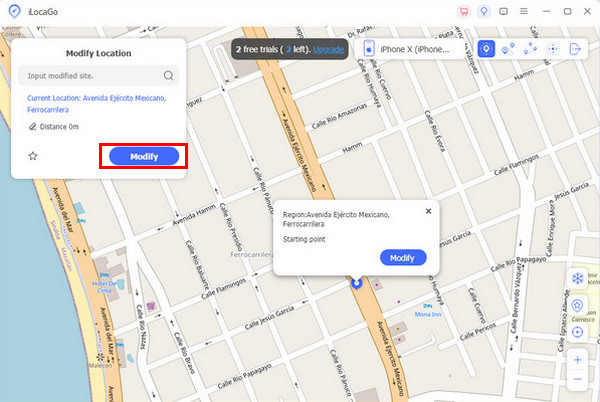
Click the Search section at the top left. Then, type your preferred location and click the Modify button in the small window. This way, you will change the location of your mobile phone, including the TikTok account. Unplug the Android phone or iPhone afterward from your computer.
3. Change TikTok's Language Settings
Your language preference on your TikTok account is also one of the things that can send signals and customize the content that can appear on your FYP or For You Page. Changing the language on your TikTok account sends signals that you prefer to see and understand more about the language. This way, it adjusts all the contents, like videos, trends, and hashtags, on your TikTok account. The steps below will show you how to change your TikTok account language settings.
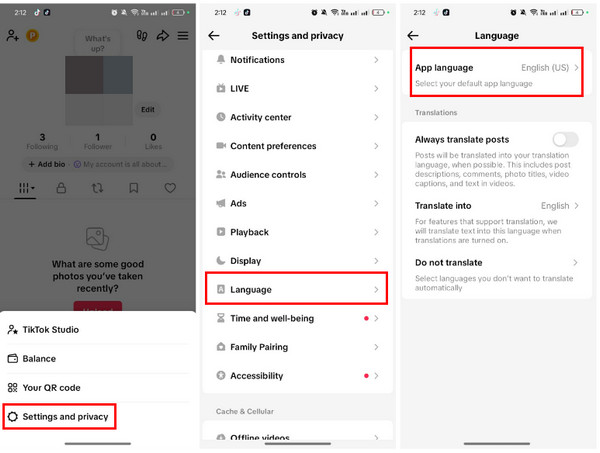
Open the TikTok app where the account is signed in. Then, tap the Profile option at the bottom right and choose the Menu button at the top right. Tap the Settings and Privacy button at the bottom.
Select the Language button from the list. Then, select the App Language button at the top. Please select your preferred language. Save the changes to change the location or contents from your TikTok account.
4. Use a Proxy App
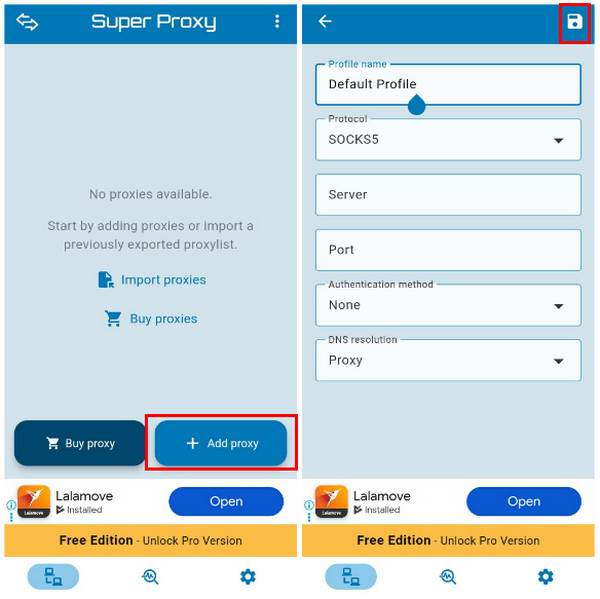
A proxy app can guide you on how to change a TikTok location to Canada or other countries that are not available. Super Proxy is one of them. This app is almost similar to VPN applications that can change the location of the iPhone or Android phone. It routes your internet traffic to another server before it reaches your TikTok app. This way, you can access it quickly without entering your internet.
However, this application is a bit risky or less secure. It collects your personal and other information from your mobile phone. It offers a high risk of being shadowbanned and flagged on your account. Use the app with the steps below.
Download Super Proxy on your mobile phone. After that, open it to see its features. Then, tap the Add Proxy button at the bottom right. You may also tap the Buy Proxy button at the bottom left.
The Profile Name, Protocol, and other information about the proxy will appear. Please enter all the needed information to proceed. Finally, tap the Save button at the top right corner of the screen to save the proxy.
Part 3. Is It Legal to Change Location on TikTok?
Changing the location on your TikTok account is primarily legal. TikTok allows you to change your region or language settings, but you need to do it inside the app. People change their location to access more content from different countries.
However, there are countries around the globe where TikTok is banned. Changing the location of your TikTok account to access it using a VPN is prohibited. It is the same way if you fake an Instagram location with a VPN. Also, some bypass the regional restrictions to post misleading
Conclusion
To summarize, TikTok is not available to all countries and changing its location is one of the primary ways to access it. Four quick guides on how to change your location on TikTok are here. imyPass iLocaGo is one of them, which is the best third-party tool for spoofing your location. You may download the tool to explore more of its features.
Penny focuses on GPS troubleshooting and Windows optimization. She formerly worked as a technical support engineer, helping clients solve location-based and system issues efficiently. Backed by IT support experience, she provides practical solutions that really work. In her free time, she likes hiking and geocaching, testing GPS tech in the real world.
Hot Solutions
-
GPS Location
-
Unlock iOS
-
iOS Tips
-
Unlock Android


