



 Solution
 Support Center
 About Us
 Contact
Does MobileUnlocks Really Remove Carrier Locks? Real User Insights
 Penny Warren Published on September 03, 2026Unlock iOS3-min reading
A carrier-locked phone stops you from switching mobile carriers, reselling freely and roaming abroad. Most users turn to MobileUnlocks for remote online unlock. But does it really work? This unbiased review analyzes its safety, performance, and cost-effectiveness and gives you practical suggestions for carrier unlock needs.

In this article:
Part 1: What is MobileUnlocks.com
The MibileUnlocks website is an online service to unlock your phone carrier lock remotely. It claims to unlock AT&T, T-Mobile, Verizon, Cricket and more network providers from your phone. Its key features include IMEI check, SIM remote unlock and iCloud check. It supports various popular smartphone brands, including Apple, Samsung, Huawei, Nokia and other major manufacturers.
How MobileUnlocks Works:
MobileUnlocks uses an IMEI-based remote unlock to remove carrier restrictions from mobile devices. You don't need to connect your phone to a computer or install additional programs.
Find your IMEI number first. You can check it by dialing *#06# on your phone or going to Settings > General > About to view the IMEI information.
Select your phone's network carrier and enter your IMEI number. MobileUnlocks will check your device's unlock eligibility and prepare your unlock request.
After your order is submitted, MobileUnlocks sends the unlock request through carrier and manufacturer database for verification. You can click Order Tracking on the menu bar to monitor your order status in real time.
Once the unlock request is approved, you will receive a confirmation email. For iPhone devices, the unlock is completed remotely through Apple's system. For other brands, you may receive an official unlock code to finish the SIM unlock.
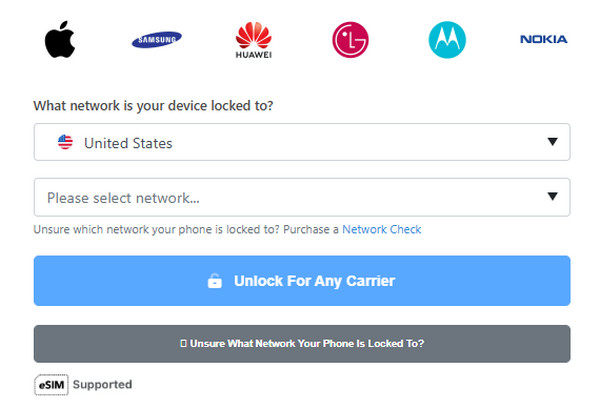
Part 2: Is MobileUnlocks a Trusted Website
Before using any online phone unlock service, users usually care about three things: legitimacy, safety, and price.
Is MobileUnlocks Legit?
Yes, MobileUnlocks is a legitimate SIM unlock service, but it is not an official carrier unlocking service. If you use it for personal uses, like unlock your own device, it is generally considered legit.
Is MobileUnlocks Safe to Use?
Generally, MobileUnlocks is relatively safe to use because it does not require your phone password, Apple ID, Google account, or access to personal data. The service mainly relies on IMEI information to process unlock requests.
MobileUnlocks Pricing: Is It Worth Paying For?
MobileUnlocks charges $40-$200 to unlock devices across different devices and carriers. It cannot guarantee every unlock succeeds, so users should review the refund policy and pay attention to potential risks before placing an order. Some customers have complained on forums about unsuccessful requests, delayed processing, and additional charges.
Part 3: Cross-Platform MobileUnlocks Reviews from Real Users
According to the reviews on Trustpilot and Reddit, MobileUnlock receives mixed feedback from users. The negative feedback focuses on pricing transparency and carrier unlock failures. Some customers reported that the initial low unlock fee increased significantly due to additional charges during the unlock process. They were asked to pay extra fees for carrier checks, unlock verification, or completing the unlock request after the initial payment. Several users also complained about the slow responses from customer support and refund policy.
Here are some selected real user reviews:
"The phone I had took a little while to get unlocked but I was kept updated at every stage and the unlock code successfully did its job."
"It took a couple of days but my old spare iPhone 7 was unlocked successfully. I was kept up to date with the progress. Happy with my purchase & would recommend."
"This website lures customers with cheap unlock pricing, then piles on hidden charges step by step."
"They first charged me $6.99 for a carrier check to find out which carrier the phone was locked to. Then, they charged another $24.99 to “check” whether the phone could be unlocked. After that, they requested an additional $54 to complete the unlock process."
"In short, I ended up paying $188.99 for an iPhone 13. It's already been 15 days, and I've tried to contact them. I left 3 messages but received no reply."
Part 4: Does MobileUnlocks Really Work? Real Test Results
To evaluate whether MobileUnlocks can actually unlock carrier-locked phones, we tested it with different devices and network providers. The following test results show the actual unlocking performance.
| Device | Locked Carrier | Result | Processing Time | Notes |
| iPhone 13 Pro | AT&T | Successful | 3 days | / |
| Google Pixel 7 | T-Mobile | Successful | 2 days | / |
| Samsung Galaxy S22 Ultra | Spectrum | Failed | 5 days | Received email saying that unlock was rejected by the network provider. |
| iPhone 12 | Verizon | Failed | 7 days | Did not receive the unlock confirmation email. |
Final Verdict: The results show that MobileUnlocks can successfully unlock some carrier-locked phones, but it does not work in every situation. The success rate may vary significantly depending on the carrier and device type. A successful unlock for one phone does not guarantee the same result for another device, even if they are the same model.
Part 5: Best MobileUnlocks Alternative to Unlock iPhone Carrier Lock
If you are concerned about the drawbacks reflected by users, you may need a more reliable solution. imyPass iPassGo is an all-in-one iOS unlock tool that help solve various iPhone lock issues. It can remove the carrier lock easily, so you can use SIM cards from other carriers. Compared with MobileUnlocks, this tool offers clear pricing, a simple unlocking process, and dedicated customer support for a more convenient user experience.

4,000,000+ Downloads
Remove carrier lock without losing personal data.
Unlock iPhone from Verizon, AT&T, T-Mobile, and more providers.
Provide a user-friendly interface and easy to navigate.
Compatible with the latest iOS versions and iPhone models.
Connect your iPhone to the computer, launch the software, and choose Unlock SIM Card from the interface.
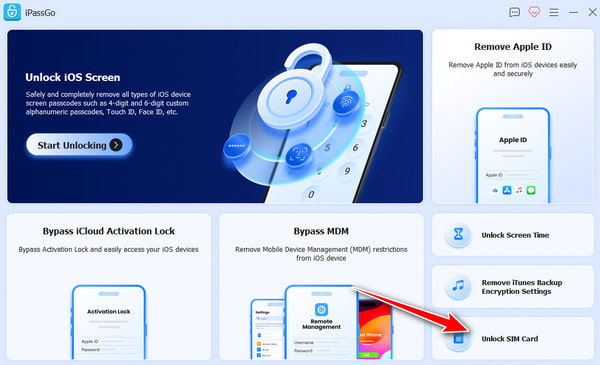
Please review the statement and warnings carefully, then click Start Now to proceed.
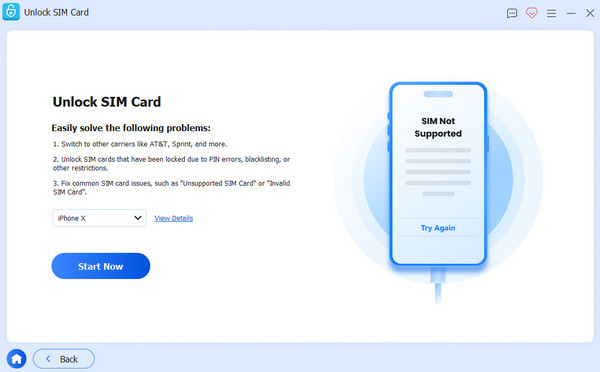
Mack sure your device information is correct, and click Start Bypassing. If your device is not jailbroken, you need to jailbreak it first. Follow the on-screen tutorial to set up your device.
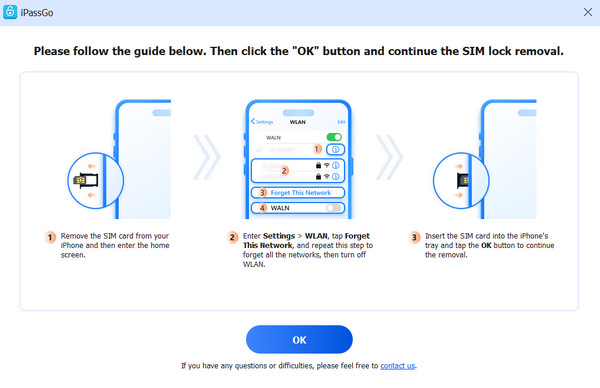
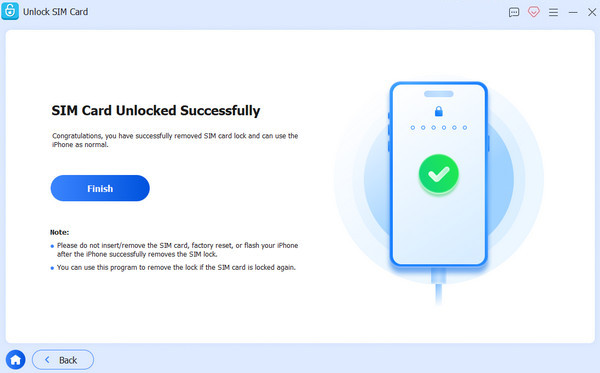
Click the OK button to confirm the removal. Then your SIM lock will be removed in minutes.
Conclusion
In short, MobileUnlocks.com is a safe and legal carrier unlock website you can trust. One key detail to note is that the unlock success rate heavily relies on your device model and carrier. Some users also report that the service has additional fees during the unlocking process. If these downsides concern you, you can try a SIM unlocker as an alternative, like imyPass iPassGo we mentioned.
Penny focuses on GPS troubleshooting and Windows optimization. She formerly worked as a technical support engineer, helping clients solve location-based and system issues efficiently. Backed by IT support experience, she provides practical solutions that really work. In her free time, she likes hiking and geocaching, testing GPS tech in the real world.
Hot Solutions
-
Unlock iOS
-
iOS Tips
-
Unlock Android
-
Password Tips


