Solution
 Support Center
 About Us
 Contact
The Current Mint Mobile Unlock Policy & What Changed
 Samuel Spenser Published on September 02, 2026Unlock Android3-min reading
When you purchase a phone from Mint Mobile and want to switch to another carrier, you first need to check if your device is carrier-locked. Many users look for unlocked phones for Mint Mobile to avoid network restrictions. However, phones purchased directly from Mint are locked under the carrier's unlocking requirements. The good news is that eligible devices unlock automatically after meeting the required 60-day activation period. In this post, we'll explain Mint Mobile's current unlocking rules and show you how to check your device's eligibility. We will also teach you the official unlocking process and provide troubleshooting solutions if your Mint Mobile phone cannot be unlocked.

In this article:
Part 1. The Current Mint Mobile Unlock Policy
The New 60-Day Rule
When you purchase a phone from Mint Mobile, your device is locked to their network. Under the current Mint Mobile unlock policy, the phone will only unlock after 60 days of network activation. It means you cannot use SIM cards from other carriers or another wireless carrier network.
Why Does Mint Mobile Lock Phones?
According to Mint Mobile, they lock phones to prevent fraudulent activity and to keep phone discounts tied to service use. Don't confuse it with the Android lock screen (FRP) or Apple Activation Lock, as they are different.
Devices That Cannot Be Unlocked
Mint Mobile does not simply unlock phones upon request. You need to provide proof of purchase or written information when you unlock a Mint Mobile phone to prevent fraud. If the request could result in Policy abuse or fraud against Mint Mobile or its customers, they'll refuse.
Part 2. How to Check if Your Mint Mobile Phone Is Unlocked
Prepaid and pay-as-you-go are usually unlocked. If you're not, see the quick methods below to check if your Mint Mobile phone is unlocked.
Method 1: Check Your Phone's Settings
On iPhone:
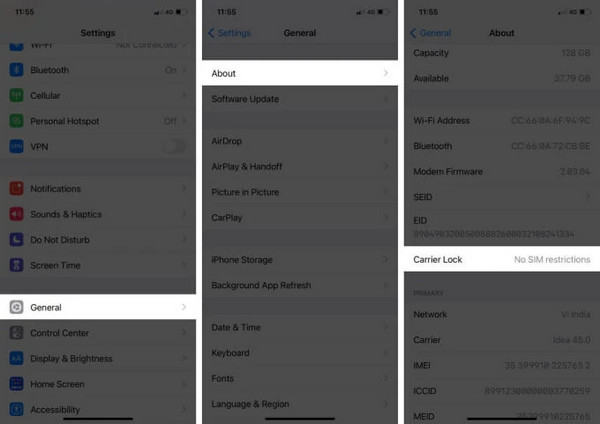
Go to the Settings app, go to General, and tap About.
Scroll down to Carrier Lock, and check:
- If it shows SIM locked, your iPhone is locked.
- If it shows No SIM restrictions, your Mint Mobile phone is unlocked.
On Android:
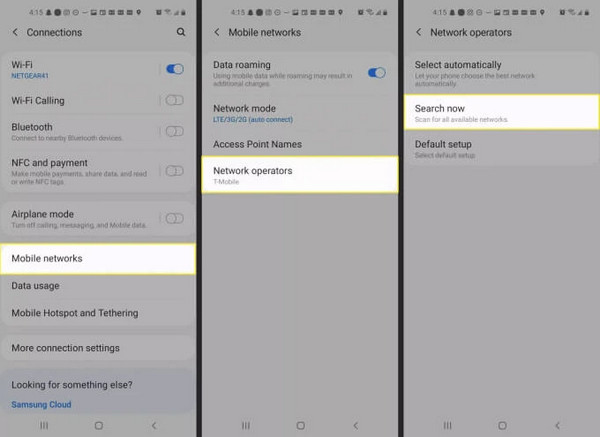
Open the Settings and scroll down to Connections or Network & Internet.
Tap Mobile Networks, select Network operators, and search for available networks. If multiple carrier networks appear, your Android device is unlocked.
Method 2: The SIM Card Test
The simplest way to determine whether a Mint Mobile phone is unlocked is to use a different carrier's SIM card. If it registers on another carrier, that means your phone is not locked.
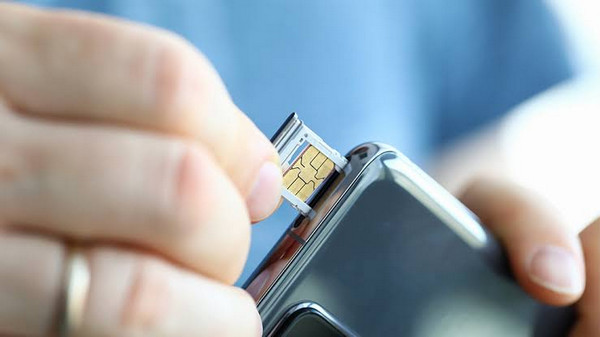
Turn off the phone and eject the Mint Mobile SIM card.
Turn the phone back on and wait for it to connect to the new network.
Method 3: Check with Mint Mobile Directly
You can check eligibility to unlock the Mint Mobile phone by contacting Customer Care. You can reach them by calling (800) 683-7392. Please be informed that representatives are available seven days a week (5 am-7 pm PT).
Part 3. The Official Way to Unlock Your Mint Mobile Phone
1. Automatic Unlocking (The Standard Process)
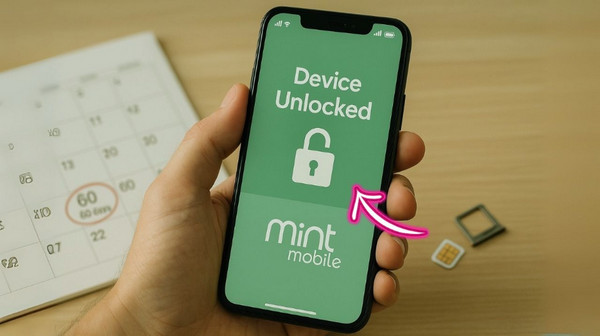
Unlocking a phone purchased from Mint Mobile isn't complicated. You only need to meet a few requirements to unlock your phone automatically. Here are the basic requirements:
- The phone should complete the 60-90-day activation period.
- The phone must have a remaining balance of 0.
- The account holder must be in good standing.
2. Manual Unlocking Request (If Auto-Unlock Fails)
Mint Mobile phones are unlocked after completing a 60-90-day activation period. If the auto-unlock fails, you can contact Customer Care to request manual unlocking.
Go to the Mint Mobile Help Center and provide your device IMEI number.
Fill out the unlock request and submit proof of purchase, then wait for email confirmation.
3. Military Personnel Exception
An exception to the 60-day rule exists for deployed military personnel. If you're deployed and want the phone unlocked before the normal period, call Mint Mobile and explain the situation. You will be asked to provide supporting deployment documentation for your request.
Part 4. Troubleshooting – Why Won't My Mint Mobile Phone Unlock?
1. Phone Won't Unlock After 60 Days
Mint Mobile's unlock policy allows phones to be unlocked 60 days after activation. However, delays happen when account holders have unpaid balances on their financing or account status issues. Be sure your account is active and in good standing with no unpaid renewals.
2. SIM Not Supported Error
A SIM Not Supported error on Mint Mobile means your phone is locked to another carrier. Check if your phone is still tied to a contract or locked to a previous carrier. If yes, contact your previous carrier to unlock your device if it was purchased under a payment plan or contract.
3. Account not in Good Standing
Financed phones or installment plans must have no remaining balance before requesting unlock. Accounts with past-due or suspension won't qualify for automated unlock checks. The best thing to do is to pay off the remaining device finance balance.
4. Device Reported Lost or Stolen
Any device found to be involved in fraud, loss, or theft will be permanently blocklisted from network unlocking. It is illegal for carriers to unlock blocked IMEI numbers. Check the device's history to make sure no previous owners flagged it as unlocked on Mint Mobile.
5. Old Policy Confusion
Prior to the recent change, the old unlock policy for Mint Mobile required that phones purchased directly from them be locked to the network for 12 months of active service before they could be unlocked. However, the timeline has since been changed to an automatic unlock within 60 days.
Bonus: A Third-Party Unlocking Tool (For Urgent Cases)
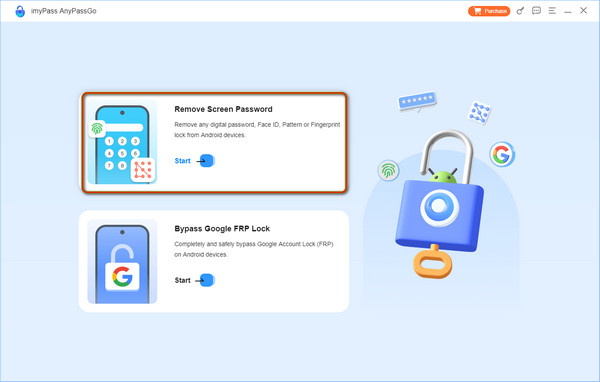
Sometimes, an Android phone is locked due to a forgotten screen lock password or Factory Reset Protection (FRP) after a reset. And carrier unlocking is not the right solution. In these cases, use imyPass AnyPassGo, an Android unlocking tool for screen-lock and FRP-related issues. It can remove any Android screen lock, including numeric PIN, Pattern, Password, Fingerprint, and Face recognition. Also, it can bypass the Google FRP Lock from popular brands like Huawei, Samsung, Xiaomi, and more.
Conclusion
Mint Mobile's unlock phone process lets you use another carrier. Eligible devices unlock automatically after the 60-day activation period. However, financing, account status, and other device-related restrictions prevent the unlocking process from proceeding. If the issue is a forgotten Android screen lock or FRP, imyPass AnyPassGo is what you need. It can help you regain access to your locked device in seconds.
Samuel specializes in password security and digital privacy. He used to work as a cybersecurity consultant for small businesses to protect digital assets. With certifications in Cybersecurity and Ethical Hacking, he turns complex security topics into easy-to-follow advice. He also enjoys sharing password tips to help users protect their accounts more confidently.
Hot Solutions
-
Unlock Android
-
Unlock iOS
-
Password Tips
-
iOS Tips