Solution
 Support Center
 About Us
 Contact
Vortex FRP Bypass Guide - What Works and What to Avoid
 Gideon Byron Published on October 15, 2026Unlock Android3-min reading
Locked out of your Vortex phone after a factory reset? It can be stressful, but there are ways to regain access. This guide explains why Vortex FRP appears, what you can try before bypassing it, and free Vortex FRP bypass methods with their limitations. After unlocking your phone, follow the recommended security steps to protect your data and prevent future lockouts.

In this article:
Part 1. Why is My Vortex Phone FRP Locked?
Factory Reset Protection (FRP) is a security feature built into Android devices, including Vortex phones. It is designed to protect your device if it is lost or stolen. When a phone is reset without removing the linked Google account first, FRP may be triggered and ask you to verify the previously synced Google account.
A Vortex phone can become FRP locked in several common situations.
- You forgot your Google account password and cannot complete the verification.
- You bought a used Vortex phone that is still linked to the previous owner's Google account.
- You reset the phone before removing the Google account.
Part 2. Things to Check Before You Try a Vortex FRP Bypass
Before trying any Vortex FRP bypass method, check whether you can regain access through official options first.
1. Recover Your Google Account
If you still own the Vortex phone but cannot remember the Google account password, try recovering your account through Google's official recovery page first. You may need to verify your identity using a recovery email address, phone number, or other account details.
2. Ask the Previous Owner to Remove the Account
If you purchased a used Vortex phone, the device may still be connected to the previous owner's Google account. The most straightforward way is to contact the previous owner and ask them to remove the account.
3. Contact Official Support
If you cannot recover the account or contact the previous owner, consider reaching out to Vortex support or an authorized service provider. Keep your proof of purchase, IMEI number, and other ownership information ready, as they may be required to verify that you own the device.
Part 3. 3 Ways to Bypass Vortex FRP on Android
1. Use imyPass AnyPassGo to Remove Vortex FRP
Struggling with a locked Vortex phone? imyPass AnyPassGo makes it surprisingly simple to regain access. It removes Android screen locks and FRP restrictions easily. You can bypass FRP without Google account credentials. Working with Android 5-17 and most brands, AnyPassGo is practical for users who are in a hurry and need a reliable solution.
4,000,000+ Downloads
Bypass Vortex FRP without a Google account or password.
Remove Android screen locks in easy 3 steps.
Support most popular brands, like Samsung, Xiaomi & OnePlus.
Work on phones running Android 5-17.
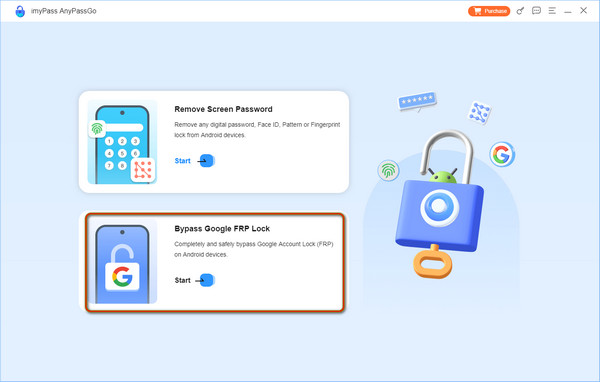
Launch imyPass AnyPassGo on your computer and select the Bypass Google FRP Lock feature.
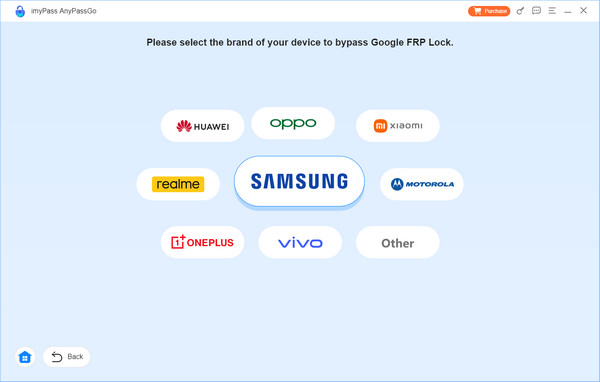
Select the brand of your device. If you cannot find it, click the Other option. Connect your Android phone to your computer.
Once connected, click the Bypass button to start Vortex FRP bypass. Follow the on-screen instructions to set up your device.
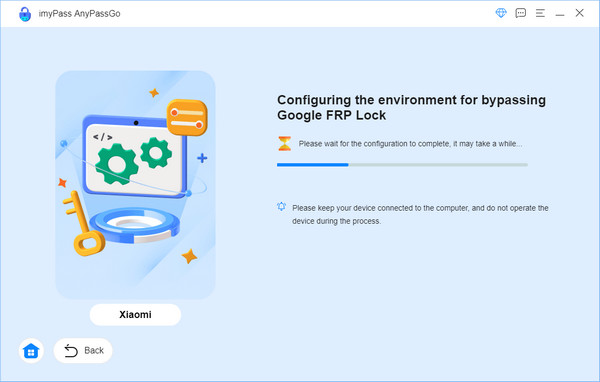
Now you can start bypassing the Google FRP lock on your device and wait for the removal to be finished in seconds.
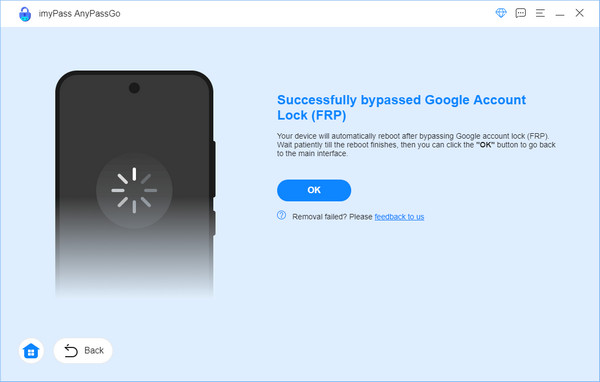
Note:
This process will erase all your data and settings on your phone, make sure you have a recent backup available!
2. Use FRP Bypass APKs
Some APK files claim to help remove Google account verification or bypass FRP locks on Vortex devices. These methods usually require installing files from external sources and don't work on every Vortex model or Android version. Downloading APK files from unknown websites can also create security risks, so check the source before use.
Copy the required APK file to a USB drive or OTG device. Make sure the file comes from a source you trust.
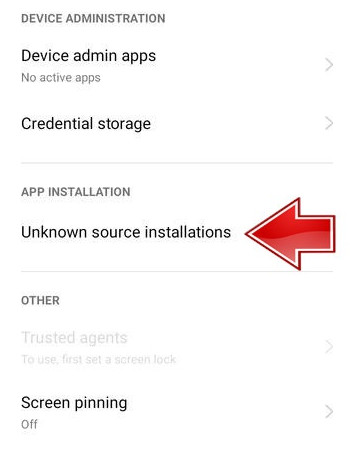
Connect the USB or OTG device to your Vortex phone and install the APK if your device allows it. You may need to enable installation from unknown sources in the device settings.
Open the APK and follow its instructions to bypass Vortex FRP.
3. Use Google Keyboard Workarounds
Some older Android phones had workarounds that used Google Keyboard features to access device settings. However, this method only applies to certain older Android versions and have been patched on many newer devices.
Connect your Vortex phone to Wi-Fi. On the FRP screen, open Google Keyboard and go to Help & Feedback section.
Open any article, press and hold some text, then select Web Search.
A browser page will open. On some older Android versions, you can access phone settings through the page.
Go to Accounts or Google Account settings and check whether you can remove the previous Google account.
Part 4. What to Do After Vortex FRP Bypassing
If you used a Vortex FRP bypass tool to regain access, do the following steps right away. These actions secure the phone, protect your account, and reduce the chance of future lockouts.
1. Confirm & Secure Your Account
Check the account that will be used on the phone. Make sure recovery email addresses, phone numbers, and backup codes are current. This makes regaining access far simpler if you are locked out again. If you find web posts titled Vortex FRP bypass without PC, treat those as a second option and try official account recovery first.
2. Remove Old Owners & Device Links
Sign out and remove any accounts or devices that do not belong to you. A phone tied to a prior owner will often relock on setup. Clearing old links reduces the chance of accidental re-locking and makes support easier if you need help. You will see many forum threads labelled Vortex FRP bypass. Remember, they are often unreliable and may push unsafe tools.
3. Strong Security on Account & Device
Set a strong screen lock and enable two-step verification for your Google account. Add a recovery phone and confirm which devices are trusted. These steps stop casual attacks and reduce risk if credentials leak. For model-specific issues, be cautious of guides that mention Vortex J24 FRP bypass; contact the maker or an authorized center instead of following unknown fixes.
4. Update the System & Remove Risky Software
Install all available Android updates and security patches. Then review installed apps and remove anything you do not recognize. Old firmware and unknown apps are how many exploits spread. When you see searches for FRP bypass Vortex, it usually points to unsafe downloads that can add malware or void warranties.
5. Record Ownership Info
Write down the IMEI or serial and keep receipts or order emails in a safe place. If account recovery fails, present this proof to the manufacturer or an authorized service center for legitimate support. Avoid services or downloads promoted as FRP bypass Vortex HD65 without a PC for free; they often ask for payment and offer no real guarantee, while risking your device and data.
Conclusion
Using reliable solutions can help you regain access to your Vortex phone with fewer risks. Start with Google account recovery or official solutions. If those options are not available, imyPass AnyPassGo is your best Vortex FRP bypass tool for Android 5-17. Always make sure you own the device or have permission to unlock it before using any FRP bypass tool.
Gideon writes about unlocking iOS, Android, and Windows devices. He previously worked as a mobile device specialist in a repair center, assisting customers with locked devices and password recovery. In his spare time, he tests new unlock tools, customizes smart devices and makes complex unlock processes simple and safe.
Hot Solutions
-
Unlock Android
-
Unlock iOS
-
Password Tips
-
iOS Tips