Solution
 Support Center
 About Us
 Contact
How to Change Your Location on Nextdoor on Web and App
 Penny Warren Published on September 02, 2026GPS Location3-min reading
This guide shares the proven ways to change location on Nextdoor on the web or the app. It is a unique social media platform that helps you communicate with your neighbors. It offers a way to foster relationships with your neighbors through the internet, reading trusted local news, sharing real-time safety alerts, and more. As a location-based platform, it reads your location data and lets you keep in touch with your neighbors.

In this article:
Part 1: How to Change Location on Nextdoor Website
Unlike other social media platforms, users are allowed to change location on Nextdoor. In other words, you can adjust which community to follow. However, that is only in limited and legitimate circumstances. It means that you can update your address if you have moved to a new city, but you should not do so on the platform.
Go to the Nextdoor website in your browser.
Log in to your account and click the profile picture.
Open the Account menu on the sidebar.
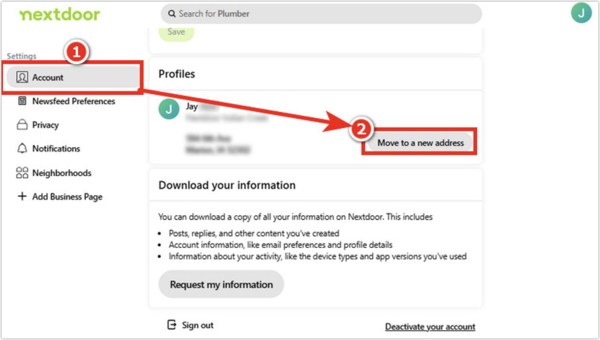
Now, you will see a few options:
Click Move to a new address if you have moved to a new home.
Click Edit address to update the residential address.
Click Edit next to your address if you want to go to the address editing field.
Click Change address to initiate the address update process and verify it.
Click the Move to a new address button.
Fill out the form about the new address and click the Continue button.
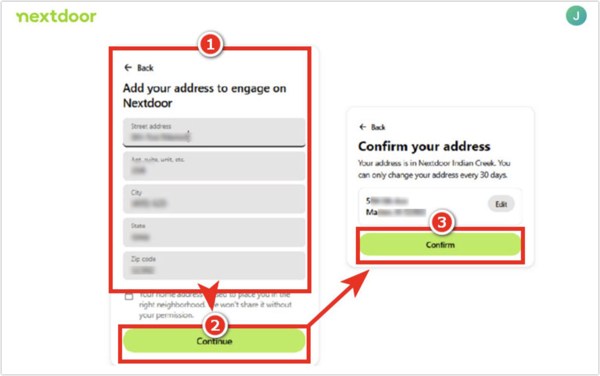
Finally, click on the Confirm button.
Then, Nextdoor will ask you to verify the new address following the prompts.
Come back to your feed and see if your neighborhood has updated.
Note: According to Nextdoor, a fake address may lead to verification problems.
Part 2: How to Add Another Location on Nextdoor App
When you move to a new community, you have to add another location on Nextdoor. Plus, you can follow another nearby area on Nextdoor after changing your location. Of course, you can join a neighborhood where you don’t live, although that is not how Nextdoor works.
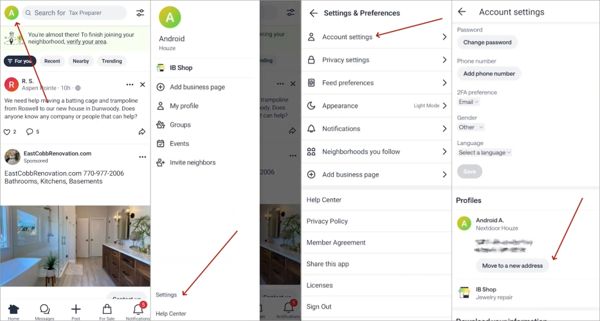
Run your Nextdoor app on your Android phone or iPhone.
Sign in to your account.
Tap on your profile picture or tap the Hamburger button.
Navigate to the Settings tab and select the Account or Account settings option.
Tap the Move to a new address button.
Enter the new address details, like street name, apartment number, city, state, postal code, and country.
Tap the Continue button after adding the location.
Next, follow the onscreen instructions to verify the new location on Nextdoor.
Note: If the new address is unavailable or the verification process fails, contact Nextdoor Support.
Part 3: A Quick Way to Change Nextdoor Location on Mobile Devices
If you want to change location on Nextdoor temporarily, imyPass iLocaGo can meet your needs. It is able to change your GPS location to any address around the world when visiting Nextdoor on your iPhone or Android phone. More importantly, this way can pass the verification process smoothly. The user-friendly design simplifies the workflow.
4,000,000+ Downloads
Change location on Nextdoor in a few clicks.
Support accurate addresses and any positions.
Simulate movements with multiple modes.
Offer custom options, like speed and traffic.
Compatible with a wide range of iOS and Android devices.
How to Change Location on Nextdoor on Mobile
Link to your phone
Start the location changing software after you install it on your PC. There is another version for Mac OS X 10.12 and above. Connect your iPhone or Android phone to your PC with a compatible cable and make sure to trust this PC.
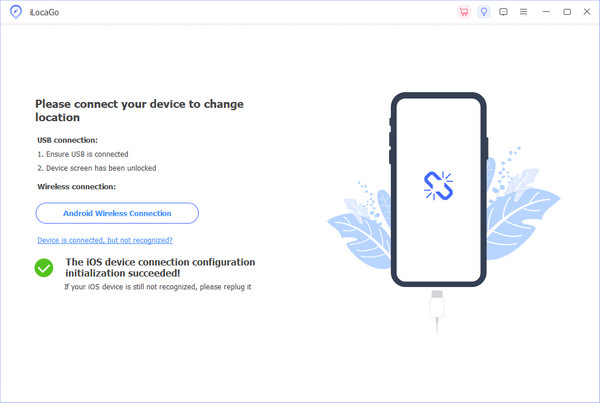
If you are using an Android device, you can also connect it to your PC with a stable Wi-Fi.
Choose Modify Location
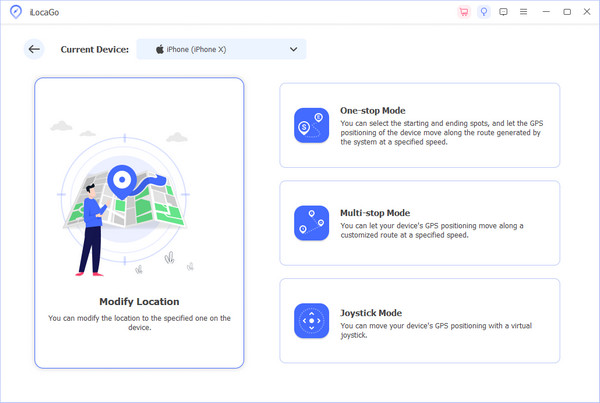
Click the Modify Location option if you want to add another location on Nextdoor. The other three modes, One-stop Mode, Multi-stop Mode, and Joystick Mode, are used to make virtual routes.
Change Nextdoor location
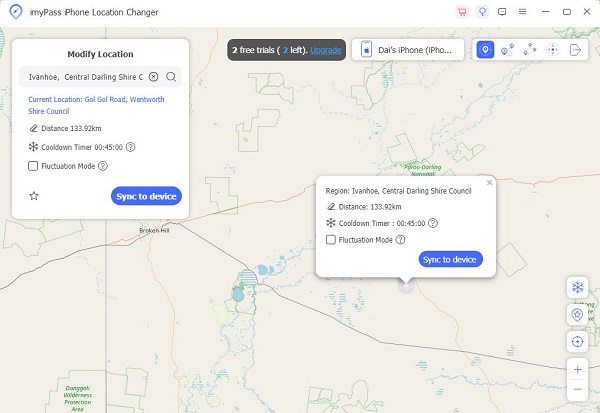
Once the interactive map appears, type an address into the field. If you don’t have an address, click the destination on the map. Finally, click on the Modify button to confirm it. Now, you can access Nextdoor on your phone, update the location, and verify it. You can also change location on Paramount Plus on your iPhone or Android.
Conclusion
This guide explained how do I change my location on the Nextdoor app or website. You can pick the right device and follow our detailed steps to complete the process. Then, you can join a new community. imyPass iLocaGo is a quick way to change your location and verify it successfully on the Nextdoor app.
Penny focuses on GPS troubleshooting and Windows optimization. She formerly worked as a technical support engineer, helping clients solve location-based and system issues efficiently. Backed by IT support experience, she provides practical solutions that really work. In her free time, she likes hiking and geocaching, testing GPS tech in the real world.
Hot Solutions
-
GPS Location
-
Unlock iOS
-
iOS Tips
-
Unlock Android