Solution
 Support Center
 About Us
 Contact
Everything You Should Know about Life360 and Similar Apps
 Penny Warren Published on July 17, 2026GPS Location4-min reading
There is a wide array of parental control apps on the market. They can help parents track their children and keep them safe anywhere. Life360 app, for example, is one of the advanced parental control apps available on iOS and Android. However, there are questions about this app, such as what the app can do, whether it is safe to use, and more. This article shares an unbiased review of the app.

In this article:
Part 1. What Is Life360
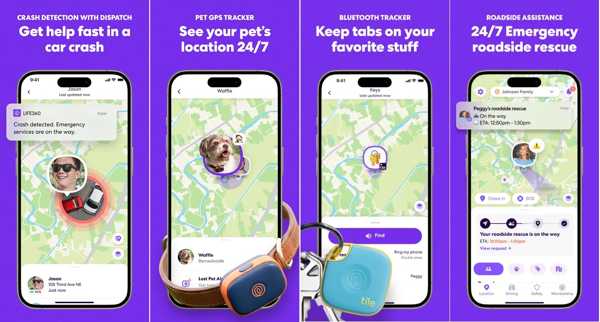
Life360 is a parental app on Android and iOS with excellent location and driving tracking. It comes with a number of unique features to make finding friends, family, and pets easier. According to our research, over 60 million users are using the app on their mobile devices. To help you understand what Life360 is, we tested this app in our lab and collected hundreds of users’ reviews.
What Does Life360 Do?
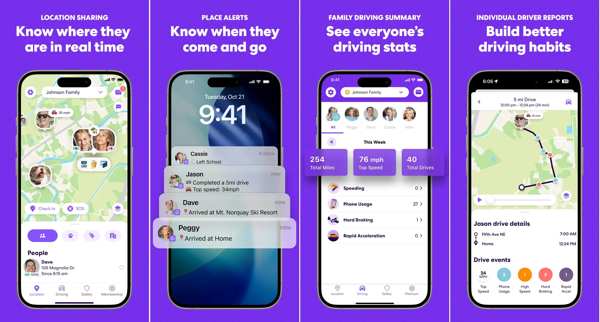
- 1. Track location in real time. You can see where your family members are and stay connected wherever life takes them.
- 2. Integrates Smart Place alerts. When your friends or family members arrive at or leave key locations, such as school, home, or company, you will get notifications instantly.
- 3. Get crash detection and emergency help. Life360 tracker can automatically detect car crashes and send alerts with location details to emergency contacts or support teams.
- 4. Report driving behavior. The app can record top speeds and phone usage when you are driving, hard braking, and more. Life360 will offer detailed driver analytics, too.
- 5. Track tile items. The app can locate lost items, such as keys, wallets, and backpacks, right on your map.
- 6. Save location history for each member. Users can set the option between 2 and 30 days.
- 7. Send an SOS alert. When you are in danger or need help, you can send a silent SOS alert with your location.
- 8. Create private circles. Users can create a few circles for custom settings.
- 9. Identity theft protection. Safeguard sensitive digital information for each family member.
- 10. Offer roadside assistance. Display free towing, jumpstarts, tire changes, lockout assistance, refueling, and more.
- 11. Come with in-app communication. The app contains a messaging feature for easy coordination within circles. In addition to locations, users can share status, images, voice messages, and more.
- 12. Provide both a free version and paid plans.
How Much Is Life360?
Is Life360 free? It provides a free version with basic location sharing within your circles. Besides, the free membership supports data breach alerts and crash detection. You can set 2 custom place alerts and access SOS emergency features.
Moreover, the app provides paid plans, but Life360 cost is reasonable.
Life360 Free vs. Paid
| Free membership | Silver membership | Gold membership | Platinum membership | |
| Price | free | $7.99 per month | $14.99 per month | $24.99 per month |
| Location sharing | 2 | unlimited | unlimited | unlimited |
| Location history | 2 days | 30 days | 30 days | 30 days |
| Custom place alerts | 2 places | Unlimited | Unlimited | Unlimited |
| Driver reports | No | Yes | Yes | Yes |
| Circle size | Up to 5 members | Unlimited | Unlimited | Unlimited |
| Number of circles | 1 | 1 | Unlimited | Unlimited |
| Bonus features | No | $100 for stolen phone protection | $250 for stolen phones | $1,000 of stolen funds Travel support and 24/7 nurse helpline |
Is Life360 safe?
Life360 is being sued and not just once. Since 2023, the app has been facing a complex web of lawsuits in 2025, including Texas Attorney General Ken Paxton’s lawsuit.
Furthermore, when downloading the app, it is natural to have questions around privacy and security of personal data. Here are some key things to understand whether Life360 is safe:
- 1.Encryption technology.
- 2.How does it keep and share your personal data?
- 3.Does it provide user controls to limit location sharing?
- 4.What data is collected?
Life360 practices are to be aligned with industry standards among family safety tools. However, users should educate themselves and configure privacy settings appropriately for their comfort level.
Part 2. Life360 Review
Is Life360 worth using? Why is Life360 bad? Understanding the review of the app can help you make the best decision. The app has many beneficial features, but there are also downsides to consider.
Pros
- Provide real-time location tracking for family members and friends.
- Set custom alerts for arrivals or departures.
- Integrate the SOS button, supplying emergency responders with users’ locations.
- Include roadside assistance and free towing miles.
- Offer driving safety features promotes better habits.
- Support coordination and communication with family members.
Cons
- Users can feel invasive with constant location tracking.
- The app requires Location Services to be enabled at all times.
- It can cause battery drain from constant GPS usage.
- The full feature access is only available to Platinum membership.
- Potential for false alerts and technical glitches.
- Lack the offline mode.
Life360 Reviews in App Store, Play Store, and Web
Life360 Review in App Store
We started as a family of 4, and we are all linked together in this one app that always gives us some peace of mind, trust, and just a little less anxiety to worry about. I know when not to bother the teens who drive with a call or text message that can wait until they reach their destination, and avoid an unnecessary distraction from their eyes on the road.
Life360 Review in the Play Store
The location in Life360 isn’t accurate enough. If we are trying to find someone, we will be looking in the wrong place. It’s just across the street, and we need to go to the area on the other side.
Life360 Review in Trustpilot
The tracking seems to work fine, but the location notifications don’t. I get annoying notifications about permissions the app wants to change. Moreover, support is unable to help, and the AI bot takes a while to break through to get a human.
Life360 Review on Reddit
I have had Life360 on my phone for over a year. Recently, I have been more concerned about my privacy and preventing data collection. My parents made me use the app to track my location after I moved out, mostly due to my history of running off and being a stupid teen. This app accesses my location 24/7 and tracks my speed and location history.
You May Also Like:
Part 3. How Does Life360 Work
How does Life360 work? How accurate is Life360 speed? To get started, you need to set up the app and move through verification and permissions properly. This app is free to download from the App Store and the Play Store.
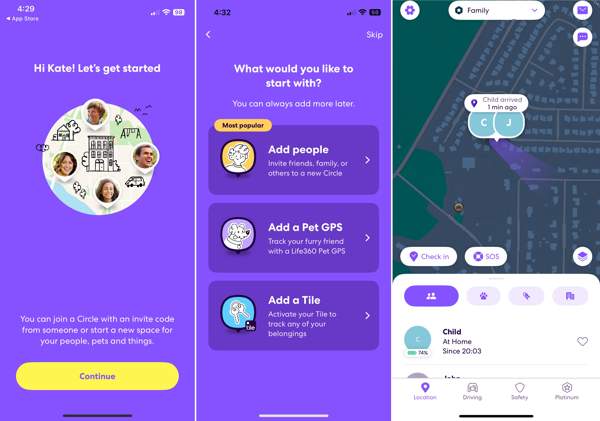
Open the app on your handset.
Input your name, phone number, email address, and age to get started.
Choose Add people to create a circle, Add a Pet GPS for tracking, or Add a Tile to activate a tile.
If you want to set it up later, tap the Skip button.
Choose your role, read the permissions, and tap Allow permissions.
Tap the Create a Circle button and enter a name.
Send the invite code using your preferred messaging app or social media.
Once the recipient receives a code, tap Join a Circle and enter the invitation code.
Then, tap the Settings button and select Circle Management to customize the circle.
If you want to set a driver report, go to the Driving tab. To set up driving safety, go to the Safety tab.
Part 4. Apps like Life360
Apple’s Find My
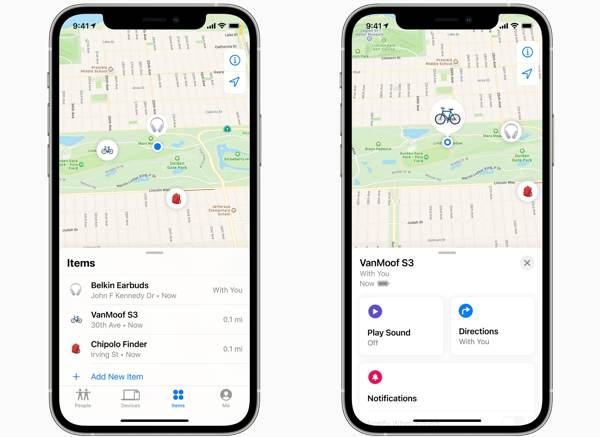
Many people compared Life360 and Find My released by Apple. Both are popular location tracking apps. However, Apple’s Find My is only available for Apple users to keep families connected and safe.
Pros
- Completely free for Apple users.
- Easy to use.
- Share location in real time.
- Locate and erase Apple devices remotely.
Cons
- Limited to Apple devices.
- Lack advanced safety features.
Verizon Smart Family
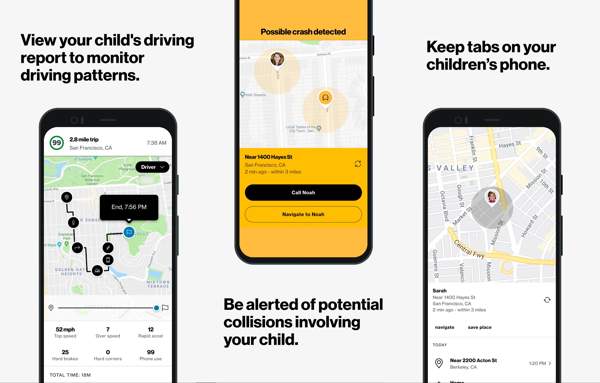
Compared to Life360, Verizon Smart Family is a parental control and location management tool exclusive to Verizon users. It focuses on location tracking, geofencing, and call and activity monitoring.
Pros
- Free for Verizon accounts.
- Provide location alerts and driving insights.
- Offer account-level control
- Set up quickly.
Cons
- Only available to Verizon.
- No message content scanning.
Glympse
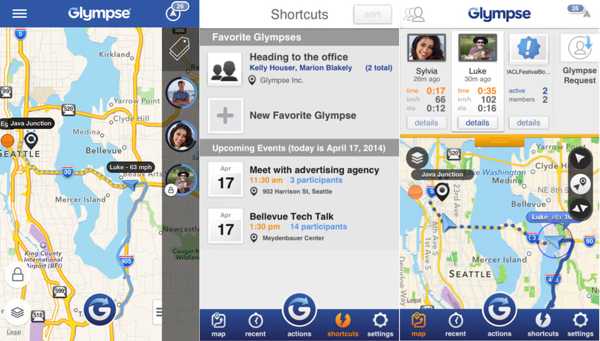
Glympse is another app like Life360. It is a convenient way to share your GPS location temporarily, but not to monitor your movement all the time. Plus, it allows you to create a private or public group to track locations.
Pros
- Share location without an account.
- Run in the background.
- Available on Android and iOS.
- Free to use.
Cons
- No location history.
- GPS often delays.
Google Trusted Contacts
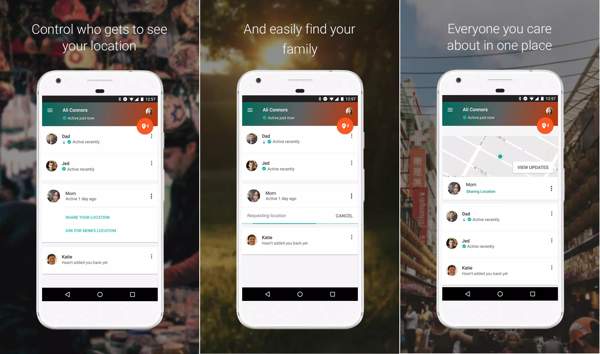
Google’s Trusted Contacts is a Life360 alternative for staying connected with your family. It is both a parental control and personal safety app that opens a direct line of sharing location between you and your family.
Pros
- Add family members as trusted contacts.
- Allow trusted contacts to request your location.
- Share your location in an emergency.
- Schedule a location alert.
Cons
- Lack advanced features.
- Unavailable in the App Store and Play Store.
Part 5. Bonus Tip: How to Hide Your Location for Life360
Life360 tracks location 24/7. Sometimes, you may want to hide your location from your family members temporarily without others knowing. From this point, we recommend imyPass iLocaGo.
4,000,000+ Downloads
Hide your location with a fake address.
Support accurate addresses and any location.
Offer multiple modes for different purposes.
Support a wide range of iPhones and Android devices.
How to Hide Your Location for Life360
Connect to your device
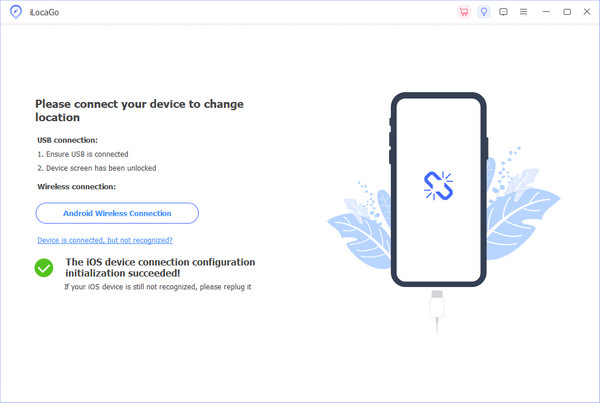
Launch the location changer software after installing it on your computer. It works on Windows 11/10/8/7 and macOS 10.12 or above. Connect your iPhone or Android phone to your computer with a compatible cable. For Android devices, you can also connect them to a Wi-Fi network. Make sure to trust this computer.
Choose a mode
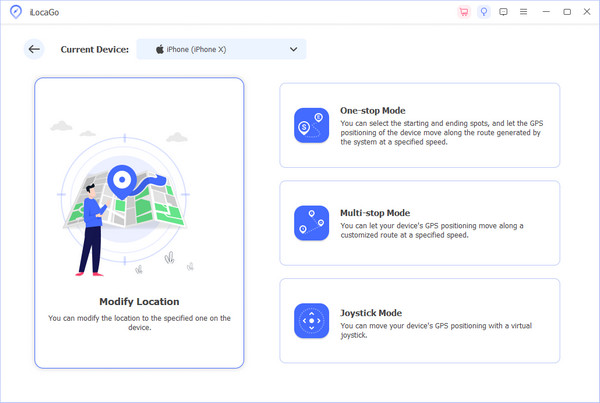
Choose the Modify Location option if you want to fake a static location. The other three modes, One-stop Mode, Multi-stop Mode, and Joystick Mode, are used to make virtual routes.
Hide your location for Life360
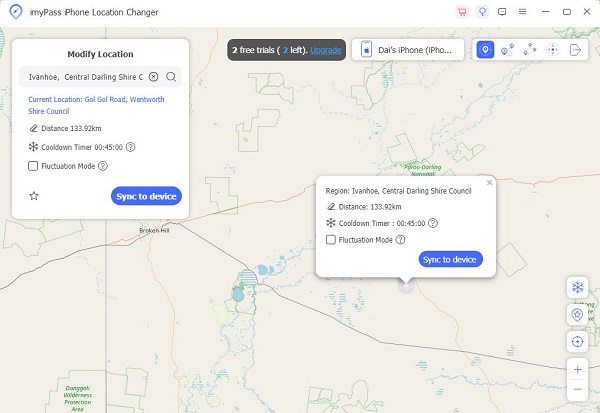
Input an address into the field or click a proper position on the map. Finally, click the Modify button. Turn to your phone and visit Life360.
Conclusion
Based on our review, you should understand what Life360 is, what the app can do, its benefits and drawbacks, and how it works on an iPhone or Android phone. Furthermore, we shared similar apps for sharing and tracking locations on your mobile device. imyPass iLocaGo is able to hide your geolocation when using location-sharing apps on your iPhone or Android device.
Penny focuses on GPS troubleshooting and Windows optimization. She formerly worked as a technical support engineer, helping clients solve location-based and system issues efficiently. Backed by IT support experience, she provides practical solutions that really work. In her free time, she likes hiking and geocaching, testing GPS tech in the real world.
Hot Solutions
-
GPS Location
-
Unlock iOS
-
iOS Tips
-
Unlock Android